Been using Windows 7 for a few months and I like it pretty well so far. Search is really the only thing I am having trouble with.
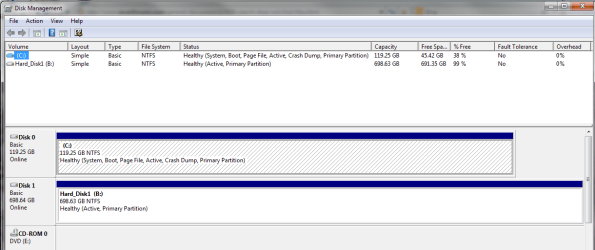
I have two hard drives installed in my case. Drive "C:" is for my windows system files and program files. All the other user data goes into drive "B:\". When I do a search in windows, it will quickly show files that reside on the c:. The problem is that it will not find any files that are on the b:. I checked the indexing options and the b: is included there (with no exclusions). I can do a search from a folder and while I know the file is there because I can see it, the search will not find it.
I have tried doing a search from the start panel and from windows explorer and neither will find any file on the b: drive.
Any ideas on what I am missing?
I have two hard drives installed in my case. Drive "C:" is for my windows system files and program files. All the other user data goes into drive "B:\". When I do a search in windows, it will quickly show files that reside on the c:. The problem is that it will not find any files that are on the b:. I checked the indexing options and the b: is included there (with no exclusions). I can do a search from a folder and while I know the file is there because I can see it, the search will not find it.
I have tried doing a search from the start panel and from windows explorer and neither will find any file on the b: drive.
Any ideas on what I am missing?
My Computer
At a glance
Windows 7i712 GBGTS 250
- OS
- Windows 7
- CPU
- i7
- Motherboard
- EVGA X58
- Memory
- 12 GB
- Graphics Card(s)
- GTS 250
- Hard Drives
- OCZ Agility SSD
- PSU
- OCZ 700 watt
- Case
- Coolmaster Gladiator 600
- Cooling
- Silenx