Solved Search Engines?

Alexey2912

New member
Member
VIP
Local time
12:44 PM
Messages
1,351
Location
Honolulu
Hi,

Have G Chrome's latest version on my newly installed W7 and G Chrome running on my Android, which are both synced.

The 1st time after installing on my pc gave Chrome notifications like G Mail, Weather etc, some I unchecked but now get no notifications?

Is it possible to revert back to get notifications and customize them or would I need to uninstall and reinstall G Chrome?

Thanks.
 

Attachments

  • 1.PNG
    1.PNG
    4.4 KB · Views: 1

My Computers

System One System Two

  • Computer type
    Laptop
    Computer Manufacturer/Model Number
    Dell
    OS
    W7 Pro 32bit
    CPU
    Intel(R) Core(TM)2 CPU T7200 @ 2.00GHz
    Motherboard
    Dell Inc. 0CF456
    Memory
    4.00 GB
    Graphics Card(s)
    NVIDIA GTX 7980 512 MB
    Sound Card
    (1) HD Pro Webcam C910 (2) Bluetooth Stereo Audio (3) Si
    Hard Drives
    SSD
    Browser
    Brave
  • Computer type
    PC/Desktop
    System Manufacturer/Model Number
    Dell XPS Special Edition 8940
    OS
    W10 Pro
    CPU
    core i7 11th gen, 11700, 2.5-4.9 GHZ
    Memory
    32 GBB, 2 X16 GB @2933 MHz.
    Graphics Card(s)
    NVIDIA GeForce RTX 3070 8GB GDDR6
    Monitor(s) Displays
    Dell UltraSharp 32 4K monitor.
    Hard Drives
    1. 1TB M.2 PCIe NVMe SSD.

    2. 1TB 7200 rpm 3.5" SATA Hard Drive.
    PSU
    500W.
    Case
    Mineral White Bezel Chassis.
I was trying to tell about this..........notification icon and G chrome small icon running as shown in the screen capture.

Had to Revo uninstall reboot and reinstall G Chrome to get them back.

1. Should G Chrome be running down at the right bottom?

2. In notifications > settings see Google Drive, Google Now and GMail.......out of these 3 which should be checked or all checked or all unchecked?

3. If G chrome is unallowed to run in the back ground and notification all unchecked how can they brought back?

Thanks.
 

Attachments

  • 1.PNG
    1.PNG
    1.1 KB · Views: 26

My Computers

System One System Two

  • Computer type
    Laptop
    Computer Manufacturer/Model Number
    Dell
    OS
    W7 Pro 32bit
    CPU
    Intel(R) Core(TM)2 CPU T7200 @ 2.00GHz
    Motherboard
    Dell Inc. 0CF456
    Memory
    4.00 GB
    Graphics Card(s)
    NVIDIA GTX 7980 512 MB
    Sound Card
    (1) HD Pro Webcam C910 (2) Bluetooth Stereo Audio (3) Si
    Hard Drives
    SSD
    Browser
    Brave
  • Computer type
    PC/Desktop
    System Manufacturer/Model Number
    Dell XPS Special Edition 8940
    OS
    W10 Pro
    CPU
    core i7 11th gen, 11700, 2.5-4.9 GHZ
    Memory
    32 GBB, 2 X16 GB @2933 MHz.
    Graphics Card(s)
    NVIDIA GeForce RTX 3070 8GB GDDR6
    Monitor(s) Displays
    Dell UltraSharp 32 4K monitor.
    Hard Drives
    1. 1TB M.2 PCIe NVMe SSD.

    2. 1TB 7200 rpm 3.5" SATA Hard Drive.
    PSU
    500W.
    Case
    Mineral White Bezel Chassis.
How do I delete search engine added by an extension on a fresh install of Google Chrome?

Settings > Search > Manage Search Engines > Search engines added by extensions.

Thanks.
 

My Computers

System One System Two

  • Computer type
    Laptop
    Computer Manufacturer/Model Number
    Dell
    OS
    W7 Pro 32bit
    CPU
    Intel(R) Core(TM)2 CPU T7200 @ 2.00GHz
    Motherboard
    Dell Inc. 0CF456
    Memory
    4.00 GB
    Graphics Card(s)
    NVIDIA GTX 7980 512 MB
    Sound Card
    (1) HD Pro Webcam C910 (2) Bluetooth Stereo Audio (3) Si
    Hard Drives
    SSD
    Browser
    Brave
  • Computer type
    PC/Desktop
    System Manufacturer/Model Number
    Dell XPS Special Edition 8940
    OS
    W10 Pro
    CPU
    core i7 11th gen, 11700, 2.5-4.9 GHZ
    Memory
    32 GBB, 2 X16 GB @2933 MHz.
    Graphics Card(s)
    NVIDIA GeForce RTX 3070 8GB GDDR6
    Monitor(s) Displays
    Dell UltraSharp 32 4K monitor.
    Hard Drives
    1. 1TB M.2 PCIe NVMe SSD.

    2. 1TB 7200 rpm 3.5" SATA Hard Drive.
    PSU
    500W.
    Case
    Mineral White Bezel Chassis.
I got it removed and came back when checked or unchecked Settings > System Continue running back ground apps when Google is closed yesterday.......... but to day it wont appear despite I check it........any ideas why?

Thanks.
 

My Computers

System One System Two

  • Computer type
    Laptop
    Computer Manufacturer/Model Number
    Dell
    OS
    W7 Pro 32bit
    CPU
    Intel(R) Core(TM)2 CPU T7200 @ 2.00GHz
    Motherboard
    Dell Inc. 0CF456
    Memory
    4.00 GB
    Graphics Card(s)
    NVIDIA GTX 7980 512 MB
    Sound Card
    (1) HD Pro Webcam C910 (2) Bluetooth Stereo Audio (3) Si
    Hard Drives
    SSD
    Browser
    Brave
  • Computer type
    PC/Desktop
    System Manufacturer/Model Number
    Dell XPS Special Edition 8940
    OS
    W10 Pro
    CPU
    core i7 11th gen, 11700, 2.5-4.9 GHZ
    Memory
    32 GBB, 2 X16 GB @2933 MHz.
    Graphics Card(s)
    NVIDIA GeForce RTX 3070 8GB GDDR6
    Monitor(s) Displays
    Dell UltraSharp 32 4K monitor.
    Hard Drives
    1. 1TB M.2 PCIe NVMe SSD.

    2. 1TB 7200 rpm 3.5" SATA Hard Drive.
    PSU
    500W.
    Case
    Mineral White Bezel Chassis.
Is it possible to clean uninstall G Chrome of all its remnants and reinstall..........if yes how?

Performed a clean install of W7 but still G Chrome behaves erratic once signed in?

The only reason am with G Chrome is that all my mail accounts are synced with it and is synced with my Androids G Chrome, plus need a Google account for Google apps.........

Thanks.
 

My Computers

System One System Two

  • Computer type
    Laptop
    Computer Manufacturer/Model Number
    Dell
    OS
    W7 Pro 32bit
    CPU
    Intel(R) Core(TM)2 CPU T7200 @ 2.00GHz
    Motherboard
    Dell Inc. 0CF456
    Memory
    4.00 GB
    Graphics Card(s)
    NVIDIA GTX 7980 512 MB
    Sound Card
    (1) HD Pro Webcam C910 (2) Bluetooth Stereo Audio (3) Si
    Hard Drives
    SSD
    Browser
    Brave
  • Computer type
    PC/Desktop
    System Manufacturer/Model Number
    Dell XPS Special Edition 8940
    OS
    W10 Pro
    CPU
    core i7 11th gen, 11700, 2.5-4.9 GHZ
    Memory
    32 GBB, 2 X16 GB @2933 MHz.
    Graphics Card(s)
    NVIDIA GeForce RTX 3070 8GB GDDR6
    Monitor(s) Displays
    Dell UltraSharp 32 4K monitor.
    Hard Drives
    1. 1TB M.2 PCIe NVMe SSD.

    2. 1TB 7200 rpm 3.5" SATA Hard Drive.
    PSU
    500W.
    Case
    Mineral White Bezel Chassis.
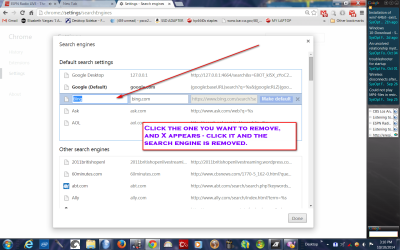
Click Settings and Search engines - click Manage and a list of your search engines appears.

Click the one you want to remove, and an X appears - click it and the search engine is removed.


In my case, I checked Bing as an example.
 

Attachments

  • CHROME SETTINGS.png
    CHROME SETTINGS.png
    134.3 KB · Views: 3
  • search engines 10.10.14.png
    search engines 10.10.14.png
    148.8 KB · Views: 2
Last edited:

My Computer

Computer type
PC/Desktop
Computer Manufacturer/Model Number
Self-Built
OS
Windows 7 Professional X64
CPU
Core i7 (2nd gen) i7-2600K / 3.40GHz
Motherboard
ASUS P8Z77-V Intel 7 Series Motherboard
Memory
DDR3 2400MHz (OC) 16gb
Graphics Card(s)
Intel(R) HD Graphics 3000, -1988 Mb
Sound Card
8 ChannelsAudio Chipset Realtek ALC892
Monitor(s) Displays
LG 29UM65 Black 29"
Screen Resolution
2560 x 1080
Hard Drives
840 EVO 250 GB SSD ;2tb (2);Seagate;1tb Seagate; 750 gb Seagate; wd ext (2) 750 gb,WD 2tb X 2;WD 3TB Black
PSU
750 watt
Case
Thermaltake RX -1
Cooling
2120mm Fans Included 1Other Fan Ports 5x 200mm Fan Ports
Keyboard
Microsoft Digital Media Pro
Mouse
Microsoft Wireless 6000
Internet Speed
U-verse 18 mbps
Antivirus
MSE
Browser
Firefox, Chrome and my favorite: Pale Moon
Other Info
HdHomerun Dual Tuner.
SRS Audio Lab,
Pioneer BDR 208-DBK
PS3-What a difference in my Surround Sound Receiver!
HP 4540s - My new Toy.
Epson R280 Printer- To personalize my Dvds.
Canon MP 560 - For scanning.
That could be normal. Its probably That Notifications are mostly inactive. The icon does not need to show all the time. Icon might show at times, its probably nothing to be worried about.
 

My Computer

Computer type
PC/Desktop
Computer Manufacturer/Model Number
HP
OS
Windows Vista Business 32bit
CPU
Intel(R) Pentium(R) Daul CPU E2220 @ 2.40GHz
Memory
2.00GB
Graphics Card(s)
Intel Pentium
Sound Card
AudioESP SoundMAX
Monitor(s) Displays
Dell
Hard Drives
ST380815AS ATA Device 80 GB
Keyboard
Logitech Keyboard
Mouse
Logitech Mouse
Internet Speed
44 Mbps
Antivirus
AVG Free
has been answered by PSCO2007
d.png
 

My Computer

Computer type
Laptop
Computer Manufacturer/Model Number
Acer
OS
Windows 7 Home Premium 32bit
CPU
Intel Core i3-3217U CPU @ 1.89GHz 1.79 GHz
Motherboard
Aspire V5-471
Memory
4GB
Graphics Card(s)
Nvidia Geforce
Hard Drives
WD BLACK SERIES WD5000BPKX 500GB 7200 RPM 16MB Cache SATA 6.0Gb/s 2.5" Internal Notebook Hard Drive Bare D
Antivirus
Avast
Browser
Opera
Click Settings and Search engines - click Manage and a list of your search engines appears.

Click the one you want to remove, and an X appears - click it and the search engine is removed.


In my case, I checked Bing as an example.


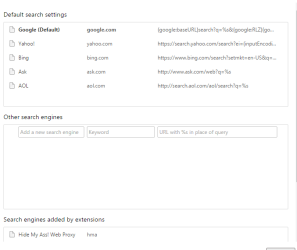
Thanks for replying...........it's not under Default OR Other Search Engines but under the last one i.e. Search Engines added by extensions, how do I delete that?
 

My Computers

System One System Two

  • Computer type
    Laptop
    Computer Manufacturer/Model Number
    Dell
    OS
    W7 Pro 32bit
    CPU
    Intel(R) Core(TM)2 CPU T7200 @ 2.00GHz
    Motherboard
    Dell Inc. 0CF456
    Memory
    4.00 GB
    Graphics Card(s)
    NVIDIA GTX 7980 512 MB
    Sound Card
    (1) HD Pro Webcam C910 (2) Bluetooth Stereo Audio (3) Si
    Hard Drives
    SSD
    Browser
    Brave
  • Computer type
    PC/Desktop
    System Manufacturer/Model Number
    Dell XPS Special Edition 8940
    OS
    W10 Pro
    CPU
    core i7 11th gen, 11700, 2.5-4.9 GHZ
    Memory
    32 GBB, 2 X16 GB @2933 MHz.
    Graphics Card(s)
    NVIDIA GeForce RTX 3070 8GB GDDR6
    Monitor(s) Displays
    Dell UltraSharp 32 4K monitor.
    Hard Drives
    1. 1TB M.2 PCIe NVMe SSD.

    2. 1TB 7200 rpm 3.5" SATA Hard Drive.
    PSU
    500W.
    Case
    Mineral White Bezel Chassis.
If it is in extensions, you just click the garbage can.

Can you post a pic?
 

My Computer

Computer type
PC/Desktop
Computer Manufacturer/Model Number
Self-Built
OS
Windows 7 Professional X64
CPU
Core i7 (2nd gen) i7-2600K / 3.40GHz
Motherboard
ASUS P8Z77-V Intel 7 Series Motherboard
Memory
DDR3 2400MHz (OC) 16gb
Graphics Card(s)
Intel(R) HD Graphics 3000, -1988 Mb
Sound Card
8 ChannelsAudio Chipset Realtek ALC892
Monitor(s) Displays
LG 29UM65 Black 29"
Screen Resolution
2560 x 1080
Hard Drives
840 EVO 250 GB SSD ;2tb (2);Seagate;1tb Seagate; 750 gb Seagate; wd ext (2) 750 gb,WD 2tb X 2;WD 3TB Black
PSU
750 watt
Case
Thermaltake RX -1
Cooling
2120mm Fans Included 1Other Fan Ports 5x 200mm Fan Ports
Keyboard
Microsoft Digital Media Pro
Mouse
Microsoft Wireless 6000
Internet Speed
U-verse 18 mbps
Antivirus
MSE
Browser
Firefox, Chrome and my favorite: Pale Moon
Other Info
HdHomerun Dual Tuner.
SRS Audio Lab,
Pioneer BDR 208-DBK
PS3-What a difference in my Surround Sound Receiver!
HP 4540s - My new Toy.
Epson R280 Printer- To personalize my Dvds.
Canon MP 560 - For scanning.
Thanks for replying.

They wont appear again despite that have new mails, cause I checked GMail only........unchecked Docs and Google Now?

Unchecked the tiny Google icon under settings to make it disappear which it did but wont reappear despite checking it again?.......
 

My Computers

System One System Two

  • Computer type
    Laptop
    Computer Manufacturer/Model Number
    Dell
    OS
    W7 Pro 32bit
    CPU
    Intel(R) Core(TM)2 CPU T7200 @ 2.00GHz
    Motherboard
    Dell Inc. 0CF456
    Memory
    4.00 GB
    Graphics Card(s)
    NVIDIA GTX 7980 512 MB
    Sound Card
    (1) HD Pro Webcam C910 (2) Bluetooth Stereo Audio (3) Si
    Hard Drives
    SSD
    Browser
    Brave
  • Computer type
    PC/Desktop
    System Manufacturer/Model Number
    Dell XPS Special Edition 8940
    OS
    W10 Pro
    CPU
    core i7 11th gen, 11700, 2.5-4.9 GHZ
    Memory
    32 GBB, 2 X16 GB @2933 MHz.
    Graphics Card(s)
    NVIDIA GeForce RTX 3070 8GB GDDR6
    Monitor(s) Displays
    Dell UltraSharp 32 4K monitor.
    Hard Drives
    1. 1TB M.2 PCIe NVMe SSD.

    2. 1TB 7200 rpm 3.5" SATA Hard Drive.
    PSU
    500W.
    Case
    Mineral White Bezel Chassis.
Thanks again, here is a screen shot. I no longer use the extension on new W7 install?
 

Attachments

  • 1.PNG
    1.PNG
    12 KB · Views: 11

My Computers

System One System Two

  • Computer type
    Laptop
    Computer Manufacturer/Model Number
    Dell
    OS
    W7 Pro 32bit
    CPU
    Intel(R) Core(TM)2 CPU T7200 @ 2.00GHz
    Motherboard
    Dell Inc. 0CF456
    Memory
    4.00 GB
    Graphics Card(s)
    NVIDIA GTX 7980 512 MB
    Sound Card
    (1) HD Pro Webcam C910 (2) Bluetooth Stereo Audio (3) Si
    Hard Drives
    SSD
    Browser
    Brave
  • Computer type
    PC/Desktop
    System Manufacturer/Model Number
    Dell XPS Special Edition 8940
    OS
    W10 Pro
    CPU
    core i7 11th gen, 11700, 2.5-4.9 GHZ
    Memory
    32 GBB, 2 X16 GB @2933 MHz.
    Graphics Card(s)
    NVIDIA GeForce RTX 3070 8GB GDDR6
    Monitor(s) Displays
    Dell UltraSharp 32 4K monitor.
    Hard Drives
    1. 1TB M.2 PCIe NVMe SSD.

    2. 1TB 7200 rpm 3.5" SATA Hard Drive.
    PSU
    500W.
    Case
    Mineral White Bezel Chassis.
As long as you have Google as default, it really doesn't matter.


If you click the one you are referring to, doesn't an X appear?

You can also go into Extensions ( in settings) and remove it from there.
 

My Computer

Computer type
PC/Desktop
Computer Manufacturer/Model Number
Self-Built
OS
Windows 7 Professional X64
CPU
Core i7 (2nd gen) i7-2600K / 3.40GHz
Motherboard
ASUS P8Z77-V Intel 7 Series Motherboard
Memory
DDR3 2400MHz (OC) 16gb
Graphics Card(s)
Intel(R) HD Graphics 3000, -1988 Mb
Sound Card
8 ChannelsAudio Chipset Realtek ALC892
Monitor(s) Displays
LG 29UM65 Black 29"
Screen Resolution
2560 x 1080
Hard Drives
840 EVO 250 GB SSD ;2tb (2);Seagate;1tb Seagate; 750 gb Seagate; wd ext (2) 750 gb,WD 2tb X 2;WD 3TB Black
PSU
750 watt
Case
Thermaltake RX -1
Cooling
2120mm Fans Included 1Other Fan Ports 5x 200mm Fan Ports
Keyboard
Microsoft Digital Media Pro
Mouse
Microsoft Wireless 6000
Internet Speed
U-verse 18 mbps
Antivirus
MSE
Browser
Firefox, Chrome and my favorite: Pale Moon
Other Info
HdHomerun Dual Tuner.
SRS Audio Lab,
Pioneer BDR 208-DBK
PS3-What a difference in my Surround Sound Receiver!
HP 4540s - My new Toy.
Epson R280 Printer- To personalize my Dvds.
Canon MP 560 - For scanning.
Sure thanks, but X doesn't appear on hma?
 

My Computers

System One System Two

  • Computer type
    Laptop
    Computer Manufacturer/Model Number
    Dell
    OS
    W7 Pro 32bit
    CPU
    Intel(R) Core(TM)2 CPU T7200 @ 2.00GHz
    Motherboard
    Dell Inc. 0CF456
    Memory
    4.00 GB
    Graphics Card(s)
    NVIDIA GTX 7980 512 MB
    Sound Card
    (1) HD Pro Webcam C910 (2) Bluetooth Stereo Audio (3) Si
    Hard Drives
    SSD
    Browser
    Brave
  • Computer type
    PC/Desktop
    System Manufacturer/Model Number
    Dell XPS Special Edition 8940
    OS
    W10 Pro
    CPU
    core i7 11th gen, 11700, 2.5-4.9 GHZ
    Memory
    32 GBB, 2 X16 GB @2933 MHz.
    Graphics Card(s)
    NVIDIA GeForce RTX 3070 8GB GDDR6
    Monitor(s) Displays
    Dell UltraSharp 32 4K monitor.
    Hard Drives
    1. 1TB M.2 PCIe NVMe SSD.

    2. 1TB 7200 rpm 3.5" SATA Hard Drive.
    PSU
    500W.
    Case
    Mineral White Bezel Chassis.
Do you see it in the Extensions tab?
 

My Computer

Computer type
PC/Desktop
Computer Manufacturer/Model Number
Self-Built
OS
Windows 7 Professional X64
CPU
Core i7 (2nd gen) i7-2600K / 3.40GHz
Motherboard
ASUS P8Z77-V Intel 7 Series Motherboard
Memory
DDR3 2400MHz (OC) 16gb
Graphics Card(s)
Intel(R) HD Graphics 3000, -1988 Mb
Sound Card
8 ChannelsAudio Chipset Realtek ALC892
Monitor(s) Displays
LG 29UM65 Black 29"
Screen Resolution
2560 x 1080
Hard Drives
840 EVO 250 GB SSD ;2tb (2);Seagate;1tb Seagate; 750 gb Seagate; wd ext (2) 750 gb,WD 2tb X 2;WD 3TB Black
PSU
750 watt
Case
Thermaltake RX -1
Cooling
2120mm Fans Included 1Other Fan Ports 5x 200mm Fan Ports
Keyboard
Microsoft Digital Media Pro
Mouse
Microsoft Wireless 6000
Internet Speed
U-verse 18 mbps
Antivirus
MSE
Browser
Firefox, Chrome and my favorite: Pale Moon
Other Info
HdHomerun Dual Tuner.
SRS Audio Lab,
Pioneer BDR 208-DBK
PS3-What a difference in my Surround Sound Receiver!
HP 4540s - My new Toy.
Epson R280 Printer- To personalize my Dvds.
Canon MP 560 - For scanning.
Not in extensions?
 

Attachments

  • 2.PNG
    2.PNG
    19.5 KB · Views: 1

My Computers

System One System Two

  • Computer type
    Laptop
    Computer Manufacturer/Model Number
    Dell
    OS
    W7 Pro 32bit
    CPU
    Intel(R) Core(TM)2 CPU T7200 @ 2.00GHz
    Motherboard
    Dell Inc. 0CF456
    Memory
    4.00 GB
    Graphics Card(s)
    NVIDIA GTX 7980 512 MB
    Sound Card
    (1) HD Pro Webcam C910 (2) Bluetooth Stereo Audio (3) Si
    Hard Drives
    SSD
    Browser
    Brave
  • Computer type
    PC/Desktop
    System Manufacturer/Model Number
    Dell XPS Special Edition 8940
    OS
    W10 Pro
    CPU
    core i7 11th gen, 11700, 2.5-4.9 GHZ
    Memory
    32 GBB, 2 X16 GB @2933 MHz.
    Graphics Card(s)
    NVIDIA GeForce RTX 3070 8GB GDDR6
    Monitor(s) Displays
    Dell UltraSharp 32 4K monitor.
    Hard Drives
    1. 1TB M.2 PCIe NVMe SSD.

    2. 1TB 7200 rpm 3.5" SATA Hard Drive.
    PSU
    500W.
    Case
    Mineral White Bezel Chassis.
Thanks PSCO2007, could you ask mods to let you use Team Viewer and fix my W7s G Chrome....... a complete uninstall and than reinstall?

Shall appreciate it big time.

Regards!
 

My Computers

System One System Two

  • Computer type
    Laptop
    Computer Manufacturer/Model Number
    Dell
    OS
    W7 Pro 32bit
    CPU
    Intel(R) Core(TM)2 CPU T7200 @ 2.00GHz
    Motherboard
    Dell Inc. 0CF456
    Memory
    4.00 GB
    Graphics Card(s)
    NVIDIA GTX 7980 512 MB
    Sound Card
    (1) HD Pro Webcam C910 (2) Bluetooth Stereo Audio (3) Si
    Hard Drives
    SSD
    Browser
    Brave
  • Computer type
    PC/Desktop
    System Manufacturer/Model Number
    Dell XPS Special Edition 8940
    OS
    W10 Pro
    CPU
    core i7 11th gen, 11700, 2.5-4.9 GHZ
    Memory
    32 GBB, 2 X16 GB @2933 MHz.
    Graphics Card(s)
    NVIDIA GeForce RTX 3070 8GB GDDR6
    Monitor(s) Displays
    Dell UltraSharp 32 4K monitor.
    Hard Drives
    1. 1TB M.2 PCIe NVMe SSD.

    2. 1TB 7200 rpm 3.5" SATA Hard Drive.
    PSU
    500W.
    Case
    Mineral White Bezel Chassis.
I don't have that on my Chrome settings.

It really doesn't affect anything.

The only other thing I can suggest is to do a computer search or look in Programs and see if it is there.

Sorry.
 

My Computer

Computer type
PC/Desktop
Computer Manufacturer/Model Number
Self-Built
OS
Windows 7 Professional X64
CPU
Core i7 (2nd gen) i7-2600K / 3.40GHz
Motherboard
ASUS P8Z77-V Intel 7 Series Motherboard
Memory
DDR3 2400MHz (OC) 16gb
Graphics Card(s)
Intel(R) HD Graphics 3000, -1988 Mb
Sound Card
8 ChannelsAudio Chipset Realtek ALC892
Monitor(s) Displays
LG 29UM65 Black 29"
Screen Resolution
2560 x 1080
Hard Drives
840 EVO 250 GB SSD ;2tb (2);Seagate;1tb Seagate; 750 gb Seagate; wd ext (2) 750 gb,WD 2tb X 2;WD 3TB Black
PSU
750 watt
Case
Thermaltake RX -1
Cooling
2120mm Fans Included 1Other Fan Ports 5x 200mm Fan Ports
Keyboard
Microsoft Digital Media Pro
Mouse
Microsoft Wireless 6000
Internet Speed
U-verse 18 mbps
Antivirus
MSE
Browser
Firefox, Chrome and my favorite: Pale Moon
Other Info
HdHomerun Dual Tuner.
SRS Audio Lab,
Pioneer BDR 208-DBK
PS3-What a difference in my Surround Sound Receiver!
HP 4540s - My new Toy.
Epson R280 Printer- To personalize my Dvds.
Canon MP 560 - For scanning.
Thanks PSCO2007, could you ask mods to let you use Team Viewer and fix my W7s G Chrome....... a complete uninstall and than reinstall?

Shall appreciate it big time.

Regards!

We're not permitted to do a remote.

All questions must be on the forum.

If you want to reinstall Chrome, just delete it and download it again.
 

My Computer

Computer type
PC/Desktop
Computer Manufacturer/Model Number
Self-Built
OS
Windows 7 Professional X64
CPU
Core i7 (2nd gen) i7-2600K / 3.40GHz
Motherboard
ASUS P8Z77-V Intel 7 Series Motherboard
Memory
DDR3 2400MHz (OC) 16gb
Graphics Card(s)
Intel(R) HD Graphics 3000, -1988 Mb
Sound Card
8 ChannelsAudio Chipset Realtek ALC892
Monitor(s) Displays
LG 29UM65 Black 29"
Screen Resolution
2560 x 1080
Hard Drives
840 EVO 250 GB SSD ;2tb (2);Seagate;1tb Seagate; 750 gb Seagate; wd ext (2) 750 gb,WD 2tb X 2;WD 3TB Black
PSU
750 watt
Case
Thermaltake RX -1
Cooling
2120mm Fans Included 1Other Fan Ports 5x 200mm Fan Ports
Keyboard
Microsoft Digital Media Pro
Mouse
Microsoft Wireless 6000
Internet Speed
U-verse 18 mbps
Antivirus
MSE
Browser
Firefox, Chrome and my favorite: Pale Moon
Other Info
HdHomerun Dual Tuner.
SRS Audio Lab,
Pioneer BDR 208-DBK
PS3-What a difference in my Surround Sound Receiver!
HP 4540s - My new Toy.
Epson R280 Printer- To personalize my Dvds.
Canon MP 560 - For scanning.
I don't have that on my Chrome settings.

It really doesn't affect anything.

The only other thing I can suggest is to do a computer search or look in Programs and see if it is there.

Sorry.


As posted earlier its a new W7 install hardly 2 days old. No apps relating to it.
 

My Computers

System One System Two

  • Computer type
    Laptop
    Computer Manufacturer/Model Number
    Dell
    OS
    W7 Pro 32bit
    CPU
    Intel(R) Core(TM)2 CPU T7200 @ 2.00GHz
    Motherboard
    Dell Inc. 0CF456
    Memory
    4.00 GB
    Graphics Card(s)
    NVIDIA GTX 7980 512 MB
    Sound Card
    (1) HD Pro Webcam C910 (2) Bluetooth Stereo Audio (3) Si
    Hard Drives
    SSD
    Browser
    Brave
  • Computer type
    PC/Desktop
    System Manufacturer/Model Number
    Dell XPS Special Edition 8940
    OS
    W10 Pro
    CPU
    core i7 11th gen, 11700, 2.5-4.9 GHZ
    Memory
    32 GBB, 2 X16 GB @2933 MHz.
    Graphics Card(s)
    NVIDIA GeForce RTX 3070 8GB GDDR6
    Monitor(s) Displays
    Dell UltraSharp 32 4K monitor.
    Hard Drives
    1. 1TB M.2 PCIe NVMe SSD.

    2. 1TB 7200 rpm 3.5" SATA Hard Drive.
    PSU
    500W.
    Case
    Mineral White Bezel Chassis.
Back
Top