Search files with a special word

speigel205

New member
Local time
3:35 PM
Messages
2
Hi, With command line, I want to search all the files *.txt in the directory C:\MyDirectory to find files that contains the word "tag" like xytag or Tag123 or /tAg. Regards
 

My Computer My Computer

At a glance

Windows 7 32 bit
OS
Windows 7 32 bit
Install Grep for Windows - a port from Linux. I use it all the time.

For example, for me to search all my html files in my web server root directory, for the word message:

grep -i "message" *.html (-i means case insensitive search)

For your case. it would be:

grep -i "tag" *.txt

You can even direct the output to a file if you want:

grep -i "tag" *.txt > results.txt

Great little program from SourceForge.

If you want to see the output and save in a file, use another little Linux port of a program called tee which the author calls wtee.

The you would do this:

grep -i "tag" *.txt | wtee results.txt

(wtee.exe has to be in a directory in your path environment variable)
 

My Computer My Computer

At a glance

Windows 10 Pro X64Intel Quad Core i7-4770 @ 3.4Ghz16.0GB PC3-12800 DDR3 SDRAM 1600 MHzIntel Integrated HD Graphics
Computer type
PC/Desktop
Computer Manufacturer/Model Number
Lenovo IdeaCenter 450
OS
Windows 10 Pro X64
CPU
Intel Quad Core i7-4770 @ 3.4Ghz
Memory
16.0GB PC3-12800 DDR3 SDRAM 1600 MHz
Graphics Card(s)
Intel Integrated HD Graphics
Sound Card
Realtek HD Audio
Monitor(s) Displays
HP 22" LCD
Screen Resolution
1680 x 1050
Hard Drives
250GB Samsung EVO SATA-3 SSD
2TB Seagate ST2000DM001 SATA-2
1.5TB Seagate ST3150041AS SATA
Keyboard
Dell USB
Mouse
Lenovo USB
Internet Speed
Cable via Road Runner 3MB Upload, 30MB Download
Antivirus
Windows Defender, MBAM Pro, MBAE
Browser
Seamonkey
Other Info
UEFI/GPT
PLDS DVD-RW DH16AERSH
Thank you very mush for your help, it seem windows is not capable for doing this task by itself from command line not like linux did. Okay, so can you just tell me how to search for files with the extension *.txt in C:\MyDirectory if that is possible of course.
 

My Computer My Computer

At a glance

Windows 7 32 bit
OS
Windows 7 32 bit
EDIT: This and my next post will help with your post above.
I originally wrote this in response to your first post untill I read it again and realised it's not what you asked. I'll look into your first post tomorrow.

If you only want to output a list of these files then try this in cmd, but it will give you the full path to the file not just the filename.

dir /b /s /a:-d "C:\MyDirectory\*tag*" (output to screen)
or
dir /b /s /a:-d "C:\MyDirectory\*tag*" > results.txt (output to text file)

use dir /? for a explanation of the switches

results.txt will be in which ever folder your cmd prompt is in, eg your cmd prompt is C:\Windows\System32> then it will be found at C:\Windows\System32\results.txt. You can also specify a full path for the results.txt file.

If your only searching a single directory, not sub directories then drop the /s and you don't get the full path.

If this looks like it might work then have a play with the switches, although you might not be able to get exactly what you want.

Please let us know exactly what format you want the results returned.

? = Any char, eg. \tag?? will find tag12, tagak, tagml etc... But won't find atag12, MyTag, ThisTag123 etc...

* = Any number of any char, eg. \*tag* will find atag12, MyTag, ThisTag123, tag_me etc... \*.txt will find all text files, *.bmp will find all bitmap files, *tag*.txt will find all text files with the word tag in the filename etc...

 

My Computer My Computer

At a glance

Windows 7 Ultimate x64Intel Pentium Dual Core E5200 2.5GHz (3.77GHz...Corsair 4GB DDR2 (4x1GB CM2X1024-6400C4)Palit GeForce GTS 250 (1024MB)
Computer Manufacturer/Model Number
Self built
OS
Windows 7 Ultimate x64
CPU
Intel Pentium Dual Core E5200 2.5GHz (3.77GHz OC)
Motherboard
Asus P5Q-E
Memory
Corsair 4GB DDR2 (4x1GB CM2X1024-6400C4)
Graphics Card(s)
Palit GeForce GTS 250 (1024MB)
Sound Card
On Board (ADI AD2000B 8ch HD)
Monitor(s) Displays
Samsung 32in LCD TV
Screen Resolution
1360x768
Hard Drives
2 x 1TB Samsung 103SJ (Raid0)
2 x External 500GB Samsung 502IJ (NexStar 3 HD Enclosures)
PSU
550W Antec Neo HE 550
Case
Antec P180
Cooling
Xigmatex Red Scorpion CPU Cooler. 3x120mm Fans
Keyboard
Logitech MX5000 Laser (Combo)
Mouse
Logitech MX5000 Laser (Combo)
Internet Speed
ADSL2+ (avg 10 Mbps Down, 0.80 Mbps up)
Other Info
Gigabyte GN-WP01GS 54g Wireless Lan Card
You might prefer this to output filename and extension only.

for /r "C:\MyDirectory\" %i in (*tag*.txt) do @echo %~nxi

It can be modified to output the fullpath, you can find the modifiers here Microsoft Corporation, about half way down the page look for Variable with modifier and Variable with combined modifiers in the first column in a blue box.

This command will output a space at the end of each line though.

To output this to a text file you need to use >> results.txt.
> creates or overwrites, >> creates or appends.

And if you plan to use this in a cmd or bat file the %i and %~nxi needs to be %%i and %%~nxi.

Sorry if I explained stuff you already know but I don't know your level of experience with cmd.
 

My Computer My Computer

At a glance

Windows 7 Ultimate x64Intel Pentium Dual Core E5200 2.5GHz (3.77GHz...Corsair 4GB DDR2 (4x1GB CM2X1024-6400C4)Palit GeForce GTS 250 (1024MB)
Computer Manufacturer/Model Number
Self built
OS
Windows 7 Ultimate x64
CPU
Intel Pentium Dual Core E5200 2.5GHz (3.77GHz OC)
Motherboard
Asus P5Q-E
Memory
Corsair 4GB DDR2 (4x1GB CM2X1024-6400C4)
Graphics Card(s)
Palit GeForce GTS 250 (1024MB)
Sound Card
On Board (ADI AD2000B 8ch HD)
Monitor(s) Displays
Samsung 32in LCD TV
Screen Resolution
1360x768
Hard Drives
2 x 1TB Samsung 103SJ (Raid0)
2 x External 500GB Samsung 502IJ (NexStar 3 HD Enclosures)
PSU
550W Antec Neo HE 550
Case
Antec P180
Cooling
Xigmatex Red Scorpion CPU Cooler. 3x120mm Fans
Keyboard
Logitech MX5000 Laser (Combo)
Mouse
Logitech MX5000 Laser (Combo)
Internet Speed
ADSL2+ (avg 10 Mbps Down, 0.80 Mbps up)
Other Info
Gigabyte GN-WP01GS 54g Wireless Lan Card
Thought I'd have a look quick look tonight. Give this a test and see if it works.

findstr /i /s /m .*tag.* "C:\MyDirectory\*.txt" -- Outputs full path

Check it out using findstr /? or here Microsoft Corporation.

Grep could be better, I don't know, but if this works and you prefer this but you only want the filename let me know and I'll see if I can find a way.
 

My Computer My Computer

At a glance

Windows 7 Ultimate x64Intel Pentium Dual Core E5200 2.5GHz (3.77GHz...Corsair 4GB DDR2 (4x1GB CM2X1024-6400C4)Palit GeForce GTS 250 (1024MB)
Computer Manufacturer/Model Number
Self built
OS
Windows 7 Ultimate x64
CPU
Intel Pentium Dual Core E5200 2.5GHz (3.77GHz OC)
Motherboard
Asus P5Q-E
Memory
Corsair 4GB DDR2 (4x1GB CM2X1024-6400C4)
Graphics Card(s)
Palit GeForce GTS 250 (1024MB)
Sound Card
On Board (ADI AD2000B 8ch HD)
Monitor(s) Displays
Samsung 32in LCD TV
Screen Resolution
1360x768
Hard Drives
2 x 1TB Samsung 103SJ (Raid0)
2 x External 500GB Samsung 502IJ (NexStar 3 HD Enclosures)
PSU
550W Antec Neo HE 550
Case
Antec P180
Cooling
Xigmatex Red Scorpion CPU Cooler. 3x120mm Fans
Keyboard
Logitech MX5000 Laser (Combo)
Mouse
Logitech MX5000 Laser (Combo)
Internet Speed
ADSL2+ (avg 10 Mbps Down, 0.80 Mbps up)
Other Info
Gigabyte GN-WP01GS 54g Wireless Lan Card
I just tried findstr and grep.

findstr found two files then throws a "Out of memory" error processing the 3rd which has 450+ hits of the search target.
grep found and reported all with no problems.
 

My Computer My Computer

At a glance

Windows 10 Pro X64Intel Quad Core i7-4770 @ 3.4Ghz16.0GB PC3-12800 DDR3 SDRAM 1600 MHzIntel Integrated HD Graphics
Computer type
PC/Desktop
Computer Manufacturer/Model Number
Lenovo IdeaCenter 450
OS
Windows 10 Pro X64
CPU
Intel Quad Core i7-4770 @ 3.4Ghz
Memory
16.0GB PC3-12800 DDR3 SDRAM 1600 MHz
Graphics Card(s)
Intel Integrated HD Graphics
Sound Card
Realtek HD Audio
Monitor(s) Displays
HP 22" LCD
Screen Resolution
1680 x 1050
Hard Drives
250GB Samsung EVO SATA-3 SSD
2TB Seagate ST2000DM001 SATA-2
1.5TB Seagate ST3150041AS SATA
Keyboard
Dell USB
Mouse
Lenovo USB
Internet Speed
Cable via Road Runner 3MB Upload, 30MB Download
Antivirus
Windows Defender, MBAM Pro, MBAE
Browser
Seamonkey
Other Info
UEFI/GPT
PLDS DVD-RW DH16AERSH
@Ztrucker
Don't know about the "Out of memory" message, it worked for me with a file 30.9mb in size that had 74993 hits. To count the hits I used - find /i /c "com" "E:\MyDirectory\*.txt"

I would still consider using Grep because findstr would not work with 1 of my files I was using, although I don't know if Grep would do any better because something fishy was going on with that file.
It was 61.8mb in size but when I copied the text into a new file the new file was 30.9mb and when I just deleted the text from the original file it was still 2 bytes in size when it should have been 0 bytes.

I've attached the file with just a few words I put in if you would like to test Grep with it. I would also be intrested in knowing if findstr works with it on your computer. The OP would also probably like to know.

EDIT: In the screen shot Fishy File was originally "Office XP Media....". I had already copied and changed the contents before posting the screen shot. New text document is the copy of the text from "Office XP Media...." pasted into the New text document.
 

Attachments

  • Fishy File.txt
    Fishy File.txt
    194 bytes · Views: 5
  • findstr.jpg
    findstr.jpg
    24.8 KB · Views: 4
Last edited:

My Computer My Computer

At a glance

Windows 7 Ultimate x64Intel Pentium Dual Core E5200 2.5GHz (3.77GHz...Corsair 4GB DDR2 (4x1GB CM2X1024-6400C4)Palit GeForce GTS 250 (1024MB)
Computer Manufacturer/Model Number
Self built
OS
Windows 7 Ultimate x64
CPU
Intel Pentium Dual Core E5200 2.5GHz (3.77GHz OC)
Motherboard
Asus P5Q-E
Memory
Corsair 4GB DDR2 (4x1GB CM2X1024-6400C4)
Graphics Card(s)
Palit GeForce GTS 250 (1024MB)
Sound Card
On Board (ADI AD2000B 8ch HD)
Monitor(s) Displays
Samsung 32in LCD TV
Screen Resolution
1360x768
Hard Drives
2 x 1TB Samsung 103SJ (Raid0)
2 x External 500GB Samsung 502IJ (NexStar 3 HD Enclosures)
PSU
550W Antec Neo HE 550
Case
Antec P180
Cooling
Xigmatex Red Scorpion CPU Cooler. 3x120mm Fans
Keyboard
Logitech MX5000 Laser (Combo)
Mouse
Logitech MX5000 Laser (Combo)
Internet Speed
ADSL2+ (avg 10 Mbps Down, 0.80 Mbps up)
Other Info
Gigabyte GN-WP01GS 54g Wireless Lan Card
Absolutely no need to install third party tools. The Windows Search syntax for your search would be:
Code:
ext:txt content:tag
(Search all files with extension txt for the string tag.)

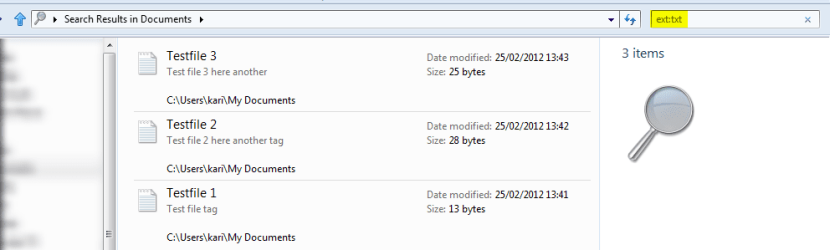
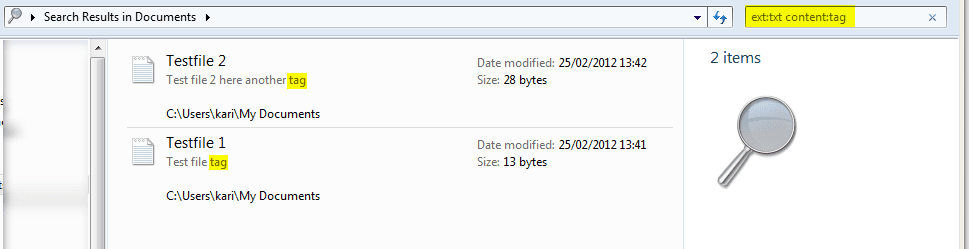
Here's an example. I created three txt files, Testfile 1 and Testfile 2 include string tag whereas Testfile 3 does not contain that string. First searching for all files with extension txt, syntax ext:tag:

Search_1.png

As should be, Windows Search finds all three files. Now I narrow the search, searching files with extension txt containing string tag, syntax ext:txt content:tag:

Search_2.png

Testfile 1 and Testfile 2 contain string tag, therefore they are found.

Easy and fast.

Kari
 

My Computer My Computer

At a glance

Windows 10 Pro x64 EN-GB1.6 GHz Intel Core i7-720QM Processor6 GBATI Mobility Radeon HD 5850 Graphics
Computer type
Laptop
Computer Manufacturer/Model Number
HP ENVY 17-1150eg
OS
Windows 10 Pro x64 EN-GB
CPU
1.6 GHz Intel Core i7-720QM Processor
Memory
6 GB
Graphics Card(s)
ATI Mobility Radeon HD 5850 Graphics
Sound Card
Beats sound system with integrated subwoofer
Monitor(s) Displays
17" laptop display, 22" LED and 32" Full HD TV through HDMI
Screen Resolution
1600*900 (1), 1920*1080 (2&3)
Hard Drives
Internal: 2 x 500 GB SATA Hard Disk Drive 7200 rpm
External: 2TB for backups, 3TB USB3 network drive for media
Cooling
As Envy runs a bit warm, I have it on a Cooler Master pad
Keyboard
Logitech diNovo Media Desktop Laser (bluetooth)
Mouse
Logitech Performance Mouse MX
Internet Speed
50/10 Mbps VDSL
Antivirus
Windows Defender 4.3.9431.0
Browser
Maxthon 3.5.2., IE11
@Kari
1st - The OP want's to do it from the command line
2nd - It doesn't work with wildcard char to find, and I quote, like xytag or Tag123 or /tAg
3rd - it's much slower than the command line if working with large files, eg. 30.9mb without the folder being indexed.
4th - Forced to search subfolders if normally searched

Actually number 2 is true and false for me, changing it to - ext:txt content:*tag*, and adding Tag123 or /tAg to one file it works but adding xytag it does not. File also contains avtag and copytagall in all test.
 

My Computer My Computer

At a glance

Windows 7 Ultimate x64Intel Pentium Dual Core E5200 2.5GHz (3.77GHz...Corsair 4GB DDR2 (4x1GB CM2X1024-6400C4)Palit GeForce GTS 250 (1024MB)
Computer Manufacturer/Model Number
Self built
OS
Windows 7 Ultimate x64
CPU
Intel Pentium Dual Core E5200 2.5GHz (3.77GHz OC)
Motherboard
Asus P5Q-E
Memory
Corsair 4GB DDR2 (4x1GB CM2X1024-6400C4)
Graphics Card(s)
Palit GeForce GTS 250 (1024MB)
Sound Card
On Board (ADI AD2000B 8ch HD)
Monitor(s) Displays
Samsung 32in LCD TV
Screen Resolution
1360x768
Hard Drives
2 x 1TB Samsung 103SJ (Raid0)
2 x External 500GB Samsung 502IJ (NexStar 3 HD Enclosures)
PSU
550W Antec Neo HE 550
Case
Antec P180
Cooling
Xigmatex Red Scorpion CPU Cooler. 3x120mm Fans
Keyboard
Logitech MX5000 Laser (Combo)
Mouse
Logitech MX5000 Laser (Combo)
Internet Speed
ADSL2+ (avg 10 Mbps Down, 0.80 Mbps up)
Other Info
Gigabyte GN-WP01GS 54g Wireless Lan Card
Back
Top