I need A special excel Hyperlink that only I can change.

DonM123

New member
Member
VIP
Local time
10:43 PM
Messages
140
How do I make a hyperlink in excel that excel will not change ?

There must be a special way to make a hyperlink in excel to an specail type of object that the excel programers did not have the time to make it so excel changes my links. I knwo thier must be a trick a work around a way A way to link to a image on my hard drive that excel can not change to a location that does not exist or can not work a place I can not put files.
See there must be a special object that would a allow a specail hyperlink that absolutly can not be modified by excel. LIke if I could LOCK it down to be only CHANGED BY ME and no other intitity.

I need to tell excel that I want to make a hyperlink to a image on drive D or Drive C:\folder And I do not want excel to ever be able to change that. There must be a secret way to make a hyperlink to a file that excel can not change. I do not want excel to be changing what I put in as it takes time to put each hyperlink in. and I do not want to have to wonder if excel will be able to change what I put in for a link. I want to find a way to make a hyperlink that excel will not be able to change. Like it just does not have a choice. liek maybe I could make a special object and hyperlink to that spec ail object.

Like so if excel tries to change my hyperlink i could send a message to excel that says excel you do not have permission to change this link/.
 

My Computer My Computer

At a glance

win7proi716GTX 980 TI
Computer type
PC/Desktop
Computer Manufacturer/Model Number
Gigibyte Custom build
OS
win7pro
CPU
i7
Memory
16
Graphics Card(s)
GTX 980 TI
Hard Drives
ssd 4t 750gig
Antivirus
norton pain
Why do you think Excel is conspiring to change your links? Have you intercepted its cell phone messages?
 

My Computer My Computer

At a glance

Win 7 Ult 64-bitG620 2.6GHZ Pentium R6 GB
Computer type
PC/Desktop
Computer Manufacturer/Model Number
HP p6-2020t
OS
Win 7 Ult 64-bit
CPU
G620 2.6GHZ Pentium R
Memory
6 GB
Monitor(s) Displays
25" HPLV2311
Screen Resolution
1920 x 1200
Hard Drives
1 SATA, 1 exterior SATA
Case
HP
Cooling
PSU
Antivirus
Glasswire
Browser
Waterfox; Firefox; Chrome for work
Other Info
Firewall--Glasswire
Similar specs in Gateway DX4200
Verizon FIOS Wired network

1 other Win7 computer-- has SSD
I think you can password a cell or a record containing said cell -- after you make the hyperlink in that cell.
 
Last edited:

My Computer My Computer

At a glance

Windows 7 Professional 64-bitDesktop i5; Acers i5 & i7desktop 16GB; 1 Acer 8GB & 1 Acer 16GB
Computer type
PC/Desktop
Computer Manufacturer/Model Number
Antec desktop; Acer Aspire laptops
OS
Windows 7 Professional 64-bit
CPU
Desktop i5; Acers i5 & i7
Memory
desktop 16GB; 1 Acer 8GB & 1 Acer 16GB
Hard Drives
1TB split into 2 equal partitions [OS and data] usable by RJS
Internet Speed
AT&T DSL
Browser
FF, GChrome, msIE
Other Info
Windows 7 Firewall, Emsisoft AM/AV, MSE [scan-only], SpywareBlaster, Ruiware/BillP combine
crazy post YES. There must be a way to make a hyperlink in excel that excel can not change to something else. this makes a lot of sense to me especially because a person can spend a lot of time making those hyperlinks.
 

My Computer My Computer

At a glance

win7proi716GTX 980 TI
Computer type
PC/Desktop
Computer Manufacturer/Model Number
Gigibyte Custom build
OS
win7pro
CPU
i7
Memory
16
Graphics Card(s)
GTX 980 TI
Hard Drives
ssd 4t 750gig
Antivirus
norton pain
Set the hyperlink to what you want then PW protect that cell so no one can change it. Do you really mean excel itself is actually making a change to the text of the hyperlink? Not sure that can really happen.
 

My Computer My Computer

At a glance

Win 7 Home Prem x64 SP1AMD FX6350 Vishera 3.9Ghz16Gb Ballistix Sport 2x8Gb DDR3-1600nVidia GEForce 1050Ti 4mg
Computer type
PC/Desktop
Computer Manufacturer/Model Number
Custom Build
OS
Win 7 Home Prem x64 SP1
CPU
AMD FX6350 Vishera 3.9Ghz
Motherboard
ASUS M5A97 R2.0
Memory
16Gb Ballistix Sport 2x8Gb DDR3-1600
Graphics Card(s)
nVidia GEForce 1050Ti 4mg
Sound Card
on board Realtek HD w/Logitech 2.1 speakers
Monitor(s) Displays
AOC 2243w
Screen Resolution
1920x1080
Hard Drives
500g Samsung Evo 850 OS SSD,
250g Samsung Evo 850 SSD for data,
1Tb Toshiba SSD for b/u's.
PSU
Corsair CX750 modular
Case
MasterCooler Elite 330
Cooling
2x case, Coolermaster Viper CPU stack
Keyboard
ms wireless desktop 2000
Mouse
ms wireless desktop 2000
Internet Speed
Cable:Average about 250Mbps down, 25Mbps Up +/-
Antivirus
MSE, Cclnr, MwBytes, SA-S
Browser
IE11
What do you mean by create a hyperlink that "Excel will not change"?

You can insert a link to a file on your computer, into a cell in Excel, but you must insert it as a Hyperlink:
1. In an Excel worksheet, Right-mouse click on the cell that you wish to add the hyperlink.
2. From the pop-up menu, select "Hyperlink..." from the list.
3. A new Insert Hyperlink dialog box appears. Navigate to the file that you wish to include in the spreadsheet, and select it.
4. The Spreadsheet cell now includes a hyperlink, underlined in blue, to the file that you have chosen.

If you insert link this way, then Excel will know that the object is a Hyperlink, and not plain text, or a number.
 

My Computer My Computer

At a glance

Windows 7 x64, Vista x64, 8.1 smartphoneIntel E8400 65W 64-bitDDR2 2 x 2GB, 1GB x 2XFX Radeon HD5750
Computer type
PC/Desktop
OS
Windows 7 x64, Vista x64, 8.1 smartphone
CPU
Intel E8400 65W 64-bit
Motherboard
Gigabyte EP45-UD3LR
Memory
DDR2 2 x 2GB, 1GB x 2
Graphics Card(s)
XFX Radeon HD5750
Sound Card
AMD High Definition Audio; Realtek High Definition Audio
Monitor(s) Displays
iiyama prolite X2377HDS
Screen Resolution
1920 x 1080
Hard Drives
500GB 7200 rpm Seagate ST3500413AS 16MB, 500GB 5400 rpm Toshiba MQ02ABF050H 32MB, 200GB 7200 rpm Seagate ST3200820AS 8MB, 2TB 7200 rpm Western Digital WD20EZRX 64MB
PSU
Enermax Liberty Modular
Case
Antec P193 Midi Tower
Keyboard
Mionix ZIBAL 60
Mouse
Razer USB 2.0 Diamondback Mouse or Huion Graphics Tablet
Browser
Internet Explorer, Lunascape, Firefox, Opera, Avast Safezone
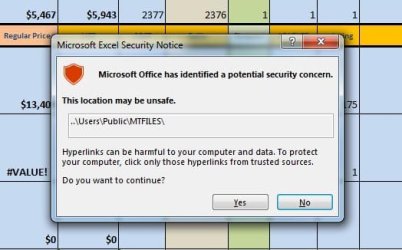
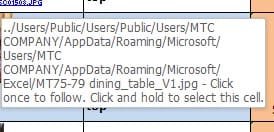
I am creating the link as you say. For some reason excel wants to change my links to my pictures. So I need to find a way to make a hyperlink to a picture in a way that excel has no way to change. It keeps putting in all this appdata/roaming stuff in front of my links. There must be a way to create a hyperlink that excel has no way of changing.
It does not seam to matter where I put the files Microsoft wants to change the text in the hyperlink.
 

Attachments

  • users.jpg
    users.jpg
    47.2 KB · Views: 13
  • users22.jpg
    users22.jpg
    30.1 KB · Views: 12

My Computer My Computer

At a glance

win7proi716GTX 980 TI
Computer type
PC/Desktop
Computer Manufacturer/Model Number
Gigibyte Custom build
OS
win7pro
CPU
i7
Memory
16
Graphics Card(s)
GTX 980 TI
Hard Drives
ssd 4t 750gig
Antivirus
norton pain
"Set the hyperlink to what you want then PW protect that cell" I will look into this.thanks Yes excel wants to change the link. As you can see in the picture it puts all the appdata roaming stuff. And I am asking how to make a link that excel has no way to change EVER.
 

My Computer My Computer

At a glance

win7proi716GTX 980 TI
Computer type
PC/Desktop
Computer Manufacturer/Model Number
Gigibyte Custom build
OS
win7pro
CPU
i7
Memory
16
Graphics Card(s)
GTX 980 TI
Hard Drives
ssd 4t 750gig
Antivirus
norton pain
There is a very simple fix to this "Hyper-Loss" problem. Either turn off "Autosave" or go to Options/Save and direct the autosave to default to the location that the files reside in. For some reason, your file is auto saved every 10 minutes to a folder on your hard drive named user/appdata/roaming/Microsoft/Excel by default and if that your file is accidentally closed and the autosaved version pops up; it will have the new hyperlink location as you hover.

There are several circumstances in which links between files can be inadvertently made to point to erroneous locations. The following are two of the most common scenarios.
Scenario 1:

  1. You map a drive under the root of a share. For example, you map drive Z to \Server\Share\Folder1.
  2. You create links to a workbook that is stored at the mapped location after you open the file through that mapped drive.
  3. You open the file by a UNC path.
As a consequence the link will be broken.
If you close the file without saving it, the links will not be changed. However, if you save the file before you close it, you will save the links with the current broken path. The folders between the root of the share and the mapped folder will be left out of the path. In the example above, the link would change to \Server\Folder1. In other words, the Share name is eliminated from the path.
Scenario 2:

  1. You map a drive under the root of a share. For example, you map drive Z to \Server\Share\Folder1.
  2. You open the file by a UNC path or a mapped drive mapped to a different folder on the share, such as \Server\Share\Folder2.
  3. As a consequence, the link will be broken.
If you close the file without saving it, the links will not be changed. However, if you save the file before you close it, you will save the links with the current broken path. The folders between the root of the share and the mapped folder will be left out of the path. In the example above, the link would change to \Server\Folder1.


Microsoft Knowledge Base article regarding this: Description of link management and storage in Excel

:thumbsup::grouphug:
 
Last edited:

My Computer My Computer

At a glance

Win 10 x64, Linux Lite, Win 7 x64, BlackArch,...
Computer type
PC/Desktop
Computer Manufacturer/Model Number
HP Desktop & Compaq Laptop
OS
Win 10 x64, Linux Lite, Win 7 x64, BlackArch, & Kali
Hard Drives
Samsung 850 Pro 256Gb,
Hitachi HDD 1Tb,
Crucial MX SSD 250Gb
Segate 3Tb USB 3.0 Ext. Backup HDD
Internet Speed
150Mbps dn, 20Mbps up
Antivirus
Avast Free, Malwarebytes Anti-Exploit & Anti-Ransomware
Browser
Firefox, Chrome, Opera, & VPN
Excel is awesome but finicky, formulas, for instance:
If you enter data then the formula, you risk calculation errors.
Simple prevention, formula first, then data
Data then formula on top, excel doesn't play nice!
 

My Computer My Computer

At a glance

Win 10 x64, Linux Lite, Win 7 x64, BlackArch,...
Computer type
PC/Desktop
Computer Manufacturer/Model Number
HP Desktop & Compaq Laptop
OS
Win 10 x64, Linux Lite, Win 7 x64, BlackArch, & Kali
Hard Drives
Samsung 850 Pro 256Gb,
Hitachi HDD 1Tb,
Crucial MX SSD 250Gb
Segate 3Tb USB 3.0 Ext. Backup HDD
Internet Speed
150Mbps dn, 20Mbps up
Antivirus
Avast Free, Malwarebytes Anti-Exploit & Anti-Ransomware
Browser
Firefox, Chrome, Opera, & VPN
Snick ! I so much appreciate your post THANK YOU I am taking a class on Udemy And they have ideas that I will post as well. Excel is a beautiful program - I love it nearly as much as Photoshop. Photoshop actions and the bulk folder modification will save gobs of time. I am researching ways of attaching information to pictures within excel - and working with pictures within cells.
 

My Computer My Computer

At a glance

win7proi716GTX 980 TI
Computer type
PC/Desktop
Computer Manufacturer/Model Number
Gigibyte Custom build
OS
win7pro
CPU
i7
Memory
16
Graphics Card(s)
GTX 980 TI
Hard Drives
ssd 4t 750gig
Antivirus
norton pain

My Computer My Computer

At a glance

Win 10 x64, Linux Lite, Win 7 x64, BlackArch,...
Computer type
PC/Desktop
Computer Manufacturer/Model Number
HP Desktop & Compaq Laptop
OS
Win 10 x64, Linux Lite, Win 7 x64, BlackArch, & Kali
Hard Drives
Samsung 850 Pro 256Gb,
Hitachi HDD 1Tb,
Crucial MX SSD 250Gb
Segate 3Tb USB 3.0 Ext. Backup HDD
Internet Speed
150Mbps dn, 20Mbps up
Antivirus
Avast Free, Malwarebytes Anti-Exploit & Anti-Ransomware
Browser
Firefox, Chrome, Opera, & VPN
Back
Top