
You are using an out of date browser. It may not display this or other websites correctly.
You should upgrade or use an alternative browser.
You should upgrade or use an alternative browser.
Solved Search programs and files blank/no results
- Thread starter sloth1
- Start date
James, on step 1 It says to stop windows search services. I understand to get there you need to type 'services' in windows search. Since I can't do that, where can I find this?
thanks
thanks
My Computer
At a glance
Windows 7 Ultimate x64
- OS
- Windows 7 Ultimate x64

Start Menu|Right click on Computer, choose Manage, choose Services from the left pane.
Or, you can go to C:\Windows\System32\Services.msc.
Or, you can go to C:\Windows\System32\Services.msc.
My Computer
At a glance
Win7U 64 RTMQ95508GB GskillASUS|EAH4850/HTDI/1GD3/A
- OS
- Win7U 64 RTM
- CPU
- Q9550
- Motherboard
- GA-EP45-UD3R
- Memory
- 8GB Gskill
- Graphics Card(s)
- ASUS|EAH4850/HTDI/1GD3/A
- Sound Card
- xfi Plat
- Monitor(s) Displays
- Dell 2405fpw
- Screen Resolution
- 1920x1200
- Hard Drives
- Seagate & WD sata Drives
- PSU
- Antec
- Case
- Antec
- Keyboard
- MS Natural Ergonomic 4000
- Mouse
- Logitech MX610 USB Cordless
Check Control Panel\Indexing Options. Is index running?
My Computer
At a glance
Win7U 64 RTMQ95508GB GskillASUS|EAH4850/HTDI/1GD3/A
- OS
- Win7U 64 RTM
- CPU
- Q9550
- Motherboard
- GA-EP45-UD3R
- Memory
- 8GB Gskill
- Graphics Card(s)
- ASUS|EAH4850/HTDI/1GD3/A
- Sound Card
- xfi Plat
- Monitor(s) Displays
- Dell 2405fpw
- Screen Resolution
- 1920x1200
- Hard Drives
- Seagate & WD sata Drives
- PSU
- Antec
- Case
- Antec
- Keyboard
- MS Natural Ergonomic 4000
- Mouse
- Logitech MX610 USB Cordless

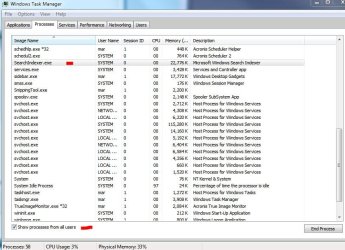
Try checking task manager to see if it's running. You'll have to click the Show Process from All Users button. If it is, end the process:
My Computer
At a glance
Win7U 64 RTMQ95508GB GskillASUS|EAH4850/HTDI/1GD3/A
- OS
- Win7U 64 RTM
- CPU
- Q9550
- Motherboard
- GA-EP45-UD3R
- Memory
- 8GB Gskill
- Graphics Card(s)
- ASUS|EAH4850/HTDI/1GD3/A
- Sound Card
- xfi Plat
- Monitor(s) Displays
- Dell 2405fpw
- Screen Resolution
- 1920x1200
- Hard Drives
- Seagate & WD sata Drives
- PSU
- Antec
- Case
- Antec
- Keyboard
- MS Natural Ergonomic 4000
- Mouse
- Logitech MX610 USB Cordless
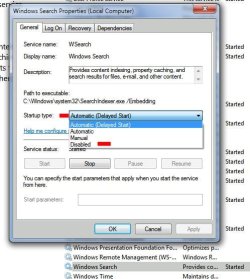
Double check Services. Is it still running? Double click on the Windows Search service, click on stop, set the startup type to disabled, as in screenshot, then check TM process to see if it's still running.
My Computer
At a glance
Win7U 64 RTMQ95508GB GskillASUS|EAH4850/HTDI/1GD3/A
- OS
- Win7U 64 RTM
- CPU
- Q9550
- Motherboard
- GA-EP45-UD3R
- Memory
- 8GB Gskill
- Graphics Card(s)
- ASUS|EAH4850/HTDI/1GD3/A
- Sound Card
- xfi Plat
- Monitor(s) Displays
- Dell 2405fpw
- Screen Resolution
- 1920x1200
- Hard Drives
- Seagate & WD sata Drives
- PSU
- Antec
- Case
- Antec
- Keyboard
- MS Natural Ergonomic 4000
- Mouse
- Logitech MX610 USB Cordless
After you've backed up windows.edb to another location and deleted the original, don't forget to restart the service, setting it back to Automatic.
My Computer
At a glance
Win7U 64 RTMQ95508GB GskillASUS|EAH4850/HTDI/1GD3/A
- OS
- Win7U 64 RTM
- CPU
- Q9550
- Motherboard
- GA-EP45-UD3R
- Memory
- 8GB Gskill
- Graphics Card(s)
- ASUS|EAH4850/HTDI/1GD3/A
- Sound Card
- xfi Plat
- Monitor(s) Displays
- Dell 2405fpw
- Screen Resolution
- 1920x1200
- Hard Drives
- Seagate & WD sata Drives
- PSU
- Antec
- Case
- Antec
- Keyboard
- MS Natural Ergonomic 4000
- Mouse
- Logitech MX610 USB Cordless
Deleted the edb file, restarted windows search and set it to automatic, restarted the computer...and same problem 
it was a valiant effort. It seems the only way to get it working would be to (maybe) create another user account. Any more ideas?
appreciate all the help.
it was a valiant effort. It seems the only way to get it working would be to (maybe) create another user account. Any more ideas?
appreciate all the help.
My Computer
At a glance
Windows 7 Ultimate x64
- OS
- Windows 7 Ultimate x64
The hotfix mentioned earlier (for which you can't find the download) doesn't seem to apply to your case, but it's worth a shot, and the link gives instructions on how to manually merge it to the registry. Regedit can be found in C:\Windows. Give it a shot. It can't hurt.
I'm running out to grab a bite. I'll check this thread when I get back. Also, don't forget to re-enable the Windows Search Service.
I'm running out to grab a bite. I'll check this thread when I get back. Also, don't forget to re-enable the Windows Search Service.
My Computer
At a glance
Win7U 64 RTMQ95508GB GskillASUS|EAH4850/HTDI/1GD3/A
- OS
- Win7U 64 RTM
- CPU
- Q9550
- Motherboard
- GA-EP45-UD3R
- Memory
- 8GB Gskill
- Graphics Card(s)
- ASUS|EAH4850/HTDI/1GD3/A
- Sound Card
- xfi Plat
- Monitor(s) Displays
- Dell 2405fpw
- Screen Resolution
- 1920x1200
- Hard Drives
- Seagate & WD sata Drives
- PSU
- Antec
- Case
- Antec
- Keyboard
- MS Natural Ergonomic 4000
- Mouse
- Logitech MX610 USB Cordless
Also, it's in the thread I linked to, but I should have told you to check indexing options again. Is it now reindexing? If it is, it could take a little time to produce results.
My Computer
At a glance
Win7U 64 RTMQ95508GB GskillASUS|EAH4850/HTDI/1GD3/A
- OS
- Win7U 64 RTM
- CPU
- Q9550
- Motherboard
- GA-EP45-UD3R
- Memory
- 8GB Gskill
- Graphics Card(s)
- ASUS|EAH4850/HTDI/1GD3/A
- Sound Card
- xfi Plat
- Monitor(s) Displays
- Dell 2405fpw
- Screen Resolution
- 1920x1200
- Hard Drives
- Seagate & WD sata Drives
- PSU
- Antec
- Case
- Antec
- Keyboard
- MS Natural Ergonomic 4000
- Mouse
- Logitech MX610 USB Cordless
Also, I think I asked before, but have you made any changes to the system prior to this issue? User folders, Libraries? Anything else?
My Computer
At a glance
Win7U 64 RTMQ95508GB GskillASUS|EAH4850/HTDI/1GD3/A
- OS
- Win7U 64 RTM
- CPU
- Q9550
- Motherboard
- GA-EP45-UD3R
- Memory
- 8GB Gskill
- Graphics Card(s)
- ASUS|EAH4850/HTDI/1GD3/A
- Sound Card
- xfi Plat
- Monitor(s) Displays
- Dell 2405fpw
- Screen Resolution
- 1920x1200
- Hard Drives
- Seagate & WD sata Drives
- PSU
- Antec
- Case
- Antec
- Keyboard
- MS Natural Ergonomic 4000
- Mouse
- Logitech MX610 USB Cordless
were you referring to this link about the registry Fix Windows 7 Start Menu Search Problem If so, the folder it tells me to delete in the registry is not there.
Indexing is running, and re-indexing. It just finished and still a completely blank search.
Nope, 0 changes to any of those. Just the installation of Malwarebytes and then SP1.
It's so mind boggling, especially since the search function runs perfect on the Guest account. I really don't want to create a new user account and copy everything over, since I'm not familiar with that, but if it's what gets my search working I may have to.
Any more ideas are welcome. Thanks again.
Indexing is running, and re-indexing. It just finished and still a completely blank search.
Nope, 0 changes to any of those. Just the installation of Malwarebytes and then SP1.
It's so mind boggling, especially since the search function runs perfect on the Guest account. I really don't want to create a new user account and copy everything over, since I'm not familiar with that, but if it's what gets my search working I may have to.
Any more ideas are welcome. Thanks again.
My Computer
At a glance
Windows 7 Ultimate x64
- OS
- Windows 7 Ultimate x64
I'd like to get to the bottom of this, since it's occurred for others and there seems to be no solution, but that may not be practical. Here is a link to a method for copying your user profile over to a new account. I recommend first imaging your system partition so that if anything goes awry, you can at least restore to a working system.
If you don't have imaging software, many here recommend the Free Macrium Reflect. You will need to save the image to a partition other than that which you are imaging.
Here's the link:
Windows 7 Start search menu displays empty result. - Microsoft Answers
You should propbably read through the entire thread. Please let us know how it goes.
If you don't have imaging software, many here recommend the Free Macrium Reflect. You will need to save the image to a partition other than that which you are imaging.
Here's the link:
Windows 7 Start search menu displays empty result. - Microsoft Answers
You should propbably read through the entire thread. Please let us know how it goes.
My Computer
At a glance
Win7U 64 RTMQ95508GB GskillASUS|EAH4850/HTDI/1GD3/A
- OS
- Win7U 64 RTM
- CPU
- Q9550
- Motherboard
- GA-EP45-UD3R
- Memory
- 8GB Gskill
- Graphics Card(s)
- ASUS|EAH4850/HTDI/1GD3/A
- Sound Card
- xfi Plat
- Monitor(s) Displays
- Dell 2405fpw
- Screen Resolution
- 1920x1200
- Hard Drives
- Seagate & WD sata Drives
- PSU
- Antec
- Case
- Antec
- Keyboard
- MS Natural Ergonomic 4000
- Mouse
- Logitech MX610 USB Cordless
yeah, it seems every possible solution has been tried, and the only 'fix' isn't really a fix, but a work-around.
I've never done the imaging thing before. I do have a partition with absolutely nothing on it that I can put it in, however how does this work? I run the program and it's pretty much step by step? I have 2 HDDs. My main HDD with windows and program files and then a storage HDD with data. I would just need to make an image of the main HDD, right? Sorry, this is all new to me.
I actually read that thread from Answers. I read like 20 before coming here. Search Programs and files shows no results after W7 service pack 1 - Microsoft Answers This thread starter has my problem exactly, especially where it's related to SP1.
I've never done the imaging thing before. I do have a partition with absolutely nothing on it that I can put it in, however how does this work? I run the program and it's pretty much step by step? I have 2 HDDs. My main HDD with windows and program files and then a storage HDD with data. I would just need to make an image of the main HDD, right? Sorry, this is all new to me.
I actually read that thread from Answers. I read like 20 before coming here. Search Programs and files shows no results after W7 service pack 1 - Microsoft Answers This thread starter has my problem exactly, especially where it's related to SP1.
My Computer
At a glance
Windows 7 Ultimate x64
- OS
- Windows 7 Ultimate x64
No need for sorry  . It's what this forum is about. Here's a link to a tutorial on how to create a disk image:
Macrium KB
And here's a list of their tutorials:
Macrium Reflect Disk Imaging and Backup - Tutorials
And this will also be useful (do create the boot disk):
Macrium KB
Hopefully, that thread will get you back to normal.
. It's what this forum is about. Here's a link to a tutorial on how to create a disk image:Macrium KB
And here's a list of their tutorials:
Macrium Reflect Disk Imaging and Backup - Tutorials
And this will also be useful (do create the boot disk):
Macrium KB
Hopefully, that thread will get you back to normal.
My Computer
At a glance
Win7U 64 RTMQ95508GB GskillASUS|EAH4850/HTDI/1GD3/A
- OS
- Win7U 64 RTM
- CPU
- Q9550
- Motherboard
- GA-EP45-UD3R
- Memory
- 8GB Gskill
- Graphics Card(s)
- ASUS|EAH4850/HTDI/1GD3/A
- Sound Card
- xfi Plat
- Monitor(s) Displays
- Dell 2405fpw
- Screen Resolution
- 1920x1200
- Hard Drives
- Seagate & WD sata Drives
- PSU
- Antec
- Case
- Antec
- Keyboard
- MS Natural Ergonomic 4000
- Mouse
- Logitech MX610 USB Cordless
Similar threads
- Replies
- 3
- Views
- 3K

- Replies
- 2
- Views
- 6K
