SeaTools for DOS and Windows - How to Use

How to Use SeaTools for DOS and Windows Disk Check Utility

Contents:
Part One: SeaTools for Windows
Part Two: SeaTools for DOS
*Caution for AHCI Storage Controller

   Information
Seatools is a powerful tool to analyze the Hard Drives. It can perform a lot of tests like Drive Self-test, Read-Write teat, SMART (Self-Monitoring, Analysis and Reporting Technology) extraction and performs some advanced actions like bad sector repair.

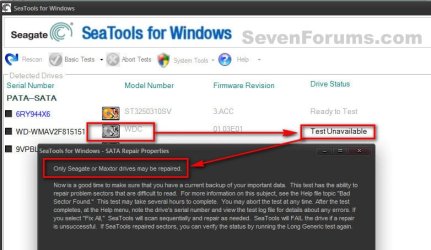
Though Seatools can test all the brands of HDD, it performs the repair action for the Seagate brand HDD only.

   Warning
It is always better that you back up your data.


OPTION ONE

Seatools for Windows

1. Get it from SeaTools | Seagate

2. Click on I accept and then download. Install the program and run it within windows. It will take a time to scan the drivers, and then the program window will appear. Click on I accept. Now you are on the Seatools For Windows GUI.

3.(a) For Non Seatools Brand HDDs, you can perform Short Drive Self Test, Short Generic Test and Long Generic Test.

3.(b) For Seatools brand Hdds, you can perform all the tests.

Attempted a Basic Test > Fix All > Fast on a non SeaGate HDD, and here is the result.1.jpgSo Repair works on SeaGate only, but you can test any brand of HDD.

   Warning
You are suggested to not take the Advanced tests.


OPTION TWO

Seatools for DOS, Recommended

   Information
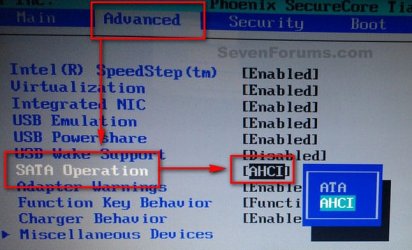
If you are using AHCI storage controller, Seatools for DOS will not be able to detect a AHCI disc. So Boot into the BIOS, set the storage controller mode to IDE/SATA before running the test.

All the BIOSs are not the same, but usually this option is found in "Advanced" BIOS settings.2.jpgWhen the test is done, Boot into the BIOS again and set the controller mode back to AHCI, otherwise windows will refuse to boot.
1. Get it from SeaTools | Seagate

2. Accept and download. It will come as a disc image file. Actually it is bundled with FreeDOS Operating System. It works as bootable, so it is to burn the downloaded ISO to either a blank CD or a USB pen drive.

PART - I: Writing the Image

1. For writing it to a CD/DVD, follow this tutorial: http://www.sevenforums.com/tutorials/548-burn-disc-image-iso-img-file.html

2. For writing it to an USB pen drive, the easy way is to use Win32 Disk Imager | Free Development software downloads at SourceForge.net

   Note
The downloaded ISO will not be written to the USB Pen Drive as it is. You need to alter the .iso file a bit to make it writable. Very little job is involved.

  • Download or install either 7-Zip (free) or WinRAR (not free).
  • Extract the downloaded .iso file.
  • Rename the SeaTools.ima to SeaTools.img.
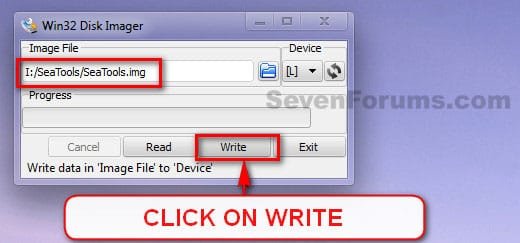
  • Burn the SeaTools.img file using Win32 Disk Imager


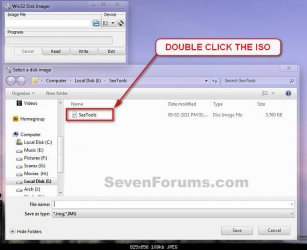
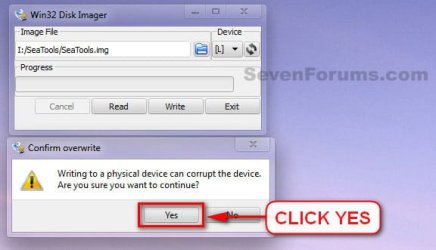
3. Download and double click to execute it. Select teh USB device, and browse for the renamed .img image.3.jpg4. Double click on the image, when found.4.jpg5. Click on Write.5.jpg6. A Confirm Overwrite message will appear. Click yes.6.jpg7. See the progress bar for a few seconds and the image is written and ready to boot from.
PART - II: Booting from Seatools for DOS

1. Now it is to boot from the CD/DVD or USB. You may do it using two alternative ways.

  • Enter into the BISO and change the BOOT order to CD (or USB) to first.
  • Use the BIOS Boot Menu Key to get the list of all possible devices to boot from. Select the CD (or USB) by using the scroll arrow keys and enter.
2. When on the GUI, at first a warning message will appear. Accept it by clicking on "I Accept".7.JPGPart - 3: Testing

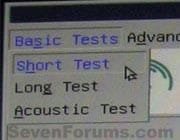
There are three types of tests.

  • Short Test;
  • Long Test; and
  • Acoustic Test.
8.jpgFor most of the cases, Short tests are enough. But if Short tests detect problems, Long tests are suggested.

   Information
Long test has a mechanism to recover/repair some disc errors like BAD sectors. But the recovery/repair options work only for Seagate brand HDDs.


PART - IV: Results

Test results are of two types, in general.

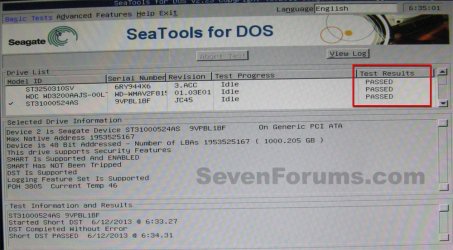
  1. Passed; and
  2. Failed with errors; which may yield two possible alternative ultimate outcomes.
    • Passed after repair
    • Failed after repair
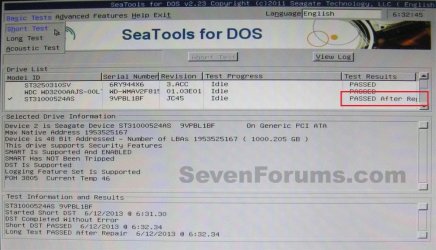
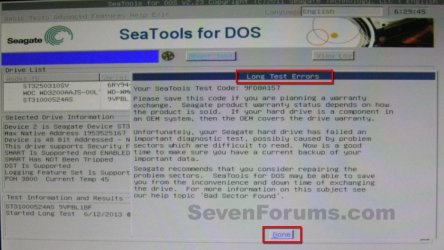
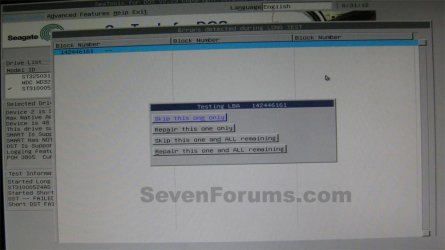
1. If passed, its all good.Passed.JPG2. If the test result a failure, with bad sectors etc, it will suggest you to have a warranty replacement, with a supplied test code.Failure.JPGClick on "Done". It will supply you some options to repair the failures.11.JPGYou need to opt for "Repair this one and all remaining".
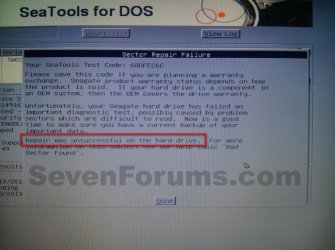
2.(a) If repairs are successful, it will show a result as passed after repair. It is good, too.14.JPG2.(b) But if the repair is unsuccessful, then there is no way but try to back up your data and replace the disc.15.jpgThat’s all.
 
Last edited:
Isn't that the same as running chkdsk at startup? If so, I've tried that already, didn't seem to fix the bad sectors.

EDIT- I suppose it's possible that they were fixed but other ones appeared shortly after?
 
Last edited:

My Computer My Computer

At a glance

Windows 7 Ultimate x64
Computer type
PC/Desktop
OS
Windows 7 Ultimate x64
How old is the HDD?

If it's old, it may be time to replace it to be safe.
 

My Computer My Computer

At a glance

64-bit Windows 11 Pro for WorkstationsIntel i7-8700K OC'd to 5 GHz64 GB (4x16GB) G.SKILL TridentZ RGB DDR4 3600...ASUS ROG-STRIX-GTX1080TI-O11G-GAMING
Computer type
PC/Desktop
Computer Manufacturer/Model Number
Self built custom
OS
64-bit Windows 11 Pro for Workstations
CPU
Intel i7-8700K OC'd to 5 GHz
Motherboard
ASUS ROG Maximus XI Formula Z390
Memory
64 GB (4x16GB) G.SKILL TridentZ RGB DDR4 3600 MHz
Graphics Card(s)
ASUS ROG-STRIX-GTX1080TI-O11G-GAMING
Sound Card
Integrated
Monitor(s) Displays
2 x Samsung Odyssey G7 27"
Screen Resolution
2560x1440
Hard Drives
1TB Samsung 990 PRO M.2,
4TB Samsung 990 PRO PRO M.2,
TerraMaster F8 SSD Plus NAS
PSU
Seasonic Prime Titanium 850W
Case
Thermaltake Core P3
Cooling
Corsair Hydro H115i
Keyboard
Logitech wireless K800
Mouse
Logitech MX Master 4
Internet Speed
2 Gb/s Download and 100 Mb/s Upload
Antivirus
Malwarebyte Anti-Malware Premium
Browser
Google Chrome
Other Info
Logitech Z625 speaker system,
Logitech BRIO 4K Pro webcam,
HP Color LaserJet Pro MFP M477fdn,
APC SMART-UPS RT 1000 XL - SURT1000XLI,
Galaxy S23 Plus phone
Yes I was thinking the same. TBH I'm not exactly sure how old. I thought I had had it about 3 years but when I looked through my accts paperwork the only entry that could have been the hard disk was over 5 years ago. Seagate Warranty checker seemed to think it had expired but didn't say when. It's a 1.5Tb Sata. I think when I take it out there may be a date marked on it. Also some files that I left as a backup on my previous disk, which became my secondary drive, had a date of April 2010, so it's well possible that it could have been around then so that would be over 5.5 years.

What is the normal lifespan of a HDD? I have gone through quite a few in my time but then I guess they do get a fair bit of use.

Also the (unreliable?) result of that Eassos scan was 24 bad sectors out of 182401 with the vast majority of sectors being in Excellent condition. So it seems a shame to throw it away for just a tiny bit of damage if there is another option.
Did the "electrical failure" message I mentioned earlier mean anything to you? Doesn't sound too good but then in my limited experience SMART messages can be misleading.
 

My Computer My Computer

At a glance

Windows 7 Ultimate x64
Computer type
PC/Desktop
OS
Windows 7 Ultimate x64
The life of a HDD varies to much. They have an average read/write life listed in their specs, but everyone's wear and tear is different, so it can vary. Here's a nice article to help.

How Long Will My Hard Drives Really Last?

I wouldn't throw it away just yet. Once you replace it, format it and see if you may be able to run SeaTools on it afterwards to check the health.

Sometimes a good format is all it needs.

If it checks out ok, it'll make a good data or backup drive.
 

My Computer My Computer

At a glance

64-bit Windows 11 Pro for WorkstationsIntel i7-8700K OC'd to 5 GHz64 GB (4x16GB) G.SKILL TridentZ RGB DDR4 3600...ASUS ROG-STRIX-GTX1080TI-O11G-GAMING
Computer type
PC/Desktop
Computer Manufacturer/Model Number
Self built custom
OS
64-bit Windows 11 Pro for Workstations
CPU
Intel i7-8700K OC'd to 5 GHz
Motherboard
ASUS ROG Maximus XI Formula Z390
Memory
64 GB (4x16GB) G.SKILL TridentZ RGB DDR4 3600 MHz
Graphics Card(s)
ASUS ROG-STRIX-GTX1080TI-O11G-GAMING
Sound Card
Integrated
Monitor(s) Displays
2 x Samsung Odyssey G7 27"
Screen Resolution
2560x1440
Hard Drives
1TB Samsung 990 PRO M.2,
4TB Samsung 990 PRO PRO M.2,
TerraMaster F8 SSD Plus NAS
PSU
Seasonic Prime Titanium 850W
Case
Thermaltake Core P3
Cooling
Corsair Hydro H115i
Keyboard
Logitech wireless K800
Mouse
Logitech MX Master 4
Internet Speed
2 Gb/s Download and 100 Mb/s Upload
Antivirus
Malwarebyte Anti-Malware Premium
Browser
Google Chrome
Other Info
Logitech Z625 speaker system,
Logitech BRIO 4K Pro webcam,
HP Color LaserJet Pro MFP M477fdn,
APC SMART-UPS RT 1000 XL - SURT1000XLI,
Galaxy S23 Plus phone
That's a good idea, I'll get a new replacement one first, then transfer everything over, then format it and use it as a backup. Oh wait a minute, trying to backup was what got me here in the first place. My backups were failing due to bad sectors.

Oh the joys of computing. I'm fairly PC-literate and yet I just seem to get problem after problem.

Anyway that's my next steps - 1 Buy new HDD, 2 Run chkdsk at start up again on old drive just to see if it will fix the bad sectors, 3 Try backup again and swap disk for new one, 4 Format old disk.

Thanks for all your help.
 

My Computer My Computer

At a glance

Windows 7 Ultimate x64
Computer type
PC/Desktop
OS
Windows 7 Ultimate x64
You're welcome. Please let us know how it went.
 

My Computer My Computer

At a glance

64-bit Windows 11 Pro for WorkstationsIntel i7-8700K OC'd to 5 GHz64 GB (4x16GB) G.SKILL TridentZ RGB DDR4 3600...ASUS ROG-STRIX-GTX1080TI-O11G-GAMING
Computer type
PC/Desktop
Computer Manufacturer/Model Number
Self built custom
OS
64-bit Windows 11 Pro for Workstations
CPU
Intel i7-8700K OC'd to 5 GHz
Motherboard
ASUS ROG Maximus XI Formula Z390
Memory
64 GB (4x16GB) G.SKILL TridentZ RGB DDR4 3600 MHz
Graphics Card(s)
ASUS ROG-STRIX-GTX1080TI-O11G-GAMING
Sound Card
Integrated
Monitor(s) Displays
2 x Samsung Odyssey G7 27"
Screen Resolution
2560x1440
Hard Drives
1TB Samsung 990 PRO M.2,
4TB Samsung 990 PRO PRO M.2,
TerraMaster F8 SSD Plus NAS
PSU
Seasonic Prime Titanium 850W
Case
Thermaltake Core P3
Cooling
Corsair Hydro H115i
Keyboard
Logitech wireless K800
Mouse
Logitech MX Master 4
Internet Speed
2 Gb/s Download and 100 Mb/s Upload
Antivirus
Malwarebyte Anti-Malware Premium
Browser
Google Chrome
Other Info
Logitech Z625 speaker system,
Logitech BRIO 4K Pro webcam,
HP Color LaserJet Pro MFP M477fdn,
APC SMART-UPS RT 1000 XL - SURT1000XLI,
Galaxy S23 Plus phone
I will.

I still wonder why Seatools won't work on my drive though?
 

My Computer My Computer

At a glance

Windows 7 Ultimate x64
Computer type
PC/Desktop
OS
Windows 7 Ultimate x64
Nope, useless. The program runs but....

"No hard drives found!"

"No disk controller detected!"

One wasted blank cd.
Did you change the controller to IDE as explained in the tutorial?
 

My Computer My Computer

At a glance

Windows 10 Pro x64 ; Xubuntu x64Intel i7 860 @ 2.80 GHz O/C'ed to 4.0GHz16GB Corsair Vengance DDR3 @ 661 MHz Dual Cha...EVGA NVidia GTX 560 1024MB
Computer type
PC/Desktop
Computer Manufacturer/Model Number
Golden Mk. I.4
OS
Windows 10 Pro x64 ; Xubuntu x64
CPU
Intel i7 860 @ 2.80 GHz O/C'ed to 4.0GHz
Motherboard
Gigabyte P55A-UD3R Rev.1. Award BIOS F13
Memory
16GB Corsair Vengance DDR3 @ 661 MHz Dual Channel (9-9-9-24)
Graphics Card(s)
EVGA NVidia GTX 560 1024MB
Sound Card
Realtek Integrated
Monitor(s) Displays
Dual Samsung SyncMaster 2494HS
Screen Resolution
1920*1080 and 1920*1080
Hard Drives
1*Samsung 840 EVO 120GB SSD;
1*OCZ Vertex 2 60GB SSD;
2*Samsung F3 SpinPoint 1TB in RAID0;
1*Samsung F1 SpinPoint 1TB;
2*Western Digital 1TB External USB 3.0
1*Western Digital 500GB External USB 3.0
1*Seagate 500GB External USB 2.0
PSU
Thermaltake ToughPower QFan 750W
Case
Thermaltake Element S VK60001W2Z
Cooling
Corsair H60 Water Cooling, 2*230mm and 2*80mm case fans
Keyboard
Logitech G110
Mouse
Logitech MX518
I had an issue with a new Seagate HD a while ago.
Running tests I got an error that i couldn't figure out.
I contacted Seagate support (via email), they explained the problem and solution.
I was happy they quickly responded (within 1 business day) to me with an explanation/solution.
My error was different than yours.

Being the skeptical type, i confirmed their answer by attaching the HD to a different Windows PC and running the tests.

I suggest asking Seagate support, but the HD i had was new, within warranty, and could be returned.
I don't know if they would support an older out of warranty HD as they did for me.
 

My Computer My Computer

At a glance

Multi-Boot W7_Pro_x64 W8.1_Pro_x64 W10_Pro_x6...AMD Athlon II x4 6206GB GSkill DDR2 800AMD 4670 GPU + AMD 4200 IGP
Computer type
PC/Desktop
Computer Manufacturer/Model Number
home built
OS
Multi-Boot W7_Pro_x64 W8.1_Pro_x64 W10_Pro_x64 +Linux_VMs +Chromium_VM
CPU
AMD Athlon II x4 620
Motherboard
Gigabyte GA-MA785G-UD3H
Memory
6GB GSkill DDR2 800
Graphics Card(s)
AMD 4670 GPU + AMD 4200 IGP
Sound Card
on board Realtek ALC889A
Monitor(s) Displays
RCA 40" LCD TV, Insignia 32" LCD TV, HP 15" LCD monitor
Screen Resolution
1680 x 1050
Hard Drives
OCZ Vertex 3 120GB,
Samsung F3 1TB (3),
Several others - WD, Seagate, Hitachi, ...
PSU
Corsair 500 W
Case
Rosewill mid tower
Cooling
CM 90mm rifle
Keyboard
Gyration wireless, Logitech wireless, Dell USB wired
Mouse
Gyration wireless, Logitech wireless, V7 USB wired
Internet Speed
Spectrum - 100Mbps D / 10Mbps U
Antivirus
Avast, MBAM3, EMET, WinPatrol
Browser
Pale Moon, Firefox, IE
Other Info
2 multi-boot PC's
Mainly HTPC/Office/Gen purpose (no gaming).
Trendnet USB KVM.
LG DVD burner/Blue Ray Player.
Tray system for removable SATA backup drives.

Not currently OCd, under-volted.
I use Hybrid sleep, rarely re-boot or shutdown.

Hauppauge HD-PVR, Avermedia PCIe TV Tuner, Hauppauge PCI TV Tuner.
Did you change the controller to IDE as explained in the tutorial?

Oooops!!!, I completely missed that bit and now I feel REALLY stupid.
Even after you said, I had to read it a few times as I thought it didn't apply to me. I thought, no my PC is definitely AHCI, and no my HDD is definitely not IDE as it is SATA.

After changing it I tried again and sure enough it worked this time.

I ran the Short Test and it Passed.
I ran the Long Test and it found 3 bad blocks or sectors (I forget the actual word) so Failed but then offered to repair them after which it then said Passed. So that's brilliant. Objective achieved.

The only minor thing though was that it did mention something about an electrical failure again.
It said it created a log on the C drive but now I have rebooted back to Windows I cant seem to find it.
 

My Computer My Computer

At a glance

Windows 7 Ultimate x64
Computer type
PC/Desktop
OS
Windows 7 Ultimate x64
Did you change the controller to IDE as explained in the tutorial?

Oooops!!!, I completely missed that bit and now I feel REALLY stupid.
Even after you said, I had to read it a few times as I thought it didn't apply to me. I thought, no my PC is definitely AHCI, and no my HDD is definitely not IDE as it is SATA.

After changing it I tried again and sure enough it worked this time.

I ran the Short Test and it Passed.
I ran the Long Test and it found 3 bad blocks or sectors (I forget the actual word) so Failed but then offered to repair them after which it then said Passed. So that's brilliant. Objective achieved.

The only minor thing though was that it did mention something about an electrical failure again.
It said it created a log on the C drive but now I have rebooted back to Windows I cant seem to find it.


Great news. :party:

Thank you for pointing that out Colin. I just assumed that he did.
 

My Computer My Computer

At a glance

64-bit Windows 11 Pro for WorkstationsIntel i7-8700K OC'd to 5 GHz64 GB (4x16GB) G.SKILL TridentZ RGB DDR4 3600...ASUS ROG-STRIX-GTX1080TI-O11G-GAMING
Computer type
PC/Desktop
Computer Manufacturer/Model Number
Self built custom
OS
64-bit Windows 11 Pro for Workstations
CPU
Intel i7-8700K OC'd to 5 GHz
Motherboard
ASUS ROG Maximus XI Formula Z390
Memory
64 GB (4x16GB) G.SKILL TridentZ RGB DDR4 3600 MHz
Graphics Card(s)
ASUS ROG-STRIX-GTX1080TI-O11G-GAMING
Sound Card
Integrated
Monitor(s) Displays
2 x Samsung Odyssey G7 27"
Screen Resolution
2560x1440
Hard Drives
1TB Samsung 990 PRO M.2,
4TB Samsung 990 PRO PRO M.2,
TerraMaster F8 SSD Plus NAS
PSU
Seasonic Prime Titanium 850W
Case
Thermaltake Core P3
Cooling
Corsair Hydro H115i
Keyboard
Logitech wireless K800
Mouse
Logitech MX Master 4
Internet Speed
2 Gb/s Download and 100 Mb/s Upload
Antivirus
Malwarebyte Anti-Malware Premium
Browser
Google Chrome
Other Info
Logitech Z625 speaker system,
Logitech BRIO 4K Pro webcam,
HP Color LaserJet Pro MFP M477fdn,
APC SMART-UPS RT 1000 XL - SURT1000XLI,
Galaxy S23 Plus phone
If you ran it from a bootable medium, then the log file is only stored in memory temporarily until you reboot.
 

My Computer My Computer

At a glance

Windows 10 Pro x64 ; Xubuntu x64Intel i7 860 @ 2.80 GHz O/C'ed to 4.0GHz16GB Corsair Vengance DDR3 @ 661 MHz Dual Cha...EVGA NVidia GTX 560 1024MB
Computer type
PC/Desktop
Computer Manufacturer/Model Number
Golden Mk. I.4
OS
Windows 10 Pro x64 ; Xubuntu x64
CPU
Intel i7 860 @ 2.80 GHz O/C'ed to 4.0GHz
Motherboard
Gigabyte P55A-UD3R Rev.1. Award BIOS F13
Memory
16GB Corsair Vengance DDR3 @ 661 MHz Dual Channel (9-9-9-24)
Graphics Card(s)
EVGA NVidia GTX 560 1024MB
Sound Card
Realtek Integrated
Monitor(s) Displays
Dual Samsung SyncMaster 2494HS
Screen Resolution
1920*1080 and 1920*1080
Hard Drives
1*Samsung 840 EVO 120GB SSD;
1*OCZ Vertex 2 60GB SSD;
2*Samsung F3 SpinPoint 1TB in RAID0;
1*Samsung F1 SpinPoint 1TB;
2*Western Digital 1TB External USB 3.0
1*Western Digital 500GB External USB 3.0
1*Seagate 500GB External USB 2.0
PSU
Thermaltake ToughPower QFan 750W
Case
Thermaltake Element S VK60001W2Z
Cooling
Corsair H60 Water Cooling, 2*230mm and 2*80mm case fans
Keyboard
Logitech G110
Mouse
Logitech MX518
OK, thanks, well I think I got the gist of it anyhow. I just worry about the "electrical failure" line. I might see if I can get any response from Seagate.
 

My Computer My Computer

At a glance

Windows 7 Ultimate x64
Computer type
PC/Desktop
OS
Windows 7 Ultimate x64
free dos only i in boot scren
 

My Computer My Computer

At a glance

Windows 10 x64pentium dual core4gbintel
Computer type
Laptop
Computer Manufacturer/Model Number
dell
OS
Windows 10 x64
CPU
pentium dual core
Motherboard
dell
Memory
4gb
Graphics Card(s)
intel
Hard Drives
320gb
Antivirus
windows defender
Browser
chrome
I just used SeaTools for DOS & got to step 2 with an indicated problem. I hit done, but I did not get the 3rd screen shot of the option to repair failures. Instead, it initiated a SHORT DST scan & has been going for the past 3 hours. The progress bar appears to remain at the 10% value while the execution wheel continues to spin. Is it still preparing for repair options or is it stuck in a hopeless loop? How can I check?

PART - IV: Results

Test results are of two types, in general.
Passed; and
Failed with errors; which may yield two possible alternative ultimate outcomes.
Passed after repair
Failed after repair
1. If passed, its all good.
-passed.jpg
2. If the test result a failure, with bad sectors etc, it will suggest you to have a warranty replacement, with a supplied test code.
-failure.jpg
Click on "Done". It will supply you some options to repair the failures.
-11.jpg
You need to opt for "Repair this one and all remaining".
 

My Computer My Computer

At a glance

Windows 7 Home Prem 32 bit
Computer type
PC/Desktop
OS
Windows 7 Home Prem 32 bit
I just used SeaTools for DOS & got to step 2 with an indicated problem. I hit done, but I did not get the 3rd screen shot of the option to repair failures. Instead, it initiated a SHORT DST scan & has been going for the past 3 hours. The progress bar appears to remain at the 10% value while the execution wheel continues to spin. Is it still preparing for repair options or is it stuck in a hopeless loop? How can I check?

PART - IV: Results

Test results are of two types, in general.
Passed; and
Failed with errors; which may yield two possible alternative ultimate outcomes.
Passed after repair
Failed after repair
1. If passed, its all good.
-passed.jpg
2. If the test result a failure, with bad sectors etc, it will suggest you to have a warranty replacement, with a supplied test code.
-failure.jpg
Click on "Done". It will supply you some options to repair the failures.
-11.jpg
You need to opt for "Repair this one and all remaining".
NEVER MIND the REPAIR options just popped up. If I have further ??'s I will post later.
 

My Computer My Computer

At a glance

Windows 7 Home Prem 32 bit
Computer type
PC/Desktop
OS
Windows 7 Home Prem 32 bit
Out of curiosity would a drive designated for data with bad sectors affect the OS booting? I can understand not retrieving data, but not necessarily affecting the boot procedure.
 

My Computer My Computer

At a glance

Windows 7 Home Prem 32 bit
Computer type
PC/Desktop
OS
Windows 7 Home Prem 32 bit
I've had a dead data drive prevent Windows from booting until disconnected before.
 

My Computer My Computer

At a glance

64-bit Windows 11 Pro for WorkstationsIntel i7-8700K OC'd to 5 GHz64 GB (4x16GB) G.SKILL TridentZ RGB DDR4 3600...ASUS ROG-STRIX-GTX1080TI-O11G-GAMING
Computer type
PC/Desktop
Computer Manufacturer/Model Number
Self built custom
OS
64-bit Windows 11 Pro for Workstations
CPU
Intel i7-8700K OC'd to 5 GHz
Motherboard
ASUS ROG Maximus XI Formula Z390
Memory
64 GB (4x16GB) G.SKILL TridentZ RGB DDR4 3600 MHz
Graphics Card(s)
ASUS ROG-STRIX-GTX1080TI-O11G-GAMING
Sound Card
Integrated
Monitor(s) Displays
2 x Samsung Odyssey G7 27"
Screen Resolution
2560x1440
Hard Drives
1TB Samsung 990 PRO M.2,
4TB Samsung 990 PRO PRO M.2,
TerraMaster F8 SSD Plus NAS
PSU
Seasonic Prime Titanium 850W
Case
Thermaltake Core P3
Cooling
Corsair Hydro H115i
Keyboard
Logitech wireless K800
Mouse
Logitech MX Master 4
Internet Speed
2 Gb/s Download and 100 Mb/s Upload
Antivirus
Malwarebyte Anti-Malware Premium
Browser
Google Chrome
Other Info
Logitech Z625 speaker system,
Logitech BRIO 4K Pro webcam,
HP Color LaserJet Pro MFP M477fdn,
APC SMART-UPS RT 1000 XL - SURT1000XLI,
Galaxy S23 Plus phone
Well, SeaTool indicated that it successfully repaired my drive, but my bootup is still sluggish with the data drive connected. It is perfect with the drive disconnected. I think I might have a driver or some BIOS setting incorrect. What is the best way to diagnose?

Another 2 observations: if a copy a file from that drive to another SATA drive the transfer rate is less than 1 Mb/sec;
WINDOWS shutdown is sluggish as well, So something is AWRY.

FURTHER:
I used the DISKPART to mount a .vhd file on that drive it failed & the drive was no longer accessible through WINDOWS EXPLORER. IF this file is corrupt can I simply delete it or is something amiss with the file system?
 
Last edited:

My Computer My Computer

At a glance

Windows 7 Home Prem 32 bit
Computer type
PC/Desktop
OS
Windows 7 Home Prem 32 bit
Well, SeaTool indicated that it successfully repaired my drive, but my bootup is still sluggish with the data drive connected. It is perfect with the drive disconnected. I think I might have a driver or some BIOS setting incorrect. What is the best way to diagnose?

Another 2 observations: if a copy a file from that drive to another SATA drive the transfer rate is less than 1 Mb/sec;
WINDOWS shutdown is sluggish as well, So something is AWRY.

FURTHER:
I used the DISKPART to mount a .vhd file on that drive it failed & the drive was no longer accessible through WINDOWS EXPLORER. IF this file is corrupt can I simply delete it or is something amiss with the file system?
It would appear I have a NORMAL boot sequence now. I am not sure of the cause, but I suspect the .vhd. I suppose if I want to reuse the drive I had best wipe & repartition? Should I use SeaTools or Partition Wizard?
Any opinions on that?
 

My Computer My Computer

At a glance

Windows 7 Home Prem 32 bit
Computer type
PC/Desktop
OS
Windows 7 Home Prem 32 bit
Back
Top