SeaTools for DOS and Windows - How to Use

How to Use SeaTools for DOS and Windows Disk Check Utility

Contents:
Part One: SeaTools for Windows
Part Two: SeaTools for DOS
*Caution for AHCI Storage Controller

   Information
Seatools is a powerful tool to analyze the Hard Drives. It can perform a lot of tests like Drive Self-test, Read-Write teat, SMART (Self-Monitoring, Analysis and Reporting Technology) extraction and performs some advanced actions like bad sector repair.

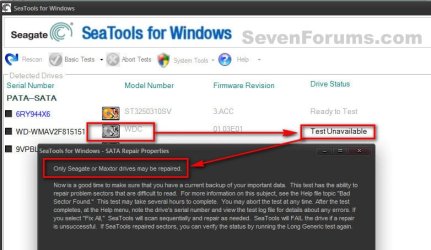
Though Seatools can test all the brands of HDD, it performs the repair action for the Seagate brand HDD only.

   Warning
It is always better that you back up your data.


OPTION ONE

Seatools for Windows

1. Get it from SeaTools | Seagate

2. Click on I accept and then download. Install the program and run it within windows. It will take a time to scan the drivers, and then the program window will appear. Click on I accept. Now you are on the Seatools For Windows GUI.

3.(a) For Non Seatools Brand HDDs, you can perform Short Drive Self Test, Short Generic Test and Long Generic Test.

3.(b) For Seatools brand Hdds, you can perform all the tests.

Attempted a Basic Test > Fix All > Fast on a non SeaGate HDD, and here is the result.1.jpgSo Repair works on SeaGate only, but you can test any brand of HDD.

   Warning
You are suggested to not take the Advanced tests.


OPTION TWO

Seatools for DOS, Recommended

   Information
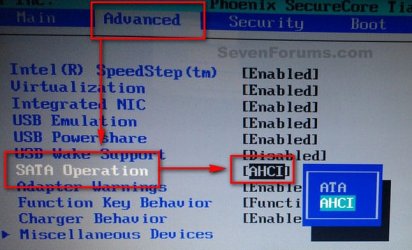
If you are using AHCI storage controller, Seatools for DOS will not be able to detect a AHCI disc. So Boot into the BIOS, set the storage controller mode to IDE/SATA before running the test.

All the BIOSs are not the same, but usually this option is found in "Advanced" BIOS settings.2.jpgWhen the test is done, Boot into the BIOS again and set the controller mode back to AHCI, otherwise windows will refuse to boot.
1. Get it from SeaTools | Seagate

2. Accept and download. It will come as a disc image file. Actually it is bundled with FreeDOS Operating System. It works as bootable, so it is to burn the downloaded ISO to either a blank CD or a USB pen drive.

PART - I: Writing the Image

1. For writing it to a CD/DVD, follow this tutorial: http://www.sevenforums.com/tutorials/548-burn-disc-image-iso-img-file.html

2. For writing it to an USB pen drive, the easy way is to use Win32 Disk Imager | Free Development software downloads at SourceForge.net

   Note
The downloaded ISO will not be written to the USB Pen Drive as it is. You need to alter the .iso file a bit to make it writable. Very little job is involved.

  • Download or install either 7-Zip (free) or WinRAR (not free).
  • Extract the downloaded .iso file.
  • Rename the SeaTools.ima to SeaTools.img.
  • Burn the SeaTools.img file using Win32 Disk Imager


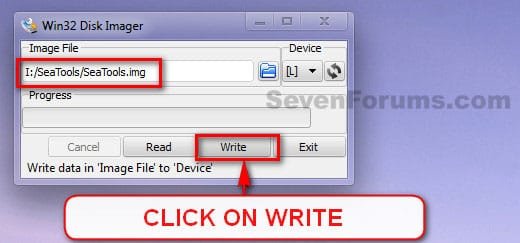
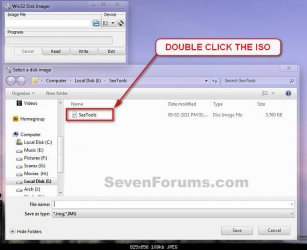
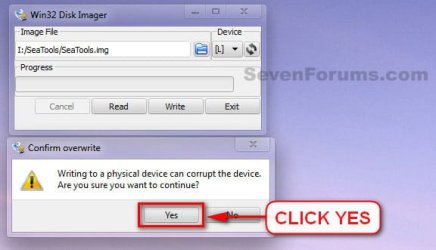
3. Download and double click to execute it. Select teh USB device, and browse for the renamed .img image.3.jpg4. Double click on the image, when found.4.jpg5. Click on Write.5.jpg6. A Confirm Overwrite message will appear. Click yes.6.jpg7. See the progress bar for a few seconds and the image is written and ready to boot from.
PART - II: Booting from Seatools for DOS

1. Now it is to boot from the CD/DVD or USB. You may do it using two alternative ways.

  • Enter into the BISO and change the BOOT order to CD (or USB) to first.
  • Use the BIOS Boot Menu Key to get the list of all possible devices to boot from. Select the CD (or USB) by using the scroll arrow keys and enter.
2. When on the GUI, at first a warning message will appear. Accept it by clicking on "I Accept".7.JPGPart - 3: Testing

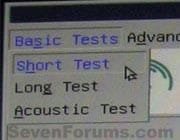
There are three types of tests.

  • Short Test;
  • Long Test; and
  • Acoustic Test.
8.jpgFor most of the cases, Short tests are enough. But if Short tests detect problems, Long tests are suggested.

   Information
Long test has a mechanism to recover/repair some disc errors like BAD sectors. But the recovery/repair options work only for Seagate brand HDDs.


PART - IV: Results

Test results are of two types, in general.

  1. Passed; and
  2. Failed with errors; which may yield two possible alternative ultimate outcomes.
    • Passed after repair
    • Failed after repair
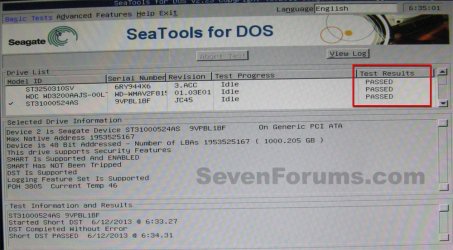
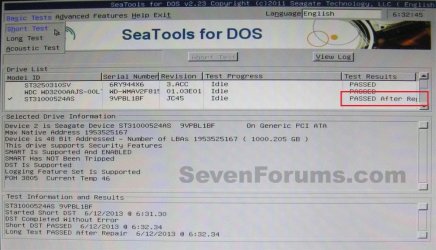
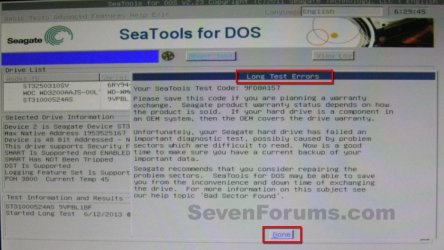
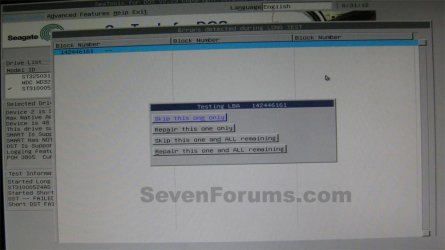
1. If passed, its all good.Passed.JPG2. If the test result a failure, with bad sectors etc, it will suggest you to have a warranty replacement, with a supplied test code.Failure.JPGClick on "Done". It will supply you some options to repair the failures.11.JPGYou need to opt for "Repair this one and all remaining".
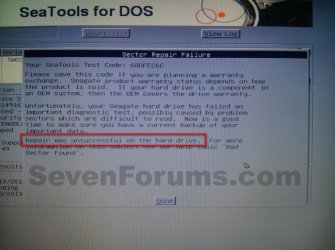
2.(a) If repairs are successful, it will show a result as passed after repair. It is good, too.14.JPG2.(b) But if the repair is unsuccessful, then there is no way but try to back up your data and replace the disc.15.jpgThat’s all.
 
Last edited:
I successful repair will give you enough time to copy the data and replace the disk. :) I would suggest you that if that disk is containing any data that is valuable to you then back it up. It may fail again.

If you plan to wipe the disk entirely and redo the partitions etc, then Partition Wizard will be your tool to do it.
 

My Computer My Computer

At a glance

Microsoft Windows 10 Pro Insider Preview 64-bitIntel(R) Core(TM) i3-4130 CPU @ 3.40GHzCorsair Vengence 4GB x2 (8.00GB Dual-Channel ...2047MB GeForce GTS 450 (ZOTAC International)
Computer type
PC/Desktop
Computer Manufacturer/Model Number
Self Assembled
OS
Microsoft Windows 10 Pro Insider Preview 64-bit
CPU
Intel(R) Core(TM) i3-4130 CPU @ 3.40GHz
Motherboard
Gigabyte Technology Co., Ltd. B85M-D3H
Memory
Corsair Vengence 4GB x2 (8.00GB Dual-Channel DDR3 @ 798MHz)
Graphics Card(s)
2047MB GeForce GTS 450 (ZOTAC International)
Sound Card
Onboard (Realtek High Definition Audio)
Monitor(s) Displays
LG Flatron E2040T
Screen Resolution
1600x900
Hard Drives
Western Digital 1 TB
Seagate 500 GB
PSU
Corsair VS550
Case
Cooler Master K380
Cooling
Cooler Master Seidon 120V Plus
Keyboard
Logitech MK260r
Mouse
Logitech MK260r
Internet Speed
PMPL Broadband
Antivirus
Windows Defender + MBAM
Browser
Firefox
Other Info
Dell Studio 15" Laptop
Hello, not sure if this forum still active but here is my exp so far.

I have to use sea tools dos and was able to start a long scan thx to all the pervious info from this forum.
Currently is scanning a 1TB drive which has lot of bad LBAs, I noticed the long test will only fix 99 errors at a time.
Once is repaired it will replied with passed after fix. But I'll have to start the long test again and it will pick up a new sets of 99 bad LBAs to fix. This cont. on for a while.... which is very time consuming coz you have to start from scratch after it fixed 99 bad sectors. Have anyone seen this behaviour? I was hoping for the "fix all long test" but I dont see it avil on the dos 2..23 version.
 

My Computer My Computer

At a glance

win 8.1
Computer type
PC/Desktop
OS
win 8.1
If it was my computer I would save all my needed or wanted data to a external drive and replace the problem drive in question.
If you keep testing the problem drive you might not be able to retrieve the data.
 

My Computer My Computer

At a glance

Windows 10 Pro. 64/ version 1709 Windows 7 Pr...Intel i7-6800K @ 4.3Corsair Platinum 16 gig @2400EVGA GTX 1070 OC
Computer type
PC/Desktop
Computer Manufacturer/Model Number
Home made Desktop
OS
Windows 10 Pro. 64/ version 1709 Windows 7 Pro/64
CPU
Intel i7-6800K @ 4.3
Motherboard
ASUS X-99 Deluxe II
Memory
Corsair Platinum 16 gig @2400
Graphics Card(s)
EVGA GTX 1070 OC
Monitor(s) Displays
Asus 27" LED LCD/VE278Q
Screen Resolution
1920-1080 or 1280-720 HDMI
Hard Drives
INTEL SSD 730-240 Gb Sata 3.0/
PSU
EVGA Platium 1200W
Case
Phanteks Luxe Tempered Glass 8 fans/ one radiator
Cooling
XSPC/ Water Cooled CPU
Keyboard
Das 4 Professional
Mouse
Logitech M705/MX Anywhere 2-S
Internet Speed
100 mbits
Antivirus
Microsoft Security Essentials/ Malwarebytes Premium 3.0/ SAS
Browser
I.E. 11 default/Firefox/ ISP Time Warner Cable/Spectrum
Other Info
LG BluRay Burner/
Sound system-KLipsch-THX/
Icy Dock ssd Hot Swap bays.
Hi everyone found this by chance hope some one can help me
I am having the same problem as guyver99 I keep on getting blocks of 99 repairs to be done by seatools. Do I keep on re running the long test until it clears all the disk errors?
I am having trouble booting up windows so cannot access any files to back up, I would like to be able to boot up so I can back up and then replace the Hard Drive with a new one.
 

My Computer My Computer

At a glance

Win 10 64 bit
Computer type
PC/Desktop
Computer Manufacturer/Model Number
Acer
OS
Win 10 64 bit
Seatools attempts for a repair, but in the real world experience a repaired bad sector is not well functional.
Let the process take its time. If the bad sectors are really repaired and the disk boots back, then you can access your data as usual.

The time taken to repair the bad sectors may be long enough; after that long time it may report a success or a failure.
Even if it is a success, run short test once again to verify that report.

Even if seatools reports a success, prepare to back up your data and shift to another disk.
If seatools fails to repair the disk, try to recover the data using this method: http://www.sevenforums.com/tutorials/287439-emergency-kit-save-your-files-dead-os.html
 

My Computer My Computer

At a glance

Microsoft Windows 10 Pro Insider Preview 64-bitIntel(R) Core(TM) i3-4130 CPU @ 3.40GHzCorsair Vengence 4GB x2 (8.00GB Dual-Channel ...2047MB GeForce GTS 450 (ZOTAC International)
Computer type
PC/Desktop
Computer Manufacturer/Model Number
Self Assembled
OS
Microsoft Windows 10 Pro Insider Preview 64-bit
CPU
Intel(R) Core(TM) i3-4130 CPU @ 3.40GHz
Motherboard
Gigabyte Technology Co., Ltd. B85M-D3H
Memory
Corsair Vengence 4GB x2 (8.00GB Dual-Channel DDR3 @ 798MHz)
Graphics Card(s)
2047MB GeForce GTS 450 (ZOTAC International)
Sound Card
Onboard (Realtek High Definition Audio)
Monitor(s) Displays
LG Flatron E2040T
Screen Resolution
1600x900
Hard Drives
Western Digital 1 TB
Seagate 500 GB
PSU
Corsair VS550
Case
Cooler Master K380
Cooling
Cooler Master Seidon 120V Plus
Keyboard
Logitech MK260r
Mouse
Logitech MK260r
Internet Speed
PMPL Broadband
Antivirus
Windows Defender + MBAM
Browser
Firefox
Other Info
Dell Studio 15" Laptop
Booting from USB thumb drive problem

I followed you fantastic tutorial and decided to create SeaToolsDOS on a USB thumb drive as I have been having problems ejecting dvd while in System Repair (which is also why I could not use the System Images I created...I couldn't get the Installation DVD to eject so I could insert them!). Everything appeared to have burned properly using the Win32DiskImager so I adjusted the Boot order, inserted the USB drive and restarted.

Instead of booting to the GUI for SeaTools I am at a blank screen other than FreeDOS is in the upper left corner followed by a blinking cursor.

Nothing will get me out of this screen. I cannot type anything nor can I Escape.

What should I do now?

*UPDATE: Not sure what the problem was with the USB option but I created the program on a DVD adn it booted in to the GUI perfectly, found no errors after running the Long Test and the Short DST. I am very grateful that my hard drive appears to be fine so that I can use it as a backup drive after upgrading to an SSD but now I need to figure out what the problem really is...I was certain it was hard drive failure!
 
Last edited:

My Computer My Computer

At a glance

Microsoft Windows 7 Home Premium 64-bit 7601 ...Intel(R) Core(TM)2 Quad CPU Q8400 @ 2.66GHz8.00 GBNVIDIA GeForce GT 330M
Computer type
PC/Desktop
Computer Manufacturer/Model Number
Sony
OS
Microsoft Windows 7 Home Premium 64-bit 7601 Multiprocessor Free Service Pack 1
CPU
Intel(R) Core(TM)2 Quad CPU Q8400 @ 2.66GHz
Motherboard
Sony Corporation VAIO
Memory
8.00 GB
Graphics Card(s)
NVIDIA GeForce GT 330M
Sound Card
(1) Bluetooth Hands-free Audio (2) Realtek High Definition
Monitor(s) Displays
Digital Flat Panel (1920X1080 60Hz)
Screen Resolution
1920 x 1080 x 32 bits (4294967296 colors) @ 59 Hz
Hard Drives
ST31000528AS ATA Device
Keyboard
MS USB Dual Receiver Wireless Keyboard and Mouse
Mouse
MS USB Dual Receiver Wireless Keyboard and Mouse
Antivirus
ms security essentials, mbam 3.0 premium
Browser
Chrome
To boot from a USB device, you may need to disable Fast Boot and UEFI Secure Boot in the BIOS/UEFI Firmware Setup; if those are enabled.

For a Sony VAIO, you may also need to enable "External Drive Boot" in "Advanced" field of the BIOS/UEFI Firmware Setup.
Then Either Esc, or F10 or F11 (depending on the build; usually disclosed in the POST screen) will let you access to the Boot Menu. The USB device will be listed there. Select it to boot from it.

If you are not having the disk issue, very good news. Please make a thread in a suitable area of the forum relating to your issue; some of your fellow members will be able to assist you.
 

My Computer My Computer

At a glance

Microsoft Windows 10 Pro Insider Preview 64-bitIntel(R) Core(TM) i3-4130 CPU @ 3.40GHzCorsair Vengence 4GB x2 (8.00GB Dual-Channel ...2047MB GeForce GTS 450 (ZOTAC International)
Computer type
PC/Desktop
Computer Manufacturer/Model Number
Self Assembled
OS
Microsoft Windows 10 Pro Insider Preview 64-bit
CPU
Intel(R) Core(TM) i3-4130 CPU @ 3.40GHz
Motherboard
Gigabyte Technology Co., Ltd. B85M-D3H
Memory
Corsair Vengence 4GB x2 (8.00GB Dual-Channel DDR3 @ 798MHz)
Graphics Card(s)
2047MB GeForce GTS 450 (ZOTAC International)
Sound Card
Onboard (Realtek High Definition Audio)
Monitor(s) Displays
LG Flatron E2040T
Screen Resolution
1600x900
Hard Drives
Western Digital 1 TB
Seagate 500 GB
PSU
Corsair VS550
Case
Cooler Master K380
Cooling
Cooler Master Seidon 120V Plus
Keyboard
Logitech MK260r
Mouse
Logitech MK260r
Internet Speed
PMPL Broadband
Antivirus
Windows Defender + MBAM
Browser
Firefox
Other Info
Dell Studio 15" Laptop
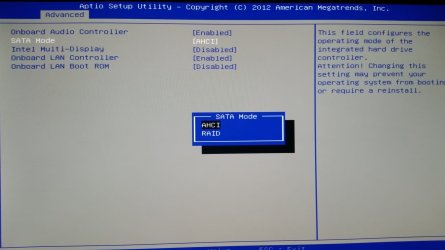
I'm having a slight problem following along, as when I try to set the storage controller mode to IDE/SATA in order to run SeaTools, the only other available option is RAID.
 

Attachments

  • bios.jpg
    bios.jpg
    132.2 KB · Views: 658

My Computer My Computer

At a glance

Windows 7 Professional x643.4 GHz i7-477012 GBGTX 645 1 GB
Computer type
PC/Desktop
Computer Manufacturer/Model Number
Dell
OS
Windows 7 Professional x64
CPU
3.4 GHz i7-4770
Memory
12 GB
Graphics Card(s)
GTX 645 1 GB
Antivirus
MSE + MBAM Free
Hi!
I know this is an old thread, but I hope someone else slogging through here with the same issue may find this helpful.

My first question would have been "Have you tried ignoring the "wrong" AHCI setting?

I am running Sea Tools for Dos right now (second attempt) on an older Dell laptop that did have an AHCI/ATA setting, BUT... while I was poking at it, I got to thinking about my wife's new (1 month old) Lenovo laptop, which I know has no such setting, and wondered how I would boot up this DVD if I ever had to.

It turned out I didn't have to make any changes to the Lenovo's BIOS. Although It was set for AHCI, It somehow figured out that it had legacy disk and handled it properly. I do believe I ended up hitting F11/F12 alternately quickly at the start to get its attention and pick the CD/DVD drive, but then it booted, and recognized the internal disk.

CONCLUSION:
I'm beginning to think the new BIOS setups are not giving fewer choice just to be cheap. It might be because they are smart enough to figure stuff out that we used to have to set by hand.
... or maybe I'm just an optimist.

--
Jim
 

My Computer My Computer

At a glance

Microsoft Windows10 Professional 64-bit Build...Intel(R) Core(TM) i5-4590 CPU @ 3.30GHz, 3301...8.00 GBNVIDIA GeForce GTX 560 Ti
Computer type
PC/Desktop
Computer Manufacturer/Model Number
Homebuilt
OS
Microsoft Windows10 Professional 64-bit Build 16299
CPU
Intel(R) Core(TM) i5-4590 CPU @ 3.30GHz, 3301 Mhz 4 Core
Motherboard
Asrock H97M Pro4
Memory
8.00 GB
Graphics Card(s)
NVIDIA GeForce GTX 560 Ti
Sound Card
(1) Webcam 200 (2) Realtek High Definition Audio (3) Int
Monitor(s) Displays
Samsung Syncmaster 24 inch
Screen Resolution
1600 x 900 x 32 bits (4294967296 colors) @ 60 Hz
Hard Drives
(1) WDC WD5000AAKS-00E4A0 ATA Device (2) WDC WD5000AAKX-00ERMA0 ATA Device (3) WDC WD10EZEX-08M2NA0 (4) WD 7500AAC External USB Device (5) WD My Passport Ultra USB Device
PSU
Corsair 500W
Case
Corsair 100R
Cooling
Stock
Keyboard
Logitech K120
Mouse
Logitech M110
Internet Speed
20Mbps
Antivirus
Malwarebytes, Windows Defender
Browser
Edge, Chrome, Firefox
I was instructed to do this over on the Eight forum due to system crashes. I've followed along everything and set the storage controller mode to IDE (it's under Compatible, but it says that'll set it to IDE?) but it doesn't work, it just takes me to Windows.
 

My Computer My Computer

At a glance

Windows 8.1
Computer type
PC/Desktop
OS
Windows 8.1
Alright, I got past that and made it to the page depicted in Part 2, Step 2 but now it's telling me that no hard drives have been detected?
 

My Computer My Computer

At a glance

Windows 8.1
Computer type
PC/Desktop
OS
Windows 8.1
Hi, Can i use Seatools for dos for testing my usb external hard drive of 1.5 tb size.
I tried seatools for windows, which does not show S.M.A.R.T TAB in any tab in

but when i checked the internal hard drive, the SMART test is shown.
Why this is so by seagate
Could not one test a huge storage ,like mine for SMART
They are specific, that Smart details by third party would not be correct with regard to other tools like hd sentinel.
is there any way , [;ease re[;u
 

My Computer My Computer

At a glance

Microsoft Windows 7 Ultimate 64-bit 7601 Mult...Intel(R) Core(TM)2 Duo CPU E7200 @ 2.53GHz4.00 GBNVIDIA GeForce 210
Computer type
PC/Desktop
Computer Manufacturer/Model Number
custom build
OS
Microsoft Windows 7 Ultimate 64-bit 7601 Multiprocessor Free Service Pack 1
CPU
Intel(R) Core(TM)2 Duo CPU E7200 @ 2.53GHz
Motherboard
To be filled by O.E.M. To be filled by O.E.M.
Memory
4.00 GB
Graphics Card(s)
NVIDIA GeForce 210
Sound Card
(1) NVIDIA High Definition Audio (2) Realtek High Definiti
Screen Resolution
1920 x 1080 x 32 bits (4294967296 colors) @ 60 Hz
Hard Drives
ST3500312CS ATA Device
hi, Arc, why no repl to my query. i usuallyl get reply within a day or two
 

My Computer My Computer

At a glance

Microsoft Windows 7 Ultimate 64-bit 7601 Mult...Intel(R) Core(TM)2 Duo CPU E7200 @ 2.53GHz4.00 GBNVIDIA GeForce 210
Computer type
PC/Desktop
Computer Manufacturer/Model Number
custom build
OS
Microsoft Windows 7 Ultimate 64-bit 7601 Multiprocessor Free Service Pack 1
CPU
Intel(R) Core(TM)2 Duo CPU E7200 @ 2.53GHz
Motherboard
To be filled by O.E.M. To be filled by O.E.M.
Memory
4.00 GB
Graphics Card(s)
NVIDIA GeForce 210
Sound Card
(1) NVIDIA High Definition Audio (2) Realtek High Definiti
Screen Resolution
1920 x 1080 x 32 bits (4294967296 colors) @ 60 Hz
Hard Drives
ST3500312CS ATA Device
Back
Top