
Solved Secondary hard drive is dying, but how do I swap it out for another?

redjeep

New member
Member
Local time
2:07 PM
Messages
32
I have an SSD for C drive, operating system on that and then I have 2 Seagate 2GB hard drives that I keep movies and TV shows, one is D: and the other is E:
Well D is the one that is dying, so I bought another, back up my stuff and thought I could just pull the cables on it and plug in the new one, but noooooooo, the pc wouldn't even boot
Any suggestions?

Ok, I think I see why it will not boot, the D: drive has the system reserve on it? Right?

Anyway I getting rid of this?
 

Attachments
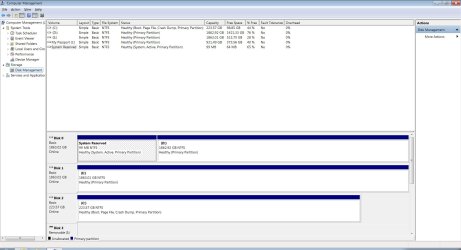
  • Disk Management.jpg
    Disk Management.jpg
    133.8 KB · Views: 7
Last edited:

My Computer My Computer

At a glance

Windows 7 32bitIntel Core 2 DuoOCZ Platinum Revision 2 2GB (2 x 1GB) 240-Pin...Nvidia GeForce 9500 GT
OS
Windows 7 32bit
CPU
Intel Core 2 Duo
Motherboard
Asus P5B Deluxe
Memory
OCZ Platinum Revision 2 2GB (2 x 1GB) 240-Pin DDR2 SDRAM DDR
Graphics Card(s)
Nvidia GeForce 9500 GT
Sound Card
Creative Sound Blaster Audigy SE
Monitor(s) Displays
ViewSonic
First, you must mark Disk 2 (C) Active, then

unplug Disk 0 and Disk 1, then

run startup repair until Disk 2 (C) boots on it`s own.

When you installed windows on the ssd, you should not have had the other 2 drives plugged in.
 

My Computer My Computer

At a glance

Windows 10 Pro x64Intel Core i7 6700KGSkill TridentZ RGB 16GB 3600 16-16-16-36EVGA GTX 980 Ti SC x2
Computer type
PC/Desktop
Computer Manufacturer/Model Number
Skylake Special #666
OS
Windows 10 Pro x64
CPU
Intel Core i7 6700K
Motherboard
Asus Sabertooth Z170 Mark 1
Memory
GSkill TridentZ RGB 16GB 3600 16-16-16-36
Graphics Card(s)
EVGA GTX 980 Ti SC x2
Sound Card
Realtek High Definition
Monitor(s) Displays
AOC G2460PG
Screen Resolution
1920 x 1080 144Hz
Hard Drives
Samsung 860 Pro 256GB, Seagate Barracuda 4TB x2
PSU
EVGA 1000 P2, EVGA White Custom Braided Cables
Case
Corsair Vengeance C70 Gunmetal Black
Cooling
Corsair H100i v2, Corsair ML120 x2, Thermal Grizzly Kryonaut
Keyboard
Logitech G910 Orion Spectrum
Mouse
Logitech G700s
Internet Speed
Verizon Fios Quantum Gateway 75/75
Antivirus
Windows Defender, Malwarebytes Free 3.8.3
Browser
Chrome
Other Info
Corsair SP120 x4, LG Blu-ray Drive, Durabrand HT-395 100 Watt Dolby Digital Amp, Corsair H2100 Wireless 7.1 Headset
addram, thanks man, worked perfect, Im all good!!
 

My Computer My Computer

At a glance

Windows 7 32bitIntel Core 2 DuoOCZ Platinum Revision 2 2GB (2 x 1GB) 240-Pin...Nvidia GeForce 9500 GT
OS
Windows 7 32bit
CPU
Intel Core 2 Duo
Motherboard
Asus P5B Deluxe
Memory
OCZ Platinum Revision 2 2GB (2 x 1GB) 240-Pin DDR2 SDRAM DDR
Graphics Card(s)
Nvidia GeForce 9500 GT
Sound Card
Creative Sound Blaster Audigy SE
Monitor(s) Displays
ViewSonic
In addition if you plan to keep the old drive attached at all you need to delete the old System Reserved partition or at least mark it Inactive so it can't interfere.

To do this follow these steps to Mark Partition as Inactive - Windows 7 Forums,
then in Disk Mgmt delete the old System Reserved partition.

If the old drive is dying then I'd move its data off and unplug it, swap it's cable to the SSD so no future reinstalls or repairs can accidentally derail the System Boot files to the first primary partition as they will. Just make sure the Win7 drive remains set as first HD to boot in BIOS setup.
 
Last edited:
Excellent, but you should finish up by following Greg`s further advice :)
 

My Computer My Computer

At a glance

Windows 10 Pro x64Intel Core i7 6700KGSkill TridentZ RGB 16GB 3600 16-16-16-36EVGA GTX 980 Ti SC x2
Computer type
PC/Desktop
Computer Manufacturer/Model Number
Skylake Special #666
OS
Windows 10 Pro x64
CPU
Intel Core i7 6700K
Motherboard
Asus Sabertooth Z170 Mark 1
Memory
GSkill TridentZ RGB 16GB 3600 16-16-16-36
Graphics Card(s)
EVGA GTX 980 Ti SC x2
Sound Card
Realtek High Definition
Monitor(s) Displays
AOC G2460PG
Screen Resolution
1920 x 1080 144Hz
Hard Drives
Samsung 860 Pro 256GB, Seagate Barracuda 4TB x2
PSU
EVGA 1000 P2, EVGA White Custom Braided Cables
Case
Corsair Vengeance C70 Gunmetal Black
Cooling
Corsair H100i v2, Corsair ML120 x2, Thermal Grizzly Kryonaut
Keyboard
Logitech G910 Orion Spectrum
Mouse
Logitech G700s
Internet Speed
Verizon Fios Quantum Gateway 75/75
Antivirus
Windows Defender, Malwarebytes Free 3.8.3
Browser
Chrome
Other Info
Corsair SP120 x4, LG Blu-ray Drive, Durabrand HT-395 100 Watt Dolby Digital Amp, Corsair H2100 Wireless 7.1 Headset
Back
Top