
Solved How do I swap to a larger HD and move the System Reserved partition

etcetera

New member
Local time
7:26 AM
Messages
1
Hi - hope this is the right forum.

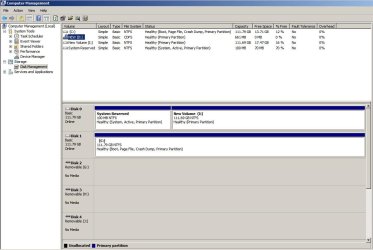
I have a Windows 7 system with two drives. Disk 0 has a System Reserved partition and the I: volume. Disk 1 has the boot partition and most of the OS software on the C: volume.

I would like to swap out Disk 0 with a larger drive and move the I: volume to it (keeping the I: letter). I don't care which drive has the System Reserved partition.

Ideally this would be as painless as possible so I'm willing to pay for software to do this if necessary.

Thanks for any help!
 

Attachments
  • diskManagement.jpg
    diskManagement.jpg
    78 KB · Views: 3

My Computer My Computer

At a glance

Windows 7 Home Premium 64bitIntel i5-2320 @3GHz
Computer type
PC/Desktop
Computer Manufacturer/Model Number
ZT Systems
OS
Windows 7 Home Premium 64bit
CPU
Intel i5-2320 @3GHz
Normally, you'd want system reserved and C on the same drive.

If you have them on separate drives, like you do now, you can't boot your PC if disk 0 is disconnected or fails.

You don't need a system reserved partition, but you DO need the files it contains.

In your shoes, I would:

1: copy the system reserved files to C using EasyBCD

2: Disconnect disk 0 and confirm that your PC can then boot from C alone (disk 1).

3: Reconnect disk 0 and the use an application like Macrium Reflect Free Edition to make an image of the I partition. Save that image file on some external drive.

4: Remove disk 0 and replace it with the new drive.

5: Restore the image of I to the new drive using Macrium.


If the I partition contains ONLY data files, not programs, you wouldn't need to use Macrium. You could just copy whatever is on I to an external using the mouse and then copy that stuff back to the new replacement drive.
 

My Computer My Computer

At a glance

Windows 7 Home Premium SP1, 64-bitIntel Skylake i5-6600K, not overclocked8 GB HyperX DDR4-2666 (2 x 4 GB)none; graphics are integrated on CPU
Computer type
PC/Desktop
Computer Manufacturer/Model Number
Ignatz Special; 4 speed manual gearbox; factory air conditioning; one of one
OS
Windows 7 Home Premium SP1, 64-bit
CPU
Intel Skylake i5-6600K, not overclocked
Motherboard
AsRock Z170M Extreme 4, micro ATX
Memory
8 GB HyperX DDR4-2666 (2 x 4 GB)
Graphics Card(s)
none; graphics are integrated on CPU
Sound Card
onboard: Realtek ALC1150; external: USB Behringer UF0-202
Monitor(s) Displays
Dell S2340M 23 inch IPS
Screen Resolution
1600 x 900
Hard Drives
System: Crucial MX100 series SSD, 128 GB;
Data: Samsung Spinpoint 103SJ, 1 TB;
Backup: WD Caviar Green WD30EZRX-00D8PB0, 3 TB
PSU
Rosewill SilentNight 500 watt fanless, semi-modular
Case
Antec Solo II
Cooling
Noctua NH-U12S; Noctua F12 intake, Noctua S12A exhaust
Keyboard
Microsoft 200 6JH-00001 USB
Mouse
Dell or Microsoft optical wired; USB
Antivirus
Microsoft Security Essentials and Malwarebytes Premium
Browser
Pale Moon
Other Info
All fans PWM; speeds at idle: CPU circa 500 rpm; intake circa 600 rpm; exhaust circa 600 rpm; CPU temps 27 idle and 47 C load in a warm room (27 C/81 F) when running Intel Extreme Tuning Utility stress test.

My Computer My Computer

At a glance

Vista, Windows7, Mint Mate, Zorin, Windows 8from 1.6GHz Duo to i7
Computer Manufacturer/Model Number
HP, Dell, Gateway, Toshiba - 4 laptops and 2 desktops
OS
Vista, Windows7, Mint Mate, Zorin, Windows 8
CPU
from 1.6GHz Duo to i7
Monitor(s) Displays
2x HP w2207
Hard Drives
5x HDD, 7x SSD, 12x Externals
Keyboard
with trackball - no mices
Mouse
Trackball mice
Internet Speed
DSL 6000
Back
Top