Secure

LonnieMac

New member
Local time
4:26 PM
Messages
84
Hi,

Is anyone able to help me, take a look at my configurations please. system services as well as comodo firewall set rules? Reason I'm asking is because I think theres a security flaw which i hope you may be able to help me with.

For those able to help, could you please advise me meaning how to upload my sys config file, comodo config file and anything else you may need.

I'm running W7, no file sharing as far as I know, stand alone system, wired up to a modem, with one firewall running which is comodo, its set to basically be invisible but I don't think it is.
 

My Computer

Computer Manufacturer/Model Number
XP3000+
OS
Windows 7
CPU
AMD Athlon Barton
Motherboard
MSI MS-6712 (Socket-A)
Memory
2.5GB DDR @ 169MHz 2.5-3-3-7
Graphics Card(s)
RADEON 9200 SERIES
Sound Card
Realtek AC'97 Audio for VIA (R) Audio Controller
Monitor(s) Displays
256MB RADEON 9200 SERIES
Screen Resolution
1280 x 1024
Hard Drives
Seagate ST3160021A ATA Device 150GB
Cooling
Fans
I can't find anything in your configuration that hints to a "security flaw". What makes you believe that there is a problem?
 

My Computer

Computer Manufacturer/Model Number
HP, Dell, Gateway, Toshiba - 4 laptops and 2 desktops
OS
Vista, Windows7, Mint Mate, Zorin, Windows 8
CPU
from 1.6GHz Duo to i7
Monitor(s) Displays
2x HP w2207
Hard Drives
5x HDD, 7x SSD, 12x Externals
Keyboard
with trackball - no mices
Mouse
Trackball mice
Internet Speed
DSL 6000
It's probably not a security flaw, but if you want to upload the system config file and the comodo config file, you'll have to use winzip or 7zip to create a zip file, then upload using the paperclip icon.
I use the Comodo firewall too, but I think for some reason Microsoft doesn't like Comodo because I get a lot of alerts for normal internal connections in my computers that wouldn't happen if Comodo and Microsoft had even the slightest collaboration. The latest version of comodo is constantly connected to the internet, to check running processes against a list of malware. A lot of the firewall and defense plus alerts are for legitimate system services. Comodo does lock down all connections when you select block all.. I've verified that using port scans from another computer I have at home.
 
I think the attached zipped file below has my system services configurations in it. I exported list in windows services if that correct, I've tried to disable everything that could lead to a possible hack. could you please have a look at it and let me know if anything else should be disabled for increased security.

again i have no wireless, no router, no file sharing or network sharing. its a stand alone system wired up to a modem (Virgin Media)
 

Attachments

My Computer

Computer Manufacturer/Model Number
XP3000+
OS
Windows 7
CPU
AMD Athlon Barton
Motherboard
MSI MS-6712 (Socket-A)
Memory
2.5GB DDR @ 169MHz 2.5-3-3-7
Graphics Card(s)
RADEON 9200 SERIES
Sound Card
Realtek AC'97 Audio for VIA (R) Audio Controller
Monitor(s) Displays
256MB RADEON 9200 SERIES
Screen Resolution
1280 x 1024
Hard Drives
Seagate ST3160021A ATA Device 150GB
Cooling
Fans
The best way to further secure your system would be to disconnect from the internet whenever you're not actively surfing the web, and turn the computer off completely when you walk away. The comodo defense plus has a good feature as well, just set it to block all unknown requests when the application is closed, whenever you're not using the internet
 
thats currently disabled, not ticked as I don't know whether or not that will mess up anything while I'm using the net. Should I enable it and leave it enabled?

Also would you be able to look at my comodo configurations if I uploaded the *.cfgx file or will you find it hard with you having to import it into your own comodo which may mess up your system? If you do wish for me to upload the file, I have the following...

COMODO - Internet Security
COMODO - Proactive Security ACTIVE
COMODO - Firewall Security

Will you only need the ACTIVE proactive file or should I upload all?

Also regarding the system services log file above, is that ok?


-------------------------------------------------------------------


heres my hijack this report if its any use,

Logfile of Trend Micro HijackThis v2.0.4
Scan saved at 06:38:22, on 02/10/2010
Platform: Windows 7 (WinNT 6.00.3504)
MSIE: Internet Explorer v8.00 (8.00.7600.16385)
Boot mode: Normal

Running processes:
C:\Windows\Explorer.EXE
C:\Windows\SOUNDMAN.EXE
C:\Program Files\ESET\ESET NOD32 Antivirus\egui.exe
C:\Program Files\COMODO\COMODO Internet Security\cfp.exe
C:\Windows\system32\taskmgr.exe
C:\Program Files\Opera\opera.exe
C:\PROGRA~1\Java\jre6\bin\jp2launcher.exe
C:\Program Files\Java\jre6\bin\java.exe
C:\Windows\system32\conhost.exe
C:\Users\mh\Desktop\HijackThis.exe

R1 - HKCU\Software\Microsoft\Internet Explorer\Main,Search Page = http://go.microsoft.com/fwlink/?LinkId=54896
R0 - HKCU\Software\Microsoft\Internet Explorer\Main,Start Page = http://www.google.co.uk/
R1 - HKLM\Software\Microsoft\Internet Explorer\Main,Default_Page_URL = http://go.microsoft.com/fwlink/?LinkId=69157
R1 - HKLM\Software\Microsoft\Internet Explorer\Main,Default_Search_URL = http://go.microsoft.com/fwlink/?LinkId=54896
R1 - HKLM\Software\Microsoft\Internet Explorer\Main,Search Page = http://go.microsoft.com/fwlink/?LinkId=54896
R0 - HKLM\Software\Microsoft\Internet Explorer\Main,Start Page = http://go.microsoft.com/fwlink/?LinkId=69157
R0 - HKLM\Software\Microsoft\Internet Explorer\Search,SearchAssistant =
R0 - HKLM\Software\Microsoft\Internet Explorer\Search,CustomizeSearch =
R0 - HKCU\Software\Microsoft\Internet Explorer\Main,Local Page =
R0 - HKLM\Software\Microsoft\Internet Explorer\Main,Local Page =
R0 - HKCU\Software\Microsoft\Internet Explorer\Toolbar,LinksFolderName =
O1 - Hosts: ::1 localhost
O2 - BHO: AcroIEHelperStub - {18DF081C-E8AD-4283-A596-FA578C2EBDC3} - C:\Program Files\Common Files\Adobe\Acrobat\ActiveX\AcroIEHelperShim.dll
O2 - BHO: Windows Live Sign-in Helper - {9030D464-4C02-4ABF-8ECC-5164760863C6} - C:\Program Files\Common Files\Microsoft Shared\Windows Live\WindowsLiveLogin.dll
O2 - BHO: Google Toolbar Helper - {AA58ED58-01DD-4d91-8333-CF10577473F7} - C:\Program Files\Google\Google Toolbar\GoogleToolbar_32.dll
O2 - BHO: Google Toolbar Notifier BHO - {AF69DE43-7D58-4638-B6FA-CE66B5AD205D} - C:\Program Files\Google\GoogleToolbarNotifier\5.5.4723.1820\swg.dll
O2 - BHO: Java(tm) Plug-In 2 SSV Helper - {DBC80044-A445-435b-BC74-9C25C1C588A9} - C:\Program Files\Java\jre6\bin\jp2ssv.dll
O3 - Toolbar: Google Toolbar - {2318C2B1-4965-11d4-9B18-009027A5CD4F} - C:\Program Files\Google\Google Toolbar\GoogleToolbar_32.dll
O4 - HKLM\..\Run: [SoundMan] SOUNDMAN.EXE
O4 - HKLM\..\Run: [egui] "C:\Program Files\ESET\ESET NOD32 Antivirus\egui.exe" /hide /waitservice
O4 - HKLM\..\Run: [msnmsgr] "C:\Program Files\Windows Live\Messenger\msnmsgr.exe" /background
O4 - HKLM\..\Run: [COMODO Internet Security] "C:\Program Files\COMODO\COMODO Internet Security\cfp.exe" -h
O4 - HKCU\..\Run: [msnmsgr] "C:\Program Files\Windows Live\Messenger\msnmsgr.exe" /background
O4 - HKUS\S-1-5-19\..\Run: [Sidebar] %ProgramFiles%\Windows Sidebar\Sidebar.exe /autoRun (User 'LOCAL SERVICE')
O4 - HKUS\S-1-5-19\..\RunOnce: [mctadmin] C:\Windows\System32\mctadmin.exe (User 'LOCAL SERVICE')
O4 - HKUS\S-1-5-20\..\Run: [Sidebar] %ProgramFiles%\Windows Sidebar\Sidebar.exe /autoRun (User 'NETWORK SERVICE')
O4 - HKUS\S-1-5-20\..\RunOnce: [mctadmin] C:\Windows\System32\mctadmin.exe (User 'NETWORK SERVICE')
O6 - HKCU\Software\Policies\Microsoft\Internet Explorer\Restrictions present
O6 - HKCU\Software\Policies\Microsoft\Internet Explorer\Control Panel present
O6 - HKCU\Software\Policies\Microsoft\Internet Explorer\Toolbars\Restrictions present
O8 - Extra context menu item: E&xport to Microsoft Excel - res://C:\PROGRA~1\MICROS~4\OFFICE11\EXCEL.EXE/3000
O8 - Extra context menu item: Google Sidewiki... - res://C:\Program Files\Google\Google Toolbar\Component\GoogleToolbarDynamic_mui_en_96D6FF0C6D236BF8.dll/cmsidewiki.html
O9 - Extra button: Research - {92780B25-18CC-41C8-B9BE-3C9C571A8263} - C:\PROGRA~1\MICROS~4\OFFICE11\REFIEBAR.DLL
O15 - Trusted Zone: http://asia.msi.com.tw
O15 - Trusted Zone: http://global.msi.com.tw
O15 - Trusted Zone: http://www.msi.com.tw
O15 - ESC Trusted Zone: http://*.update.microsoft.com
O16 - DPF: {644E432F-49D3-41A1-8DD5-E099162EEEC5} - http://security.symantec.com/sscv6/SharedContent/common/bin/cabsa.cab
O16 - DPF: {D27CDB6E-AE6D-11CF-96B8-444553540000} (Shockwave Flash Object) - http://fpdownload2.macromedia.com/get/shockwave/cabs/flash/swflash.cab
O20 - AppInit_DLLs:
O23 - Service: Adobe LM Service - Adobe Systems - C:\Program Files\Common Files\Adobe Systems Shared\Service\Adobelmsvc.exe
O23 - Service: Ati HotKey Poller - ATI Technologies Inc. - C:\Windows\system32\Ati2evxx.exe
O23 - Service: ATI Smart - Unknown owner - C:\Windows\System32\ati2sgag.exe
O23 - Service: COMODO Internet Security Helper Service (cmdAgent) - COMODO - C:\Program Files\COMODO\COMODO Internet Security\cmdagent.exe
O23 - Service: ESET HTTP Server (EhttpSrv) - ESET - C:\Program Files\ESET\ESET NOD32 Antivirus\EHttpSrv.exe
O23 - Service: ESET Service (ekrn) - ESET - C:\Program Files\ESET\ESET NOD32 Antivirus\ekrn.exe
O23 - Service: PC Tools Startup and Shutdown Monitor service (PCToolsSSDMonitorSvc) - Unknown owner - C:\Program Files\Common Files\PC Tools\sMonitor\StartManSvc.exe
O23 - Service: ServiceLayer - Nokia - C:\Program Files\PC Connectivity Solution\ServiceLayer.exe

--
End of file - 5780 bytes

 

My Computer

Computer Manufacturer/Model Number
XP3000+
OS
Windows 7
CPU
AMD Athlon Barton
Motherboard
MSI MS-6712 (Socket-A)
Memory
2.5GB DDR @ 169MHz 2.5-3-3-7
Graphics Card(s)
RADEON 9200 SERIES
Sound Card
Realtek AC'97 Audio for VIA (R) Audio Controller
Monitor(s) Displays
256MB RADEON 9200 SERIES
Screen Resolution
1280 x 1024
Hard Drives
Seagate ST3160021A ATA Device 150GB
Cooling
Fans
I can read it without applying it to my system.. but I've found the default firewall security setting to be adequate. also don't apply the "block all unknown requests" option unless you've ran your current software configuration with comodo set to training mode for about a week, and run every installed program at least once
 
files are attached, as said above the proactive security file is the one which is marked active in my configurations.

please advise
 

Attachments

My Computer

Computer Manufacturer/Model Number
XP3000+
OS
Windows 7
CPU
AMD Athlon Barton
Motherboard
MSI MS-6712 (Socket-A)
Memory
2.5GB DDR @ 169MHz 2.5-3-3-7
Graphics Card(s)
RADEON 9200 SERIES
Sound Card
Realtek AC'97 Audio for VIA (R) Audio Controller
Monitor(s) Displays
256MB RADEON 9200 SERIES
Screen Resolution
1280 x 1024
Hard Drives
Seagate ST3160021A ATA Device 150GB
Cooling
Fans
Looks ok to me.. only thing I would suggest, make sure the following folders are given exceptions program files/eset, program files/common files/eset, users/appdata/local/eset, users/appdata/roaming/eset and so on. Defense plus doesn't play nice with other antivirus apps. Also, if you haven't already done so, disable autoplay.. which is one of the biggest security flaws in windows
 
how do I disable autoplay, is it in windows services?
 

My Computer

Computer Manufacturer/Model Number
XP3000+
OS
Windows 7
CPU
AMD Athlon Barton
Motherboard
MSI MS-6712 (Socket-A)
Memory
2.5GB DDR @ 169MHz 2.5-3-3-7
Graphics Card(s)
RADEON 9200 SERIES
Sound Card
Realtek AC'97 Audio for VIA (R) Audio Controller
Monitor(s) Displays
256MB RADEON 9200 SERIES
Screen Resolution
1280 x 1024
Hard Drives
Seagate ST3160021A ATA Device 150GB
Cooling
Fans
ok. thank you mate, so all my settings are set correctly, windows services and comodo? should i delete the files uploaded in this thread now?
 

My Computer

Computer Manufacturer/Model Number
XP3000+
OS
Windows 7
CPU
AMD Athlon Barton
Motherboard
MSI MS-6712 (Socket-A)
Memory
2.5GB DDR @ 169MHz 2.5-3-3-7
Graphics Card(s)
RADEON 9200 SERIES
Sound Card
Realtek AC'97 Audio for VIA (R) Audio Controller
Monitor(s) Displays
256MB RADEON 9200 SERIES
Screen Resolution
1280 x 1024
Hard Drives
Seagate ST3160021A ATA Device 150GB
Cooling
Fans
if you want to. might not be a bad idea to leave it there for a while in case someone more knowledgeable reads this thread and offers some good advice
 
ok. thanks again mate.

I'd appreciate it if anyone else would also have a look at this, for some reason I've got a feeling theres a flaw in one of my set rules or I'm in need of another rule to block anyone trying to get in.
 

My Computer

Computer Manufacturer/Model Number
XP3000+
OS
Windows 7
CPU
AMD Athlon Barton
Motherboard
MSI MS-6712 (Socket-A)
Memory
2.5GB DDR @ 169MHz 2.5-3-3-7
Graphics Card(s)
RADEON 9200 SERIES
Sound Card
Realtek AC'97 Audio for VIA (R) Audio Controller
Monitor(s) Displays
256MB RADEON 9200 SERIES
Screen Resolution
1280 x 1024
Hard Drives
Seagate ST3160021A ATA Device 150GB
Cooling
Fans
setting the firewall to block all mode when all browsers are closed is sufficient. unlike the windows firewall and quite a few other 3rd party firewalls, when you block everything with comodo it actually closes all connections
 
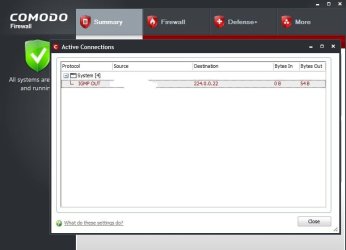
Could someone please tell me why this is happening? (picture below)

I've got no remote going on, no wireless, no router, I've disabled everything in LAC apart from the comodo driver and IPv4.
 

Attachments

  • unknown.jpg
    unknown.jpg
    31.6 KB · Views: 15

My Computer

Computer Manufacturer/Model Number
XP3000+
OS
Windows 7
CPU
AMD Athlon Barton
Motherboard
MSI MS-6712 (Socket-A)
Memory
2.5GB DDR @ 169MHz 2.5-3-3-7
Graphics Card(s)
RADEON 9200 SERIES
Sound Card
Realtek AC'97 Audio for VIA (R) Audio Controller
Monitor(s) Displays
256MB RADEON 9200 SERIES
Screen Resolution
1280 x 1024
Hard Drives
Seagate ST3160021A ATA Device 150GB
Cooling
Fans
Are you running the AV component of Comodo as well as NOD 32?
 

My Computer

OS
7
no, just the firewall
 

My Computer

Computer Manufacturer/Model Number
XP3000+
OS
Windows 7
CPU
AMD Athlon Barton
Motherboard
MSI MS-6712 (Socket-A)
Memory
2.5GB DDR @ 169MHz 2.5-3-3-7
Graphics Card(s)
RADEON 9200 SERIES
Sound Card
Realtek AC'97 Audio for VIA (R) Audio Controller
Monitor(s) Displays
256MB RADEON 9200 SERIES
Screen Resolution
1280 x 1024
Hard Drives
Seagate ST3160021A ATA Device 150GB
Cooling
Fans
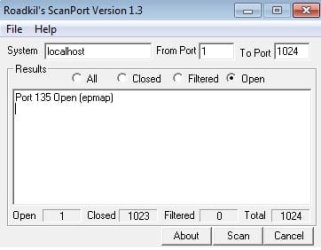
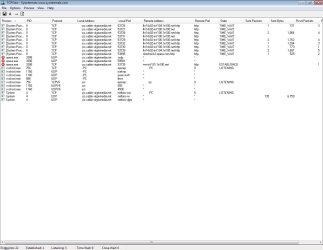
below is a screenshot of tcpview. I'm not sure what epmap is doing, port 135 or any of the others. GRC has me stealth but I done a roadkil's scan and it showed up as only one port being open which is Port 135 Open (epmap). - (screenshots below).

how do i close it? why is it open? sorry, i know this might seem spoon fed stuff but google isn't being my friend, please could someone help me.
 

Attachments

  • roadkil.jpg
    roadkil.jpg
    12.9 KB · Views: 1
  • tcpview.jpg
    tcpview.jpg
    86.1 KB · Views: 3

My Computer

Computer Manufacturer/Model Number
XP3000+
OS
Windows 7
CPU
AMD Athlon Barton
Motherboard
MSI MS-6712 (Socket-A)
Memory
2.5GB DDR @ 169MHz 2.5-3-3-7
Graphics Card(s)
RADEON 9200 SERIES
Sound Card
Realtek AC'97 Audio for VIA (R) Audio Controller
Monitor(s) Displays
256MB RADEON 9200 SERIES
Screen Resolution
1280 x 1024
Hard Drives
Seagate ST3160021A ATA Device 150GB
Cooling
Fans
right I've done a fresh install of Comodo.... settings, names etc. have all changed from the previous version so my old set up was pretty much useless.

I've got one quesiton though, following on from the picture above.... with my global rules set as stealth, no access, block all. does it matter that the proggy roadkil's shows that port 135 is open?
 

My Computer

Computer Manufacturer/Model Number
XP3000+
OS
Windows 7
CPU
AMD Athlon Barton
Motherboard
MSI MS-6712 (Socket-A)
Memory
2.5GB DDR @ 169MHz 2.5-3-3-7
Graphics Card(s)
RADEON 9200 SERIES
Sound Card
Realtek AC'97 Audio for VIA (R) Audio Controller
Monitor(s) Displays
256MB RADEON 9200 SERIES
Screen Resolution
1280 x 1024
Hard Drives
Seagate ST3160021A ATA Device 150GB
Cooling
Fans
Back
Top