Solved Securing internet connection after possible hack

hazel123

New member
Power User
VIP
Local time
10:08 PM
Messages
403
Location
Uk
So I think I was hacked recently and after doing umpteen scanning type things on laptop and installing various programs, it was suggested to me it could be via the wifi router. So I have changed the password on the wifi router and turned off WPS and Upnp. Right now though I would rather just use ethernet. I use my laptop in the room where the internet connection is so don't need wifi right now.

I'm trying to work out how to do this without using the router at all. I have an Asus NT-66-u wifi router and a TP-Link TD8817 modem. Can I just plug the ethernet cable into the phone socket? Or disconnect the Asus router and plug the ethernet cable directly into the TP-Link Modem. And how secure is the modem?

I don't really have time to be doing all this right now so just decided to use ethernet for a while and not sure which is the best way to do it. Usually I've just plugged the ethernet into the Asus router, but if that's turned off, presumably that won't work. Also it's so long since I set the modem up I have no idea how I did it or what any passwords are! The Asus seemed to take over.

Anyway - I'm guessing just plugging the ethernet into the phone socket won't be enough, so will try turning off wifi and Asus router and plugging into modem.
 

My Computer

Computer type
Laptop
Computer Manufacturer/Model Number
Sony Vaio VPCCW2S1E
OS
W7 HP 64 bit
CPU
Core i3 1st gen
Memory
8gb
Graphics Card(s)
Nvidia 330M
Internet Speed
8 mbps
Browser
Firefox
If you just use a modem your PC is live on the net so anyone can hack it a router used nat so you then get a local IP not a internet IP local can't be accessed from the net the net IP becomes the router not your PC. How do you think you were hacked?
 

My Computer

Computer type
PC/Desktop
OS
win 8 32 bit
A bit of digging about and I think that your setup is as follows - ADSL line to the house where it connects to this router. That then connects to this access point which is used to access the internet via wifi or data cable. To answer your question then simply plugging a data cable from the PC to one of the yellow ports on the top should allow access to the internet. Also are you also looking to turn off the wireless capability or not?

Going a bit deeper into your question - assuming that your setup is as outlined above then should you wish to access the internet then you are going to need the router - its purpose is to allow you to do that. In short no router no internet and to access the internet then you are going to need the access point to get to connect to said router.

Lastly you mentioned that you think you have been hacked - IIRC from your other thread about this then it was a neighbour who seems to have far more knowledge of what you have written than seems likely\possible. Could you tell me what are the sources that you think have been compromised? Facebook, Email (web based such as Gmail etc) or something else? Just trying to get a better picture here to see where any possible issue might be.
 
Last edited:

My Computer

Computer type
PC/Desktop
Computer Manufacturer/Model Number
Custom Build
OS
Windows 7 64bit
CPU
Intel(R) Core(TM) i7-4770K CPU @ 3.50GHz
Motherboard
Gigabyte Technology Co., Ltd. Z87-DS3H
Memory
Corsair XMS3 16GB kit (2x8GB) DDR3 1333MHz Unbuffered CL9 DI
Graphics Card(s)
(1) Intel(R) HD Graphics 4600 (2) NVIDIA GeForce GT 640
Hard Drives
(1) Samsung SSD 840 EVO 250G SCSI Disk Device (2) Samsung SSD 850 EVO 250G SCSI Disk Device (3) WDC WD10EZEX-00KUWA0 SCSI Disk Device
Antivirus
MSE
Browser
Pale Moon
Thank you! Yes that is the set up exactly. And as you say it didn't work disconnecting the Asus router and plugging ethernet into the TP-Link modem. So am back to the original set up and using ethernet and have turned off wifi lan switch on the laptop. What I wasn't sure was - even if I'm not using wifi and am using ethernet, presumably the Asus router is still broadcasting wifi - would that still be an issue?

It seems to be confidential things I have typed that have been accessed. The last time it was in word and something confidential I had written was known about and acted on within a couple of hours! Freaked me out. So I wrote a load of junk after that ha ha. Anyway - I had suspected something a few months ago and had keyscrambler personal on. Which scrambles internet typing but not in word. And I forgot and used Word. So thinking that was the issue I then scanned everything and installed Zemana, but from what I've looked up yesterday it seems wifi routers are quite easily hacked, so reckon sticking with ethernet is probably best for now. And have also unplugged the wifi printer which seemed to have its own ssid.

Anyway I guess that's the best I can do for now although suggestions gratefully received. Email could be compromised I guess. Kind of makes you a bit paranoid. So if the Asus router is still broadcasting wifi is that still an issue? Even if I'm using ethernet connection.
 

My Computer

Computer type
Laptop
Computer Manufacturer/Model Number
Sony Vaio VPCCW2S1E
OS
W7 HP 64 bit
CPU
Core i3 1st gen
Memory
8gb
Graphics Card(s)
Nvidia 330M
Internet Speed
8 mbps
Browser
Firefox
Potentially it is still an issue as the WIFI will be on the same network as the LAN (ethernet connection) but we will get to that in a minute.

First question - have you changed the default router password to something secure? If not I would suggest reading up on creating secure passwords and do that in the first instance. If you have the option to change the user name as well then do that as well. It goes without saying that you should make a note of the new user names and passwords ;) Write them down on a piece of paper if you wish or use something like Keepass to keep a note of them.

With regard to securing it down further - it depends on how you use your WIFI really - do you have friends who connect to your WIFI when they call round? Do you use WIFI yourself to connect a phone\tablet to? Let me know the answers and I will read the manual\dig about and see what is possible.

One last thing - after you had written whatever it was in the Word doc did you do anything with it afterwards such as email it to someone?
 
Last edited:

My Computer

Computer type
PC/Desktop
Computer Manufacturer/Model Number
Custom Build
OS
Windows 7 64bit
CPU
Intel(R) Core(TM) i7-4770K CPU @ 3.50GHz
Motherboard
Gigabyte Technology Co., Ltd. Z87-DS3H
Memory
Corsair XMS3 16GB kit (2x8GB) DDR3 1333MHz Unbuffered CL9 DI
Graphics Card(s)
(1) Intel(R) HD Graphics 4600 (2) NVIDIA GeForce GT 640
Hard Drives
(1) Samsung SSD 840 EVO 250G SCSI Disk Device (2) Samsung SSD 850 EVO 250G SCSI Disk Device (3) WDC WD10EZEX-00KUWA0 SCSI Disk Device
Antivirus
MSE
Browser
Pale Moon
Thank you. Yes I changed router username and password - and a long password with mixed characters. No-one connects to our wifi - we have two laptops, a netbook and an ipod touch that connect to it (plus the HP Printer and a plug in wifi extender on the landing (unplugged that before re-setting router and changing password and username). I didn't email the word document, just typed it and saved it. But it has occurred to me that if I was hacked my email password needs changing, so have done that.

Actually when I disconnected/turned off the Asus router and connected the laptop with ethernet cable directly to the TP_Link router, although I couldn't connect via the router, I was able to set up a broadband connection, which required me to sign in each time, as another poster mentioned above, without the router, it removes the level of security.

Is there any way to turn off wifi on the router page, and still use the router for ethernet? We're moving in a couple of weeks so it'll be less of an issue but I could do without the hassle right now to make sure we get moved on time! And without issues.

Having said no-one connects to our wifi (ie no-one has the network key or signs into it, as far as I know!) the neighbours are in an adjoining house and our phone/internet line runs across their wall into our house.
 

My Computer

Computer type
Laptop
Computer Manufacturer/Model Number
Sony Vaio VPCCW2S1E
OS
W7 HP 64 bit
CPU
Core i3 1st gen
Memory
8gb
Graphics Card(s)
Nvidia 330M
Internet Speed
8 mbps
Browser
Firefox
All routers have an option to be Ethernet only.
punch in 192.168.0.1 (or 0 depending on make), in your browser location bar
This will take you to your router settings options
login ~Usually Admin >> password on side of router, unless youve changed it, default tends to be 12345
Then make it ethernet only.

Roy
 

My Computer

Computer type
PC/Desktop
Computer Manufacturer/Model Number
medionl/Aspire 6930G/acer x55a
OS
W7 home premium 32bit/W7HP 64bit/w10 tp insider ring
CPU
E5300 dual core
Motherboard
medion MS7366
Memory
3gb
Graphics Card(s)
Nvidia Geforce 7100 Nforce 630i
Monitor(s) Displays
avixc
Internet Speed
n (isp resticted to 72)
Antivirus
mse/pands
Browser
palemoon
Other Info
Belkin Fd7050 n USB using Railink RT2870 drivers, more upto date
Thanks! Will that make it more secure using the router? ie will the wifi just not be there at all? Sorry if that's a noddy question lol. I can sign into the router page ok - have recently changed username and password - but I didn't see any way of setting it to ethernet only.
 

My Computer

Computer type
Laptop
Computer Manufacturer/Model Number
Sony Vaio VPCCW2S1E
OS
W7 HP 64 bit
CPU
Core i3 1st gen
Memory
8gb
Graphics Card(s)
Nvidia 330M
Internet Speed
8 mbps
Browser
Firefox
Hazel,
Who's the ISP
Virgin BT Sky Talk.

Roy
me im a Virgi:on
 

My Computer

Computer type
PC/Desktop
Computer Manufacturer/Model Number
medionl/Aspire 6930G/acer x55a
OS
W7 home premium 32bit/W7HP 64bit/w10 tp insider ring
CPU
E5300 dual core
Motherboard
medion MS7366
Memory
3gb
Graphics Card(s)
Nvidia Geforce 7100 Nforce 630i
Monitor(s) Displays
avixc
Internet Speed
n (isp resticted to 72)
Antivirus
mse/pands
Browser
palemoon
Other Info
Belkin Fd7050 n USB using Railink RT2870 drivers, more upto date
The WIFI is on the ASUS access point not the router so that is why you aren't seeing any options in there to go ethernet only. I will dig out the manual for the access point tomorrow and post a new reply with my findings once I have had a chance to look that over.

Given that you have other devices connecting to the WIFI I will be looking to turn off the WIFI SSID advertisement (so it in effect the WIFI becomes invisible) and changing the password for the WIFI access (assuming that there is one set of course). That should be adequate security for what you have described especially since you are moving in a couple of weeks.

With regard to where the cable runs - I would be very surprised if the neighbours decided to physically tap the cable or sniff every packet that goes back and forth on your internet connection. If they did go down that route getting the actual information that they wanted would be time consuming to say the least. Of course it is not impossible but there are easier ways of getting such information hence why I was asking what you had done with the Word doc afterwards. It is an awful lot easier to hack an email account... ;)
 

My Computer

Computer type
PC/Desktop
Computer Manufacturer/Model Number
Custom Build
OS
Windows 7 64bit
CPU
Intel(R) Core(TM) i7-4770K CPU @ 3.50GHz
Motherboard
Gigabyte Technology Co., Ltd. Z87-DS3H
Memory
Corsair XMS3 16GB kit (2x8GB) DDR3 1333MHz Unbuffered CL9 DI
Graphics Card(s)
(1) Intel(R) HD Graphics 4600 (2) NVIDIA GeForce GT 640
Hard Drives
(1) Samsung SSD 840 EVO 250G SCSI Disk Device (2) Samsung SSD 850 EVO 250G SCSI Disk Device (3) WDC WD10EZEX-00KUWA0 SCSI Disk Device
Antivirus
MSE
Browser
Pale Moon
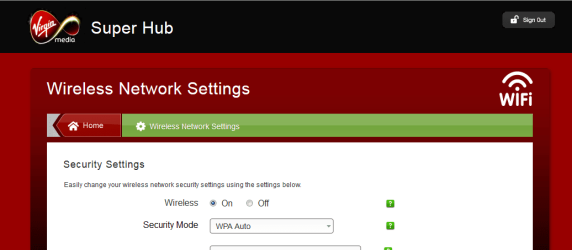
Oh really,

What are you talking about
Set to OFF no SSID is broadcast


Roy
 

Attachments

  • wfhub.PNG
    wfhub.PNG
    42.5 KB · Views: 0

My Computer

Computer type
PC/Desktop
Computer Manufacturer/Model Number
medionl/Aspire 6930G/acer x55a
OS
W7 home premium 32bit/W7HP 64bit/w10 tp insider ring
CPU
E5300 dual core
Motherboard
medion MS7366
Memory
3gb
Graphics Card(s)
Nvidia Geforce 7100 Nforce 630i
Monitor(s) Displays
avixc
Internet Speed
n (isp resticted to 72)
Antivirus
mse/pands
Browser
palemoon
Other Info
Belkin Fd7050 n USB using Railink RT2870 drivers, more upto date
Torchwood - it's Plusnet (Uk). Tranquil - thanks! I changed the SSID name (not sure if that makes much difference really) and the network key was reset when I set the router back to factory settings and started again after firmware update. I have no idea how people hack into things! But I wouldn't put it past them to tap the line lol. They are retired, but not little old people, they are not very nice people! One reason for moving. And with a legal situation in the background it's not pleasant - although I have nothing to hide, but people snooping freaks me out! Partly why it's legal - they are too aggressive to talk to, especially after a drink.

Torchwood - I can't see any on/off option like that on my router page unfortunately. There is one on my laptop so I turned wifi off on my laptop, but presumably if the other laptops are using wifi and someone can hack the router they can see all traffic on our internet connection? I can't work it out really. But am sticking to ethernet for now via the router with wifi turned off on my laptop.

I was trying to work out how someone could know the contents of a typed word document - so my first thought was - keylogger. When that didn't seem to be the case and someone suggested the wifi I looked into that a bit and upped the security on the router a bit. But it seems to me that wifi is a bit vulnerable to hacking maybe and especially with the extender we had upstairs - I think once the IP addresses for both houses got mixed up somehow (we had to change ours) and it was something to do with the extender getting into their wifi as well (didn't put that very technically but there was a crossover at one point). So extender is now unplugged.

It would help if someone knows how to turn wifi off on the Asus router - there are loads of options and settings but nothing that black and white that I can see.
 

My Computer

Computer type
Laptop
Computer Manufacturer/Model Number
Sony Vaio VPCCW2S1E
OS
W7 HP 64 bit
CPU
Core i3 1st gen
Memory
8gb
Graphics Card(s)
Nvidia 330M
Internet Speed
8 mbps
Browser
Firefox
Forgot - have a Kindle Fire stick on the wifi too - plugs into the back of the TV to give iplayer and other things.

Ok - under "Administration - Operation mode" I have
Wireless Router mode (default)
Repeater mode
Access Point (AP) mode
Media Bridge

Repeater mode says it connects to an existing wireless network. Media Bridge requires to Asus routers. So thought it might be Access Point mode doesn't sound like ethernet only either - it says:

"In Access Point (AP) mode, RT-N66U connects to a wireless router through an Ethernet cable to extend the wireless signal coverage to other network clients. In this mode, the firewall, IP sharing, and NAT functions are disabled by default.
In Access Point (AP) mode, the DHCP-assigned IP address changes. Install and use the Device Discovery Utility in order to detect the wireless router's IP address."


My Computer

Computer type
Laptop
Computer Manufacturer/Model Number
Sony Vaio VPCCW2S1E
OS
W7 HP 64 bit
CPU
Core i3 1st gen
Memory
8gb
Graphics Card(s)
Nvidia 330M
Internet Speed
8 mbps
Browser
Firefox
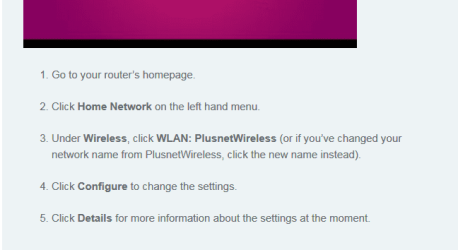
Hi Hazel,
im assuming its here, compliments Plusnet Router settings homepage.
Your Internet is provided by plusNet
Via phone/cable line to your Router then to any other devices, by cable, WIFI or both
(ALL routers can be set to which ever you want/dont want)
PLEASE NOTE the ASUS access point is NOT another router, it is used by your lappy to identify how to connect to the signal being broadcast by your Plusnet router.

Roy
 

Attachments

  • pnet.PNG
    pnet.PNG
    37.6 KB · Views: 15

My Computer

Computer type
PC/Desktop
Computer Manufacturer/Model Number
medionl/Aspire 6930G/acer x55a
OS
W7 home premium 32bit/W7HP 64bit/w10 tp insider ring
CPU
E5300 dual core
Motherboard
medion MS7366
Memory
3gb
Graphics Card(s)
Nvidia Geforce 7100 Nforce 630i
Monitor(s) Displays
avixc
Internet Speed
n (isp resticted to 72)
Antivirus
mse/pands
Browser
palemoon
Other Info
Belkin Fd7050 n USB using Railink RT2870 drivers, more upto date

My Computer

Computer type
Laptop
Computer Manufacturer/Model Number
Sony Vaio VPCCW2S1E
OS
W7 HP 64 bit
CPU
Core i3 1st gen
Memory
8gb
Graphics Card(s)
Nvidia 330M
Internet Speed
8 mbps
Browser
Firefox
That seems to have turned the wifi off. Thanks. So how easy is it to hack ethernet lol.
 

My Computer

Computer type
Laptop
Computer Manufacturer/Model Number
Sony Vaio VPCCW2S1E
OS
W7 HP 64 bit
CPU
Core i3 1st gen
Memory
8gb
Graphics Card(s)
Nvidia 330M
Internet Speed
8 mbps
Browser
Firefox
If your on Plusnet why are you on adsl the cable is so cheap with them is it not in your area?
 

My Computer

Computer type
PC/Desktop
OS
win 8 32 bit
We only got broadband in our area a few years ago :-) A bit cut off. No cable. Some areas nearby still don't have broadband. We can hardly get a phone signal lol.
 

My Computer

Computer type
Laptop
Computer Manufacturer/Model Number
Sony Vaio VPCCW2S1E
OS
W7 HP 64 bit
CPU
Core i3 1st gen
Memory
8gb
Graphics Card(s)
Nvidia 330M
Internet Speed
8 mbps
Browser
Firefox
I am not popular for turning off wifi lol. Ethernet is fine for our computers but not for 8 year old's ipod touch.
 

My Computer

Computer type
Laptop
Computer Manufacturer/Model Number
Sony Vaio VPCCW2S1E
OS
W7 HP 64 bit
CPU
Core i3 1st gen
Memory
8gb
Graphics Card(s)
Nvidia 330M
Internet Speed
8 mbps
Browser
Firefox
Are we all done then? Seems like you have figured out how to disable the WIFI (much to the chagrin of an 8 tear old).

Thanks
 

My Computer

Computer type
PC/Desktop
Computer Manufacturer/Model Number
Custom Build
OS
Windows 7 64bit
CPU
Intel(R) Core(TM) i7-4770K CPU @ 3.50GHz
Motherboard
Gigabyte Technology Co., Ltd. Z87-DS3H
Memory
Corsair XMS3 16GB kit (2x8GB) DDR3 1333MHz Unbuffered CL9 DI
Graphics Card(s)
(1) Intel(R) HD Graphics 4600 (2) NVIDIA GeForce GT 640
Hard Drives
(1) Samsung SSD 840 EVO 250G SCSI Disk Device (2) Samsung SSD 850 EVO 250G SCSI Disk Device (3) WDC WD10EZEX-00KUWA0 SCSI Disk Device
Antivirus
MSE
Browser
Pale Moon
Back
Top