Security Bulletin MS14-045 rereleased

I missed that bit about removing 2982791 first. Now I have to uninstall both updates and reinstall 2993651.

Source:

Updated: August updates cause trouble for some Windows users | www.winhelp.us

I also had it installed this morning, but I also forgot to uninstall 2982791 first.

So should I do the same as Callender told earlier?
Btw, in what order did you uninstall the above referenced KB's, Callender?

EDIT: I found this Micro$oft statement on the web (source: http://windowsitpro.com/security/its-back-microsoft-begins-pushing-out-fixed-version-kb2982791):

The statement on the matter goes like this:
Microsoft strongly recommends that customers who have not uninstalled the 2982791 update do so prior to applying the 2993651 update. Customers do not need to uninstall the expired 2982791 update before applying the 2993651 update; however, Microsoft strongly recommends it. Customers who do not remove the expired update will retain a listing for 2982791 under installed updates in Control Panel.

Well, what should I do now? Uninstall it or leave it be? I mean after reading this I'm kind of confused right now.
 
Last edited:

My Computer My Computer

At a glance

W7 64 bitIntel i7 4770kCorsair 8GB DDR3ASUS Geforce GTX 650 Ti
Computer type
PC/Desktop
Computer Manufacturer/Model Number
Custom build
OS
W7 64 bit
CPU
Intel i7 4770k
Motherboard
ASUS Sabertooth Z87
Memory
Corsair 8GB DDR3
Graphics Card(s)
ASUS Geforce GTX 650 Ti
Sound Card
Onboard
Monitor(s) Displays
17" Samsung CRT
Hard Drives
Samsung EVO SSD 256 GB + WD Green 2TB
PSU
Corsair AX 760
Antivirus
Avira Free
Browser
IE11
Re: Updates

I missed that bit about removing 2982791 first. Now I have to uninstall both updates and reinstall 2993651.

Source:

Updated: August updates cause trouble for some Windows users | www.winhelp.us

I also had it installed this morning, but I also forgot to uninstall 2982791 first.

So should I do the same as Callender told earlier?
Btw, in what order did you uninstall the above referenced KB's, Callender?

EDIT: I found this Micro$oft statement on the web (source: It's Back. Microsoft Begins Pushing Out Fixed Version of KB2982791 | Security content from Windows IT Pro):

The statement on the matter goes like this:
Microsoft strongly recommends that customers who have not uninstalled the 2982791 update do so prior to applying the 2993651 update. Customers do not need to uninstall the expired 2982791 update before applying the 2993651 update; however, Microsoft strongly recommends it. Customers who do not remove the expired update will retain a listing for 2982791 under installed updates in Control Panel.
Well, what should I do now? Uninstall it or leave it be? I mean after reading this I'm kind of confused right now.


Personally I uninstalled 2993651 then rebooted. Then I uninstalled 2982791 - rebooted. Then I let Windows Updates take care of reinstalling 2993651.

I'm currently at work and see that the IT department has left both updates installed on my work machine so make what you will of that. All I know is that on my machine the old 2982791 hasn't been offred by Windows Updates as a missing update after it was removed.
 

My Computer My Computer

At a glance

Microsoft Windows 7 Home Premium 64-bit 7601 ...AMD C-60 APU with Radeon(tm) HD Graphics4.00 GBAMD Radeon HD 6290 Graphics
Computer type
Laptop
Computer Manufacturer/Model Number
ASUS
OS
Microsoft Windows 7 Home Premium 64-bit 7601 Multiprocessor Free Service Pack 1
CPU
AMD C-60 APU with Radeon(tm) HD Graphics
Motherboard
ASUSTeK COMPUTER INC. X501U
Memory
4.00 GB
Graphics Card(s)
AMD Radeon HD 6290 Graphics
Sound Card
(1) AMD High Definition Audio Device (2) Realtek High Defi
Screen Resolution
1366 x 768 x 32 bits (4294967296 colors) @ 60 Hz
Hard Drives
Hitachi HTS545050A7E380 SATA Disk Device
Antivirus
Comodo CIS & FW, SecureAplus App Whitelisting, Threatfire
Browser
Cyberfox 64bit, Opera 64bit, Airfox
Other Info
Spy-The-Spy, HitmanPro.Alert, Norton Connect Safe, MJRegWatcher, BitDefender TrafficLight, Voodoo Shield, Zemana AntiMalware
Personally I uninstalled 2993651 then rebooted. Then I uninstalled 2982791 - rebooted. Then I let Windows Updates take care of reinstalling 2993651.


Thanks! I did it like that and everything went A-OK.

When it comes to patches like this, it's better safe than sorry.
 

My Computer My Computer

At a glance

W7 64 bitIntel i7 4770kCorsair 8GB DDR3ASUS Geforce GTX 650 Ti
Computer type
PC/Desktop
Computer Manufacturer/Model Number
Custom build
OS
W7 64 bit
CPU
Intel i7 4770k
Motherboard
ASUS Sabertooth Z87
Memory
Corsair 8GB DDR3
Graphics Card(s)
ASUS Geforce GTX 650 Ti
Sound Card
Onboard
Monitor(s) Displays
17" Samsung CRT
Hard Drives
Samsung EVO SSD 256 GB + WD Green 2TB
PSU
Corsair AX 760
Antivirus
Avira Free
Browser
IE11
So it looks like this update should still be avoided.

In my case yes.

It took Microsoft (MS) 15days to come up with a fix for the problems encountered on this August's (08-12-2014) patch Tuesday, at that rate I'm assuming they will have a new fix by September's patch Tuesday and I'm going to wait until I see any announcements.

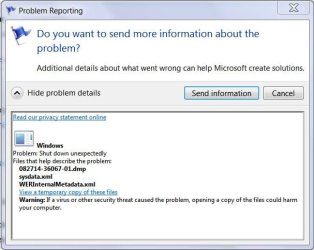
The problem report has been sent to MS:
bsod1.JPG

I'm not sure if it was an indication of the severity of the problem but it took four tries before MS's busy servers accepted the report.

Here's a copy of the .dmp, it was a problem with the win32k.sys - LogonUI.exe files. That's why it BSOD'd at the "starting windows" screen.
Strange, I've never used a log-on, but I would believe Windows needs to check the LogonUI.exe to see if one is needed or not.

Code:
Microsoft (R) Windows Debugger Version 6.11.0001.404 AMD64
Copyright (c) Microsoft Corporation. All rights reserved.

Loading Dump File [C:\Users\Amln0\AppData\Local\Temp\WER3079.tmp\082714-36067-01.dmp]
Mini Kernel Dump File: Only registers and stack trace are available

Symbol search path is: SRV*C:\SymCache*http://msdl.microsoft.com/download/symbols
Executable search path is: 
Windows 7 Kernel Version 7601 (Service Pack 1) MP (4 procs) Free x64
Product: WinNt, suite: TerminalServer SingleUserTS Personal
Built by: 7601.22616.amd64fre.win7sp1_ldr.140303-2307
Machine Name:
Kernel base = 0xfffff800`04054000 PsLoadedModuleList = 0xfffff800`04298890
Debug session time: Wed Aug 27 20:30:18.518 2014 (GMT-4)
System Uptime: 0 days 0:00:47.970
Loading Kernel Symbols
...............................................................
................................................................
......
Loading User Symbols
Loading unloaded module list
...
*******************************************************************************
*                                                                             *
*                        Bugcheck Analysis                                    *
*                                                                             *
*******************************************************************************

Use !analyze -v to get detailed debugging information.

BugCheck 3B, {c0000005, fffff9600029ab0a, fffff880025167a0, 0}

Probably caused by : win32k.sys ( win32k!DEVLOCKBLTOBJ::vClearRenderState+4a )

Followup: MachineOwner
---------

0: kd> !analyze -v
*******************************************************************************
*                                                                             *
*                        Bugcheck Analysis                                    *
*                                                                             *
*******************************************************************************

SYSTEM_SERVICE_EXCEPTION (3b)
An exception happened while executing a system service routine.
Arguments:
Arg1: 00000000c0000005, Exception code that caused the bugcheck
Arg2: fffff9600029ab0a, Address of the exception record for the exception that caused the bugcheck
Arg3: fffff880025167a0, Address of the context record for the exception that caused the bugcheck
Arg4: 0000000000000000, zero.

Debugging Details:
------------------


EXCEPTION_CODE: (NTSTATUS) 0xc0000005 - The instruction at 0x%08lx referenced memory at 0x%08lx. The memory could not be %s.

FAULTING_IP: 
win32k!DEVLOCKBLTOBJ::vClearRenderState+4a
fffff960`0029ab0a ff1500f50b00    call    qword ptr [win32k!_imp_PsGetCurrentThreadWin32Thread (fffff960`0035a010)]

CONTEXT:  fffff880025167a0 -- (.cxr 0xfffff880025167a0)
rax=fffff900c00be010 rbx=fffff88002517450 rcx=fffff88002517400
rdx=fffff88002517450 rsi=fffff900c1d81280 rdi=fffff900c1d67cd0
rip=fffff9600029ab0a rsp=fffff88002517180 rbp=0000000000000000
 r8=0000000000000000  r9=fffff900c1ccd010 r10=fffff900000004c0
r11=fffff900c01e8d40 r12=0000000000000000 r13=fffff9600038e4e0
r14=0000000000000001 r15=fffff900c1cc1b80
iopl=0         nv up ei pl zr na po nc
cs=0010  ss=0018  ds=002b  es=002b  fs=0053  gs=002b             efl=00010246
win32k!DEVLOCKBLTOBJ::vClearRenderState+0x4a:
fffff960`0029ab0a ff1500f50b00    call    qword ptr [win32k!_imp_PsGetCurrentThreadWin32Thread (fffff960`0035a010)] ds:002b:fffff960`0035a010=0000000000306352
Resetting default scope

CUSTOMER_CRASH_COUNT:  1

DEFAULT_BUCKET_ID:  VISTA_DRIVER_FAULT

BUGCHECK_STR:  0x3B

[U][B]PROCESS_NAME[/B][/U]:  [U][B][COLOR=Blue]LogonUI.exe[/COLOR][/B][/U]

CURRENT_IRQL:  0

LAST_CONTROL_TRANSFER:  from fffff9600013a029 to fffff9600029ab0a

STACK_TEXT:  
fffff880`02517180 fffff960`0013a029 : fffff880`02517400 fffff900`c1d81280 00000000`00000000 00000000`00ffffff : win32k!DEVLOCKBLTOBJ::vClearRenderState+0x4a
fffff880`025171b0 fffff960`00139ebd : fffff880`02517400 fffff900`c1d81280 fffff900`c1d81280 00000000`00000000 : win32k!DEVLOCKBLTOBJ::bDisposeTrgDco+0x41
fffff880`025171e0 fffff960`0024519c : fffff900`c1cc1b80 fffff900`c1cc1b80 00000000`746c7847 fffff900`c1cc1b80 : win32k!DEVLOCKBLTOBJ::~DEVLOCKBLTOBJ+0xdd
fffff880`02517210 fffff800`040c77d3 : 00000000`07010284 00000000`0000028b 00000000`00000186 00000000`00000014 : win32k!NtGdiAlphaBlend+0x1900
fffff880`02517610 000007fe`fda33f0a : 00000000`00000000 00000000`00000000 00000000`00000000 00000000`00000000 : nt!KiSystemServiceCopyEnd+0x13
00000000`0018e188 fffff800`040bfb90 : 00000000`00000000 00000000`00000000 00000000`00000000 00000000`00000000 : 0x7fe`fda33f0a
fffff880`02517860 fffff880`02506000 : 00000000`00000000 00000000`00000000 00000000`00000000 00000058`00000001 : nt!KiCallUserMode
fffff880`02517868 00000000`00000000 : 00000000`00000000 00000000`00000000 00000058`00000001 fffff880`02517db0 : 0xfffff880`02506000


FOLLOWUP_IP: 
win32k!DEVLOCKBLTOBJ::vClearRenderState+4a
fffff960`0029ab0a ff1500f50b00    call    qword ptr [win32k!_imp_PsGetCurrentThreadWin32Thread (fffff960`0035a010)]

SYMBOL_STACK_INDEX:  0

SYMBOL_NAME:  win32k!DEVLOCKBLTOBJ::vClearRenderState+4a

FOLLOWUP_NAME:  MachineOwner

MODULE_NAME: win32k

IMAGE_NAME:  win32k.sys

DEBUG_FLR_IMAGE_TIMESTAMP:  53f7e75f

STACK_COMMAND:  .cxr 0xfffff880025167a0 ; kb

FAILURE_BUCKET_ID:  X64_0x3B_win32k!DEVLOCKBLTOBJ::vClearRenderState+4a

BUCKET_ID:  X64_0x3B_win32k!DEVLOCKBLTOBJ::vClearRenderState+4a

Followup: MachineOwner
---------

 

My Computer My Computer

At a glance

Originally Win 7 Hm Prem x64 Ver 6.1.7600 Bui...Intel i3 530 2.93GHz, 2933MHz 2 Cores 4 Logic...6GB of 1,333MHz DDR3 SDRAM32MB Intel Graphics Media Accelerator HD IGChip
Computer type
PC/Desktop
Computer Manufacturer/Model Number
Gateway DX4831-01e (Mid-Tower Desktop)
OS
Originally Win 7 Hm Prem x64 Ver 6.1.7600 Build 7601-SP1 | Upgraded to Windows 10 December 14, 2019
CPU
Intel i3 530 2.93GHz, 2933MHz 2 Cores 4 Logical Processors
Motherboard
Gateway H57M01 133 megahertz
Memory
6GB of 1,333MHz DDR3 SDRAM
Graphics Card(s)
32MB Intel Graphics Media Accelerator HD IGChip
Sound Card
Realtek High Definition Audio
Monitor(s) Displays
Gateway HX2000 20inch TFT active matrix TN
Screen Resolution
1600 x 900 x 59 hertz
Hard Drives
WDC WD10EADS-00M2B0 [HDD] (1000.20 GB) -- drive 0,
HL-DT-ST DVDRAM GH41N [CD-ROM dr]
Four card readers, and Four USB 2.0
PSU
300watts.
Case
Mid-Tower Desktop
Cooling
Stock from Gateway
Keyboard
Natural Ergonomic Keyboard 4000, see Other Info
Mouse
Orig. Gateway wore out now using Insignia USB wired optical
Internet Speed
Vz FIOS 10ms png 57.64Mbps down 65.53Mbps up Speedtest.org
Antivirus
Zamana Anti-logger with Anti-malware, MSE, Windows Firewall,
Browser
IE11.0.9600.19399-Upd ver11.0.135, Firefox 68.0.1 x64
Other Info
System Specs by Belarc.

BIOS: American Megatrends Inc. P01-A0 11/17/2009

Replaced the MS 'Natural' Standard PS/2 Enhanced 101-102 Keyboard with a new Natural Ergonomic Keyboard 4000 on August 1st 2014.

Canon Pixma MG3222 Printer.

Updated to IE11 on 12102015 | Fios Quantum Router g1100

Additional AV: SpywareBlaster, manual Mbam, SAS
It might be worth holding back on this update for a few days, there are a lot of reports on the MS Community Forums about it possibly being the cause of the manual searching for Windows Updates being screwed up this week. The security bulletin for the update also refers to a known issue that is currently being worked on.
 

My Computer My Computer

At a glance

Windows 7 Home Premium 64AMD Phenom II X4 9558GB Corsair XMS3 DDR3Gigabyte Geforce GTX 960 2GB
Computer type
PC/Desktop
Computer Manufacturer/Model Number
Custom build by PC Specialist
OS
Windows 7 Home Premium 64
CPU
AMD Phenom II X4 955
Motherboard
Asus M4A78T-E
Memory
8GB Corsair XMS3 DDR3
Graphics Card(s)
Gigabyte Geforce GTX 960 2GB
Sound Card
SB Audigy
Monitor(s) Displays
BenQ 24"
Screen Resolution
1920 x 1080
Hard Drives
500GB Serial ATA
PSU
1010W Quiet Quad Rail
Case
Antec 900
Cooling
Fenrir
Keyboard
Corsair
Mouse
Logitech
Internet Speed
20mbps
Antivirus
MSE plus MBAM 2.x Free
Browser
Chrome
Other Info
Second desktop different spec but similar level.

My Computer My Computer

At a glance

Originally Win 7 Hm Prem x64 Ver 6.1.7600 Bui...Intel i3 530 2.93GHz, 2933MHz 2 Cores 4 Logic...6GB of 1,333MHz DDR3 SDRAM32MB Intel Graphics Media Accelerator HD IGChip
Computer type
PC/Desktop
Computer Manufacturer/Model Number
Gateway DX4831-01e (Mid-Tower Desktop)
OS
Originally Win 7 Hm Prem x64 Ver 6.1.7600 Build 7601-SP1 | Upgraded to Windows 10 December 14, 2019
CPU
Intel i3 530 2.93GHz, 2933MHz 2 Cores 4 Logical Processors
Motherboard
Gateway H57M01 133 megahertz
Memory
6GB of 1,333MHz DDR3 SDRAM
Graphics Card(s)
32MB Intel Graphics Media Accelerator HD IGChip
Sound Card
Realtek High Definition Audio
Monitor(s) Displays
Gateway HX2000 20inch TFT active matrix TN
Screen Resolution
1600 x 900 x 59 hertz
Hard Drives
WDC WD10EADS-00M2B0 [HDD] (1000.20 GB) -- drive 0,
HL-DT-ST DVDRAM GH41N [CD-ROM dr]
Four card readers, and Four USB 2.0
PSU
300watts.
Case
Mid-Tower Desktop
Cooling
Stock from Gateway
Keyboard
Natural Ergonomic Keyboard 4000, see Other Info
Mouse
Orig. Gateway wore out now using Insignia USB wired optical
Internet Speed
Vz FIOS 10ms png 57.64Mbps down 65.53Mbps up Speedtest.org
Antivirus
Zamana Anti-logger with Anti-malware, MSE, Windows Firewall,
Browser
IE11.0.9600.19399-Upd ver11.0.135, Firefox 68.0.1 x64
Other Info
System Specs by Belarc.

BIOS: American Megatrends Inc. P01-A0 11/17/2009

Replaced the MS 'Natural' Standard PS/2 Enhanced 101-102 Keyboard with a new Natural Ergonomic Keyboard 4000 on August 1st 2014.

Canon Pixma MG3222 Printer.

Updated to IE11 on 12102015 | Fios Quantum Router g1100

Additional AV: SpywareBlaster, manual Mbam, SAS

My Computer My Computer

At a glance

Windows 7 Home Premium 64-BITAMD A8 7200P8GB 1600mhzRadeon R5 (APU) + Radeon R5 M230 2GB Dual Gra...
Computer type
PC/Desktop
Computer Manufacturer/Model Number
ASUS X550ZE
OS
Windows 7 Home Premium 64-BIT
CPU
AMD A8 7200P
Motherboard
N/A
Memory
8GB 1600mhz
Graphics Card(s)
Radeon R5 (APU) + Radeon R5 M230 2GB Dual Graphics
Sound Card
Realtek ALC269 with SonicMaster
Monitor(s) Displays
Laptop Display
Screen Resolution
1920 x 1080 @60hz
Hard Drives
WDC WD50 00LPVX-80V0TT0 (500GB)
PSU
Laptop Charger
Mouse
ARMAGGEDON TEXTRON SCORPION 7
Internet Speed
100 mbps DOWN / 50 mbps UP
Antivirus
Windows Defender
Browser
Mozzila FireFox, Valve Steam in-game internet browser
...actually I've since uninstalled it, not because of problems but I figured why look for possible trouble when I can just eliminate the source of said possible trouble. Overkill/overthinking on my part? Perhaps. But I sleep well at night.
 

My Computer My Computer

At a glance

Win 10 Pro x64, Win 7 Pro x64Intel Core i7-6700HQ Skylake16gb Crucial DDR4NVIDIA GeForce GTX 960M 2 GB
Computer type
Laptop
Computer Manufacturer/Model Number
MSI PE60 6QE
OS
Win 10 Pro x64, Win 7 Pro x64
CPU
Intel Core i7-6700HQ Skylake
Motherboard
MSI MS-16J5
Memory
16gb Crucial DDR4
Graphics Card(s)
NVIDIA GeForce GTX 960M 2 GB
Screen Resolution
1920 x 1080
Hard Drives
Samsung 850 EVO 250 GB M.2 SSD (MZ-N5E250BW)
HGST 1TB @7200 RPM HTS721010A9E630
Case
Plastic
Keyboard
Got one...
Mouse
Yep, one of those too.
Internet Speed
FIOS 75/75
Antivirus
Defender
Browser
Chrome/FFox/Ex-PLODE-r/(L)Edge
Other Info
Defender, Custom Hosts, uBlock, regular backups w/ Macrium (Free)
Back
Top