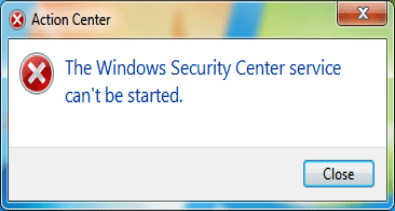
Security centre won't start

lrm537

New member
Member
Local time
5:57 PM
Messages
36
Location
Aberdeen
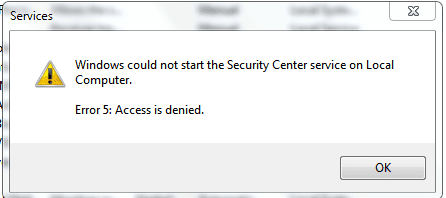
keep getting a warning that security centre will not start, when i try to start it in services i just get another warning that says " windows could not start the security centre on local computer. Error 5: Access is denied". It has not always been like this, it was fine from the begining until recently, it started sometime while i was flipping between AV software to determing which i would prefer, it was between Avast 5 free or Microsoft Sec Es. (i decided on MSE)
I would really like a fix for this as i've been in touch with MS via e-mail with no luck, they had several ideas but none were any use to me.
Thanks
LRM
 

Attachments
  • secserv.PNG
    secserv.PNG
    7.3 KB · Views: 27

My Computer My Computer

At a glance

Windows 7 Home Premium 64Intel Core i3-2350M CPU @ 2.30GHz Sandy Bridge8.00 GB Dual-Channel DDR3 @ 665MHz1024MB GeForce GT 520M
Computer Manufacturer/Model Number
Lenovo Ideapad Z570
OS
Windows 7 Home Premium 64
CPU
Intel Core i3-2350M CPU @ 2.30GHz Sandy Bridge
Motherboard
LENOVO Emerald Lake
Memory
8.00 GB Dual-Channel DDR3 @ 665MHz
Graphics Card(s)
1024MB GeForce GT 520M
Sound Card
Realtek High Definition Audio Intel(R) Display Audio
Monitor(s) Displays
15.6
Screen Resolution
1366x768
Hard Drives
500GB Seagate 2.5" SATA @5400 & a 600GB Lacie external HDD
Mouse
hp
Internet Speed
Never fast enough
Since it is a permission error, there are two things you can try.

1.
In the start menu search, type in 'UAC', and press enter.
Drag slider to the top.
Now try to start the service. If that fails, try my next method.

2.
In the start menu search, type in 'cmd', and press 'Ctrl' + 'Shift' + 'Enter'.
Click yes if prompted.
Type in the command prompt

net user administrator /active:yes

and press enter.
Close the cmd window.
Log off, and you should now have a new profile. Click on it to log in.
(This account gives you the highest privileges)

Now try to start the Security Center service again.
 

My Computer My Computer

At a glance

Windows Seven UltimateAMD Piledriver FX 8320 @ 3.5GHzCrucial Ballistix 8GB 1600 MHz DDR3ASUS GeForce GTX 970 Strix Edition @ 1.114 GHz
Computer type
PC/Desktop
Computer Manufacturer/Model Number
The Dominator?
OS
Windows Seven Ultimate
CPU
AMD Piledriver FX 8320 @ 3.5GHz
Motherboard
ASUS M5A97 EVO R2.0
Memory
Crucial Ballistix 8GB 1600 MHz DDR3
Graphics Card(s)
ASUS GeForce GTX 970 Strix Edition @ 1.114 GHz
Sound Card
Integrated
Monitor(s) Displays
LG 23EA63V 23" IPS 1080p Monitor
Screen Resolution
1920x1080
Hard Drives
Samsung SSD 840 EVO 120 GB
1x WD GreenPower 500GB 7200RPM
1 External HDD 1TB
PSU
Corsair CX500
Case
Zalman Z9 Plus
Cooling
CPU - Corsair Hydro H80i, Case - 3x Aerocool Shark Edition
Keyboard
Xenta Backlit Keyboard (Not very good!)
Mouse
Logitech G400
Internet Speed
Download: 7 mb/s Upload: 0.76 mb/s
Antivirus
Microsoft Security Essentials
Browser
Google Chrome
Other Info
Overclockers UK Desk Pad 89 x 45 cm
1200x730x600mm Desk
Using Virtual Audio Cable to split stereo sound into Audio Technica ATH-M50 headphones and Logitech X-530 speakers.
Since it is a permission error, there are two things you can try.

1.
In the start menu search, type in 'UAC', and press enter.
Drag slider to the top.
Now try to start the service. If that fails, try my next method.

2.
In the start menu search, type in 'cmd', and press 'Ctrl' + 'Shift' + 'Enter'.
Click yes if prompted.
Type in the command prompt

net user administrator /active:yes

and press enter.
Close the cmd window.
Log off, and you should now have a new profile. Click on it to log in.
(This account gives you the highest privileges)

Now try to start the Security Center service again.

If LilDomii's advice does not work, but it should. Bite the bullet do a quick system restore and you will be back in business. I wish you luck with either suggestion
 

My Computer My Computer

At a glance

Windows 10, Home Clean InstallIntel Core2 processsor Q8200(2.33Ghz 1333FSB)...6 gbATI Radeon 256MB HD3650
Computer type
PC/Desktop
Computer Manufacturer/Model Number
Dell XPS 420
OS
Windows 10, Home Clean Install
CPU
Intel Core2 processsor Q8200(2.33Ghz 1333FSB) Quad Core Tech
Motherboard
Dell
Memory
6 gb
Graphics Card(s)
ATI Radeon 256MB HD3650
Sound Card
Intergrated 7.1 Channel Audio
Monitor(s) Displays
Dell SP2009W 20"
Hard Drives
640 GB Serial ATA Hard drive
Cooling
Fan
Keyboard
Dell USB Keyboard
Mouse
Dell Premium Optical USB
Internet Speed
DSL 2.85
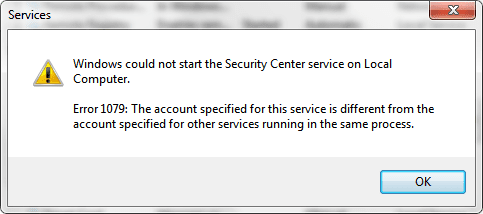
Nothing seems to be working, I'm now getting a different message.
What do you suggest now eh? Come on, somebody must know what to do.
Thank for trying, any more ideas? I'd love to hear 'em.

lrm537
 

Attachments

  • Untitled.png
    Untitled.png
    13.7 KB · Views: 26
  • 1079.png
    1079.png
    9.2 KB · Views: 17

My Computer My Computer

At a glance

Windows 7 Home Premium 64Intel Core i3-2350M CPU @ 2.30GHz Sandy Bridge8.00 GB Dual-Channel DDR3 @ 665MHz1024MB GeForce GT 520M
Computer Manufacturer/Model Number
Lenovo Ideapad Z570
OS
Windows 7 Home Premium 64
CPU
Intel Core i3-2350M CPU @ 2.30GHz Sandy Bridge
Motherboard
LENOVO Emerald Lake
Memory
8.00 GB Dual-Channel DDR3 @ 665MHz
Graphics Card(s)
1024MB GeForce GT 520M
Sound Card
Realtek High Definition Audio Intel(R) Display Audio
Monitor(s) Displays
15.6
Screen Resolution
1366x768
Hard Drives
500GB Seagate 2.5" SATA @5400 & a 600GB Lacie external HDD
Mouse
hp
Internet Speed
Never fast enough
Nothing seems to be working, I'm now getting a different message.
What do you suggest now eh? Come on, somebody must know what to do.
Thank for trying, any more ideas? I'd love to hear 'em.

lrm537

There are several dozen fake anti-virus programs that will cause this. Have you seen any suspicious dialog boxes popping up? I'd suggest the latest Malwarebytes to try to fix it. Otherwise Start, type "ser", select "Services", open Security Center from the right pane, click Logon and make sure it's set to Local Service. If not report back please.
 

My Computer My Computer

At a glance

El Capitan / Windows 10i7-4980HQ16GBIris 5200
Computer type
Laptop
Computer Manufacturer/Model Number
Apple
OS
El Capitan / Windows 10
CPU
i7-4980HQ
Memory
16GB
Graphics Card(s)
Iris 5200
I was about to suggest running a malware scan as well, especially if you were running with an AV package for any period of time as you switched.
 

My Computer My Computer

At a glance

Windows 7 Ultimate x64 SP1Intel Core i7-260012 GB Patriot Extreme DDR3-1333Nvidia GTX 470
OS
Windows 7 Ultimate x64 SP1
CPU
Intel Core i7-2600
Motherboard
Gigabyte GA-P67A-UD3P-B3
Memory
12 GB Patriot Extreme DDR3-1333
Graphics Card(s)
Nvidia GTX 470
Monitor(s) Displays
Dell UltraSharp 2209WA
Hard Drives
OCZ Agility3 240 GB, WD5001AALS, WD7501AALS
PSU
OCZ ModStream 700W
Case
CoolerMaster HAF 912 Advanced
Cooling
CoolerMaster Hyper 212 Plus
Nothing seems to be working, I'm now getting a different message.
What do you suggest now eh? Come on, somebody must know what to do.
Thank for trying, any more ideas? I'd love to hear 'em.

lrm537

Take a look in the "Dependencies" tab for the Security Center service. Note that it is dependent upon the RPC service and a couple of others. These serivices will have to be running before Security Center will start, so check them as well. Also, don't set it to automatic... it needs to be on Automatic Delayed Start... again because these other services have to be running first.

Windows Services are highly interdependant. It is rare that you can simply shut down a Service without secondary consequences to your system. When adjusting services you should always check dependencies before you do anything.
 

My Computer My Computer

At a glance

XP Pro SP3 X86 / Win7 Pro X86Amd 64 x2 4200 (2.4ghz)Kingston DDR2 800 2gbNvidia GF-8400
Computer Manufacturer/Model Number
Homebrew
OS
XP Pro SP3 X86 / Win7 Pro X86
CPU
Amd 64 x2 4200 (2.4ghz)
Motherboard
Asus M2N-MX SE Plus
Memory
Kingston DDR2 800 2gb
Graphics Card(s)
Nvidia GF-8400
Sound Card
Realtek on Motherboard
Monitor(s) Displays
Acer x-193bw
Screen Resolution
1440 x 900
Hard Drives
Western Digital 500g
PSU
350watt In-Win
Case
In-Win
Cooling
Air
Keyboard
yes
Mouse
yes
Internet Speed
5mpbs
Other Info
Also ASRock ION 330 as HTPC (on XP).
Acer Aspire as GP netbook (on XP).
Thanks for the replies, but still nothing seems to sort this out. I have run Malware Bytes, SuperAntiSpyware, and various full scans with MSE and Avast (I did not have MSE & Avast installed at the same time) and all came back clean.
I have changed it back to Automatic Delayed Start, as i had changed it to Automatic Start as per earlier advice on another forum.

Keep em coming folks, don't be shy, i want this annoyance sorted.
 

My Computer My Computer

At a glance

Windows 7 Home Premium 64Intel Core i3-2350M CPU @ 2.30GHz Sandy Bridge8.00 GB Dual-Channel DDR3 @ 665MHz1024MB GeForce GT 520M
Computer Manufacturer/Model Number
Lenovo Ideapad Z570
OS
Windows 7 Home Premium 64
CPU
Intel Core i3-2350M CPU @ 2.30GHz Sandy Bridge
Motherboard
LENOVO Emerald Lake
Memory
8.00 GB Dual-Channel DDR3 @ 665MHz
Graphics Card(s)
1024MB GeForce GT 520M
Sound Card
Realtek High Definition Audio Intel(R) Display Audio
Monitor(s) Displays
15.6
Screen Resolution
1366x768
Hard Drives
500GB Seagate 2.5" SATA @5400 & a 600GB Lacie external HDD
Mouse
hp
Internet Speed
Never fast enough
Try changing the logon to Local System. Click on Start button, then type Services.msc. Right click on the security center service, click on Properties, then in Log On tab, set to Local System.
 
Last edited:

My Computer My Computer

At a glance

Windows 7 x64 pro/ Windows 7 x86 Pro/ XP SP3 x86
Computer Manufacturer/Model Number
Too many to describe...
OS
Windows 7 x64 pro/ Windows 7 x86 Pro/ XP SP3 x86
I eventually just done a repair reinstall. Problem solved.

No repeats do far.

Thanks all.

Sent from my Desire HD using Tapatalk
 

My Computer My Computer

At a glance

Windows 7 Home Premium 64Intel Core i3-2350M CPU @ 2.30GHz Sandy Bridge8.00 GB Dual-Channel DDR3 @ 665MHz1024MB GeForce GT 520M
Computer Manufacturer/Model Number
Lenovo Ideapad Z570
OS
Windows 7 Home Premium 64
CPU
Intel Core i3-2350M CPU @ 2.30GHz Sandy Bridge
Motherboard
LENOVO Emerald Lake
Memory
8.00 GB Dual-Channel DDR3 @ 665MHz
Graphics Card(s)
1024MB GeForce GT 520M
Sound Card
Realtek High Definition Audio Intel(R) Display Audio
Monitor(s) Displays
15.6
Screen Resolution
1366x768
Hard Drives
500GB Seagate 2.5" SATA @5400 & a 600GB Lacie external HDD
Mouse
hp
Internet Speed
Never fast enough
Wow, didn't expect a reply this far from when the issue first occurred. Anyway, very glad it worked out well for you :)
 

My Computer My Computer

At a glance

Windows Seven UltimateAMD Piledriver FX 8320 @ 3.5GHzCrucial Ballistix 8GB 1600 MHz DDR3ASUS GeForce GTX 970 Strix Edition @ 1.114 GHz
Computer type
PC/Desktop
Computer Manufacturer/Model Number
The Dominator?
OS
Windows Seven Ultimate
CPU
AMD Piledriver FX 8320 @ 3.5GHz
Motherboard
ASUS M5A97 EVO R2.0
Memory
Crucial Ballistix 8GB 1600 MHz DDR3
Graphics Card(s)
ASUS GeForce GTX 970 Strix Edition @ 1.114 GHz
Sound Card
Integrated
Monitor(s) Displays
LG 23EA63V 23" IPS 1080p Monitor
Screen Resolution
1920x1080
Hard Drives
Samsung SSD 840 EVO 120 GB
1x WD GreenPower 500GB 7200RPM
1 External HDD 1TB
PSU
Corsair CX500
Case
Zalman Z9 Plus
Cooling
CPU - Corsair Hydro H80i, Case - 3x Aerocool Shark Edition
Keyboard
Xenta Backlit Keyboard (Not very good!)
Mouse
Logitech G400
Internet Speed
Download: 7 mb/s Upload: 0.76 mb/s
Antivirus
Microsoft Security Essentials
Browser
Google Chrome
Other Info
Overclockers UK Desk Pad 89 x 45 cm
1200x730x600mm Desk
Using Virtual Audio Cable to split stereo sound into Audio Technica ATH-M50 headphones and Logitech X-530 speakers.
Wow, didn't expect a reply this far from when the issue first occurred. Anyway, very glad it worked out well for you :)

Yeah, sorry about that. I've been otherwise occupied.

Sent from my Desire HD using Tapatalk
 

My Computer My Computer

At a glance

Windows 7 Home Premium 64Intel Core i3-2350M CPU @ 2.30GHz Sandy Bridge8.00 GB Dual-Channel DDR3 @ 665MHz1024MB GeForce GT 520M
Computer Manufacturer/Model Number
Lenovo Ideapad Z570
OS
Windows 7 Home Premium 64
CPU
Intel Core i3-2350M CPU @ 2.30GHz Sandy Bridge
Motherboard
LENOVO Emerald Lake
Memory
8.00 GB Dual-Channel DDR3 @ 665MHz
Graphics Card(s)
1024MB GeForce GT 520M
Sound Card
Realtek High Definition Audio Intel(R) Display Audio
Monitor(s) Displays
15.6
Screen Resolution
1366x768
Hard Drives
500GB Seagate 2.5" SATA @5400 & a 600GB Lacie external HDD
Mouse
hp
Internet Speed
Never fast enough
Back
Top