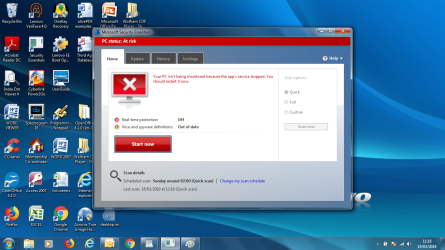
Security Essentials problem

r0bertd

New member
Local time
6:49 PM
Messages
4
I had just updated security essentials. It showed the system was being protected and was up to date. I then tried to run a quick scan. Part way through it fails saying that (both) it was not updated and realtime protection was off Turning these back on does not help. any suggestions?
 

My Computer

Computer type
Laptop
Computer Manufacturer/Model Number
Lenovo
OS
Windows 7 Home Premium 64 bit
Hi r0bertd,

Welcome to SevenForums!

I had just updated security essentials. It showed the system was being protected and was up to date. I then tried to run a quick scan. Part way through it fails saying that (both) it was not updated and realtime protection was off Turning these back on does not help. any suggestions?

Something has obviously got corrupted!
Have you tried un-installing MSE and re-installing it?
 

My Computer

Computer type
Laptop
Computer Manufacturer/Model Number
Fujitsu LIFEBOOK
OS
Win 7 HP SP1 64-bit Vista HB SP2 32-bit Linux Mint 18.3
CPU
Intel(R) Pentium(R) CPU P6200 @ 2.13GHz
Motherboard
FUJITSU FJNBB06
Memory
4.00 GB
Graphics Card(s)
Intel(R) Graphics Media Accelerator HD
Sound Card
[1] Realtek High Definition Audio [2] Intel(R) Display Audio
Screen Resolution
1366 x 768 x 32 bits (4294967296 colors) @ 59 Hz
Hard Drives
TOSHIBA MK5076GSX
Antivirus
AVG FREE
No I have not as yet. The Windows defender finished its scan without finding any malware. If I delete security essentials will it reinstall on machine reboot or is it more complicated. I have attached a screenshot of the failure
 

Attachments

  • Security Essentials failure1.png
    Security Essentials failure1.png
    226.5 KB · Views: 1

My Computer

Computer type
Laptop
Computer Manufacturer/Model Number
Lenovo
OS
Windows 7 Home Premium 64 bit
Hi r0bertd,

No I have not as yet. The Windows defender finished its scan without finding any malware. If I delete security essentials will it reinstall on machine reboot or is it more complicated. I have attached a screenshot of the failure

You should be able to uninstall it from Programs and Features and then run WU [Windows Update] where it should appear.
 

My Computer

Computer type
Laptop
Computer Manufacturer/Model Number
Fujitsu LIFEBOOK
OS
Win 7 HP SP1 64-bit Vista HB SP2 32-bit Linux Mint 18.3
CPU
Intel(R) Pentium(R) CPU P6200 @ 2.13GHz
Motherboard
FUJITSU FJNBB06
Memory
4.00 GB
Graphics Card(s)
Intel(R) Graphics Media Accelerator HD
Sound Card
[1] Realtek High Definition Audio [2] Intel(R) Display Audio
Screen Resolution
1366 x 768 x 32 bits (4294967296 colors) @ 59 Hz
Hard Drives
TOSHIBA MK5076GSX
Antivirus
AVG FREE
Security Essentials

I have uninstalled and re-installed. The scan then went past the previous point but eventually failed again in the same way. I have also done an online scan with Eset antivirus which found no malware. So maybe it is in security essentials. If anyone else has this problem with scan I will be glad to hear (or any other solution)

thanks for your help
 

My Computer

Computer type
Laptop
Computer Manufacturer/Model Number
Lenovo
OS
Windows 7 Home Premium 64 bit
Hi r0bertd,

Unistalling/Reinstalling should have fixed any problems with MSE.

leads me to think there are other issues.
can you run these 2 MS repair tools

sfc /scannow
SFC /SCANNOW Command - System File Checker

SURT

https://www.microsoft.com/en-us/download/details.aspx?id=20858

post the logs for both please


Please be advised support for W7 will cease in January, NO security updates will be offered after that date
By then you will have to use another AV and browser, if you use IE11

i would go for Bitdefender FREE, it is lightweight with has no other features built-in

Roy
 

My Computer

Computer type
PC/Desktop
Computer Manufacturer/Model Number
medionl/Aspire 6930G/acer x55a
OS
W7 home premium 32bit/W7HP 64bit/w10 tp insider ring
CPU
E5300 dual core
Motherboard
medion MS7366
Memory
3gb
Graphics Card(s)
Nvidia Geforce 7100 Nforce 630i
Monitor(s) Displays
avixc
Internet Speed
n (isp resticted to 72)
Antivirus
mse/pands
Browser
palemoon
Other Info
Belkin Fd7050 n USB using Railink RT2870 drivers, more upto date
Sorry! I have given up. Despite there having arrived an update for Security essentials itself as opposed for the virus definitions (kb3068708) it was still failing at random places in the scan. So I have uninstalled Security Essentials and used another antivirus (AVG). So I am not in a position to try these suggestions.

Thank for the ideas.
 

My Computer

Computer type
Laptop
Computer Manufacturer/Model Number
Lenovo
OS
Windows 7 Home Premium 64 bit
Hi r0bertd,

So I have uninstalled Security Essentials and used another antivirus (AVG).
I have used AVG for many years and I have never had a problem with it! :thumbsup:
 

My Computer

Computer type
Laptop
Computer Manufacturer/Model Number
Fujitsu LIFEBOOK
OS
Win 7 HP SP1 64-bit Vista HB SP2 32-bit Linux Mint 18.3
CPU
Intel(R) Pentium(R) CPU P6200 @ 2.13GHz
Motherboard
FUJITSU FJNBB06
Memory
4.00 GB
Graphics Card(s)
Intel(R) Graphics Media Accelerator HD
Sound Card
[1] Realtek High Definition Audio [2] Intel(R) Display Audio
Screen Resolution
1366 x 768 x 32 bits (4294967296 colors) @ 59 Hz
Hard Drives
TOSHIBA MK5076GSX
Antivirus
AVG FREE
I had just updated security essentials. It showed the system was being protected and was up to date. I then tried to run a quick scan. Part way through it fails saying that (both) it was not updated and realtime protection was off Turning these back on does not help. any suggestions?

Its not just you its affecting all users of Windows 7 and 8.1, due to the recent definition updates. I got this even on my 8.1 machine, 10 is fine though.

Windows 7, 8, 8.1 Windows Defender und Security Essentials mit Problemen (19.03.) [Update] | Deskmodder.de

Translate it via google.
 

My Computer

Computer type
PC/Desktop
OS
8.1
Back
Top