
UPDATE: I went to the .exe and checked my permissions, I had no "special" permissions just read/write iirc. Set my access to full control and ran the .exe directly (no shortcut) still doesn't work properly. Neither does running as administrator. I should also mention that I'm able to copy files into there without any problem...So now I have no idea what it's doing. One weird thing I noticed though was that my user folder has a padlock on it...doesn't seem to make any difference, but again I don't remember that ever being there on my previous installation.
Okay, so I have my new PC up and running.
Windows 7 installed fine, set it up as far as I can tell exactly how I have every time before...however I think I'm still having problems with being the "total admin".
I run an Authoring Tool for E-Learning and it ran fine on my previous PC/Win7 installation. Now it was refusing me access to the temp folder.
I looked into the permissions for it and found the following:
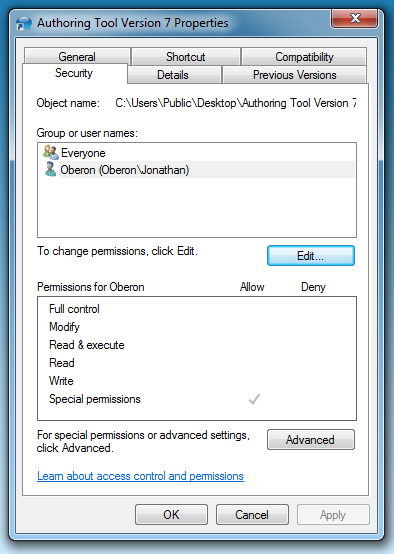
The everyone group has full permission, but when I look at my account/group I only have "special permission". Just...wtf? I'm the only user on this PC, I don't seem to have a problem with anything else, but why if I'm the "admin" (and only user) do I not have full permissions for everything?
Now, I set my permission to "full control", but "special permissions" is still ticked. The problem is that this program writes to the temp folder when you want to preview your work and it's giving me:
Access Denied to "file:///C:/Users/Jonathan/AppData/Local/Temp/"
Is there a simple way to just kick Win7 in the arse and give me administrator access, will full control and none of this sneaky "special permissions" bs?
Am I not set up as the "primary" administrator?
Am I set up as just a user with admin power?
Am I somehow a member of the wrong group?
How did I end up restricting my OWN access to stuff?
It's possible I had to fix this on my last PC, but it's been so long I honestly don't remember.
- Now to be clear, while getting this to work would be great, what I'm really after is setting Win7 so I NEVER HAVE TO SET ACCESS FOR ANYTHING EVER AGAIN. + Now to be clear, while getting this to work would be great, what I'm really after is setting Win7 so I never have to set access to anything again?
Apologies for somewhat angry post, but I'm really sick of Windows trying to fight me every step of the way +
+
p.s. I realise I can enable the "master admin" account or whatever it is, but I don't think I did that on my last install; as I still had the option to "run as administrator" on my right-click menus...
Okay, so I have my new PC up and running.
Windows 7 installed fine, set it up as far as I can tell exactly how I have every time before...however I think I'm still having problems with being the "total admin".
I run an Authoring Tool for E-Learning and it ran fine on my previous PC/Win7 installation. Now it was refusing me access to the temp folder.
I looked into the permissions for it and found the following:
The everyone group has full permission, but when I look at my account/group I only have "special permission". Just...wtf? I'm the only user on this PC, I don't seem to have a problem with anything else, but why if I'm the "admin" (and only user) do I not have full permissions for everything?
Now, I set my permission to "full control", but "special permissions" is still ticked. The problem is that this program writes to the temp folder when you want to preview your work and it's giving me:
Access Denied to "file:///C:/Users/Jonathan/AppData/Local/Temp/"
Is there a simple way to just kick Win7 in the arse and give me administrator access, will full control and none of this sneaky "special permissions" bs?
Am I not set up as the "primary" administrator?
Am I set up as just a user with admin power?
Am I somehow a member of the wrong group?
How did I end up restricting my OWN access to stuff?
It's possible I had to fix this on my last PC, but it's been so long I honestly don't remember.
- Now to be clear, while getting this to work would be great, what I'm really after is setting Win7 so I NEVER HAVE TO SET ACCESS FOR ANYTHING EVER AGAIN. + Now to be clear, while getting this to work would be great, what I'm really after is setting Win7 so I never have to set access to anything again?
Apologies for somewhat angry post, but I'm really sick of Windows trying to fight me every step of the way
+ p.s. I realise I can enable the "master admin" account or whatever it is, but I don't think I did that on my last install; as I still had the option to "run as administrator" on my right-click menus...
Last edited:
My Computer
At a glance
Win 7 64
- Computer type
- PC/Desktop
- Computer Manufacturer/Model Number
- Custom
- OS
- Win 7 64


