

- Local time
- 8:07 AM
- Messages
- 231
Windows 7 Home Premium, 64 bit. I am the administrator (although an admin. password was never set up). For no obvious reason I am now often told I don't have permission for simple operations such as moving a file from one folder to another. Then I get a momentray black screen then "Do you want this program to alter your computer". After that sometimes I can carry out the operation, sometimes I am told I don't have permission and must abort the operation. This happens with other operations which I can't remember at the moment.
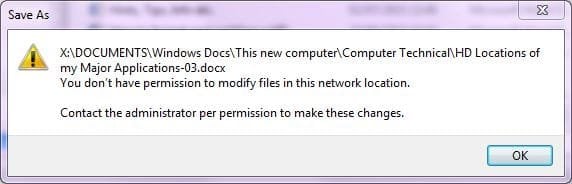
Word is a particular nuisance. If I open and amend a Word file and try to save it under the same name by pressing CTRL + S and it saves immediatley. Abnormally, instead of the save being carried out, I am offered a Save D. Box with the file name in it. If I then choose Save I get the error as in the attachment to this post. I must assign another name which I do. The save is then successful. But then I can't delete the old file ("You do not have permission"). This happens every time. My machine is getting littered with un-deletable Word files. (No problem with Notepad nor, I think, with other programs).
I have User Account Control Settings set at default ("Always norify..."). (In any case, that just involves changes being made to Windows.)
How can I get back to normal please?
Thanks.
EDIT: In one folder, (not others) when trying to delete a Word file, I get a D. Box that mentions networks. I am not on a network! (Please see second attachment.)
Word is a particular nuisance. If I open and amend a Word file and try to save it under the same name by pressing CTRL + S and it saves immediatley. Abnormally, instead of the save being carried out, I am offered a Save D. Box with the file name in it. If I then choose Save I get the error as in the attachment to this post. I must assign another name which I do. The save is then successful. But then I can't delete the old file ("You do not have permission"). This happens every time. My machine is getting littered with un-deletable Word files. (No problem with Notepad nor, I think, with other programs).
I have User Account Control Settings set at default ("Always norify..."). (In any case, that just involves changes being made to Windows.)
How can I get back to normal please?
Thanks.
EDIT: In one folder, (not others) when trying to delete a Word file, I get a D. Box that mentions networks. I am not on a network! (Please see second attachment.)
Attachments

My Computer
At a glance
Windows 7 Home Premium 64bitIntel Pentium Edition G3220 3.0 GHz8 GB DDR3 1600 MHz DIMMNot Known
- Computer type
- PC/Desktop
- Computer Manufacturer/Model Number
- Gigabyte ATX case with 500 W power supply GZ-M1
- OS
- Windows 7 Home Premium 64bit
- CPU
- Intel Pentium Edition G3220 3.0 GHz
- Motherboard
- Gigabyte Socket 1150 MicroATX Mot Ultra Durable, GA-H81M-S2H
- Memory
- 8 GB DDR3 1600 MHz DIMM
- Graphics Card(s)
- Not Known
- Sound Card
- Not known
- Monitor(s) Displays
- Samsung LS24D590 23.6"
- Screen Resolution
- 1920 x 1080
- Hard Drives
- 256 GB Solid State Drive (C: on which Windows 7 is installed)-
1 TB internal conventional HD (X:)-
Two WD "Elements" " 2TB USB drives as backups
- PSU
- 500 W
- Case
- Gigabyte ATX case
- Cooling
- Several fans!
- Keyboard
- Accuratus 301 USB Compact, white.
- Mouse
- Microsoft Basic Optical Mouse v2.0, two-button, tethered
- Internet Speed
- 10 to 12 Mb per second
- Antivirus
- Kaspersky Internet Security 2016, Malwarebytes (paid)
- Browser
- Firefox (ocassionally Safari)
- Other Info
- The 256 GB SSD (C:) also has Adobe Photoshop CS6 and InDesign CS6, MS Office, Adobe Lightroom, and other small programs.


