Security Warning Using Every Shortcut

Budfudder

New member
Local time
9:17 AM
Messages
10
Yesterday my Windows 7 (64-bit) machine installed some Windows updates, including a few which are described as 'Security Update'.

Since then whenever I try to start an application from a shortcut I have configured in my Favourites bar or from some (and only some) menu items, I get the standard "Do you want to open this file?" security warning. I have to click 'Open' and then the app happily proceeds. There's no "Always ask for this type of file" checkbox, so I can't get rid of it. It's extremely annoying.

I've tried a couple of solutions I found on the internet:

  • run "ICACLS "C:\Users\\Desktop" /Setintegritylevel (OI)(CI)M" at the command line
  • change the security settings on IE to Medium
None of them worked. I really don't want to muck about uninstalling updates - presumably they are serving some useful purpose (apart from just annoying me). So how do I fix this?
 

My Computer

OS
Windows 7 Home Premium 64 bit

My Computer

Computer type
Laptop
Computer Manufacturer/Model Number
Employer provided Dell Latitude
OS
W7 Pro SP1 64bit
CPU
i7
Memory
8GB
Graphics Card(s)
Intel HD Graphics
Hard Drives
crappy SSD
Antivirus
Employer mandated Symantec Endpoint Protection
Browser
Pale Moon 64bit, IE11 64bit & Chrome 64bit
For one of the problematic shortcuts, what do you see when you ask for:
Code:
ICACLS [I]path-to-shortcut[/I]

Can you please post a screenshot of that ICACLS query using these steps:
http://www.sevenforums.com/tutorials/9733-screenshots-files-upload-post-seven-forums.html

Are the shortcuts on the public desktop impacted - or only on the user's desktop?
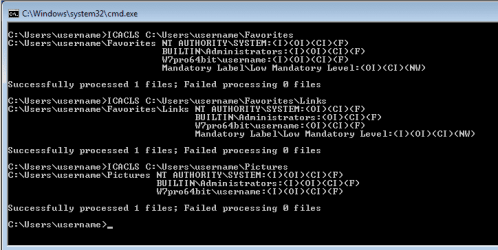
Some of the shortcuts affected are those in my Favourites. When I run ICACLS for that folder I get this:


Code:
ICACLS "C:\Users\user_name\pictures\favorites\links"

"C:\Users\user_name\pictures\favorites\links" NT AUTHORITY\SYSTEM: (I)(OI)(CI)(F)
                                              BUILTIN\Administrators:(I)(OI)(CI)(F)
                                              GL\user_name:(I)(OI)(CI)(F)
                                              Mandatory Label\Medium Mandatory Level:(OI)(CI)(NW)

Successfully processed 1 files; Failed processing 0 files
 

My Computer

OS
Windows 7 Home Premium 64 bit
You could try this

Right tick on the icon and select Advanced. Some icons will give you a option to check Run as admin.
 

My Computer

Computer type
PC/Desktop
Computer Manufacturer/Model Number
Home made Desktop
OS
Windows 10 Pro. 64/ version 1709 Windows 7 Pro/64
CPU
Intel i7-6800K @ 4.3
Motherboard
ASUS X-99 Deluxe II
Memory
Corsair Platinum 16 gig @2400
Graphics Card(s)
EVGA GTX 1070 OC
Monitor(s) Displays
Asus 27" LED LCD/VE278Q
Screen Resolution
1920-1080 or 1280-720 HDMI
Hard Drives
INTEL SSD 730-240 Gb Sata 3.0/
PSU
EVGA Platium 1200W
Case
Phanteks Luxe Tempered Glass 8 fans/ one radiator
Cooling
XSPC/ Water Cooled CPU
Keyboard
Das 4 Professional
Mouse
Logitech M705/MX Anywhere 2-S
Internet Speed
100 mbits
Antivirus
Microsoft Security Essentials/ Malwarebytes Premium 3.0/ SAS
Browser
I.E. 11 default/Firefox/ ISP Time Warner Cable/Spectrum
Other Info
LG BluRay Burner/
Sound system-KLipsch-THX/
Icy Dock ssd Hot Swap bays.
The permissions look fine. The integrity level is normally low, but I understand why you changed it to medium.

Let's see if other forum members have a solution to this.
 

My Computer

Computer type
Laptop
Computer Manufacturer/Model Number
Employer provided Dell Latitude
OS
W7 Pro SP1 64bit
CPU
i7
Memory
8GB
Graphics Card(s)
Intel HD Graphics
Hard Drives
crappy SSD
Antivirus
Employer mandated Symantec Endpoint Protection
Browser
Pale Moon 64bit, IE11 64bit & Chrome 64bit
Please pick one of the problematic shortcuts and run the ICACLS command against the shortcut file itself.
 

My Computer

Computer type
Laptop
Computer Manufacturer/Model Number
Employer provided Dell Latitude
OS
W7 Pro SP1 64bit
CPU
i7
Memory
8GB
Graphics Card(s)
Intel HD Graphics
Hard Drives
crappy SSD
Antivirus
Employer mandated Symantec Endpoint Protection
Browser
Pale Moon 64bit, IE11 64bit & Chrome 64bit
Please pick one of the problematic shortcuts and run the ICACLS command against the shortcut file itself.
I did that - here's the commands:

Code:
C:\Users\user_name>ICACLS "C:\Users\user_name\Pictures\Favorites\Links\Explorer.lnk" /Setintegritylevel (OI)(CI)M"
processed file: C:\Users\user_name\Pictures\Favorites\Links\Explorer.lnk
Successfully processed 1 files; Failed processing 0 files

C:\Users\user_name>ICACLS "C:\Users\user_name\Pictures\Favorites\Links\Explorer.lnk"

C:\Users\user_name\Pictures\Favorites\Links\Explorer.lnk NT AUTHORITY\SYSTEM:(I)(F)
                                                         BUILTIN\Administrators:(I)(F)
                                                         GL\user_name:(I)(F)
                                                         Mandatory Label\Low Mandatory Level:(NW)

Successfully processed 1 files; Failed processing 0 files

Sadly, it changed nothing. When I clicked the link I still got the same security warning.
 

My Computer

OS
Windows 7 Home Premium 64 bit
I have a Virtual Machine running W7 pro 64bit. That VM only has SP1 installed, so it does not have recent updates.

This is what I see when I query with ICACLS:

IL.PNG

If I add a shortcut to explorer.exe to the folder named Links, that shortcut will have a LOW integrity level. Using the shortcut gives me the security prompt that you described. If I change the integrity level of that shortcut to MEDIUM, then the prompt will not appear.

I'm not sure how you were able to use a shortcut to explorer from IE's Favorites bar (Links folder) without getting that prompt in the past.
 

My Computer

Computer type
Laptop
Computer Manufacturer/Model Number
Employer provided Dell Latitude
OS
W7 Pro SP1 64bit
CPU
i7
Memory
8GB
Graphics Card(s)
Intel HD Graphics
Hard Drives
crappy SSD
Antivirus
Employer mandated Symantec Endpoint Protection
Browser
Pale Moon 64bit, IE11 64bit & Chrome 64bit
I have a Virtual Machine running W7 pro 64bit. That VM only has SP1 installed, so it does not have recent updates.

This is what I see when I query with ICACLS:

View attachment 381519

If I add a shortcut to explorer.exe to the folder named Links, that shortcut will have a LOW integrity level. Using the shortcut gives me the security prompt that you described. If I change the integrity level of that shortcut to MEDIUM, then the prompt will not appear.

I'm not sure how you were able to use a shortcut to explorer from IE's Favorites bar (Links folder) without getting that prompt in the past.
So should I change the security level? Sorry, this conversation is getting a little out of my depth.
 

My Computer

OS
Windows 7 Home Premium 64 bit
I don't understand all of this either. I keep several shortcuts on IE's Favorites bar. Each of those shortcuts has a LOW integrity level... and yet, I do not see the security warning that you see for those shortcuts.

I was able to replicate the security warning by placing a shortcut to Explorer on the Favorites bar. I have a theory as to why I do not always see the security warning, but let's not go there.

You can change the integrity level for each shortcut that you deem is safe. Explorer should be safe to launch from the Favorites bar.

ICACLS path-to-the-shortcut-file.LNK /Setintegritylevel M
 
Last edited:

My Computer

Computer type
Laptop
Computer Manufacturer/Model Number
Employer provided Dell Latitude
OS
W7 Pro SP1 64bit
CPU
i7
Memory
8GB
Graphics Card(s)
Intel HD Graphics
Hard Drives
crappy SSD
Antivirus
Employer mandated Symantec Endpoint Protection
Browser
Pale Moon 64bit, IE11 64bit & Chrome 64bit
I don't understand all of this either. I keep several shortcuts on IE's Favorites bar. Each of those shortcuts has a LOW integrity level... and yet, I do not see the security warning that you see for those shortcuts.

I was able to replicate the security warning by placing a shortcut to Explorer on the Favorites bar. I a theory as to why I do not always see the security warning, but let's not go there.

You can change the integrity level for each shortcut that you deem is safe. Explorer should be safe to launch from the Favorites bar.

ICACLS path-to-the-shortcut-file.LNK /Setintegritylevel M

Thanks. I just tried that and it seemed to work. So now I have to go through my entire menu and do it for all of the shortcuts that are throwing this security warning? What a pain. And why are only some of them throwing it? And why did it all start after a recent update?
 

My Computer

OS
Windows 7 Home Premium 64 bit
There might be a better way to to change the integrity level for each item...

ICACLS path-to-the-shortcut-file/*.* /Setintegritylevel M

...should change each item in a give folder. If you have lots of different folders (like I do), then you might want to wait and see if someone knows how to make ICACLS change things in sub-folders.

See if you can find common ground for the shortcuts that are throwing this warning. Perhaps it only happens on shortcuts that directly start an EXE file (like your explorer shortcut does).

I have no idea which update (if any) could have caused this. Let's wait and see if other forum members see this happening too.
 

My Computer

Computer type
Laptop
Computer Manufacturer/Model Number
Employer provided Dell Latitude
OS
W7 Pro SP1 64bit
CPU
i7
Memory
8GB
Graphics Card(s)
Intel HD Graphics
Hard Drives
crappy SSD
Antivirus
Employer mandated Symantec Endpoint Protection
Browser
Pale Moon 64bit, IE11 64bit & Chrome 64bit
I don't understand all of this either. I keep several shortcuts on IE's Favorites bar. Each of those shortcuts has a LOW integrity level... and yet, I do not see the security warning that you see for those shortcuts.

I was able to replicate the security warning by placing a shortcut to Explorer on the Favorites bar. I have a theory as to why I do not always see the security warning, but let's not go there.

You can change the integrity level for each shortcut that you deem is safe. Explorer should be safe to launch from the Favorites bar.

ICACLS path-to-the-shortcut-file.LNK /Setintegritylevel M

I did that, and it worked...so now I have to go through and do it for every shortcut? What a pain. I wish I knew why it suddenly started happening.
 

My Computer

OS
Windows 7 Home Premium 64 bit
The wildcard info in post #12 should change every shortcut in a folder with one operation.
 

My Computer

Computer type
Laptop
Computer Manufacturer/Model Number
Employer provided Dell Latitude
OS
W7 Pro SP1 64bit
CPU
i7
Memory
8GB
Graphics Card(s)
Intel HD Graphics
Hard Drives
crappy SSD
Antivirus
Employer mandated Symantec Endpoint Protection
Browser
Pale Moon 64bit, IE11 64bit & Chrome 64bit
Does anybody have any more information on what might be causing this? At the moment I'm having to explicitly change the permissions for every single shortcut in my menu before it will work without me having to go through the security screen every time.
 

My Computer

OS
Windows 7 Home Premium 64 bit
Back
Top