Solved Sent mail ends up in Outbox

Trident1

New member
Local time
8:27 AM
Messages
117
I recently attempted to send four messages using Windows Live Mail. They did not appear in the "Sent" folder, but in the Outbox. I usually send the "TO" to myself and the others in BCC. I dragged the three from the Outbox to the Sent folder. This has occurred on several occasions - am I doing something wrong?
 

My Computer My Computer

Computer type
PC/Desktop
Computer Manufacturer/Model Number
Custom
OS
Windows 7 Professional, 32bit
CPU
intel Core i5, i5 3570 3.4GHZ, 6MB Quad Core
Motherboard
Asus P8B75-V, LGA 1155
Memory
4GB, (2x2GB) 240 Pin DDR3, 1333Mhz
Graphics Card(s)
on board
Sound Card
Audigy
Monitor(s) Displays
Samsung 21"
Hard Drives
WD 500GB 7200 RPM, 16NB Cache SATA
PSU
Corsair 600W
Case
Cooler Master Storm Scout
Keyboard
MS
Mouse
MS Optical
Antivirus
MS Security Essentials
Browser
IE 10, and Firefox ver. 24

My Computer My Computer

Computer Manufacturer/Model Number
Look in my Signature.
OS
Win7 H.Prem. 32bit+SP1
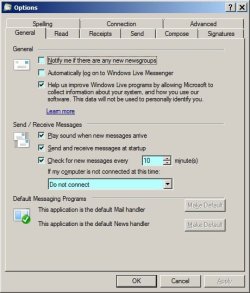
Hello, Roderunner.
"open the 'Send' tab on the 'Options' image in my PDF. WLM Options.pdf
-
It should look like this:-"

Sorry to say, I'm at a loss at your suggestion. Where do I find WLM Options. pdf? The image you sent reminds me of one I used to see when accessing Internet Options in WindowsXP. The Options I see in WLM are quite different, and the Options in IE do not show a "Send" tab.
 

My Computer My Computer

Computer type
PC/Desktop
Computer Manufacturer/Model Number
Custom
OS
Windows 7 Professional, 32bit
CPU
intel Core i5, i5 3570 3.4GHZ, 6MB Quad Core
Motherboard
Asus P8B75-V, LGA 1155
Memory
4GB, (2x2GB) 240 Pin DDR3, 1333Mhz
Graphics Card(s)
on board
Sound Card
Audigy
Monitor(s) Displays
Samsung 21"
Hard Drives
WD 500GB 7200 RPM, 16NB Cache SATA
PSU
Corsair 600W
Case
Cooler Master Storm Scout
Keyboard
MS
Mouse
MS Optical
Antivirus
MS Security Essentials
Browser
IE 10, and Firefox ver. 24
Just click the blue link.
 

My Computer My Computer

Computer Manufacturer/Model Number
Look in my Signature.
OS
Win7 H.Prem. 32bit+SP1
Okay, will try later when I get home. Thanks!
 

My Computer My Computer

Computer type
PC/Desktop
Computer Manufacturer/Model Number
Custom
OS
Windows 7 Professional, 32bit
CPU
intel Core i5, i5 3570 3.4GHZ, 6MB Quad Core
Motherboard
Asus P8B75-V, LGA 1155
Memory
4GB, (2x2GB) 240 Pin DDR3, 1333Mhz
Graphics Card(s)
on board
Sound Card
Audigy
Monitor(s) Displays
Samsung 21"
Hard Drives
WD 500GB 7200 RPM, 16NB Cache SATA
PSU
Corsair 600W
Case
Cooler Master Storm Scout
Keyboard
MS
Mouse
MS Optical
Antivirus
MS Security Essentials
Browser
IE 10, and Firefox ver. 24
I recently attempted to send four messages using Windows Live Mail. They did not appear in the "Sent" folder, but in the Outbox. I usually send the "TO" to myself and the others in BCC. I dragged the three from the Outbox to the Sent folder. This has occurred on several occasions - am I doing something wrong?

Usually when an email goes to the outbox it is because it could not send it. Look at the email and see if the Send button is still dark color to send or highlighted out
If it looks like you can still hit the send tab then something in the address is incorrect
Normally WLM will show you on on the right bottom side of the program the error msg and you can click it to see why your email cannot go out
 

My Computer My Computer

Computer type
PC/Desktop
Computer Manufacturer/Model Number
Dell Computers
OS
Windows 7 Pro 32/64 bit and Windows 10 Pro 32 Bit/64bit
Memory
4gigs
Graphics Card(s)
AMD Radeon HD and Nvidia
Monitor(s) Displays
Samsung 24". INC 19". Dell 22 ". Dell 17" & 19"
Roderunner: Made one change, under the "General tab" Now I'll wait to receive an e-mail with graphics and see if it can be sent.

robin9: The "Sent" button is dark, but there was nothing there. I'll try roderunner's link (corrections) and see what happens the next time I receive an e-mail with several graphics.

Thanks, guys!
 

My Computer My Computer

Computer type
PC/Desktop
Computer Manufacturer/Model Number
Custom
OS
Windows 7 Professional, 32bit
CPU
intel Core i5, i5 3570 3.4GHZ, 6MB Quad Core
Motherboard
Asus P8B75-V, LGA 1155
Memory
4GB, (2x2GB) 240 Pin DDR3, 1333Mhz
Graphics Card(s)
on board
Sound Card
Audigy
Monitor(s) Displays
Samsung 21"
Hard Drives
WD 500GB 7200 RPM, 16NB Cache SATA
PSU
Corsair 600W
Case
Cooler Master Storm Scout
Keyboard
MS
Mouse
MS Optical
Antivirus
MS Security Essentials
Browser
IE 10, and Firefox ver. 24
Good luck and let us know if it worked
 

My Computer My Computer

Computer type
PC/Desktop
Computer Manufacturer/Model Number
Dell Computers
OS
Windows 7 Pro 32/64 bit and Windows 10 Pro 32 Bit/64bit
Memory
4gigs
Graphics Card(s)
AMD Radeon HD and Nvidia
Monitor(s) Displays
Samsung 24". INC 19". Dell 22 ". Dell 17" & 19"
Changing that one option (under General) seems to have corrected the problem. Thanks again!
 

My Computer My Computer

Computer type
PC/Desktop
Computer Manufacturer/Model Number
Custom
OS
Windows 7 Professional, 32bit
CPU
intel Core i5, i5 3570 3.4GHZ, 6MB Quad Core
Motherboard
Asus P8B75-V, LGA 1155
Memory
4GB, (2x2GB) 240 Pin DDR3, 1333Mhz
Graphics Card(s)
on board
Sound Card
Audigy
Monitor(s) Displays
Samsung 21"
Hard Drives
WD 500GB 7200 RPM, 16NB Cache SATA
PSU
Corsair 600W
Case
Cooler Master Storm Scout
Keyboard
MS
Mouse
MS Optical
Antivirus
MS Security Essentials
Browser
IE 10, and Firefox ver. 24
Happy surfing.
 

My Computer My Computer

Computer Manufacturer/Model Number
Look in my Signature.
OS
Win7 H.Prem. 32bit+SP1
Back
Top