Solved Alternative Hotmail programme When Windows Live Mail Ends In June 2016

Chris Nicola

New member
Power User
VIP
Local time
2:52 AM
Messages
170
I was sad to receive the following message from Microsoft today by e mail. It appears that in June WLM will no longer be able to synchronise my Hotmail account.

https://support.office.com/en-gb/ar...bbb-88ca-f8ec74f8e8fd?ui=en-US&rs=en-GB&ad=GB

I need to keep my e mail store and contacts. Does anyone know of a free programme that runs on Win 7 and can sync Hotmail/Gmail and can import my contacts and old e mail message store from WLM? I Know Outlook 2016 will work but I was hoping a free programme is available.

Kind Regards
Chris
 

My Computer My Computer

Computer type
PC/Desktop
Computer Manufacturer/Model Number
Desktop Custom built, Laptop Lenovo G575 Model 20081
OS
Desktop Win 10 Pro 64 bit, Laptop Win 7 Home 64 bit
CPU
Desktop Intel i7 4790 CPU 3.6 GHz, Laptop AMD C-50 1GHz
Motherboard
ASUS H81 Gamer
Memory
Desktop 16 Gbt, Laptop 4 Gbt
Graphics Card(s)
Desktop nvidea GeForce NTX960, Laptop AMD Raedon HD 6250M
Sound Card
Desktop onboard Realtec high definition audio nvidea HD aud
Monitor(s) Displays
BENQ G900 Digital 19 inch
Screen Resolution
1024 x 768
Hard Drives
Silicon Power SSD SATA 3.0 450b Gbt
Seagate 4 Tbt SSHD
PSU
Thermaltake 1000W
Case
Thermaltake
Cooling
Onboard case fans
Keyboard
Standard PS/2
Mouse
A4 Tech optical wireless PS/2
Internet Speed
10 Mbps
Antivirus
Microsoft Security Essentials
Other Info
DVD Samsung TSST corp CDDVDW - SATA
Try free eM Client. It can be installed as "non-default" email client for testing.

Email Client for Outlook.com | eM Client

Note: Personally I don't use outlook.com or hotmail accounts.

I do use it with gmail and one other webmail provider.
 

My Computer My Computer

Computer type
Laptop
Computer Manufacturer/Model Number
ASUS
OS
Microsoft Windows 7 Home Premium 64-bit 7601 Multiprocessor Free Service Pack 1
CPU
AMD C-60 APU with Radeon(tm) HD Graphics
Motherboard
ASUSTeK COMPUTER INC. X501U
Memory
4.00 GB
Graphics Card(s)
AMD Radeon HD 6290 Graphics
Sound Card
(1) AMD High Definition Audio Device (2) Realtek High Defi
Screen Resolution
1366 x 768 x 32 bits (4294967296 colors) @ 60 Hz
Hard Drives
Hitachi HTS545050A7E380 SATA Disk Device
Antivirus
Comodo CIS & FW, SecureAplus App Whitelisting, Threatfire
Browser
Cyberfox 64bit, Opera 64bit, Airfox
Other Info
Spy-The-Spy, HitmanPro.Alert, Norton Connect Safe, MJRegWatcher, BitDefender TrafficLight, Voodoo Shield, Zemana AntiMalware
Thanks I will check it out.

Kind regards
Chris
 

My Computer My Computer

Computer type
PC/Desktop
Computer Manufacturer/Model Number
Desktop Custom built, Laptop Lenovo G575 Model 20081
OS
Desktop Win 10 Pro 64 bit, Laptop Win 7 Home 64 bit
CPU
Desktop Intel i7 4790 CPU 3.6 GHz, Laptop AMD C-50 1GHz
Motherboard
ASUS H81 Gamer
Memory
Desktop 16 Gbt, Laptop 4 Gbt
Graphics Card(s)
Desktop nvidea GeForce NTX960, Laptop AMD Raedon HD 6250M
Sound Card
Desktop onboard Realtec high definition audio nvidea HD aud
Monitor(s) Displays
BENQ G900 Digital 19 inch
Screen Resolution
1024 x 768
Hard Drives
Silicon Power SSD SATA 3.0 450b Gbt
Seagate 4 Tbt SSHD
PSU
Thermaltake 1000W
Case
Thermaltake
Cooling
Onboard case fans
Keyboard
Standard PS/2
Mouse
A4 Tech optical wireless PS/2
Internet Speed
10 Mbps
Antivirus
Microsoft Security Essentials
Other Info
DVD Samsung TSST corp CDDVDW - SATA
You can always try:

Mozilla Thunderbird Email Client

It's quite comprehensive, and if you already use any Mozilla software (cough*Firefox*cough) it's quite easy to learn. Supports POP3 and IMAP protocols, can use hardware acceleration for faster rending, You can easily switch accounts for composing emails, and multiple adress books, supports Outlook.com, Gmail, Yahoo and many others (as long as they support above protocols).

I know, I sound like a fanboy, but I use it, and I love it.

You got two options anyway, the best one is the one that suits you ;)
 

My Computer My Computer

Computer type
PC/Desktop
Computer Manufacturer/Model Number
Assembled Desktop PC
OS
Microsoft Windows 7 Home Premium SP1 64-bit Build 7600
CPU
AMD Athlon 64 X2 5200+ Dual Core CPU @ 2.7 Ghz (Brisbane)
Motherboard
PCChips A13G+ v3.0
Memory
2x2 GB DDR2 PC-5300 (667 Mhz) Kingston ValueRAM
Graphics Card(s)
XFX ATI Radeon HD 4350 GPU (512 MB + 512 MB HM)
Sound Card
Realtek High Definition Audio Driver ALC660 @ MCP61S
Monitor(s) Displays
HP S2031 20" LED HD Widescreen Display Monitor
Screen Resolution
1600 x 900 px
Hard Drives
Maxtor Diamond Max 10 (160 GB, 7200 RPM, SATA-II Hard Disk)
Western Digital Scorpion Blue (250 GB, 5400 RPM, SATA-II External Hard Disk - Personal Data)
Toshiba MQ01ABD050 (500 GB, 5400 RPM, SATA-II External Hard Disk - Software & ISOs)
PSU
Pixxo Transformer 850W 80+ Certification PSU
Case
Compaq 5BW353 Case
Cooling
Many solutions, see other info...
Keyboard
Green Leaf (Mitzu) Standard Keyboard
Mouse
Microsoft USB Lasser Pointing Device
Internet Speed
10 MB
Antivirus
Avast Antivirus Free
Browser
Firefox, Chrome, Internet Explorer
Other Info
Windows Experience Index Result: 3.8 of 7.9.

Cooling solutions:
- AVC @ 2000/5000 RPM Copper Heatpipes (For Athlon 64 X2 6000+ CPU used in an Athlon 64 X2 5200+)
- Rear Fan 80 mm @ 2700 RPM for heat extraction
- Manhatan Chipset Cooler @ 4700/7200 RPM (For nVidia Chipset in MoBo)
- Foxconn @ 2500 RPM (Old Pentium III heatsink fan) in XFX ATI Radeon HD 4350
Thanks for the suggestion. Thunderbird sounds like a good option. The problem with Hotmail accounts from June is that they will use a different protocol. Hopefully Other e mail programmes will be able to update their software to be compatible but I don't know if they will be willing to do this. Another problem is that I have a very large e mail store going back some years that I need to keep. I would like to import my e mail store into the new e mail client but I don't know if this is possible. If not then I will always need to keep Windows Live mail installed to be able to access the old e mails.

Kind regards

Chris
 

My Computer My Computer

Computer type
PC/Desktop
Computer Manufacturer/Model Number
Desktop Custom built, Laptop Lenovo G575 Model 20081
OS
Desktop Win 10 Pro 64 bit, Laptop Win 7 Home 64 bit
CPU
Desktop Intel i7 4790 CPU 3.6 GHz, Laptop AMD C-50 1GHz
Motherboard
ASUS H81 Gamer
Memory
Desktop 16 Gbt, Laptop 4 Gbt
Graphics Card(s)
Desktop nvidea GeForce NTX960, Laptop AMD Raedon HD 6250M
Sound Card
Desktop onboard Realtec high definition audio nvidea HD aud
Monitor(s) Displays
BENQ G900 Digital 19 inch
Screen Resolution
1024 x 768
Hard Drives
Silicon Power SSD SATA 3.0 450b Gbt
Seagate 4 Tbt SSHD
PSU
Thermaltake 1000W
Case
Thermaltake
Cooling
Onboard case fans
Keyboard
Standard PS/2
Mouse
A4 Tech optical wireless PS/2
Internet Speed
10 Mbps
Antivirus
Microsoft Security Essentials
Other Info
DVD Samsung TSST corp CDDVDW - SATA
Thanks for the suggestion. Thunderbird sounds like a good option. The problem with Hotmail accounts from June is that they will use a different protocol. Hopefully Other e mail programmes will be able to update their software to be compatible but I don't know if they will be willing to do this. Another problem is that I have a very large e mail store going back some years that I need to keep. I would like to import my e mail store into the new e mail client but I don't know if this is possible. If not then I will always need to keep Windows Live mail installed to be able to access the old e mails.

Kind regards

Chris

Microsoft is only removing Live/Outlook Syncronization protocol, a special protocol only used by WLM2012, POP3 and IMAP are still up, so all third party clients will work with Outlook.com.
You can use whatever client you want, if it supports POP3 or IMAP, Outlook wil work too.
 

My Computer My Computer

Computer type
PC/Desktop
Computer Manufacturer/Model Number
Assembled Desktop PC
OS
Microsoft Windows 7 Home Premium SP1 64-bit Build 7600
CPU
AMD Athlon 64 X2 5200+ Dual Core CPU @ 2.7 Ghz (Brisbane)
Motherboard
PCChips A13G+ v3.0
Memory
2x2 GB DDR2 PC-5300 (667 Mhz) Kingston ValueRAM
Graphics Card(s)
XFX ATI Radeon HD 4350 GPU (512 MB + 512 MB HM)
Sound Card
Realtek High Definition Audio Driver ALC660 @ MCP61S
Monitor(s) Displays
HP S2031 20" LED HD Widescreen Display Monitor
Screen Resolution
1600 x 900 px
Hard Drives
Maxtor Diamond Max 10 (160 GB, 7200 RPM, SATA-II Hard Disk)
Western Digital Scorpion Blue (250 GB, 5400 RPM, SATA-II External Hard Disk - Personal Data)
Toshiba MQ01ABD050 (500 GB, 5400 RPM, SATA-II External Hard Disk - Software & ISOs)
PSU
Pixxo Transformer 850W 80+ Certification PSU
Case
Compaq 5BW353 Case
Cooling
Many solutions, see other info...
Keyboard
Green Leaf (Mitzu) Standard Keyboard
Mouse
Microsoft USB Lasser Pointing Device
Internet Speed
10 MB
Antivirus
Avast Antivirus Free
Browser
Firefox, Chrome, Internet Explorer
Other Info
Windows Experience Index Result: 3.8 of 7.9.

Cooling solutions:
- AVC @ 2000/5000 RPM Copper Heatpipes (For Athlon 64 X2 6000+ CPU used in an Athlon 64 X2 5200+)
- Rear Fan 80 mm @ 2700 RPM for heat extraction
- Manhatan Chipset Cooler @ 4700/7200 RPM (For nVidia Chipset in MoBo)
- Foxconn @ 2500 RPM (Old Pentium III heatsink fan) in XFX ATI Radeon HD 4350
I tried eM Client and it works Ok. IMO, not as good as WLM, but Ok.

It constantly reports errors when syncing with my hotmail account. The errors don't prevent it from working but they are annoying nonetheless.
 

My Computer My Computer

Computer type
PC/Desktop
Computer Manufacturer/Model Number
Home Built desktop, Dell G15 5511 Gaming laptop,MS Surface Pro 7 tablet
OS
W10 Pro desktop, W11 laptop, W11 Pro tablet (all 64-bit)
CPU
3.7Ghz 8700K i7, i7-11800H, i7-1065G7
Motherboard
ASUS TUF Z370-Pro Gaming in desktop
Memory
16G desktop, 16G laptop, 4G tablet
Graphics Card(s)
AMD Radeon RX580, RTX 3060, Intel Iris Plus
Sound Card
High Definition Audio (Built-in to mobo)
Monitor(s) Displays
Samsung U32J59 32" (2x), 15.6", 12"
Screen Resolution
3840x2160, 3840x2160, 1920x1080, 2160x1440
Hard Drives
500G SSD for OS; 2T, 10T & 15T HDDs for Data on Desktop, 1TB SSD laptop, 128G SSD tablet.
PSU
Corsair CX 750M
Case
Antec 100
Cooling
CM 212+
Keyboard
IBM Model M - used continuously since 1986
Mouse
Microsoft Pro IntelliMouse
Internet Speed
400M down 8M up
Antivirus
Windows Defender
Browser
FireFox
Other Info
Built my first computer (8Mhz 8088cpu, 640K RAM, 20MB HDD, 2 360K floppy drives) in 1985 and have been building them for myself, relatives and friends ever since.

My Computer My Computer

Computer type
PC/Desktop
Computer Manufacturer/Model Number
Custom Build
OS
Win 7 Ultimate, Win 8.1 Pro, Linux Mint 19 Cinnamon (All 64-Bit)
CPU
Intel i5 4690K
Motherboard
Gigabyte Z97X-UD3H
Memory
Corsair Vengeance LP 32GB DDR3
Graphics Card(s)
MSI GTX 1060 GAMING X 6GB
Sound Card
Onboard
Hard Drives
Samsung 850 EVO 250GB SSD (x2)
Samsung 860 EVO 1TB SSD (x2)
Crucial MX300 525GB SSD
WD Blue 2TB 5400rpm Intellipark Disabled (x2)
PSU
Corsair HX750i
Case
Phanteks Enthoo Pro
Cooling
CM Hyper 212 EVO on CPU, Noctua Redux NF-P14S 1500rpm (x6)
Keyboard
Corsair K70 RGB LUX
Mouse
Corsair Sabre RGB
Antivirus
Avast Free, MalwareBytes, SAS & CryptoPrevent
Browser
Chrome
Other Info
StarTech PEXESAT322I 2 Port PCI-E SATA Card
ASUS PCE-AC56 Dual-band AC1300 Wireless Card
Akasa FC.Six Manual Fan Controller
And a Partridge in a Pear Tree!
I tried eM Client and it works Ok. IMO, not as good as WLM, but Ok.

It constantly reports errors when syncing with my hotmail account. The errors don't prevent it from working but they are annoying nonetheless.

Suggest:

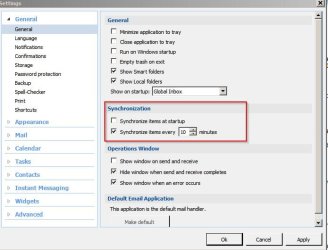
Check Tools> Settings> General

eM Client sync.jpg

Also suggest using IMAP with Hotmail.

The only problem I've ever noticed is sometimes read messages are marked unread. It's a known bug that should be fixed in a forthcoming release.

Also see FAQ's

FAQ | Troubleshooting | Solving Problems | eM Client

POP3 accounts do not keep your items synchronized with the server and are only used to download new data
 

My Computer My Computer

Computer type
Laptop
Computer Manufacturer/Model Number
ASUS
OS
Microsoft Windows 7 Home Premium 64-bit 7601 Multiprocessor Free Service Pack 1
CPU
AMD C-60 APU with Radeon(tm) HD Graphics
Motherboard
ASUSTeK COMPUTER INC. X501U
Memory
4.00 GB
Graphics Card(s)
AMD Radeon HD 6290 Graphics
Sound Card
(1) AMD High Definition Audio Device (2) Realtek High Defi
Screen Resolution
1366 x 768 x 32 bits (4294967296 colors) @ 60 Hz
Hard Drives
Hitachi HTS545050A7E380 SATA Disk Device
Antivirus
Comodo CIS & FW, SecureAplus App Whitelisting, Threatfire
Browser
Cyberfox 64bit, Opera 64bit, Airfox
Other Info
Spy-The-Spy, HitmanPro.Alert, Norton Connect Safe, MJRegWatcher, BitDefender TrafficLight, Voodoo Shield, Zemana AntiMalware
I've played with those sync settings quite a bit, doesn't help.

I haven't tried IMAP yet, eM Client makes some very large claims about being the best and the claim is that their client works with Hotmail (outlook.com). Shouldn't need to setup IMAP.

As I said before, it works and everything seems to sync Ok, only problem is that it keeps popping up an annoying box to report errors that don't seem to make a difference.
 

My Computer My Computer

Computer type
PC/Desktop
Computer Manufacturer/Model Number
Home Built desktop, Dell G15 5511 Gaming laptop,MS Surface Pro 7 tablet
OS
W10 Pro desktop, W11 laptop, W11 Pro tablet (all 64-bit)
CPU
3.7Ghz 8700K i7, i7-11800H, i7-1065G7
Motherboard
ASUS TUF Z370-Pro Gaming in desktop
Memory
16G desktop, 16G laptop, 4G tablet
Graphics Card(s)
AMD Radeon RX580, RTX 3060, Intel Iris Plus
Sound Card
High Definition Audio (Built-in to mobo)
Monitor(s) Displays
Samsung U32J59 32" (2x), 15.6", 12"
Screen Resolution
3840x2160, 3840x2160, 1920x1080, 2160x1440
Hard Drives
500G SSD for OS; 2T, 10T & 15T HDDs for Data on Desktop, 1TB SSD laptop, 128G SSD tablet.
PSU
Corsair CX 750M
Case
Antec 100
Cooling
CM 212+
Keyboard
IBM Model M - used continuously since 1986
Mouse
Microsoft Pro IntelliMouse
Internet Speed
400M down 8M up
Antivirus
Windows Defender
Browser
FireFox
Other Info
Built my first computer (8Mhz 8088cpu, 640K RAM, 20MB HDD, 2 360K floppy drives) in 1985 and have been building them for myself, relatives and friends ever since.
What problems are you having Strollin? Just the errors popping up?
I'm using IMAP in WLM 2012 now and it's working fine, just had to make a few adjustments. Only thing I have noticed is that it isn't as quick as DeltaSync was. Syncing was almost instantaneous before whereas now there is a little delay when syncing a folder/folders. Also when clicking "Send/Receive All" it probably takes around 10 seconds longer to check all my accounts. But I don't mind that as long as I can keep using the program.
The calendar and contacts sync won't work anymore but I always used my Gmail for that anyway, as I use Android devices.
 

My Computer My Computer

Computer type
PC/Desktop
Computer Manufacturer/Model Number
Custom Build
OS
Win 7 Ultimate, Win 8.1 Pro, Linux Mint 19 Cinnamon (All 64-Bit)
CPU
Intel i5 4690K
Motherboard
Gigabyte Z97X-UD3H
Memory
Corsair Vengeance LP 32GB DDR3
Graphics Card(s)
MSI GTX 1060 GAMING X 6GB
Sound Card
Onboard
Hard Drives
Samsung 850 EVO 250GB SSD (x2)
Samsung 860 EVO 1TB SSD (x2)
Crucial MX300 525GB SSD
WD Blue 2TB 5400rpm Intellipark Disabled (x2)
PSU
Corsair HX750i
Case
Phanteks Enthoo Pro
Cooling
CM Hyper 212 EVO on CPU, Noctua Redux NF-P14S 1500rpm (x6)
Keyboard
Corsair K70 RGB LUX
Mouse
Corsair Sabre RGB
Antivirus
Avast Free, MalwareBytes, SAS & CryptoPrevent
Browser
Chrome
Other Info
StarTech PEXESAT322I 2 Port PCI-E SATA Card
ASUS PCE-AC56 Dual-band AC1300 Wireless Card
Akasa FC.Six Manual Fan Controller
And a Partridge in a Pear Tree!
There are advanced settings to enable logging. Maybe try enabling all types of logging and check logs for errors and see if anything obvious shows up.
 

My Computer My Computer

Computer type
Laptop
Computer Manufacturer/Model Number
ASUS
OS
Microsoft Windows 7 Home Premium 64-bit 7601 Multiprocessor Free Service Pack 1
CPU
AMD C-60 APU with Radeon(tm) HD Graphics
Motherboard
ASUSTeK COMPUTER INC. X501U
Memory
4.00 GB
Graphics Card(s)
AMD Radeon HD 6290 Graphics
Sound Card
(1) AMD High Definition Audio Device (2) Realtek High Defi
Screen Resolution
1366 x 768 x 32 bits (4294967296 colors) @ 60 Hz
Hard Drives
Hitachi HTS545050A7E380 SATA Disk Device
Antivirus
Comodo CIS & FW, SecureAplus App Whitelisting, Threatfire
Browser
Cyberfox 64bit, Opera 64bit, Airfox
Other Info
Spy-The-Spy, HitmanPro.Alert, Norton Connect Safe, MJRegWatcher, BitDefender TrafficLight, Voodoo Shield, Zemana AntiMalware
I did some research and it seems that Thunderbird has the ability to import contacts and e mail messages from WLM. So Thunderbird will be a good alternative to WLM as long as it will still be able to sync messages from Hotmail after the changeover in June.

https://support.mozilla.org/en-US/questions/1046033

I do hope though that it will still be possible to continue using WLM 2012 after some tweaking though nothing is guaranteed.

Kind Regards
Chris
 

My Computer My Computer

Computer type
PC/Desktop
Computer Manufacturer/Model Number
Desktop Custom built, Laptop Lenovo G575 Model 20081
OS
Desktop Win 10 Pro 64 bit, Laptop Win 7 Home 64 bit
CPU
Desktop Intel i7 4790 CPU 3.6 GHz, Laptop AMD C-50 1GHz
Motherboard
ASUS H81 Gamer
Memory
Desktop 16 Gbt, Laptop 4 Gbt
Graphics Card(s)
Desktop nvidea GeForce NTX960, Laptop AMD Raedon HD 6250M
Sound Card
Desktop onboard Realtec high definition audio nvidea HD aud
Monitor(s) Displays
BENQ G900 Digital 19 inch
Screen Resolution
1024 x 768
Hard Drives
Silicon Power SSD SATA 3.0 450b Gbt
Seagate 4 Tbt SSHD
PSU
Thermaltake 1000W
Case
Thermaltake
Cooling
Onboard case fans
Keyboard
Standard PS/2
Mouse
A4 Tech optical wireless PS/2
Internet Speed
10 Mbps
Antivirus
Microsoft Security Essentials
Other Info
DVD Samsung TSST corp CDDVDW - SATA
Well after some anticipation Microsoft pulled the plug and Windows Live mail stopped working today and would no longer send or receive messages. After looking at all the options I decided the best free app for my particular needs was Thunderbird and the best paid app was Microsoft Outlook. I was actually offered a free 1 year subscription to Office 2016 and outlook so I would be fully prepared.

I am glad to say though I found a work around to get Windows Live Mail working again without needing to use any other programmes. I followed the advice on this website to configure WLM for IMAP.

Windows Live Mail 2012 end of Outlook support - gHacks Tech News

Since my original post I have switched to Windows 10 and WLM is working fine. The same method should work on Win 7 if anyone wishes to try it.

Here is the procedure.

1 Using your favourite browser log on to your outlook/Hotmail account.
2 Click on the gear symbol at the top right and mail options will open. click on options at the bottom of the list
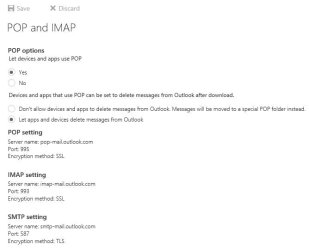
3 In the options list on the left select mail and click on POP and IMAP accounts. You will see a screenshot like the one attached
4 Select to allow POP and IMAP and select the other options you prefer and click SAVE
5 Now open your WLM and right click your existing Hotmail account and select remove account since it does not work anyway.
6 Under the accounts tab click to add a new account and write a fake account like [email protected] The reason for this is if you write your correct Hotmail account you will not get the options to needed to configure Hotmail for IMAP which you will get with a g mail account. You can overwrite the fake account with your true Hotmail account and password before you click apply/OK.
7 Under the general tab write your true Hotmail /outlook e mail address and name etc.
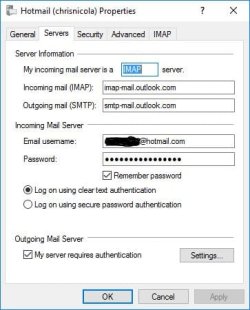
8 Please see screenshot. Under the servers tab write your server is IMAP
Incoming mail: imap-mail.outlook.com
Outgoing mail: smtp-mail.outlook.com
Write your correct e mail and password
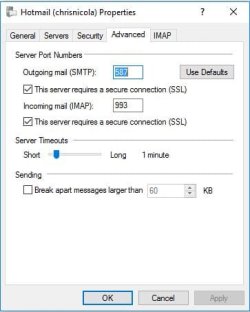
9 Please see screenshot. Under the advanced tab click outgoing mail port 587 and tick SSL box
Incoming mail port 993 and tick SSL box
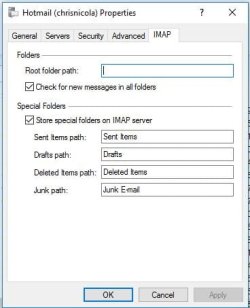
10 Configure IMAP tab as shown in the screenshot.
11 Click apply /OK and you should be ready to go.

Select to synchronise the account. You can right click the account and choose download all folders or click the send/receive all button. Initially you may have to do some debugging like enter the password again or close and reopen WLM. After a while though all the folders should download and yo should be up and running. I did not try the POP settings as IMAP worked file for me.

I hope this information will be useful to someone.

Kind regards
Chris

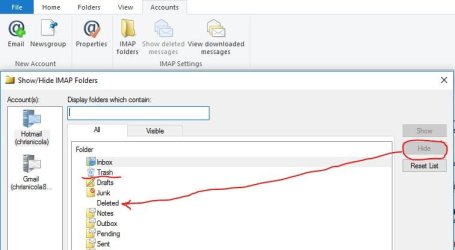
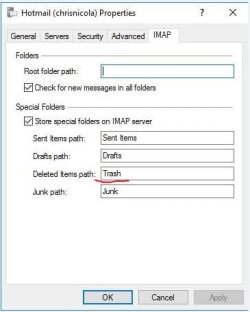
Update: On my system the deleted items folder in WLM was not working so I renamed it to Trash as explained in this Tutorial and then it started working properly and is syncronising with the with the Deleted Items Folder on the Outlook server.

https://support.tigertech.net/windows-live-mail-imap

I did not select the Inbox as the root folder as suggested in the tutorial as that did not work for me.

Please compare the two screenshots to see the difference in the naming of the IMAP folders. I hid the redundant Deleted items folder in WLM. Of course computers are different so what worked for me might not work for someone else.

Kind regards
Chris
 

Attachments

  • 01- Outlook Pop & Imap Options.JPG
    01- Outlook Pop & Imap Options.JPG
    27.3 KB · Views: 26
  • 02- Servers Tab.JPG
    02- Servers Tab.JPG
    33.9 KB · Views: 26
  • 03- Advanced Tab.JPG
    03- Advanced Tab.JPG
    27.8 KB · Views: 26
  • O4- IMAP tab.JPG
    O4- IMAP tab.JPG
    28.9 KB · Views: 24
  • 06- Hide Deleted Folder.JPG
    06- Hide Deleted Folder.JPG
    36.1 KB · Views: 0
  • 05- IMAP Folders C2.JPG
    05- IMAP Folders C2.JPG
    27.3 KB · Views: 17
Last edited:

My Computer My Computer

Computer type
PC/Desktop
Computer Manufacturer/Model Number
Desktop Custom built, Laptop Lenovo G575 Model 20081
OS
Desktop Win 10 Pro 64 bit, Laptop Win 7 Home 64 bit
CPU
Desktop Intel i7 4790 CPU 3.6 GHz, Laptop AMD C-50 1GHz
Motherboard
ASUS H81 Gamer
Memory
Desktop 16 Gbt, Laptop 4 Gbt
Graphics Card(s)
Desktop nvidea GeForce NTX960, Laptop AMD Raedon HD 6250M
Sound Card
Desktop onboard Realtec high definition audio nvidea HD aud
Monitor(s) Displays
BENQ G900 Digital 19 inch
Screen Resolution
1024 x 768
Hard Drives
Silicon Power SSD SATA 3.0 450b Gbt
Seagate 4 Tbt SSHD
PSU
Thermaltake 1000W
Case
Thermaltake
Cooling
Onboard case fans
Keyboard
Standard PS/2
Mouse
A4 Tech optical wireless PS/2
Internet Speed
10 Mbps
Antivirus
Microsoft Security Essentials
Other Info
DVD Samsung TSST corp CDDVDW - SATA
Have been using mail 11. Got the warning mail a few months ago. Got the error 3219 pop up today. Switched to imap/smtp sync today using the Ctrl-Shift-T wizard as suggested above. Works fine and I kept the old program mail.
 

My Computer My Computer

Computer type
PC/Desktop
Computer Manufacturer/Model Number
compaq
OS
windows 7 home premium 64
Antivirus
norton
Browser
ie 11
Good to know WLM is working for you. Out of interest does the "Deleted Items" folder in WLM work properly on your system? If not, try renaming it to trash as explained in the update to my previous post.

Kind regards
Chris
 

My Computer My Computer

Computer type
PC/Desktop
Computer Manufacturer/Model Number
Desktop Custom built, Laptop Lenovo G575 Model 20081
OS
Desktop Win 10 Pro 64 bit, Laptop Win 7 Home 64 bit
CPU
Desktop Intel i7 4790 CPU 3.6 GHz, Laptop AMD C-50 1GHz
Motherboard
ASUS H81 Gamer
Memory
Desktop 16 Gbt, Laptop 4 Gbt
Graphics Card(s)
Desktop nvidea GeForce NTX960, Laptop AMD Raedon HD 6250M
Sound Card
Desktop onboard Realtec high definition audio nvidea HD aud
Monitor(s) Displays
BENQ G900 Digital 19 inch
Screen Resolution
1024 x 768
Hard Drives
Silicon Power SSD SATA 3.0 450b Gbt
Seagate 4 Tbt SSHD
PSU
Thermaltake 1000W
Case
Thermaltake
Cooling
Onboard case fans
Keyboard
Standard PS/2
Mouse
A4 Tech optical wireless PS/2
Internet Speed
10 Mbps
Antivirus
Microsoft Security Essentials
Other Info
DVD Samsung TSST corp CDDVDW - SATA
^^^^^
'deleted' is working correctly.
Only thing I've noticed is that checking for mail is much slower than sync with outlook.
 

My Computer My Computer

Computer type
PC/Desktop
Computer Manufacturer/Model Number
compaq
OS
windows 7 home premium 64
Antivirus
norton
Browser
ie 11
Back
Top