Separate Data Partition - Why???

Thanks Night Hawk...

Eventually however you have to remove one or more as the 30gb fills rather quickly.

I use Macrium for my backups, so I have that covered. Now, I'm wondering if I did the right thing, since I'm now having the Outlook error I just posted. Also, if I cannot delete the "old" or "other" documnts folder, what is the point of creating the partition and moving all of the data so that my system images would me smaller?

I'm befuddled! :confused:
 

My Computer

Computer Manufacturer/Model Number
HP Pavilion Media Center PC m7350n
OS
Microsoft Windows 7 Home Premium 32-bit 7601 Multiprocessor Free Service Pack 1
CPU
Intel(R) Pentium(R) D CPU 2.80GHz
Motherboard
ASUSTek Computer INC. EMERY
Memory
2.00 GB
Graphics Card(s)
NVIDIA GeForce 6200SE TurboCache(TM)
Sound Card
Realtek High Definition Audio
Monitor(s) Displays
HP L1710 LCD Display
Screen Resolution
1280 x 1024 x 32 bits (4294967296 colors) @ 60 Hz
Hard Drives
(1) SAMSUNG SP2504C (2) EPSON Stylus Storage USB Device (3) Generic USB CF Reader USB Device (4) Generic USB MS Reader USB Device (5) Generic USB SD Reader USB Device (6) Generic USB SM Reader USB Device (7) Seagate FA GoFlex Desk USB Dev
Internet Speed
20+mbps
Ouch! Once you have a program installed and running the only time you would move or actually backup program files and mail would be in prep for later reinstalling the same program fresh.

If you moved and not simply copied the file you may have to perform a full reinstall in order to see everything working if moving the file back fails to see results. Some files are directly tied by the system registry where you have to follow a set of steps when going to make backups in order to keep the present installation running.

One 9/5/2009 blog called "Microsoft Office Outlook 2010 Backup" is what you will want to look over for this at Microsoft Office Outlook 2010 Backup

Apparently the layout and options seen in the 2010 beta are very close to what is seen in Office 2007.

Since we missed each other's posts the OS primary here always see the original installation files and folders left intact. Creating the image of the drive preserves everything onto in your case the D partition you made there when backing up the C primary.

The idea of moving any files or folders from C over to D or the other partition you made isn't even necesssary since the image holds all of that. This is why I suggested using the Windows Easy Transfer or simply copy and paste various folders individually for ready access while still having the images when needing a full restoration.
 

My Computers

System One System Two

  • Computer type
    PC/Desktop
    Computer Manufacturer/Model Number
    Custom builds = 2
    OS
    W7 Ultimate x64/W10 Pro x64/W11 Pro Triple Boot - Main PC W7 Remote PC Micro ATX W7 Pro x64/W11 Pro
    CPU
    AMD Phenom II X4 975 Deneb 3.6ghz - 965 2nd remote pc
    Motherboard
    Gigabyte GA-790XTA-UD4-Gigabyte GA-880GM-D2H remote pc
    Memory
    Kingston Hyper X DDR3 1600 1.5v 16gb - Hyper X Fury 8gb 2nd
    Graphics Card(s)
    MSI HD Radeon 5750 1gb - MSI HD Radeon 6450 on mini tower
    Sound Card
    Creative Labs X-Fi Xtreme Audio P - Realtek onooard 2nd case
    Monitor(s) Displays
    ASUS VW199T-P 19" HP 2082a Main-HP 2082a 20" remote pc
    Screen Resolution
    Asus 1440x900 - HP 1600x900
    Hard Drives
    WD Black 1TB HD per OS W7, W10, and pending W11 presently on 500gb OS Drive - Pending Triple 1TB HDs for Spanned Storage/backup volume
    Single 2TB external USB enclosure, single 1TB System 7 Host/Boot drive, Pending 8TB external HD for system image b
    PSU
    Corsair 750TX - primary / Corsair CX600 - second
    Case
    Antec 900-2 - SSD compatible / NZXT Vulcan mini tower
    Cooling
    Zalman CNPS9900A
    Keyboard
    AZIO L70 Backlit Letters Gaming - ONN Cordless/USB
    Mouse
    MSI DS200 Programmable, Logitech Cordless
    Internet Speed
    30mbps upgrade - primary hard wired - mini tower usb WiFi
    Antivirus
    GFI VIPRE Internet Security 2014 on W7 2016 beta on W10,
    Browser
    Cyberfox, WaterFox 64bit FF variants, FireFox x64, Pale Moon
    Other Info
    Accomdata fan cooled usb 2.0 PIDE/Sata II, III external enclosure.
    Sambient usb/eSata PATA/Sata II, III external enclosure.
  • Computer type
    PC/Desktop
    System Manufacturer/Model Number
    CUSTOM ASSEMBLY
    OS
    W7 Pro x64/W11 Pro
    CPU
    AMD Deneb 3.6ghz - 965
    Motherboard
    Gigabyte GA-880GM-D2H remote pc
    Memory
    Kingston Hyper X Fury 8gb
    Graphics Card(s)
    MSI HD Radeon 6450 DVI Output
    Sound Card
    Realtek onooard Creative or Other separate PENDING
    Monitor(s) Displays
    VIZIO 32" LCD TV Separate LCD Pending
    Screen Resolution
    1600x1080
    Hard Drives
    WD 500GB OS Host/Boot WD Green 1TB Storage/Backup
    PSU
    Corsair 600W - THERMALTAKE 600W spare case
    Case
    NZXT Vulcan mini tower
    Cooling
    Twin 120mm Top Fans - 240mm Side Cover
    Keyboard
    ONN Cordless/USB Logitech Cordless
    Mouse
    ONN USB/Cordless - Logitech Cordless
    Internet Speed
    DSL 5G
    Browser
    MS Edge, FireFox, WaterFox x64, FireFox Nightly
    Other Info
    OS Testing-Remote Access to Main TeamViewer
I thought I just had to move the Outlook.pst file. What other files does Outlook use? How can I fix this? (It seems to be just email accounts that are affected, so there must be something specific to those. My SMS Officer account is working fine.) What a nightmare!
 

My Computer

Computer Manufacturer/Model Number
HP Pavilion Media Center PC m7350n
OS
Microsoft Windows 7 Home Premium 32-bit 7601 Multiprocessor Free Service Pack 1
CPU
Intel(R) Pentium(R) D CPU 2.80GHz
Motherboard
ASUSTek Computer INC. EMERY
Memory
2.00 GB
Graphics Card(s)
NVIDIA GeForce 6200SE TurboCache(TM)
Sound Card
Realtek High Definition Audio
Monitor(s) Displays
HP L1710 LCD Display
Screen Resolution
1280 x 1024 x 32 bits (4294967296 colors) @ 60 Hz
Hard Drives
(1) SAMSUNG SP2504C (2) EPSON Stylus Storage USB Device (3) Generic USB CF Reader USB Device (4) Generic USB MS Reader USB Device (5) Generic USB SD Reader USB Device (6) Generic USB SM Reader USB Device (7) Seagate FA GoFlex Desk USB Dev
Internet Speed
20+mbps
And what about all the other Office programs that depend upon the c:\users\username\ file structure? Are they going to be messed up as well?

What is the cleanest way to fix this?
 

My Computer

Computer Manufacturer/Model Number
HP Pavilion Media Center PC m7350n
OS
Microsoft Windows 7 Home Premium 32-bit 7601 Multiprocessor Free Service Pack 1
CPU
Intel(R) Pentium(R) D CPU 2.80GHz
Motherboard
ASUSTek Computer INC. EMERY
Memory
2.00 GB
Graphics Card(s)
NVIDIA GeForce 6200SE TurboCache(TM)
Sound Card
Realtek High Definition Audio
Monitor(s) Displays
HP L1710 LCD Display
Screen Resolution
1280 x 1024 x 32 bits (4294967296 colors) @ 60 Hz
Hard Drives
(1) SAMSUNG SP2504C (2) EPSON Stylus Storage USB Device (3) Generic USB CF Reader USB Device (4) Generic USB MS Reader USB Device (5) Generic USB SD Reader USB Device (6) Generic USB SM Reader USB Device (7) Seagate FA GoFlex Desk USB Dev
Internet Speed
20+mbps
As far as email contacts you may have to remove all of the ones effected and simply readd each one back in to see a new pst file made up. As far as the other office wares that will depend on whether simply moving the files back to each one's original location will prevent the need to redo everything all over.

I doubt using a restore point can do much for you on this since the registry portion is as it should be. All you can do now is try restoring each file to it's original location and see which programs will need to be repaired or reinstalled.

This is one reason I now simply image a drive since I will continue to add new programs at time being evaluated or to remain on indefinitely. If something does go bad like any while not likely here viral infection trashes the present installation I can restore the latest made after cleaning off the drive if needed.

For backing up emails and contact info as if you were moving into a new system for example each program typically will have some guide for that whether being an MS page or someone's blog site where you have to follow the steps closely for the best results.
 

My Computers

System One System Two

  • Computer type
    PC/Desktop
    Computer Manufacturer/Model Number
    Custom builds = 2
    OS
    W7 Ultimate x64/W10 Pro x64/W11 Pro Triple Boot - Main PC W7 Remote PC Micro ATX W7 Pro x64/W11 Pro
    CPU
    AMD Phenom II X4 975 Deneb 3.6ghz - 965 2nd remote pc
    Motherboard
    Gigabyte GA-790XTA-UD4-Gigabyte GA-880GM-D2H remote pc
    Memory
    Kingston Hyper X DDR3 1600 1.5v 16gb - Hyper X Fury 8gb 2nd
    Graphics Card(s)
    MSI HD Radeon 5750 1gb - MSI HD Radeon 6450 on mini tower
    Sound Card
    Creative Labs X-Fi Xtreme Audio P - Realtek onooard 2nd case
    Monitor(s) Displays
    ASUS VW199T-P 19" HP 2082a Main-HP 2082a 20" remote pc
    Screen Resolution
    Asus 1440x900 - HP 1600x900
    Hard Drives
    WD Black 1TB HD per OS W7, W10, and pending W11 presently on 500gb OS Drive - Pending Triple 1TB HDs for Spanned Storage/backup volume
    Single 2TB external USB enclosure, single 1TB System 7 Host/Boot drive, Pending 8TB external HD for system image b
    PSU
    Corsair 750TX - primary / Corsair CX600 - second
    Case
    Antec 900-2 - SSD compatible / NZXT Vulcan mini tower
    Cooling
    Zalman CNPS9900A
    Keyboard
    AZIO L70 Backlit Letters Gaming - ONN Cordless/USB
    Mouse
    MSI DS200 Programmable, Logitech Cordless
    Internet Speed
    30mbps upgrade - primary hard wired - mini tower usb WiFi
    Antivirus
    GFI VIPRE Internet Security 2014 on W7 2016 beta on W10,
    Browser
    Cyberfox, WaterFox 64bit FF variants, FireFox x64, Pale Moon
    Other Info
    Accomdata fan cooled usb 2.0 PIDE/Sata II, III external enclosure.
    Sambient usb/eSata PATA/Sata II, III external enclosure.
  • Computer type
    PC/Desktop
    System Manufacturer/Model Number
    CUSTOM ASSEMBLY
    OS
    W7 Pro x64/W11 Pro
    CPU
    AMD Deneb 3.6ghz - 965
    Motherboard
    Gigabyte GA-880GM-D2H remote pc
    Memory
    Kingston Hyper X Fury 8gb
    Graphics Card(s)
    MSI HD Radeon 6450 DVI Output
    Sound Card
    Realtek onooard Creative or Other separate PENDING
    Monitor(s) Displays
    VIZIO 32" LCD TV Separate LCD Pending
    Screen Resolution
    1600x1080
    Hard Drives
    WD 500GB OS Host/Boot WD Green 1TB Storage/Backup
    PSU
    Corsair 600W - THERMALTAKE 600W spare case
    Case
    NZXT Vulcan mini tower
    Cooling
    Twin 120mm Top Fans - 240mm Side Cover
    Keyboard
    ONN Cordless/USB Logitech Cordless
    Mouse
    ONN USB/Cordless - Logitech Cordless
    Internet Speed
    DSL 5G
    Browser
    MS Edge, FireFox, WaterFox x64, FireFox Nightly
    Other Info
    OS Testing-Remote Access to Main TeamViewer
I hesitate to recommend this method since I'm sure there must be a better way, perhaps by importing your old data files into Outlook, but anyway, when I encountered similar problems after moving the documents and other data folders, I simply deleted my email accounts and recreated them over again from scratch as if I was setting Outlook up for the first time, and let Outlook create new data files for them, iirc, and the result was I had my email up and running again within a few minutes. My original Outlook.pst file still worked fine when I pointed Outlook (2010) to it in File, account settings, data files, and set it as the default data file, so I didn't lose any contacts, thankfully. Again, I'm sure there must be a better more correct way to get Outlook working again but this did work for me.

A side benefit was that some errors I had been getting occasionally in Outlook seems to have been permanently fixed by recreating my accounts from scratch in Outlook 2010. Now everything in Outlook is working very fast and smoothly for me, i.e., no more errors when receiving and sending email.

Hope that helps.

(Also, on a related topic that may not apply to the OP but might be useful for others, for my Live/hotmail email accounts, I had been using the Outlook Connector to access my Live email accounts but I had frequently had errors with that, especially with Outlook 2010, so I decided to try uninstalling the Connector and just setting up the @live.com accounts just like any other web based pop email accounts and I have so far found that to be working better for me than using the Connector add in ever did.

Just in case anyone wants to try that, the settings that worked were:

Incoming mail server is pop3.live.com port 995 (use SSL encryption)
Outgoing mail server is smtp.live.com port 25 (set outgoing encryption to Auto)
The ports and encryption options are under More Settings… under the Advanced Tab. Also in the more settings dialog, under outgoing server tab, set it to use same settings as incoming server. The user name is your live/hotmail address.)
 
Last edited:

My Computer

Computer Manufacturer/Model Number
HP DV8t quad
OS
Windows 7 Ultimate x64 (Retail)
CPU
i7-Q 720
Motherboard
Motherboard Chipset Intel Ibex Peak-M PM55, Intel Lynnfield
Memory
6 GB
Graphics Card(s)
nVidia GeForce GT 230M (1GB)
Sound Card
IDT High Definition Audio CODEC
Monitor(s) Displays
18.4 inch HP Infinity FHD (Samsung 184HT03-001)
Screen Resolution
1920 x 1080
Hard Drives
Hitachi 500GB 7200 rpm (x2)
Seagate FreeAgent 1.5 TB External USB (x2)
Thermaltake BlacX eSATA/USB 2.0 3.5/2.5 HD dock
Cooling
Zalman NC-2000 notebook cooling pad
Keyboard
laptop
Mouse
Logitech VX Revolution
Other Info
Backup Unit: Lenovo T61p
Harpua, where should Outlook pst file be located?

Harpua, thanks for your commens. I would like to know if it is even proper to have the outlook.pst file in the documents directory. Another poster told me that I should put it back in its default location, then use the MS backup utility for Outlook to copy a backup to the data storage location for backup.

What do you think? I'm thinking about just restoring my system to where it was before I did all this, then properly moving Outlook.pst to its "proper" location. The question is whether or not I will have this problem with other Office programs, or is it just Outlook that is problematic with moving the data files?

And you're right, I could possibly delete and re-create the email accounts, I just don't know if I should try and keep the Outlook.pst file separate anymore, or if I should just keep it in the default directory,,,

I will await your reply. Thanks!
 

My Computer

Computer Manufacturer/Model Number
HP Pavilion Media Center PC m7350n
OS
Microsoft Windows 7 Home Premium 32-bit 7601 Multiprocessor Free Service Pack 1
CPU
Intel(R) Pentium(R) D CPU 2.80GHz
Motherboard
ASUSTek Computer INC. EMERY
Memory
2.00 GB
Graphics Card(s)
NVIDIA GeForce 6200SE TurboCache(TM)
Sound Card
Realtek High Definition Audio
Monitor(s) Displays
HP L1710 LCD Display
Screen Resolution
1280 x 1024 x 32 bits (4294967296 colors) @ 60 Hz
Hard Drives
(1) SAMSUNG SP2504C (2) EPSON Stylus Storage USB Device (3) Generic USB CF Reader USB Device (4) Generic USB MS Reader USB Device (5) Generic USB SD Reader USB Device (6) Generic USB SM Reader USB Device (7) Seagate FA GoFlex Desk USB Dev
Internet Speed
20+mbps
You're thinking along the same lines there since with the origimal files intact and returned to the program installed locations a fresh contact list always worked with OE in XP and WMail in Vista as well as in the new Outlook.

With a clean install of each program for the others you would end up seeing the same thing where each one would also need a fresh record with the new entries made. First however you should go back over the steps you took for each other program to make sure you move the files back to the correct locations for each one.
 

My Computers

System One System Two

  • Computer type
    PC/Desktop
    Computer Manufacturer/Model Number
    Custom builds = 2
    OS
    W7 Ultimate x64/W10 Pro x64/W11 Pro Triple Boot - Main PC W7 Remote PC Micro ATX W7 Pro x64/W11 Pro
    CPU
    AMD Phenom II X4 975 Deneb 3.6ghz - 965 2nd remote pc
    Motherboard
    Gigabyte GA-790XTA-UD4-Gigabyte GA-880GM-D2H remote pc
    Memory
    Kingston Hyper X DDR3 1600 1.5v 16gb - Hyper X Fury 8gb 2nd
    Graphics Card(s)
    MSI HD Radeon 5750 1gb - MSI HD Radeon 6450 on mini tower
    Sound Card
    Creative Labs X-Fi Xtreme Audio P - Realtek onooard 2nd case
    Monitor(s) Displays
    ASUS VW199T-P 19" HP 2082a Main-HP 2082a 20" remote pc
    Screen Resolution
    Asus 1440x900 - HP 1600x900
    Hard Drives
    WD Black 1TB HD per OS W7, W10, and pending W11 presently on 500gb OS Drive - Pending Triple 1TB HDs for Spanned Storage/backup volume
    Single 2TB external USB enclosure, single 1TB System 7 Host/Boot drive, Pending 8TB external HD for system image b
    PSU
    Corsair 750TX - primary / Corsair CX600 - second
    Case
    Antec 900-2 - SSD compatible / NZXT Vulcan mini tower
    Cooling
    Zalman CNPS9900A
    Keyboard
    AZIO L70 Backlit Letters Gaming - ONN Cordless/USB
    Mouse
    MSI DS200 Programmable, Logitech Cordless
    Internet Speed
    30mbps upgrade - primary hard wired - mini tower usb WiFi
    Antivirus
    GFI VIPRE Internet Security 2014 on W7 2016 beta on W10,
    Browser
    Cyberfox, WaterFox 64bit FF variants, FireFox x64, Pale Moon
    Other Info
    Accomdata fan cooled usb 2.0 PIDE/Sata II, III external enclosure.
    Sambient usb/eSata PATA/Sata II, III external enclosure.
  • Computer type
    PC/Desktop
    System Manufacturer/Model Number
    CUSTOM ASSEMBLY
    OS
    W7 Pro x64/W11 Pro
    CPU
    AMD Deneb 3.6ghz - 965
    Motherboard
    Gigabyte GA-880GM-D2H remote pc
    Memory
    Kingston Hyper X Fury 8gb
    Graphics Card(s)
    MSI HD Radeon 6450 DVI Output
    Sound Card
    Realtek onooard Creative or Other separate PENDING
    Monitor(s) Displays
    VIZIO 32" LCD TV Separate LCD Pending
    Screen Resolution
    1600x1080
    Hard Drives
    WD 500GB OS Host/Boot WD Green 1TB Storage/Backup
    PSU
    Corsair 600W - THERMALTAKE 600W spare case
    Case
    NZXT Vulcan mini tower
    Cooling
    Twin 120mm Top Fans - 240mm Side Cover
    Keyboard
    ONN Cordless/USB Logitech Cordless
    Mouse
    ONN USB/Cordless - Logitech Cordless
    Internet Speed
    DSL 5G
    Browser
    MS Edge, FireFox, WaterFox x64, FireFox Nightly
    Other Info
    OS Testing-Remote Access to Main TeamViewer
I thought about that and found it kind of strange that 2010 wanted to put those files in the Documents folder, but I ended up deciding that I preferred to have those files located in Documents for ease of backing up (since they'll get backed up automatically every time I back up my data files), so that's where I left them and, as I said above, Outlook is now working great for me. But as a practical matter, I don't think it matters where the files are located as long as Outlook is pointed to where they are.

I have not yet experienced any other issues with other Office apps caused by moving the data files but I've only used Onenote and Word so far since moving my data files. But I don't see any reason why there would be any problems.

A couple of other non Office programs experienced some brief disorientation caused by moving the data files but they quickly recovered and mostly fixed themselves or simply needed to be pointed in the right direction. Outlook was the only app that gave me a real headache.

In sum, I'm glad I moved the data files as it has really made it a lot quicker and easier for me to back my stuff up and it will facilitate my migrating to an SSD for my C drive eventually.

Harpua, thanks for your commens. I would like to know if it is even proper to have the outlook.pst file in the documents directory. Another poster told me that I should put it back in its default location, then use the MS backup utility for Outlook to copy a backup to the data storage location for backup.

What do you think? I'm thinking about just restoring my system to where it was before I did all this, then properly moving Outlook.pst to its "proper" location. The question is whether or not I will have this problem with other Office programs, or is it just Outlook that is problematic with moving the data files?

And you're right, I could possibly delete and re-create the email accounts, I just don't know if I should try and keep the Outlook.pst file separate anymore, or if I should just keep it in the default directory,,,

I will await your reply. Thanks!
 

My Computer

Computer Manufacturer/Model Number
HP DV8t quad
OS
Windows 7 Ultimate x64 (Retail)
CPU
i7-Q 720
Motherboard
Motherboard Chipset Intel Ibex Peak-M PM55, Intel Lynnfield
Memory
6 GB
Graphics Card(s)
nVidia GeForce GT 230M (1GB)
Sound Card
IDT High Definition Audio CODEC
Monitor(s) Displays
18.4 inch HP Infinity FHD (Samsung 184HT03-001)
Screen Resolution
1920 x 1080
Hard Drives
Hitachi 500GB 7200 rpm (x2)
Seagate FreeAgent 1.5 TB External USB (x2)
Thermaltake BlacX eSATA/USB 2.0 3.5/2.5 HD dock
Cooling
Zalman NC-2000 notebook cooling pad
Keyboard
laptop
Mouse
Logitech VX Revolution
Other Info
Backup Unit: Lenovo T61p
Thanks Night Hawk and Harpua!

I'm going to restore my system for now, and then move the data files to the data partition by exporting or following whatever instructions MS has. But thanks for the input and confirmation of my path, it was very helpful from you both, and much appreciated!
 

My Computer

Computer Manufacturer/Model Number
HP Pavilion Media Center PC m7350n
OS
Microsoft Windows 7 Home Premium 32-bit 7601 Multiprocessor Free Service Pack 1
CPU
Intel(R) Pentium(R) D CPU 2.80GHz
Motherboard
ASUSTek Computer INC. EMERY
Memory
2.00 GB
Graphics Card(s)
NVIDIA GeForce 6200SE TurboCache(TM)
Sound Card
Realtek High Definition Audio
Monitor(s) Displays
HP L1710 LCD Display
Screen Resolution
1280 x 1024 x 32 bits (4294967296 colors) @ 60 Hz
Hard Drives
(1) SAMSUNG SP2504C (2) EPSON Stylus Storage USB Device (3) Generic USB CF Reader USB Device (4) Generic USB MS Reader USB Device (5) Generic USB SD Reader USB Device (6) Generic USB SM Reader USB Device (7) Seagate FA GoFlex Desk USB Dev
Internet Speed
20+mbps
OK! But when going to work with the instructions with any guide or blog found make you sure you slow down a bit to avoid running into any new problems.

Some of the instructions need close attention to detail in order to see positive results. In some cases you may have to wait until you go over one or more other guides since some are rather skimpy on providing enough to work with. I've run into that problem a number of times where someone else had a better written instruction set to follow.
 

My Computers

System One System Two

  • Computer type
    PC/Desktop
    Computer Manufacturer/Model Number
    Custom builds = 2
    OS
    W7 Ultimate x64/W10 Pro x64/W11 Pro Triple Boot - Main PC W7 Remote PC Micro ATX W7 Pro x64/W11 Pro
    CPU
    AMD Phenom II X4 975 Deneb 3.6ghz - 965 2nd remote pc
    Motherboard
    Gigabyte GA-790XTA-UD4-Gigabyte GA-880GM-D2H remote pc
    Memory
    Kingston Hyper X DDR3 1600 1.5v 16gb - Hyper X Fury 8gb 2nd
    Graphics Card(s)
    MSI HD Radeon 5750 1gb - MSI HD Radeon 6450 on mini tower
    Sound Card
    Creative Labs X-Fi Xtreme Audio P - Realtek onooard 2nd case
    Monitor(s) Displays
    ASUS VW199T-P 19" HP 2082a Main-HP 2082a 20" remote pc
    Screen Resolution
    Asus 1440x900 - HP 1600x900
    Hard Drives
    WD Black 1TB HD per OS W7, W10, and pending W11 presently on 500gb OS Drive - Pending Triple 1TB HDs for Spanned Storage/backup volume
    Single 2TB external USB enclosure, single 1TB System 7 Host/Boot drive, Pending 8TB external HD for system image b
    PSU
    Corsair 750TX - primary / Corsair CX600 - second
    Case
    Antec 900-2 - SSD compatible / NZXT Vulcan mini tower
    Cooling
    Zalman CNPS9900A
    Keyboard
    AZIO L70 Backlit Letters Gaming - ONN Cordless/USB
    Mouse
    MSI DS200 Programmable, Logitech Cordless
    Internet Speed
    30mbps upgrade - primary hard wired - mini tower usb WiFi
    Antivirus
    GFI VIPRE Internet Security 2014 on W7 2016 beta on W10,
    Browser
    Cyberfox, WaterFox 64bit FF variants, FireFox x64, Pale Moon
    Other Info
    Accomdata fan cooled usb 2.0 PIDE/Sata II, III external enclosure.
    Sambient usb/eSata PATA/Sata II, III external enclosure.
  • Computer type
    PC/Desktop
    System Manufacturer/Model Number
    CUSTOM ASSEMBLY
    OS
    W7 Pro x64/W11 Pro
    CPU
    AMD Deneb 3.6ghz - 965
    Motherboard
    Gigabyte GA-880GM-D2H remote pc
    Memory
    Kingston Hyper X Fury 8gb
    Graphics Card(s)
    MSI HD Radeon 6450 DVI Output
    Sound Card
    Realtek onooard Creative or Other separate PENDING
    Monitor(s) Displays
    VIZIO 32" LCD TV Separate LCD Pending
    Screen Resolution
    1600x1080
    Hard Drives
    WD 500GB OS Host/Boot WD Green 1TB Storage/Backup
    PSU
    Corsair 600W - THERMALTAKE 600W spare case
    Case
    NZXT Vulcan mini tower
    Cooling
    Twin 120mm Top Fans - 240mm Side Cover
    Keyboard
    ONN Cordless/USB Logitech Cordless
    Mouse
    ONN USB/Cordless - Logitech Cordless
    Internet Speed
    DSL 5G
    Browser
    MS Edge, FireFox, WaterFox x64, FireFox Nightly
    Other Info
    OS Testing-Remote Access to Main TeamViewer
What I ended up doing...

Hello and thanks to everyone who participated in my process over the weekend. As an informational update, here is what I ended up doing:

1. Used Partition Magic to change my 110GB HD into 3 partitions, System (50GB), Data (30GB) and System Images (30GB)


2. Followed the video tutorial on Vimeo provided by whs, and moved my Documents, Favorites, Downloads, Music, Videos, and Pictures to the Data partition.


3. Because I was using the Documents folder to hold my Outlook.PST file, moving it messed up Outlook, even though I moved the PST file and redirected Outlook to it. I think that Outlook must store the email settings in another location, because the email would not work after the PST move. So, as per Darryl Licht and harpua, I deleted my existing email accounts, and reconfigured them. This solved that problem.


4. The other issue was that it seemed as if there were somehow 2 previously existing documents directories. One that got moved, and one that did not. They were almost identical, but not exactly, so I was able to identify the “old”/unused one, and deleted it.


5. One of the things I tried in the midst of these eventual solutions was restoring my HD system+data partition image from DVD disc to the newly created system partition on the HD, but it did not work. I have not had a chance to troubleshoot the error, but Macrium would not even recognize the system images I had on HD, nor would it restore the image from the DVD discs that were made. I tried putting in both the first and the last disc, and each time, it said they were not the full image and therefore could not complete the restore. I thought that was the whole point of making a system image to DVD discs; so that you could use multiple discs, but apparently not. Either that, or what it was really saying is, “I don’t like that you are trying to restore me to a smaller partition than what I came from.” Even though there was still more than enough space on the new smaller partition to hold the restored image…


6. As for backups, I am going to subscribe to Mozy online unlimited backup. I have been using the free 2GB version, and offloading my data to DVD discs periodically, and not backing up Videos, or Music to Mozy, but as I was advised by a wise forum member, just a small scratch could ruin these. (Luckily, I am fastidiously duplicative about these and always make 2 or even 3 copies, but nonetheless, it was a good point.) I like Mozy, so for the short term, backing up to that will be good, and with the unlimited version, I won’t have to worry about going over the 2GB limit.

In addition to making system images to the system image partition, I am also going to try and image with Macrium to Windows Live Skydrive, which was also recommended by a poster, and I found out last night that it can be configured to be addressed as a virtual drive. Whether or not Macrium will work with that I do not know.

In the “long term”, I am going to try and afford to acquire some external USB 2.0 HDs as the price drops due to USB 3.0 coming out. Then, I will start backing up to these instead of Mozy and Skydrive.


Well, I think that about covers everything. I’m very, very, grateful to EVERYONE who gave me their input. It was ALL very insightful and helpful, and put together as parts of the puzzle, made for a good “whole”.

Thank you everyone! :)
 

My Computer

Computer Manufacturer/Model Number
HP Pavilion Media Center PC m7350n
OS
Microsoft Windows 7 Home Premium 32-bit 7601 Multiprocessor Free Service Pack 1
CPU
Intel(R) Pentium(R) D CPU 2.80GHz
Motherboard
ASUSTek Computer INC. EMERY
Memory
2.00 GB
Graphics Card(s)
NVIDIA GeForce 6200SE TurboCache(TM)
Sound Card
Realtek High Definition Audio
Monitor(s) Displays
HP L1710 LCD Display
Screen Resolution
1280 x 1024 x 32 bits (4294967296 colors) @ 60 Hz
Hard Drives
(1) SAMSUNG SP2504C (2) EPSON Stylus Storage USB Device (3) Generic USB CF Reader USB Device (4) Generic USB MS Reader USB Device (5) Generic USB SD Reader USB Device (6) Generic USB SM Reader USB Device (7) Seagate FA GoFlex Desk USB Dev
Internet Speed
20+mbps
Well we're glad you were able to get everything sorted out! :D

One thing about Macrium however and why I ended up sticking with the Backup & Restore as well as Windows Easy Transfer features in 7 was due to not being able to restore an image created of a previous Vista install on the last build when the RCs were on since that case saw 5 HDs originally seeing an XP/Vista dual boot.

Despite repeat attempts once the exact drive was free again for restoring the image Reflect came up with a message stating the images were invalid for some still unknown reason. This is when drives had been replugged in differently however and may have had a negative effect on the dating method used by that program.

Typically here the images now seen are stored on the same single partition seen on each of the two storage drives on the desktop here. Since you are working with a much smaller drive one idea for partitioning would have been seeing the 50gb OS Primary but with a single 60gb storage/backup partition rather then splitting the drive up into two smaller 30gb parts.

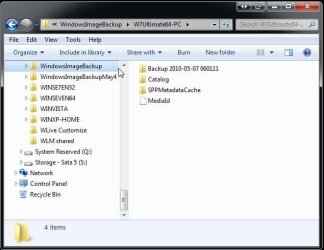
If you look at the system images created by the Windows option you will notice that those are contained in normal folders with a sub folder with the admin account's user name on that. For preventing any overwrite you'll notice I simply added a date at the end of the name on the earliest of the two shown there.
 

Attachments

  • Rename W7 Images.jpg
    Rename W7 Images.jpg
    41.7 KB · Views: 8

My Computers

System One System Two

  • Computer type
    PC/Desktop
    Computer Manufacturer/Model Number
    Custom builds = 2
    OS
    W7 Ultimate x64/W10 Pro x64/W11 Pro Triple Boot - Main PC W7 Remote PC Micro ATX W7 Pro x64/W11 Pro
    CPU
    AMD Phenom II X4 975 Deneb 3.6ghz - 965 2nd remote pc
    Motherboard
    Gigabyte GA-790XTA-UD4-Gigabyte GA-880GM-D2H remote pc
    Memory
    Kingston Hyper X DDR3 1600 1.5v 16gb - Hyper X Fury 8gb 2nd
    Graphics Card(s)
    MSI HD Radeon 5750 1gb - MSI HD Radeon 6450 on mini tower
    Sound Card
    Creative Labs X-Fi Xtreme Audio P - Realtek onooard 2nd case
    Monitor(s) Displays
    ASUS VW199T-P 19" HP 2082a Main-HP 2082a 20" remote pc
    Screen Resolution
    Asus 1440x900 - HP 1600x900
    Hard Drives
    WD Black 1TB HD per OS W7, W10, and pending W11 presently on 500gb OS Drive - Pending Triple 1TB HDs for Spanned Storage/backup volume
    Single 2TB external USB enclosure, single 1TB System 7 Host/Boot drive, Pending 8TB external HD for system image b
    PSU
    Corsair 750TX - primary / Corsair CX600 - second
    Case
    Antec 900-2 - SSD compatible / NZXT Vulcan mini tower
    Cooling
    Zalman CNPS9900A
    Keyboard
    AZIO L70 Backlit Letters Gaming - ONN Cordless/USB
    Mouse
    MSI DS200 Programmable, Logitech Cordless
    Internet Speed
    30mbps upgrade - primary hard wired - mini tower usb WiFi
    Antivirus
    GFI VIPRE Internet Security 2014 on W7 2016 beta on W10,
    Browser
    Cyberfox, WaterFox 64bit FF variants, FireFox x64, Pale Moon
    Other Info
    Accomdata fan cooled usb 2.0 PIDE/Sata II, III external enclosure.
    Sambient usb/eSata PATA/Sata II, III external enclosure.
  • Computer type
    PC/Desktop
    System Manufacturer/Model Number
    CUSTOM ASSEMBLY
    OS
    W7 Pro x64/W11 Pro
    CPU
    AMD Deneb 3.6ghz - 965
    Motherboard
    Gigabyte GA-880GM-D2H remote pc
    Memory
    Kingston Hyper X Fury 8gb
    Graphics Card(s)
    MSI HD Radeon 6450 DVI Output
    Sound Card
    Realtek onooard Creative or Other separate PENDING
    Monitor(s) Displays
    VIZIO 32" LCD TV Separate LCD Pending
    Screen Resolution
    1600x1080
    Hard Drives
    WD 500GB OS Host/Boot WD Green 1TB Storage/Backup
    PSU
    Corsair 600W - THERMALTAKE 600W spare case
    Case
    NZXT Vulcan mini tower
    Cooling
    Twin 120mm Top Fans - 240mm Side Cover
    Keyboard
    ONN Cordless/USB Logitech Cordless
    Mouse
    ONN USB/Cordless - Logitech Cordless
    Internet Speed
    DSL 5G
    Browser
    MS Edge, FireFox, WaterFox x64, FireFox Nightly
    Other Info
    OS Testing-Remote Access to Main TeamViewer
Night Hawk,

The reason I went with Macrium and not Windows "backup" is because I tried to backup some files to DVDs using the Windows backup utility, and it started and processed for a while, then got about halfway through and sat at that point for over 45 minutes before I finally just gave up on it. I have had to use my Macrium system+data images once, and it worked beautifully, so I thought that Macrium was the way to go.

Your idea about using the same partition for my system images and data is good. Then I would not have to worry so much about the system images using up the 30GB I have assigned. Do you really think it is the ideal solution, and I should now combine the two 30GB partitions?

I am a little confused right now because I just had to reconfigure the Outlook/Office user dictionary location (CUSTOM.dic) so that it would find it in my Documents folder on my new partition. Part of me wonders if having a separate data partition is such a good idea, then why doesn't Windows just set itself up to work that way? Then I answer, well it is Microsoft, and they are often not the most practical/logical thinkers. I wonder how Mac handles this, or even UNIX? Surely, by this time in computer usage, there has got to be a better way. It just does not make sense. It almost seems like DOS was more user friendly, in a way. Or at least more user controllable.
 

My Computer

Computer Manufacturer/Model Number
HP Pavilion Media Center PC m7350n
OS
Microsoft Windows 7 Home Premium 32-bit 7601 Multiprocessor Free Service Pack 1
CPU
Intel(R) Pentium(R) D CPU 2.80GHz
Motherboard
ASUSTek Computer INC. EMERY
Memory
2.00 GB
Graphics Card(s)
NVIDIA GeForce 6200SE TurboCache(TM)
Sound Card
Realtek High Definition Audio
Monitor(s) Displays
HP L1710 LCD Display
Screen Resolution
1280 x 1024 x 32 bits (4294967296 colors) @ 60 Hz
Hard Drives
(1) SAMSUNG SP2504C (2) EPSON Stylus Storage USB Device (3) Generic USB CF Reader USB Device (4) Generic USB MS Reader USB Device (5) Generic USB SD Reader USB Device (6) Generic USB SM Reader USB Device (7) Seagate FA GoFlex Desk USB Dev
Internet Speed
20+mbps
When going to see a second image created and you have slightly renamed the first's main folder like adding a date to prevent that from being overwritten the two will end up side by side like any two other folders. Since each will ne named the same besides the date you add they will simply appear as any other two folders.

The idea of one larger storage partition works better in that you lose less space between partitioning info kept in the partition table as well as those few extra mbs along with having D continuous. A 30gb storage partition is almost nothing these days once you start placing files on it. The larger single partition will allow you to expand into that space as needed for storing additional files.

In basic terms why tie up 30gb for images only when you can also utilize the same space along with the other 30gb? Once you decide on a second HD if one can be added in or using an external drive as the main storage device for local storage and of course you increase your online capacity the new 60gb could even be shrunk down some if you find you need more space available for C.

At present you will want to look at the best possible layout for the 110gb total you have available there. Much will depend on how much actual space you need for storing files on the drive as well as later adding on new programs that will consume more space on C. Then some even consider having a small OS primary and a larger D partition for seeing the software folders placed there keeping C free of a volume of them.

The screen I posted there is actually on a 3rd drive set aside as one of two storage drives and shows the contents of one image as it appears once you open the user account named sub folder under the main you see at the left. Kind of looks like any other folder with sub folders doesn't it? :D

As far as the Macrium Reflect program that gets a good rating as well as that seen for Acronis and a few other older softwares like Norton Ghost. When trying out the option for creating a full image in Windows I ran into a problem not having enough blank dvd-rws needed for the 130+gb of drive space used out of the 920-930gb available after partitioning and formatting a 1tb drive. The option for use of removable media is available with the Backup & Restore feature in Windows too.
 

My Computers

System One System Two

  • Computer type
    PC/Desktop
    Computer Manufacturer/Model Number
    Custom builds = 2
    OS
    W7 Ultimate x64/W10 Pro x64/W11 Pro Triple Boot - Main PC W7 Remote PC Micro ATX W7 Pro x64/W11 Pro
    CPU
    AMD Phenom II X4 975 Deneb 3.6ghz - 965 2nd remote pc
    Motherboard
    Gigabyte GA-790XTA-UD4-Gigabyte GA-880GM-D2H remote pc
    Memory
    Kingston Hyper X DDR3 1600 1.5v 16gb - Hyper X Fury 8gb 2nd
    Graphics Card(s)
    MSI HD Radeon 5750 1gb - MSI HD Radeon 6450 on mini tower
    Sound Card
    Creative Labs X-Fi Xtreme Audio P - Realtek onooard 2nd case
    Monitor(s) Displays
    ASUS VW199T-P 19" HP 2082a Main-HP 2082a 20" remote pc
    Screen Resolution
    Asus 1440x900 - HP 1600x900
    Hard Drives
    WD Black 1TB HD per OS W7, W10, and pending W11 presently on 500gb OS Drive - Pending Triple 1TB HDs for Spanned Storage/backup volume
    Single 2TB external USB enclosure, single 1TB System 7 Host/Boot drive, Pending 8TB external HD for system image b
    PSU
    Corsair 750TX - primary / Corsair CX600 - second
    Case
    Antec 900-2 - SSD compatible / NZXT Vulcan mini tower
    Cooling
    Zalman CNPS9900A
    Keyboard
    AZIO L70 Backlit Letters Gaming - ONN Cordless/USB
    Mouse
    MSI DS200 Programmable, Logitech Cordless
    Internet Speed
    30mbps upgrade - primary hard wired - mini tower usb WiFi
    Antivirus
    GFI VIPRE Internet Security 2014 on W7 2016 beta on W10,
    Browser
    Cyberfox, WaterFox 64bit FF variants, FireFox x64, Pale Moon
    Other Info
    Accomdata fan cooled usb 2.0 PIDE/Sata II, III external enclosure.
    Sambient usb/eSata PATA/Sata II, III external enclosure.
  • Computer type
    PC/Desktop
    System Manufacturer/Model Number
    CUSTOM ASSEMBLY
    OS
    W7 Pro x64/W11 Pro
    CPU
    AMD Deneb 3.6ghz - 965
    Motherboard
    Gigabyte GA-880GM-D2H remote pc
    Memory
    Kingston Hyper X Fury 8gb
    Graphics Card(s)
    MSI HD Radeon 6450 DVI Output
    Sound Card
    Realtek onooard Creative or Other separate PENDING
    Monitor(s) Displays
    VIZIO 32" LCD TV Separate LCD Pending
    Screen Resolution
    1600x1080
    Hard Drives
    WD 500GB OS Host/Boot WD Green 1TB Storage/Backup
    PSU
    Corsair 600W - THERMALTAKE 600W spare case
    Case
    NZXT Vulcan mini tower
    Cooling
    Twin 120mm Top Fans - 240mm Side Cover
    Keyboard
    ONN Cordless/USB Logitech Cordless
    Mouse
    ONN USB/Cordless - Logitech Cordless
    Internet Speed
    DSL 5G
    Browser
    MS Edge, FireFox, WaterFox x64, FireFox Nightly
    Other Info
    OS Testing-Remote Access to Main TeamViewer
Going a little OT here but aside from online storage options for backups, I really think the OP should consider getting a hard drive dock and one or more extra bare hard drives to back up to. Bare drives are cheap and even the slowest of them connected via the ubiquitous but slow USB 2.0 would be much faster and more reliable than burning DVD's or backing up online for that matter.

The primary advantage of online storage is that it's offsite, so that's probably a good idea in any case, but as a practical matter, it's still also important, imo, to be making backups to local external hard drives. And, if you use an inexpensive hard drive dock, you can also use relatively inexpensive bare hard drives (i.e., without additional external enclosures) to back up to. There are HD docks available that offer both USB 2.0 (slow) and Esata connections (very fast) and that accept both laptop and desktop bare hard drives, so they are very vesatile. The bare drives pop in and out of the dock just like bread in a toaster.

Don't recall the OP's machine specs right now, but if you are using a not too vintage desktop machine, you can add in an esata port to be able to take advantage of the faster transfer speeds to an external sata drive located in one of these hard drive docks rather than a slow USB 2.0 drive in an external enclosure. These add in esata ports (for desktops) can be purchased at Newegg or Ebay for less than $10, iirc. If you have a recent vintage modern laptop, there is a good chance you may already have an esata port available to connect to. I know most HP's laptops these days come with esata ports built in.

Anyway, whether you have an esata port available or just plain old USB 2.0 (which is much slower but still works fine), you can use a hard drive dock that offers both esata and USB 2.0 connection options so that in the future if you ever get a machine that has an esata port, you will be able to take advantage of it. Drives connected via esata are so fast in most cases it's just like having another internal hard drive which is awesome for making fast backups.

If concerned about having some off site backups, you can store one of your back up drives off site, at work or a relatives or friends house, if you want, and occasionally swap the drives so there will always be a fairly recent backup stored off site. Also, if using Acronis (not sure about Macrium and Paragon), you can encrypt and password protect your backups so they will be secure.
 

My Computer

Computer Manufacturer/Model Number
HP DV8t quad
OS
Windows 7 Ultimate x64 (Retail)
CPU
i7-Q 720
Motherboard
Motherboard Chipset Intel Ibex Peak-M PM55, Intel Lynnfield
Memory
6 GB
Graphics Card(s)
nVidia GeForce GT 230M (1GB)
Sound Card
IDT High Definition Audio CODEC
Monitor(s) Displays
18.4 inch HP Infinity FHD (Samsung 184HT03-001)
Screen Resolution
1920 x 1080
Hard Drives
Hitachi 500GB 7200 rpm (x2)
Seagate FreeAgent 1.5 TB External USB (x2)
Thermaltake BlacX eSATA/USB 2.0 3.5/2.5 HD dock
Cooling
Zalman NC-2000 notebook cooling pad
Keyboard
laptop
Mouse
Logitech VX Revolution
Other Info
Backup Unit: Lenovo T61p
Good point on the HD dock! harpua I talk with a few laptop users running the 64bit 7 in fact that prefer something along those lines for the increased local storage and backup options those can provide at a much lower cost. juanantoniod has a laptop presently with a 110gb drive.

In fact I now have to consider reassembling the old usb 2.0 enclosure for the 500gb HD I installed internally for an extra test drive last year for transferring files between two or more desktops! For a dock you may want to get one that takes both 3.5" as well as 2.5" drives for the added capacities that would offer.

At some point you will want to get into a desktop if not having one now and that can serve well for laptop/desktop transfers along with the online storage. As far as USB 3.0 at the present time the latest boards are now seeing at least a pair of 3.0 ports while the devices are a wait.

We're all still running 2.0 drives for the most while 3.0 adapter cards are now being listed at various shopping sites as well as 3.0 card readers. For docking stations a few by coolgear can be looked over at http://www.cooldrives.com/satadock.html
 

My Computers

System One System Two

  • Computer type
    PC/Desktop
    Computer Manufacturer/Model Number
    Custom builds = 2
    OS
    W7 Ultimate x64/W10 Pro x64/W11 Pro Triple Boot - Main PC W7 Remote PC Micro ATX W7 Pro x64/W11 Pro
    CPU
    AMD Phenom II X4 975 Deneb 3.6ghz - 965 2nd remote pc
    Motherboard
    Gigabyte GA-790XTA-UD4-Gigabyte GA-880GM-D2H remote pc
    Memory
    Kingston Hyper X DDR3 1600 1.5v 16gb - Hyper X Fury 8gb 2nd
    Graphics Card(s)
    MSI HD Radeon 5750 1gb - MSI HD Radeon 6450 on mini tower
    Sound Card
    Creative Labs X-Fi Xtreme Audio P - Realtek onooard 2nd case
    Monitor(s) Displays
    ASUS VW199T-P 19" HP 2082a Main-HP 2082a 20" remote pc
    Screen Resolution
    Asus 1440x900 - HP 1600x900
    Hard Drives
    WD Black 1TB HD per OS W7, W10, and pending W11 presently on 500gb OS Drive - Pending Triple 1TB HDs for Spanned Storage/backup volume
    Single 2TB external USB enclosure, single 1TB System 7 Host/Boot drive, Pending 8TB external HD for system image b
    PSU
    Corsair 750TX - primary / Corsair CX600 - second
    Case
    Antec 900-2 - SSD compatible / NZXT Vulcan mini tower
    Cooling
    Zalman CNPS9900A
    Keyboard
    AZIO L70 Backlit Letters Gaming - ONN Cordless/USB
    Mouse
    MSI DS200 Programmable, Logitech Cordless
    Internet Speed
    30mbps upgrade - primary hard wired - mini tower usb WiFi
    Antivirus
    GFI VIPRE Internet Security 2014 on W7 2016 beta on W10,
    Browser
    Cyberfox, WaterFox 64bit FF variants, FireFox x64, Pale Moon
    Other Info
    Accomdata fan cooled usb 2.0 PIDE/Sata II, III external enclosure.
    Sambient usb/eSata PATA/Sata II, III external enclosure.
  • Computer type
    PC/Desktop
    System Manufacturer/Model Number
    CUSTOM ASSEMBLY
    OS
    W7 Pro x64/W11 Pro
    CPU
    AMD Deneb 3.6ghz - 965
    Motherboard
    Gigabyte GA-880GM-D2H remote pc
    Memory
    Kingston Hyper X Fury 8gb
    Graphics Card(s)
    MSI HD Radeon 6450 DVI Output
    Sound Card
    Realtek onooard Creative or Other separate PENDING
    Monitor(s) Displays
    VIZIO 32" LCD TV Separate LCD Pending
    Screen Resolution
    1600x1080
    Hard Drives
    WD 500GB OS Host/Boot WD Green 1TB Storage/Backup
    PSU
    Corsair 600W - THERMALTAKE 600W spare case
    Case
    NZXT Vulcan mini tower
    Cooling
    Twin 120mm Top Fans - 240mm Side Cover
    Keyboard
    ONN Cordless/USB Logitech Cordless
    Mouse
    ONN USB/Cordless - Logitech Cordless
    Internet Speed
    DSL 5G
    Browser
    MS Edge, FireFox, WaterFox x64, FireFox Nightly
    Other Info
    OS Testing-Remote Access to Main TeamViewer
Back
Top