Separate Win7 installs requiring both hard drives to boot 1 instance?

dubbemiah

New member
Local time
11:11 AM
Messages
6
I have two copies of Windows 7. One is installed to C:\ - One is installed to D:\

They were both intended to be separate installations, due to a hard drive failure with C:\ .. (and Pre-startup reflects two different versions of Windows 7 to load, of which I have to choose the first one (D:\).

I've attempted to remove the C: from inside my tower, but when I do, D: will not boot up.

I am not understanding why this is happening. I have a new hard drive to use in place of C:, but my BIOS is not liking that I removed it, even though, it's not even supposed to be in use.

I need to get Windows 7 installed to my new Hard Drive, but removing the C: won't even allow me to boot the D: .. I'm using SATA connections for the hard drives.
 

My Computer My Computer

At a glance

Windows 7 Home Premium 32-bitAMD Athlon(tm) 64 X2 Dual Core Processor 5000...3072 mbNVIDIA GeForce GT 240
Computer type
PC/Desktop
Computer Manufacturer/Model Number
custom build
OS
Windows 7 Home Premium 32-bit
CPU
AMD Athlon(tm) 64 X2 Dual Core Processor 5000+ (2 CPUs), ~2.
Motherboard
NVDAACPI - x86
Memory
3072 mb
Graphics Card(s)
NVIDIA GeForce GT 240
Hard Drives
Drive: C:
Free Space: 231.5 GB
Total Space: 476.9 GB
File System: NTFS
Model: ST350032 0AS SCSI Disk Device

Drive: D:
Free Space: 10.2 GB
Total Space: 38.1 GB
File System: NTFS
Model: ST340211 1AS SCSI Disk Device
Antivirus
(undisclosed)
Browser
Chrome
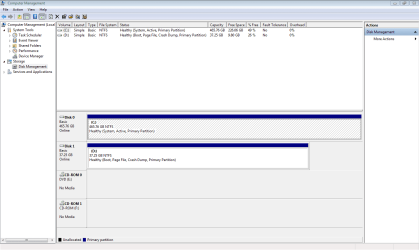
Snippet attached...
 

Attachments

  • Capture.PNG
    Capture.PNG
    25 KB · Views: 11

My Computer My Computer

At a glance

Windows 7 Home Premium 32-bitAMD Athlon(tm) 64 X2 Dual Core Processor 5000...3072 mbNVIDIA GeForce GT 240
Computer type
PC/Desktop
Computer Manufacturer/Model Number
custom build
OS
Windows 7 Home Premium 32-bit
CPU
AMD Athlon(tm) 64 X2 Dual Core Processor 5000+ (2 CPUs), ~2.
Motherboard
NVDAACPI - x86
Memory
3072 mb
Graphics Card(s)
NVIDIA GeForce GT 240
Hard Drives
Drive: C:
Free Space: 231.5 GB
Total Space: 476.9 GB
File System: NTFS
Model: ST350032 0AS SCSI Disk Device

Drive: D:
Free Space: 10.2 GB
Total Space: 38.1 GB
File System: NTFS
Model: ST340211 1AS SCSI Disk Device
Antivirus
(undisclosed)
Browser
Chrome
Looks like all your boot data is on D:\

GR will undoubtedly tell what you need to do.

You just need to repair your boot data. Hope you have the disc handy.
 

My Computer My Computer

At a glance

8 Pro x64i7 3770K 4.6GHz16GB G.Skill Trident X 2666mhzx2 EVGA 780 Ti Superclocked SLI
Computer type
PC/Desktop
Computer Manufacturer/Model Number
Systems by SmartEyeball
OS
8 Pro x64
CPU
i7 3770K 4.6GHz
Motherboard
ASUS P8Z77 WS
Memory
16GB G.Skill Trident X 2666mhz
Graphics Card(s)
x2 EVGA 780 Ti Superclocked SLI
Sound Card
SB X-FI Surround 5.1 PRO USB / ATH-AD900 Headphones
Monitor(s) Displays
x3 Dell U2410 / 58" Samsung
Screen Resolution
5760*1200/ 1920*1200
Hard Drives
2x Intel 520 240GB (RAID 0) * 2x WD Caviar Blacks 2TB (RAID 0) * 2TB WD Caviar Black * Sony Optirac DVD
PSU
Silverstone Strider Evolution 1200W
Case
Thermaltake Level 10 GT Snow Edition
Cooling
Noctua NH-D14
Keyboard
Topre Realforce // Ducky Shine MX Black // Filco Ninja TKL
Mouse
Thermaltake Theron (Highly Recommended) + Razer Imperator
Antivirus
MSE
Browser
IE, FF, WaterFox
Other Info
GT Extreme V2 Sim Racing Cockpit + 40" LCD and K/B Mouse stand ▼
Fanatec CSR Elite Wheel + Clubsport V1 Pedals + CSR shifter/7G-H ▼Saitek X52 Pro ▼ TrackIR 5 Pro
Buttkicker v2 Seat Rumbler with Dedicated 5.1 and Sub Woofer attached to frame ▼
=
Bloody Big Grin
Thanks for pointing that out smarteyeball :) See, that is what I'm hoping for. D:\ is the only drive I can use at the moment.. It's when I remove C:\, that D:\ fails to boot. I'm puzzled...
 

My Computer My Computer

At a glance

Windows 7 Home Premium 32-bitAMD Athlon(tm) 64 X2 Dual Core Processor 5000...3072 mbNVIDIA GeForce GT 240
Computer type
PC/Desktop
Computer Manufacturer/Model Number
custom build
OS
Windows 7 Home Premium 32-bit
CPU
AMD Athlon(tm) 64 X2 Dual Core Processor 5000+ (2 CPUs), ~2.
Motherboard
NVDAACPI - x86
Memory
3072 mb
Graphics Card(s)
NVIDIA GeForce GT 240
Hard Drives
Drive: C:
Free Space: 231.5 GB
Total Space: 476.9 GB
File System: NTFS
Model: ST350032 0AS SCSI Disk Device

Drive: D:
Free Space: 10.2 GB
Total Space: 38.1 GB
File System: NTFS
Model: ST340211 1AS SCSI Disk Device
Antivirus
(undisclosed)
Browser
Chrome
You're booted into D right now as signified by the Boot flag on its partition, which means that Win7 on D was installed incorrectly from C, blocking out the C letter's availability so Win7 cannot claim the C letter as it always does when it is correctly installed from a booted installer.

You can keep it this way or reinstall, this time unplugging Disk0 as also should have been done before booting the installer to Clean Install Windows 7.

You can also leave it the way it is on D which most users do not want. If you don't mind then to transfer the System boot files to D you 'll need to first mark it Active in Disk Management: Partition - Mark as Active

Then power down to unplug Disk0, swap its SATA cable to D so that it becomes Disk0, boot into the Win7 installer or System Repair Disk to run Startup Repair - Run up to 3 Separate Times with reboots, until D starts up and is marked System Active.

You can then plug back in the other HD to wipe it withDiskpart Clean Command and repartition in Disk Mgmt.
 
Greg, thank you so much for this :) I will follow-up when I'm done. :)
 

My Computer My Computer

At a glance

Windows 7 Home Premium 32-bitAMD Athlon(tm) 64 X2 Dual Core Processor 5000...3072 mbNVIDIA GeForce GT 240
Computer type
PC/Desktop
Computer Manufacturer/Model Number
custom build
OS
Windows 7 Home Premium 32-bit
CPU
AMD Athlon(tm) 64 X2 Dual Core Processor 5000+ (2 CPUs), ~2.
Motherboard
NVDAACPI - x86
Memory
3072 mb
Graphics Card(s)
NVIDIA GeForce GT 240
Hard Drives
Drive: C:
Free Space: 231.5 GB
Total Space: 476.9 GB
File System: NTFS
Model: ST350032 0AS SCSI Disk Device

Drive: D:
Free Space: 10.2 GB
Total Space: 38.1 GB
File System: NTFS
Model: ST340211 1AS SCSI Disk Device
Antivirus
(undisclosed)
Browser
Chrome

The "Active" drive is the one that Windows will boot from. You need to mark C: inactive then mark D: as "Active". You should be able to do that from the disk management screen.

Yep, there's other considerations. Forget that.
 

My Computer My Computer

At a glance

Windows 7 Pro-x64i7-2600 3.4GHz - 3.8GHz Turbo8Gb - 2x4GB, Muskin 991770 PC3-1333Integrated Intel HD 2000
Computer type
PC/Desktop
Computer Manufacturer/Model Number
Built 2/11/2011
OS
Windows 7 Pro-x64
CPU
i7-2600 3.4GHz - 3.8GHz Turbo
Motherboard
Intel DH67BL-B3
Memory
8Gb - 2x4GB, Muskin 991770 PC3-1333
Graphics Card(s)
Integrated Intel HD 2000
Sound Card
Integrated Intel 10.1 HD, RealTek ALC892
Monitor(s) Displays
Asus LCD VH222H, Haier HL24XSL2a
Screen Resolution
1920x1080, 1920x1080
Hard Drives
Crucial SSD C300-128Gb,
Western Digital WD5002AALX - 500Gb,
Western Digital WD7501AALS - 750Gb
PSU
Seasonic 650W 80+ Gold Modular
Case
Rosewill Defender
Cooling
Stock CPU, Four 120mm case fans, PCH fan added
Keyboard
Logitech EX100 Y-RBH94 Wireless
Mouse
Logitech EX100 M-RCE95 Wireless
Internet Speed
3.0/1.5 Mbs
Antivirus
Microsoft Security Essentials
Browser
Microsoft Internet Explorer 11
Other Info
Antec Veris Premier-Multimedia IR Station,
Cyber Accoustics-3602 Speakers,
AFT XM-5U Card Reader,
Hauppauge TV-HVR-2250,
Sony LX300 USB Turntable
He'll be unplugging C in order for the repairs to work, so it's Active flag won't interfere - while D will now be marked Active so ready to receive the Boot files written during repairs.

Afterward when C is plugged back in it will now be on Disk1 cable which isn't set first to boot in BIOS. So it won't interfere and boot unless it is specifically chosen to boot from the BIOS.

We know that Disk0 was set first to boot C which held the System files, and its cable has now been swapped to D so it will boot itself. It is also safer to have the System HD in Disk0 position.
 
As Greg suggests. Unplug C and move D to sata port #1 on the motherboard, then reinstall windows.

Do not plug C back in.
 

My Computer My Computer

At a glance

Windows 10 Pro x64Intel Core i7 6700KGSkill TridentZ RGB 16GB 3600 16-16-16-36EVGA GTX 980 Ti SC x2
Computer type
PC/Desktop
Computer Manufacturer/Model Number
Skylake Special #666
OS
Windows 10 Pro x64
CPU
Intel Core i7 6700K
Motherboard
Asus Sabertooth Z170 Mark 1
Memory
GSkill TridentZ RGB 16GB 3600 16-16-16-36
Graphics Card(s)
EVGA GTX 980 Ti SC x2
Sound Card
Realtek High Definition
Monitor(s) Displays
AOC G2460PG
Screen Resolution
1920 x 1080 144Hz
Hard Drives
Samsung 860 Pro 256GB, Seagate Barracuda 4TB x2
PSU
EVGA 1000 P2, EVGA White Custom Braided Cables
Case
Corsair Vengeance C70 Gunmetal Black
Cooling
Corsair H100i v2, Corsair ML120 x2, Thermal Grizzly Kryonaut
Keyboard
Logitech G910 Orion Spectrum
Mouse
Logitech G700s
Internet Speed
Verizon Fios Quantum Gateway 75/75
Antivirus
Windows Defender, Malwarebytes Free 3.8.3
Browser
Chrome
Other Info
Corsair SP120 x4, LG Blu-ray Drive, Durabrand HT-395 100 Watt Dolby Digital Amp, Corsair H2100 Wireless 7.1 Headset
Back
Top