separating child folders from parent folders

dmehling

New member
Member
Local time
10:27 AM
Messages
47
I'm not sure if this is the right place to ask my particular question, but here goes. I have a folder for all of my music, and within that folder is a bunch of artists folders, and within each of those I have album folders, which contain the individual music files. I am trying to figure out an easy way to grab all of those album folders at once and move them to one main folder. That's instead of looking through each artist folder, and moving the album folders within each one which could be a very time-consuming process. I thought I had figured out a way to do this, but all of the song files were placed directly into the master folder without being contained within their album folders. Any idea how to do this?
 

My Computer My Computer

Computer Manufacturer/Model Number
Alienware
OS
Windows 7
CPU
i7
Memory
12 GB
  1. create new folder on desktop (or any other location you like)
  2. click Start button
  3. click Computer
  4. double-click drive where music is stored
  5. look at the left side of the window
  6. double-click drive where music is stored (file tree expands)
  7. click the triangle next to folder where music is stored (file tree expands)
  8. click the triangle next to artist folder(s)
  9. start dragging album folders to newly created folder

edit* that's one way to do it anyway
 

My Computer My Computer

Computer type
Laptop
Computer Manufacturer/Model Number
Sager NP9150
OS
Windows 7 Home x64
CPU
Intel Core i7-3610QM @ 2.3GHz x4
Motherboard
Clevo P15xEMx
Memory
16GBs
Graphics Card(s)
nVidia GeForce GTX 670M
Sound Card
Realtek High Def Audio
Monitor(s) Displays
Samsung SyncMaster S24B300 + Mobile Display
Screen Resolution
1920x1080 + 1920x1080 (running 1366x768)
Hard Drives
128GBt SSD
500GBt HDD
Keyboard
Logitech K360
Mouse
Logitech Anywhere Mouse MX
Internet Speed
Fat
Antivirus
Avast
Browser
Chrome

My Computer My Computer

Computer Manufacturer/Model Number
* BFK Customs *
OS
W 7 64-bit Ultimate
CPU
Intel Q9550 Yorkfield
Motherboard
ASUS P5Q Pro
Memory
8GB Dominator 8500C5D
Graphics Card(s)
ATI : XFX 5870
Sound Card
Realtek HD Audio 7-1
Monitor(s) Displays
1x 47" LCD HDMI & 3x 26" LCD HDMI
Screen Resolution
1920x1080P & 1920x1200
Hard Drives
1x 80GB Intel X25-M G2 SSD : 1x 500GB & 1x 640GB WD Caviar Black(s)
PSU
Corsair 620HX
Case
Cooler Master RC-690
Cooling
Tuniq Tower 120, 2x 140mm and 3x 120mm case fans
Keyboard
Microsoft 500
Mouse
Razer Diamondback 3G
Internet Speed
14 Mb/s
Other Info
1x Koutech 3Gb/s SATA HDD Hot Swap Rack
I know how to find my music folders and move files. This is what I described as the time-consuming method, which I'm trying to avoid. I don't want to have to look within each artist folder and move album folders. I want to be able to move all album folders at once.
 

My Computer My Computer

Computer Manufacturer/Model Number
Alienware
OS
Windows 7
CPU
i7
Memory
12 GB
Hello dmehling.


I'm not at all sure what you're asking but start by having a look at the tutorial at the link below, I move all kinds of stuff around with it all the time (single and multiple files); be sure to keep us informed.

http://www.sevenforums.com/tutorials/516-context-menu-add-copy-folder-move-folder.html?ltr=C

I'm pretty sure the OP is looking for a less labor intensive method (something to the effect of "select all">copy>paste. Problem is, I don't think folders behave that way.
 

My Computer My Computer

Computer type
Laptop
Computer Manufacturer/Model Number
Sager NP9150
OS
Windows 7 Home x64
CPU
Intel Core i7-3610QM @ 2.3GHz x4
Motherboard
Clevo P15xEMx
Memory
16GBs
Graphics Card(s)
nVidia GeForce GTX 670M
Sound Card
Realtek High Def Audio
Monitor(s) Displays
Samsung SyncMaster S24B300 + Mobile Display
Screen Resolution
1920x1080 + 1920x1080 (running 1366x768)
Hard Drives
128GBt SSD
500GBt HDD
Keyboard
Logitech K360
Mouse
Logitech Anywhere Mouse MX
Internet Speed
Fat
Antivirus
Avast
Browser
Chrome
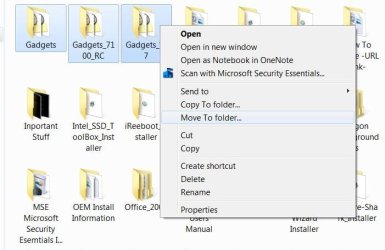
Looks pretty easy to me.

Easy.JPG
 

My Computer My Computer

Computer Manufacturer/Model Number
* BFK Customs *
OS
W 7 64-bit Ultimate
CPU
Intel Q9550 Yorkfield
Motherboard
ASUS P5Q Pro
Memory
8GB Dominator 8500C5D
Graphics Card(s)
ATI : XFX 5870
Sound Card
Realtek HD Audio 7-1
Monitor(s) Displays
1x 47" LCD HDMI & 3x 26" LCD HDMI
Screen Resolution
1920x1080P & 1920x1200
Hard Drives
1x 80GB Intel X25-M G2 SSD : 1x 500GB & 1x 640GB WD Caviar Black(s)
PSU
Corsair 620HX
Case
Cooler Master RC-690
Cooling
Tuniq Tower 120, 2x 140mm and 3x 120mm case fans
Keyboard
Microsoft 500
Mouse
Razer Diamondback 3G
Internet Speed
14 Mb/s
Other Info
1x Koutech 3Gb/s SATA HDD Hot Swap Rack
The OP wants to copy (or move) all Album (child) folders, that are themselves within multiple Artist (parent) folders, at the same time.

I think the problem is that if you're working inside a given parent folder, while you can use "select all" to copy or move that folder's entire contents, you can't move on to a different parent folder and add its contents to what you've already copied.

I don't think there is a "clipboard" function for this sort of thing, is there?

Does that even remotely make sense? I'm not the most articulate of cats...
 

My Computer My Computer

Computer type
Laptop
Computer Manufacturer/Model Number
Sager NP9150
OS
Windows 7 Home x64
CPU
Intel Core i7-3610QM @ 2.3GHz x4
Motherboard
Clevo P15xEMx
Memory
16GBs
Graphics Card(s)
nVidia GeForce GTX 670M
Sound Card
Realtek High Def Audio
Monitor(s) Displays
Samsung SyncMaster S24B300 + Mobile Display
Screen Resolution
1920x1080 + 1920x1080 (running 1366x768)
Hard Drives
128GBt SSD
500GBt HDD
Keyboard
Logitech K360
Mouse
Logitech Anywhere Mouse MX
Internet Speed
Fat
Antivirus
Avast
Browser
Chrome
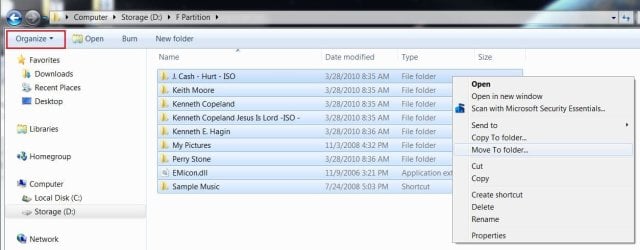
One last time.

In the upper left corner click "Organize" in organize click "select all" then on one of the highlighted (blue) lines right click, then "move to" then in the window that opens navigate to the new location then select move.


I do it all the time and it works flawlessly.

Move.JPG
 

My Computer My Computer

Computer Manufacturer/Model Number
* BFK Customs *
OS
W 7 64-bit Ultimate
CPU
Intel Q9550 Yorkfield
Motherboard
ASUS P5Q Pro
Memory
8GB Dominator 8500C5D
Graphics Card(s)
ATI : XFX 5870
Sound Card
Realtek HD Audio 7-1
Monitor(s) Displays
1x 47" LCD HDMI & 3x 26" LCD HDMI
Screen Resolution
1920x1080P & 1920x1200
Hard Drives
1x 80GB Intel X25-M G2 SSD : 1x 500GB & 1x 640GB WD Caviar Black(s)
PSU
Corsair 620HX
Case
Cooler Master RC-690
Cooling
Tuniq Tower 120, 2x 140mm and 3x 120mm case fans
Keyboard
Microsoft 500
Mouse
Razer Diamondback 3G
Internet Speed
14 Mb/s
Other Info
1x Koutech 3Gb/s SATA HDD Hot Swap Rack
If they are all .mp3, then you could do a search and then select all and then move them all to a new folder. This would move all .mp3 files on your computer to one folder though. dont know if that is a good idea or not lol

Do a search and type in *.mp3
make sure all the files listed are the ones you want to move to the new folder
Move the files

Edit: hmmm I was way off....

I will look into this when I get home
 

My Computer My Computer

Computer type
Laptop
Computer Manufacturer/Model Number
ASUS G60-RBBX05
OS
Win7 Home Premium 64x
CPU
Intel Core 2 Duo P7450 / 2.13 GHz (2.29 with Extreme Turbo)
Memory
4 GB PC-6400 Hyundai (2X2) at 800Mhz
Graphics Card(s)
NVIDIA GeForce GTX 260M 1GB DDR3 VRAM
Monitor(s) Displays
16" LED Backlit
Screen Resolution
1366 x 768 on laptop 1600x1050 max res on 22" external mon
Hard Drives
OCZ Agility 3 60GB SSD / 320 GB - Serial ATA-150 - 7200 rpm
PSU
6-cell Lithium ion { lasts 1.5 hours }
Case
ASUS G60 Laptop
Keyboard
Chicklet type back-lit (white light) keyboard
Mouse
Logitech G9 Laser Mouse 3200dpi and 1000 reports per minute
Internet Speed
Comcast 8.60mb/s up - 3.11mb/s down
Antivirus
MSE
Browser
Firefox
Other Info
General mid-budget gaming Comp. Low batterylife - High FrameRates - currently overheating problems :(

2nd Rig: Case: Rosewill BLACKHAWK Gaming ATX Mid Tower Computer Case

Mobo: GIGABYTE GA-990FXA-UD3
CPU: AMD FX-6200 Zambezi 3.8GHz (4.1GHz Turbo)
Heatsink: COOLER MASTER V8 CPU Cooler
RAM: Patriot Viper 3 8GB (2 x 4GB) 240-Pin DDR3 SDRAM 1866 (PC3 15000)
GPU: SAPPHIRE Radeon HD 6850 1GB 2
I know how to find my music folders and move files. This is what I described as the time-consuming method, which I'm trying to avoid. I don't want to have to look within each artist folder and move album folders. I want to be able to move all album folders at once.

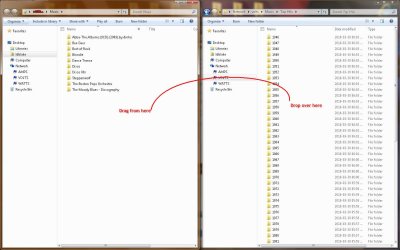
Ok... open your music folder where you want the files in one window...

Now open the folder with the sub folders you want to move in another...

Two windows.... one destination the other source.

Use the Aero snap feature....
Drag one to the left side of the screen... it will jump to fill half the screen
Drag the other to the right side of the screen... it will fill the other half

Drag the folders you want moved from one window and drop them on the other.


Capture.JPG
 

My Computer My Computer

Computer Manufacturer/Model Number
Homebrew
OS
XP Pro SP3 X86 / Win7 Pro X86
CPU
Amd 64 x2 4200 (2.4ghz)
Motherboard
Asus M2N-MX SE Plus
Memory
Kingston DDR2 800 2gb
Graphics Card(s)
Nvidia GF-8400
Sound Card
Realtek on Motherboard
Monitor(s) Displays
Acer x-193bw
Screen Resolution
1440 x 900
Hard Drives
Western Digital 500g
PSU
350watt In-Win
Case
In-Win
Cooling
Air
Keyboard
yes
Mouse
yes
Internet Speed
5mpbs
Other Info
Also ASRock ION 330 as HTPC (on XP).
Acer Aspire as GP netbook (on XP).
From the Windows Command Line:

for /D %i in ("C:\Path\to\Artists\Directory") do xcopy %i "C:\Path\to\New\Folder" /E


...where C:\Path\to\Artists\Directory is the directory with all of the artist folders that contain all of the albums within each of those folders

I believe this is what you're looking for.
 

My Computer My Computer

OS
XP / Win7 x64 Pro
CPU
Intel Quad-Core Q9450 @ 3.2GHz
Motherboard
Asus P5-E
Memory
2x2GB GSkill DDR2
Graphics Card(s)
NVIDIA GeForce 8600 GTS (EVGA)
Monitor(s) Displays
Dell 2408WFP
Screen Resolution
1920x1200
Don't ya just love a question with a dozen right answers?
 

My Computer My Computer

Computer Manufacturer/Model Number
Homebrew
OS
XP Pro SP3 X86 / Win7 Pro X86
CPU
Amd 64 x2 4200 (2.4ghz)
Motherboard
Asus M2N-MX SE Plus
Memory
Kingston DDR2 800 2gb
Graphics Card(s)
Nvidia GF-8400
Sound Card
Realtek on Motherboard
Monitor(s) Displays
Acer x-193bw
Screen Resolution
1440 x 900
Hard Drives
Western Digital 500g
PSU
350watt In-Win
Case
In-Win
Cooling
Air
Keyboard
yes
Mouse
yes
Internet Speed
5mpbs
Other Info
Also ASRock ION 330 as HTPC (on XP).
Acer Aspire as GP netbook (on XP).
I'm not sure if this is the right place to ask my particular question, but here goes. I have a folder for all of my music, and within that folder is a bunch of artists folders, and within each of those I have album folders, which contain the individual music files. I am trying to figure out an easy way to grab all of those album folders at once and move them to one main folder. That's instead of looking through each artist folder, and moving the album folders within each one which could be a very time-consuming process. I thought I had figured out a way to do this, but all of the song files were placed directly into the master folder without being contained within their album folders. Any idea how to do this?

If I understand correctly, you have a tree that looks something like this:

WE.PNG

and you want to move a,b,c,d etc. to a new folder without having to open 1 and copy those folders and then open 2 and copy those. Something that would go into the artist folders (1,2 etc. here) and copy only the album folders (a,b,c etc.) to another drive/folder. You have hundreds of artists folders and doing them one at at time will take forever.

Unfortuneately I don't have an answer at this time, a macro or script maybe. Just trying to clarify the question.
 

My Computer My Computer

Computer Manufacturer/Model Number
Dell XPS420
OS
Vista Ult 64 bit Seven Ult RTM x64
CPU
Intel Core2 Quad Q6600 2.40 gigahertz
Memory
Crucial Ballistix 4x2GB PC2 6400
Graphics Card(s)
NVIDIA GeForce 8600 GTS 256 MB
Sound Card
Creative SB X-Fi audio
Monitor(s) Displays
HP w2207 + HPvs15
Screen Resolution
1680x1050 + 1024x768
Hard Drives
2-WD5000AAKS-500 GB
WD5000AAV-500 GB external
Keyboard
Microsoft Comfort Curve
Mouse
MX Revolution
Other Info
Wacom Intuos 2 Graphics Tablet
Experience Index=5.5
Assuming the structure above, if you want to copy folders a,b,c,d,e... to a new folder, run the following command:

for /D %i in (@dir /b "C:\Test\*") do xcopy "%i" "C:\Path\to\New\Folder" /e

This will create C:\Path\to\New\Folder\a, C:\Path\to\New\Folder\b, C:\Path\to\New\Folder\c, ....
 
Last edited:

My Computer My Computer

OS
XP / Win7 x64 Pro
CPU
Intel Quad-Core Q9450 @ 3.2GHz
Motherboard
Asus P5-E
Memory
2x2GB GSkill DDR2
Graphics Card(s)
NVIDIA GeForce 8600 GTS (EVGA)
Monitor(s) Displays
Dell 2408WFP
Screen Resolution
1920x1200
Back
Top