Solved Serious Network hack

harleynut97

New member
Member
VIP
Local time
8:40 AM
Messages
121
My 80 year old father fell for what I believe is a scam that has infected his computer. He googled a telephone number for customer support for help with his Roku device...He didn't look closely and dialed this number that he thought was Roku support.... they immediately had him give them remote access to his computer..... once they did this ... they started running scripts on the computer and then trying to sell him
security protection because these "tests" they were running were showing unidentified users on his network.

He is now having unidentified network showing up occasionally.. if you right click and do trouble shoot it will reset and then find the correct network name.

When he told me about this, I immediately change his routers password (the one people would enter to use Wifi in your home) but because he gave them access into his computer and they ran these scripts... I doubt that is going to make a difference.

He is running McAfee Virus protection / firewall.
When I first set up his system I did make sure the router had security set up.

Hoping you can give me steps on what to do.

-How do you test and truly determine that unknown users are using your network?
-How do you then eliminate the problem?
-He has 2 computers hooked up to the network... one via ethernet, 2nd computer via Wifi adaptor.
He was on the wifi computer when this all happened.
 

My Computer

Computer type
PC/Desktop
Computer Manufacturer/Model Number
SYX SG-103
OS
Windows 7 home premium 64 bit sp1
CPU
Intel Core I7-2600 3.4 Ghz 1155 8M 95W CPU
Motherboard
MSI P67A-C43 (B3) ATX
Memory
16 gb DD3 1333MHZ
Graphics Card(s)
Nvidea Gforce GTX 550Ti
Sound Card
Realtek ALC892 integrated
Monitor(s) Displays
acer 23"
Screen Resolution
1920 x 1080
Hard Drives
Hitachi 1 TB 3.5" SATA 3G 7200rpm
Seagate ST32000641AS baracuda XT , 2 TB 3.5" 7200 rpm
Western digital My Book 1 tb USB2 external
Western digital My Book 3 tb USB3 external
PSU
500 Watt 80 plus
Case
Cooler Master Elite 310 RC-310-BWN1-GP
Keyboard
Logitech MK 200 Keybard
Mouse
Logitech MK200 mouse
Other Info
24x DVDRW Dual Layer SATA optical drive
First off, I recommend using another computer that is known to be clean and change all passwords to everything.
I would also notify my bank, credit companies that your system was hacked and follow their advise.
If you have a complete backup or Clone that was done way before the bad guys got in the computer you could use that.
If you don't.
Next because the bad guys had access to the computer and their is no way for sure knowing what they did I would do a Clean Install of Windows 7.

Some guidance here from a tutorial by Brink.

Clean Install Windows 7


Jack
 

My Computer

Computer type
PC/Desktop
Computer Manufacturer/Model Number
Home made Desktop
OS
Windows 10 Pro. 64/ version 1709 Windows 7 Pro/64
CPU
Intel i7-6800K @ 4.3
Motherboard
ASUS X-99 Deluxe II
Memory
Corsair Platinum 16 gig @2400
Graphics Card(s)
EVGA GTX 1070 OC
Monitor(s) Displays
Asus 27" LED LCD/VE278Q
Screen Resolution
1920-1080 or 1280-720 HDMI
Hard Drives
INTEL SSD 730-240 Gb Sata 3.0/
PSU
EVGA Platium 1200W
Case
Phanteks Luxe Tempered Glass 8 fans/ one radiator
Cooling
XSPC/ Water Cooled CPU
Keyboard
Das 4 Professional
Mouse
Logitech M705/MX Anywhere 2-S
Internet Speed
100 mbits
Antivirus
Microsoft Security Essentials/ Malwarebytes Premium 3.0/ SAS
Browser
I.E. 11 default/Firefox/ ISP Time Warner Cable/Spectrum
Other Info
LG BluRay Burner/
Sound system-KLipsch-THX/
Icy Dock ssd Hot Swap bays.
Jack, thank you for your reply.

I do have a full backup of the computer that the scripts were run on (The wifi adaptor remote computer)...It would be a nightmare to try and do a clean install,but I could definitely restore the full backup. But it is important for me to state that the external harddrive that the full back up was on....was connected to the remote computer at the time the script was run.

Let me ask a few followup questions...

1) If the script was run on the remote computer... would the other computer connected to the same network be at risk?

2) Can you give me a list of what passwords should be changed specific to the computer(s), router. I do understand credit cards,bank account passwords should be changed.

3) Is there anyway I can actually run some legitimate test to see if infact their are other uses using the network?

Thanks again for your help.
 

My Computer

Computer type
PC/Desktop
Computer Manufacturer/Model Number
SYX SG-103
OS
Windows 7 home premium 64 bit sp1
CPU
Intel Core I7-2600 3.4 Ghz 1155 8M 95W CPU
Motherboard
MSI P67A-C43 (B3) ATX
Memory
16 gb DD3 1333MHZ
Graphics Card(s)
Nvidea Gforce GTX 550Ti
Sound Card
Realtek ALC892 integrated
Monitor(s) Displays
acer 23"
Screen Resolution
1920 x 1080
Hard Drives
Hitachi 1 TB 3.5" SATA 3G 7200rpm
Seagate ST32000641AS baracuda XT , 2 TB 3.5" 7200 rpm
Western digital My Book 1 tb USB2 external
Western digital My Book 3 tb USB3 external
PSU
500 Watt 80 plus
Case
Cooler Master Elite 310 RC-310-BWN1-GP
Keyboard
Logitech MK 200 Keybard
Mouse
Logitech MK200 mouse
Other Info
24x DVDRW Dual Layer SATA optical drive
If you have TeamViewer installed on the system, change the permanent password to something you would know for one as whenever the system is connected to the Internet (if TeamViewer was installed on the system) the scammer would be able to remotely connect at any time. If TeamViewer is not installed then skip this.

Programs:
Uninstall all software that the scammer installed or may have installed. Go through the programs list and check to see which programs you don't recognise that may not have been on the system before the scammer had connected. These programs (in the start menu) should have a recent or new highlight to it's name for a couple of days. Or simple check the install date on the programs in the Add/Remove All Programs. (Or Programs and Features) (Check first screenshot below)

Network users:
Log in to the router's admin control panel (usually 192.168.0.1 / 192.168.1.1) and go to something like "Connected users" or "Connected devices". Here you can see what devices are connected to your network including their MAC Addresses. As long as you change your wireless network password only Ethernet connected devices should be able to connect and the wireless devices that you connect yourself. Your network should be safe.

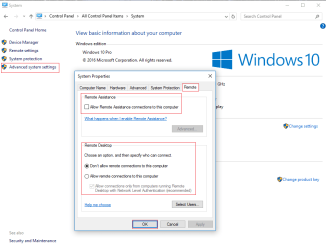
As for user accounts associated with the system, as long as there are no leftover remote access programs installed or configured by the scammer then there is no way for the scammer to access the system. To be sure, do the following: :orb: :ar: Computer (right click) :ar: Properties :ar: "Advanced system settings" :ar: "Remote". Check the second screenshot below.

As I said above, be sure to check to see if there are any other remote access programs installed that you don't recognise. If so, uninstall them.
 

Attachments

  • ss (2017-02-12 at 05.20.07).png
    ss (2017-02-12 at 05.20.07).png
    19.4 KB · Views: 2
  • ss (2017-02-12 at 05.30.26).png
    ss (2017-02-12 at 05.30.26).png
    21.6 KB · Views: 1

My Computer

Computer type
PC/Desktop
Computer Manufacturer/Model Number
Custom Built
OS
Windows 10 Pro x64 (UPGRADED - 10/20/2016)
CPU
AMD FX 8350 (OC: 4.48GHz)
Motherboard
ASUS Crosshair V Formula-Z AM3+
Memory
14GB DDR3 Corsair Vengeance
Graphics Card(s)
Asus AMD Radeon R9 280X 3GB
Sound Card
N/A
Monitor(s) Displays
BenQ G2420HD
Screen Resolution
1920x1080
Hard Drives
Internal: 1x 500GB WD Blue SSD | 1TB WD Caviar Black | 3x 500GB WD Caviar Green
External: 500GB Seagate
PSU
Corsair AX1200i
Case
CoolerMaster HAF X
Cooling
Corsair Hydro H90 Water Cooling
Keyboard
Microsoft SideWinder X6 Keyboard
Mouse
Microsoft SideWinder X8 Mouse
Antivirus
MSE / Malwarebytes Anti-Malware
Browser
Mozilla Firefox + Google Chrome
@IoNGeNeRaL

Thank you for the recommendations. The first thing I did when he told me about it is uninstall the Remote program the guy installed. I can't recall the name of it, but I did remove it

Ive also uninstalled Team Viewer on both computers(They were installed long before this occured, but I uninstalled on each computer. There were not any other programs installed since the scam/hack.

I also made changes to both computers and made them NOT allow remote access.

When I checked the router settings I only saw the ethernet connection and the one wireless connection to the remote computer. Right now his Roku is unplugged, I would think this would normally show if it was plugged in.
@samuria I will have to wait untill tomorrow to run the scans and post the logs.

But I would really like to get confirmation from the people who are trying to help with the followiing Questions

1) If the script they were running was ALL done on his remote computer (Wifi), Do the scans need to be done for the other computer?

2) I use Acronis for his Full backup. If the external hardrive that holds the backup was hooked up, at the time of the hack, what are the odds that the backup was infected? The backup is this one Giant file that if I remember right has a .tib format extension.

3) I haven't ever had to do a restore from backup with this acronis program, so I am not sure exactly how it works, Does anyone know if in the restore process, does it first wipe windows clean and then reinstall the backup?

Thank you so much for all the help
 

My Computer

Computer type
PC/Desktop
Computer Manufacturer/Model Number
SYX SG-103
OS
Windows 7 home premium 64 bit sp1
CPU
Intel Core I7-2600 3.4 Ghz 1155 8M 95W CPU
Motherboard
MSI P67A-C43 (B3) ATX
Memory
16 gb DD3 1333MHZ
Graphics Card(s)
Nvidea Gforce GTX 550Ti
Sound Card
Realtek ALC892 integrated
Monitor(s) Displays
acer 23"
Screen Resolution
1920 x 1080
Hard Drives
Hitachi 1 TB 3.5" SATA 3G 7200rpm
Seagate ST32000641AS baracuda XT , 2 TB 3.5" 7200 rpm
Western digital My Book 1 tb USB2 external
Western digital My Book 3 tb USB3 external
PSU
500 Watt 80 plus
Case
Cooler Master Elite 310 RC-310-BWN1-GP
Keyboard
Logitech MK 200 Keybard
Mouse
Logitech MK200 mouse
Other Info
24x DVDRW Dual Layer SATA optical drive
Hopefully the scans will tell for sure if anything is left running depending on what they put on it could take over all PC's and add them to a botnet hopefully they just attacked the one PC
 

My Computer

Computer type
PC/Desktop
OS
win 8 32 bit
It is highly unlikely that a scammer would have been able to infect anything on other hard disks. These scammers are mostly stupid, especially "technical support" scammers. The most obvious things they do is attempt to syskey (set a password on the Windows Account Database) and run netstat and tree commands in the command prompt. (Netstat only lists concurrent connections on the computer, nothing to worry about) and "tree" just lists all directories and files on the hard disk continuously. Again, nothing to worry about.

As I said above, these scammers aren't "professional technicians" so it is unlikely that they would have done anything else to the other system let alone being able to do such a thing. I wouldn't worry about the other computer.

You should only restore a backup of a system if it has indeed been infected. Other than that, it isn't necessary.

Hopefully the scans will tell for sure if anything is left running depending on what they put on it could take over all PC's and add them to a botnet hopefully they just attacked the one PC

Scammers such as these are unlikely to know how to make a computer apart of a botnet.
 

My Computer

Computer type
PC/Desktop
Computer Manufacturer/Model Number
Custom Built
OS
Windows 10 Pro x64 (UPGRADED - 10/20/2016)
CPU
AMD FX 8350 (OC: 4.48GHz)
Motherboard
ASUS Crosshair V Formula-Z AM3+
Memory
14GB DDR3 Corsair Vengeance
Graphics Card(s)
Asus AMD Radeon R9 280X 3GB
Sound Card
N/A
Monitor(s) Displays
BenQ G2420HD
Screen Resolution
1920x1080
Hard Drives
Internal: 1x 500GB WD Blue SSD | 1TB WD Caviar Black | 3x 500GB WD Caviar Green
External: 500GB Seagate
PSU
Corsair AX1200i
Case
CoolerMaster HAF X
Cooling
Corsair Hydro H90 Water Cooling
Keyboard
Microsoft SideWinder X6 Keyboard
Mouse
Microsoft SideWinder X8 Mouse
Antivirus
MSE / Malwarebytes Anti-Malware
Browser
Mozilla Firefox + Google Chrome
Been gone a while fighting one of my computers.

Concerning passwords.
Change all passwords.
User account passwords.

Things like banking, credit card, PayPal passwords, ect.
Any account that has a password including this web site.
Router password.

Again; all passwords to what ever.

Jack
 

My Computer

Computer type
PC/Desktop
Computer Manufacturer/Model Number
Home made Desktop
OS
Windows 10 Pro. 64/ version 1709 Windows 7 Pro/64
CPU
Intel i7-6800K @ 4.3
Motherboard
ASUS X-99 Deluxe II
Memory
Corsair Platinum 16 gig @2400
Graphics Card(s)
EVGA GTX 1070 OC
Monitor(s) Displays
Asus 27" LED LCD/VE278Q
Screen Resolution
1920-1080 or 1280-720 HDMI
Hard Drives
INTEL SSD 730-240 Gb Sata 3.0/
PSU
EVGA Platium 1200W
Case
Phanteks Luxe Tempered Glass 8 fans/ one radiator
Cooling
XSPC/ Water Cooled CPU
Keyboard
Das 4 Professional
Mouse
Logitech M705/MX Anywhere 2-S
Internet Speed
100 mbits
Antivirus
Microsoft Security Essentials/ Malwarebytes Premium 3.0/ SAS
Browser
I.E. 11 default/Firefox/ ISP Time Warner Cable/Spectrum
Other Info
LG BluRay Burner/
Sound system-KLipsch-THX/
Icy Dock ssd Hot Swap bays.
I have just finished checking over harleynut97's computer and all seems fine. I checked over various things in which scammers like to use and do, nothing out of the ordinary. No suspicious processes or programs left behind and the network and user account security seem to be in tact. I showed him how to check what devices are connected to his router as well.

It seems that the scammer only used command prompt and used the netstat and tree commands to attempt to convince the users' father that there was infections.
 

My Computer

Computer type
PC/Desktop
Computer Manufacturer/Model Number
Custom Built
OS
Windows 10 Pro x64 (UPGRADED - 10/20/2016)
CPU
AMD FX 8350 (OC: 4.48GHz)
Motherboard
ASUS Crosshair V Formula-Z AM3+
Memory
14GB DDR3 Corsair Vengeance
Graphics Card(s)
Asus AMD Radeon R9 280X 3GB
Sound Card
N/A
Monitor(s) Displays
BenQ G2420HD
Screen Resolution
1920x1080
Hard Drives
Internal: 1x 500GB WD Blue SSD | 1TB WD Caviar Black | 3x 500GB WD Caviar Green
External: 500GB Seagate
PSU
Corsair AX1200i
Case
CoolerMaster HAF X
Cooling
Corsair Hydro H90 Water Cooling
Keyboard
Microsoft SideWinder X6 Keyboard
Mouse
Microsoft SideWinder X8 Mouse
Antivirus
MSE / Malwarebytes Anti-Malware
Browser
Mozilla Firefox + Google Chrome
A huge thank you to IoNGeneRaL for all his help. He was very helpful and walked me through everything he was doing.
I also want to take time to thank Layback and Samuria for their suggestions and input.

As I told IoNGeneRaL this forum has never let me down with past problems I have had, I'm very appreciative of the help. I'm going to mark this thread as closed ...thanks again
 

My Computer

Computer type
PC/Desktop
Computer Manufacturer/Model Number
SYX SG-103
OS
Windows 7 home premium 64 bit sp1
CPU
Intel Core I7-2600 3.4 Ghz 1155 8M 95W CPU
Motherboard
MSI P67A-C43 (B3) ATX
Memory
16 gb DD3 1333MHZ
Graphics Card(s)
Nvidea Gforce GTX 550Ti
Sound Card
Realtek ALC892 integrated
Monitor(s) Displays
acer 23"
Screen Resolution
1920 x 1080
Hard Drives
Hitachi 1 TB 3.5" SATA 3G 7200rpm
Seagate ST32000641AS baracuda XT , 2 TB 3.5" 7200 rpm
Western digital My Book 1 tb USB2 external
Western digital My Book 3 tb USB3 external
PSU
500 Watt 80 plus
Case
Cooler Master Elite 310 RC-310-BWN1-GP
Keyboard
Logitech MK 200 Keybard
Mouse
Logitech MK200 mouse
Other Info
24x DVDRW Dual Layer SATA optical drive
We are here to help and learn.

Happy computing.

Jack
 

My Computer

Computer type
PC/Desktop
Computer Manufacturer/Model Number
Home made Desktop
OS
Windows 10 Pro. 64/ version 1709 Windows 7 Pro/64
CPU
Intel i7-6800K @ 4.3
Motherboard
ASUS X-99 Deluxe II
Memory
Corsair Platinum 16 gig @2400
Graphics Card(s)
EVGA GTX 1070 OC
Monitor(s) Displays
Asus 27" LED LCD/VE278Q
Screen Resolution
1920-1080 or 1280-720 HDMI
Hard Drives
INTEL SSD 730-240 Gb Sata 3.0/
PSU
EVGA Platium 1200W
Case
Phanteks Luxe Tempered Glass 8 fans/ one radiator
Cooling
XSPC/ Water Cooled CPU
Keyboard
Das 4 Professional
Mouse
Logitech M705/MX Anywhere 2-S
Internet Speed
100 mbits
Antivirus
Microsoft Security Essentials/ Malwarebytes Premium 3.0/ SAS
Browser
I.E. 11 default/Firefox/ ISP Time Warner Cable/Spectrum
Other Info
LG BluRay Burner/
Sound system-KLipsch-THX/
Icy Dock ssd Hot Swap bays.
Back
Top