- Local time
- 11:22 AM
- Messages
- 121
My 80 year old father fell for what I believe is a scam that has infected his computer. He googled a telephone number for customer support for help with his Roku device...He didn't look closely and dialed this number that he thought was Roku support.... they immediately had him give them remote access to his computer..... once they did this ... they started running scripts on the computer and then trying to sell him
security protection because these "tests" they were running were showing unidentified users on his network.
He is now having unidentified network showing up occasionally.. if you right click and do trouble shoot it will reset and then find the correct network name.
When he told me about this, I immediately change his routers password (the one people would enter to use Wifi in your home) but because he gave them access into his computer and they ran these scripts... I doubt that is going to make a difference.
He is running McAfee Virus protection / firewall.
When I first set up his system I did make sure the router had security set up.
Hoping you can give me steps on what to do.
-How do you test and truly determine that unknown users are using your network?
-How do you then eliminate the problem?
-He has 2 computers hooked up to the network... one via ethernet, 2nd computer via Wifi adaptor.
He was on the wifi computer when this all happened.
security protection because these "tests" they were running were showing unidentified users on his network.
He is now having unidentified network showing up occasionally.. if you right click and do trouble shoot it will reset and then find the correct network name.
When he told me about this, I immediately change his routers password (the one people would enter to use Wifi in your home) but because he gave them access into his computer and they ran these scripts... I doubt that is going to make a difference.
He is running McAfee Virus protection / firewall.
When I first set up his system I did make sure the router had security set up.
Hoping you can give me steps on what to do.
-How do you test and truly determine that unknown users are using your network?
-How do you then eliminate the problem?
-He has 2 computers hooked up to the network... one via ethernet, 2nd computer via Wifi adaptor.
He was on the wifi computer when this all happened.
My Computer
- Computer type
- PC/Desktop
- Computer Manufacturer/Model Number
- SYX SG-103
- OS
- Windows 7 home premium 64 bit sp1
- CPU
- Intel Core I7-2600 3.4 Ghz 1155 8M 95W CPU
- Motherboard
- MSI P67A-C43 (B3) ATX
- Memory
- 16 gb DD3 1333MHZ
- Graphics Card(s)
- Nvidea Gforce GTX 550Ti
- Sound Card
- Realtek ALC892 integrated
- Monitor(s) Displays
- acer 23"
- Screen Resolution
- 1920 x 1080
- Hard Drives
- Hitachi 1 TB 3.5" SATA 3G 7200rpm
Seagate ST32000641AS baracuda XT , 2 TB 3.5" 7200 rpm
Western digital My Book 1 tb USB2 external
Western digital My Book 3 tb USB3 external
- PSU
- 500 Watt 80 plus
- Case
- Cooler Master Elite 310 RC-310-BWN1-GP
- Keyboard
- Logitech MK 200 Keybard
- Mouse
- Logitech MK200 mouse
- Other Info
- 24x DVDRW Dual Layer SATA optical drive


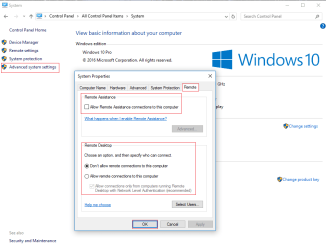
 rb: :ar: Computer (right click) :ar: Properties :ar: "Advanced system settings" :ar: "Remote".