- Local time
- 9:21 AM
- Messages
- 119
I have Windows 7 premium 64-bit installed and I use a Realtek PCI GBE LAN Network Adapter to connect to the internet. I am not fond of wireless connection so I don't use it at all.
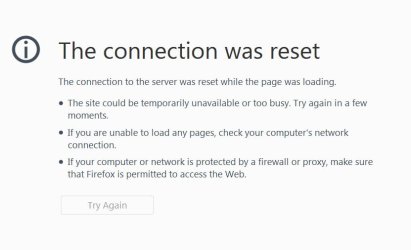
In the last 1 month I've been plagued with problems relating to network connectivity and internet. The networking center shows I'm connected to the internet but when I try to load a page the web browser displays "Server not Found." The only way I can get web pages to load is to refresh them several times. My d/l speed is 10 mbps. I regularily use FF 39 browser, but the same issue occurs on IE as well.
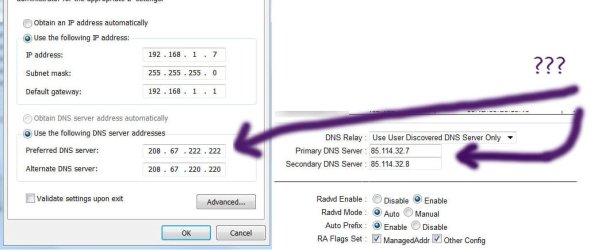
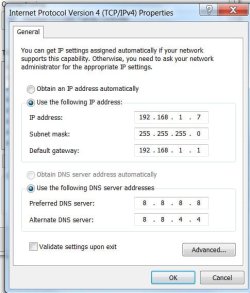
I tried all suggested fixes on Mozilla page, but the problem persists. It is not a firewall or DNS issue, I checked it several times. (Regarding the attachment, I tried "Obtain an IP address automatically" and "Obtain DNS server address automatically", but to no avail.)
After having tried all fixes which I could find online I am inclined to think that this can not be fixed at all. :-/
---------------------------------
OS Version: Microsoft Windows 7 Ultimate, Service Pack 1, 64 bit
Processor: Intel(R) Core(TM)2 Quad CPU Q6600 @ 2.40GHz, Intel64 Family 6 Model 15 Stepping 11
Processor Count: 4
RAM: 4095 Mb
Graphics Card: ATI Radeon HD 3800 Series, 512 Mb
Hard Drives: C: Total - 152617 MB, Free - 43145 MB; D: Total - 238464 MB, Free - 105880 MB; E: Total - 238464 MB, Free - 84493 MB;
Motherboard: ASUSTeK Computer INC., P5K Premium
In the last 1 month I've been plagued with problems relating to network connectivity and internet. The networking center shows I'm connected to the internet but when I try to load a page the web browser displays "Server not Found." The only way I can get web pages to load is to refresh them several times. My d/l speed is 10 mbps. I regularily use FF 39 browser, but the same issue occurs on IE as well.
I tried all suggested fixes on Mozilla page, but the problem persists. It is not a firewall or DNS issue, I checked it several times. (Regarding the attachment, I tried "Obtain an IP address automatically" and "Obtain DNS server address automatically", but to no avail.)
After having tried all fixes which I could find online I am inclined to think that this can not be fixed at all. :-/
---------------------------------
OS Version: Microsoft Windows 7 Ultimate, Service Pack 1, 64 bit
Processor: Intel(R) Core(TM)2 Quad CPU Q6600 @ 2.40GHz, Intel64 Family 6 Model 15 Stepping 11
Processor Count: 4
RAM: 4095 Mb
Graphics Card: ATI Radeon HD 3800 Series, 512 Mb
Hard Drives: C: Total - 152617 MB, Free - 43145 MB; D: Total - 238464 MB, Free - 105880 MB; E: Total - 238464 MB, Free - 84493 MB;
Motherboard: ASUSTeK Computer INC., P5K Premium
Attachments
My Computer
- Computer type
- PC/Desktop
- OS
- Windows 7 Ultimate x64
- CPU
- Intel(R) Xeon(R) CPU E3-1231 v3 @ 3.40GHz
- Motherboard
- ASUSTeK COMPUTER INC. Z97-A Rev 1.xx
- Memory
- 16 GB
- Graphics Card(s)
- AMD Radeon (TM) R9 390 Series
- Sound Card
- (1) AMD High Definition Audio Device (2) Realtek High Defi

 )
)