
"Server not found" problem on FF 39, Win 7

MATE - 64bit will work alright.
 

My Computer

Computer type
PC/Desktop
Computer Manufacturer/Model Number
Custom Build
OS
Windows 7 Ultimate x64 SP1
CPU
AMD Phenom 2 1090T
Motherboard
Gigabyte GA-890FXA-UD5
Memory
2x8GB Kingston HyperX Fury Black 1600Mhz Unganged
Graphics Card(s)
MSI GTX 970 Gaming 4G
Sound Card
Realtek On-Board HD 7.1 Audio / Logitech G35
Monitor(s) Displays
3xAcer GD245HQ
Screen Resolution
1920x1080
Hard Drives
Samsung 850 Pro 512GB SSD - OS /
WD Caviar Black SATA 3 - 1 TBx2 - Dynamic RAID 0 /
WD Caviar Green SATA 2 - 640GBx2 - Dynamic RAID 0 /
WD Caviar Green SATA 2 - 640GB - Internal Backup /
Seagate Barracude SATA 3 - 3TB - External Backup/ Sync
PSU
HighPower 1000W
Case
Cooler Master HAF 932
Cooling
Noctua NH-D14
Keyboard
Logitech G19
Mouse
Logitech G500
Internet Speed
100/4 Mbit Cable (100GB quota)
Antivirus
ZoneAlarm Extreme Security / MBAM Pro / MBAE Free / SAS Free
Browser
IE 11 - Firefox - Chrome
Other Info
Logitech F710/ G27/ G940/ Z5500 // TrackIR 5 // Nvidia 3D Surround Vision
I booted from Linux Mint - and everything went smoothly. Pages are loading fast and there weren't any Server not found message.
Just opposite of Win7
 

My Computer

Computer type
PC/Desktop
OS
Windows 7 Ultimate x64
CPU
Intel(R) Xeon(R) CPU E3-1231 v3 @ 3.40GHz
Motherboard
ASUSTeK COMPUTER INC. Z97-A Rev 1.xx
Memory
16 GB
Graphics Card(s)
AMD Radeon (TM) R9 390 Series
Sound Card
(1) AMD High Definition Audio Device (2) Realtek High Defi

My Computer

Computer type
PC/Desktop
Computer Manufacturer/Model Number
Custom Build
OS
Windows 7 Ultimate x64 SP1
CPU
AMD Phenom 2 1090T
Motherboard
Gigabyte GA-890FXA-UD5
Memory
2x8GB Kingston HyperX Fury Black 1600Mhz Unganged
Graphics Card(s)
MSI GTX 970 Gaming 4G
Sound Card
Realtek On-Board HD 7.1 Audio / Logitech G35
Monitor(s) Displays
3xAcer GD245HQ
Screen Resolution
1920x1080
Hard Drives
Samsung 850 Pro 512GB SSD - OS /
WD Caviar Black SATA 3 - 1 TBx2 - Dynamic RAID 0 /
WD Caviar Green SATA 2 - 640GBx2 - Dynamic RAID 0 /
WD Caviar Green SATA 2 - 640GB - Internal Backup /
Seagate Barracude SATA 3 - 3TB - External Backup/ Sync
PSU
HighPower 1000W
Case
Cooler Master HAF 932
Cooling
Noctua NH-D14
Keyboard
Logitech G19
Mouse
Logitech G500
Internet Speed
100/4 Mbit Cable (100GB quota)
Antivirus
ZoneAlarm Extreme Security / MBAM Pro / MBAE Free / SAS Free
Browser
IE 11 - Firefox - Chrome
Other Info
Logitech F710/ G27/ G940/ Z5500 // TrackIR 5 // Nvidia 3D Surround Vision
I did it. So far, so good...but let's wait a day or two. I'll mark the thread a s solved then.
Thank you.
 

My Computer

Computer type
PC/Desktop
OS
Windows 7 Ultimate x64
CPU
Intel(R) Xeon(R) CPU E3-1231 v3 @ 3.40GHz
Motherboard
ASUSTeK COMPUTER INC. Z97-A Rev 1.xx
Memory
16 GB
Graphics Card(s)
AMD Radeon (TM) R9 390 Series
Sound Card
(1) AMD High Definition Audio Device (2) Realtek High Defi
I just turned my PC on and...(sigh) the problem is still here. I get the same message ("The connection has timed out" this time)
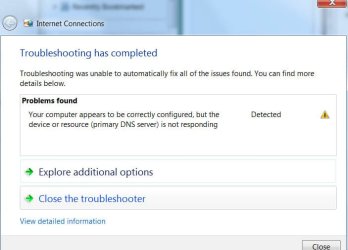
Troubleshooter is diagnosing the issue: "Your computer appears to be correctly configured, but the device or resource (DNS server) is not responding"
I do not know why DNS server is not responding after all this resetting and renewing and everything... :(
 

My Computer

Computer type
PC/Desktop
OS
Windows 7 Ultimate x64
CPU
Intel(R) Xeon(R) CPU E3-1231 v3 @ 3.40GHz
Motherboard
ASUSTeK COMPUTER INC. Z97-A Rev 1.xx
Memory
16 GB
Graphics Card(s)
AMD Radeon (TM) R9 390 Series
Sound Card
(1) AMD High Definition Audio Device (2) Realtek High Defi
The connection has timed out
Is it still like this?

Try run in cmd when you are getting the above error.
Code:
ping 8.8.8.8
 

My Computer

Computer type
PC/Desktop
Computer Manufacturer/Model Number
Custom Build
OS
Windows 7 Ultimate x64 SP1
CPU
AMD Phenom 2 1090T
Motherboard
Gigabyte GA-890FXA-UD5
Memory
2x8GB Kingston HyperX Fury Black 1600Mhz Unganged
Graphics Card(s)
MSI GTX 970 Gaming 4G
Sound Card
Realtek On-Board HD 7.1 Audio / Logitech G35
Monitor(s) Displays
3xAcer GD245HQ
Screen Resolution
1920x1080
Hard Drives
Samsung 850 Pro 512GB SSD - OS /
WD Caviar Black SATA 3 - 1 TBx2 - Dynamic RAID 0 /
WD Caviar Green SATA 2 - 640GBx2 - Dynamic RAID 0 /
WD Caviar Green SATA 2 - 640GB - Internal Backup /
Seagate Barracude SATA 3 - 3TB - External Backup/ Sync
PSU
HighPower 1000W
Case
Cooler Master HAF 932
Cooling
Noctua NH-D14
Keyboard
Logitech G19
Mouse
Logitech G500
Internet Speed
100/4 Mbit Cable (100GB quota)
Antivirus
ZoneAlarm Extreme Security / MBAM Pro / MBAE Free / SAS Free
Browser
IE 11 - Firefox - Chrome
Other Info
Logitech F710/ G27/ G940/ Z5500 // TrackIR 5 // Nvidia 3D Surround Vision
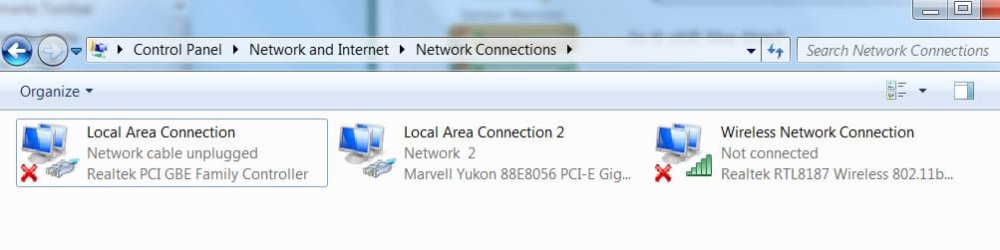
I will. I have 2 LAN ports built in on the motherboard. Only one of them is active at a time, of course, but perhaps it has something with this problem. Today I hadn't any "The connection has timed out" messages, only slow loading of pages. However, when the first such message appears I'll try that command and post the results.
 

Attachments

  • bd.jpg
    bd.jpg
    77.6 KB · Views: 0

My Computer

Computer type
PC/Desktop
OS
Windows 7 Ultimate x64
CPU
Intel(R) Xeon(R) CPU E3-1231 v3 @ 3.40GHz
Motherboard
ASUSTeK COMPUTER INC. Z97-A Rev 1.xx
Memory
16 GB
Graphics Card(s)
AMD Radeon (TM) R9 390 Series
Sound Card
(1) AMD High Definition Audio Device (2) Realtek High Defi
OK, "The connection has timed out" message still appears occasionally.
I ran the command and here are the results copied from cmd:

C:\Windows\system32>ping 8.8.8.8

Pinging 8.8.8.8 with 32 bytes of data:
Request timed out.
Request timed out.
Request timed out.
Request timed out.

Ping statistics for 8.8.8.8:
Packets: Sent = 4, Received = 0, Lost = 4 (100% loss),

C:\Windows\system32>^A
 

My Computer

Computer type
PC/Desktop
OS
Windows 7 Ultimate x64
CPU
Intel(R) Xeon(R) CPU E3-1231 v3 @ 3.40GHz
Motherboard
ASUSTeK COMPUTER INC. Z97-A Rev 1.xx
Memory
16 GB
Graphics Card(s)
AMD Radeon (TM) R9 390 Series
Sound Card
(1) AMD High Definition Audio Device (2) Realtek High Defi
Download the driver for Network adapter that has the cable plugged in. In Device Manager expand Network Adapters. Right click the one that is plugged in - Uninstall Driver - tick "Delete the driver software.." too. Restart PC, let Windows find the correct driver. If it can't use the driver you downloaded.
 

My Computer

Computer type
PC/Desktop
Computer Manufacturer/Model Number
Custom Build
OS
Windows 7 Ultimate x64 SP1
CPU
AMD Phenom 2 1090T
Motherboard
Gigabyte GA-890FXA-UD5
Memory
2x8GB Kingston HyperX Fury Black 1600Mhz Unganged
Graphics Card(s)
MSI GTX 970 Gaming 4G
Sound Card
Realtek On-Board HD 7.1 Audio / Logitech G35
Monitor(s) Displays
3xAcer GD245HQ
Screen Resolution
1920x1080
Hard Drives
Samsung 850 Pro 512GB SSD - OS /
WD Caviar Black SATA 3 - 1 TBx2 - Dynamic RAID 0 /
WD Caviar Green SATA 2 - 640GBx2 - Dynamic RAID 0 /
WD Caviar Green SATA 2 - 640GB - Internal Backup /
Seagate Barracude SATA 3 - 3TB - External Backup/ Sync
PSU
HighPower 1000W
Case
Cooler Master HAF 932
Cooling
Noctua NH-D14
Keyboard
Logitech G19
Mouse
Logitech G500
Internet Speed
100/4 Mbit Cable (100GB quota)
Antivirus
ZoneAlarm Extreme Security / MBAM Pro / MBAE Free / SAS Free
Browser
IE 11 - Firefox - Chrome
Other Info
Logitech F710/ G27/ G940/ Z5500 // TrackIR 5 // Nvidia 3D Surround Vision
I've tried that solution already. I tried it again, but to no avail.
GokAy, after all these posts, it may appear like I am pulling your leg, but I am not. I am grateful to you for trying to help me but perhaps this is unfixable.
 

My Computer

Computer type
PC/Desktop
OS
Windows 7 Ultimate x64
CPU
Intel(R) Xeon(R) CPU E3-1231 v3 @ 3.40GHz
Motherboard
ASUSTeK COMPUTER INC. Z97-A Rev 1.xx
Memory
16 GB
Graphics Card(s)
AMD Radeon (TM) R9 390 Series
Sound Card
(1) AMD High Definition Audio Device (2) Realtek High Defi
I have gone through the whole thread couple of times, and haven't seen anything regarding: do you have devices that work ok? or is this the only one that is connected?

Since it is not a hardware issue, it is bound to be fixable one way or another.

Please run cmd as admin:
Code:
sfc /scannow

If corruption is found also run in cmd:
Code:
findstr /c:"[SR]" %windir%\logs\cbs\cbs.log >"%userprofile%\desktop\sfcdetails.txt"
and attach the sfcdetails.txt here
 

My Computer

Computer type
PC/Desktop
Computer Manufacturer/Model Number
Custom Build
OS
Windows 7 Ultimate x64 SP1
CPU
AMD Phenom 2 1090T
Motherboard
Gigabyte GA-890FXA-UD5
Memory
2x8GB Kingston HyperX Fury Black 1600Mhz Unganged
Graphics Card(s)
MSI GTX 970 Gaming 4G
Sound Card
Realtek On-Board HD 7.1 Audio / Logitech G35
Monitor(s) Displays
3xAcer GD245HQ
Screen Resolution
1920x1080
Hard Drives
Samsung 850 Pro 512GB SSD - OS /
WD Caviar Black SATA 3 - 1 TBx2 - Dynamic RAID 0 /
WD Caviar Green SATA 2 - 640GBx2 - Dynamic RAID 0 /
WD Caviar Green SATA 2 - 640GB - Internal Backup /
Seagate Barracude SATA 3 - 3TB - External Backup/ Sync
PSU
HighPower 1000W
Case
Cooler Master HAF 932
Cooling
Noctua NH-D14
Keyboard
Logitech G19
Mouse
Logitech G500
Internet Speed
100/4 Mbit Cable (100GB quota)
Antivirus
ZoneAlarm Extreme Security / MBAM Pro / MBAE Free / SAS Free
Browser
IE 11 - Firefox - Chrome
Other Info
Logitech F710/ G27/ G940/ Z5500 // TrackIR 5 // Nvidia 3D Surround Vision
OK, here is the chronology.
I ran cmd yesterday evening:
sfc /scannow
The corruption was found. It said that the repair will be completed on the next boot.
Today I turned on my PC expecting that finally everything will be OK. But, as you probably expect, it wasn't.
I could not connect to internet at all. There was an red X mark between "Network" and "Internet" in Network and Sharing Center.
(Note that when I had "usual" messages "Server not found" and "The connection has timed out" that red X mark wasn't there. The connection was OK then.)
I tried to troubleshoot it, but I only succeeded in getting this message. So, I switched from Obtain IP address automatically and Obtain DNS server address automatically to - Use the following IP address. I entered the usual numbers.
First I tried with these numbers in Preffered DNS Server and Alternate DNS Server fields > 8.8.8.8 and 8.8.4.4
Nothing happened.
Then I entered 208.67.222.222 and 208.67.220.220.
Nothing happened.
 

Attachments

  • Untitled-1.jpg
    Untitled-1.jpg
    86.5 KB · Views: 0

My Computer

Computer type
PC/Desktop
OS
Windows 7 Ultimate x64
CPU
Intel(R) Xeon(R) CPU E3-1231 v3 @ 3.40GHz
Motherboard
ASUSTeK COMPUTER INC. Z97-A Rev 1.xx
Memory
16 GB
Graphics Card(s)
AMD Radeon (TM) R9 390 Series
Sound Card
(1) AMD High Definition Audio Device (2) Realtek High Defi
In order to connect to internet, I pulled out the cord from Marvell Yukon adapter and plugged it in Realtek PCI GBE. Now the connection is OK, but I don't know for how long.
Here is sfcdetails.txt
 

Attachments

My Computer

Computer type
PC/Desktop
OS
Windows 7 Ultimate x64
CPU
Intel(R) Xeon(R) CPU E3-1231 v3 @ 3.40GHz
Motherboard
ASUSTeK COMPUTER INC. Z97-A Rev 1.xx
Memory
16 GB
Graphics Card(s)
AMD Radeon (TM) R9 390 Series
Sound Card
(1) AMD High Definition Audio Device (2) Realtek High Defi
While I am at it, this is copied directly from the cmd screen after running sfc /scannow

(btw - Server not found message started to appear again)
 

Attachments

My Computer

Computer type
PC/Desktop
OS
Windows 7 Ultimate x64
CPU
Intel(R) Xeon(R) CPU E3-1231 v3 @ 3.40GHz
Motherboard
ASUSTeK COMPUTER INC. Z97-A Rev 1.xx
Memory
16 GB
Graphics Card(s)
AMD Radeon (TM) R9 390 Series
Sound Card
(1) AMD High Definition Audio Device (2) Realtek High Defi

My Computer

Computer type
PC/Desktop
Computer Manufacturer/Model Number
Custom Build
OS
Windows 7 Ultimate x64 SP1
CPU
AMD Phenom 2 1090T
Motherboard
Gigabyte GA-890FXA-UD5
Memory
2x8GB Kingston HyperX Fury Black 1600Mhz Unganged
Graphics Card(s)
MSI GTX 970 Gaming 4G
Sound Card
Realtek On-Board HD 7.1 Audio / Logitech G35
Monitor(s) Displays
3xAcer GD245HQ
Screen Resolution
1920x1080
Hard Drives
Samsung 850 Pro 512GB SSD - OS /
WD Caviar Black SATA 3 - 1 TBx2 - Dynamic RAID 0 /
WD Caviar Green SATA 2 - 640GBx2 - Dynamic RAID 0 /
WD Caviar Green SATA 2 - 640GB - Internal Backup /
Seagate Barracude SATA 3 - 3TB - External Backup/ Sync
PSU
HighPower 1000W
Case
Cooler Master HAF 932
Cooling
Noctua NH-D14
Keyboard
Logitech G19
Mouse
Logitech G500
Internet Speed
100/4 Mbit Cable (100GB quota)
Antivirus
ZoneAlarm Extreme Security / MBAM Pro / MBAE Free / SAS Free
Browser
IE 11 - Firefox - Chrome
Other Info
Logitech F710/ G27/ G940/ Z5500 // TrackIR 5 // Nvidia 3D Surround Vision
I will upload compressed CBS folder (61 MB) in my Dropbox folder and send you a PM link to it.
 

My Computer

Computer type
PC/Desktop
OS
Windows 7 Ultimate x64
CPU
Intel(R) Xeon(R) CPU E3-1231 v3 @ 3.40GHz
Motherboard
ASUSTeK COMPUTER INC. Z97-A Rev 1.xx
Memory
16 GB
Graphics Card(s)
AMD Radeon (TM) R9 390 Series
Sound Card
(1) AMD High Definition Audio Device (2) Realtek High Defi
Alright, there is nothing personal in those files by the way, you can link here without worry.
 

My Computer

Computer type
PC/Desktop
Computer Manufacturer/Model Number
Custom Build
OS
Windows 7 Ultimate x64 SP1
CPU
AMD Phenom 2 1090T
Motherboard
Gigabyte GA-890FXA-UD5
Memory
2x8GB Kingston HyperX Fury Black 1600Mhz Unganged
Graphics Card(s)
MSI GTX 970 Gaming 4G
Sound Card
Realtek On-Board HD 7.1 Audio / Logitech G35
Monitor(s) Displays
3xAcer GD245HQ
Screen Resolution
1920x1080
Hard Drives
Samsung 850 Pro 512GB SSD - OS /
WD Caviar Black SATA 3 - 1 TBx2 - Dynamic RAID 0 /
WD Caviar Green SATA 2 - 640GBx2 - Dynamic RAID 0 /
WD Caviar Green SATA 2 - 640GB - Internal Backup /
Seagate Barracude SATA 3 - 3TB - External Backup/ Sync
PSU
HighPower 1000W
Case
Cooler Master HAF 932
Cooling
Noctua NH-D14
Keyboard
Logitech G19
Mouse
Logitech G500
Internet Speed
100/4 Mbit Cable (100GB quota)
Antivirus
ZoneAlarm Extreme Security / MBAM Pro / MBAE Free / SAS Free
Browser
IE 11 - Firefox - Chrome
Other Info
Logitech F710/ G27/ G940/ Z5500 // TrackIR 5 // Nvidia 3D Surround Vision
PM sent to NoelDP, expect him to respond to you (may take a day or two depending on his current load).
 

My Computer

Computer type
PC/Desktop
Computer Manufacturer/Model Number
Custom Build
OS
Windows 7 Ultimate x64 SP1
CPU
AMD Phenom 2 1090T
Motherboard
Gigabyte GA-890FXA-UD5
Memory
2x8GB Kingston HyperX Fury Black 1600Mhz Unganged
Graphics Card(s)
MSI GTX 970 Gaming 4G
Sound Card
Realtek On-Board HD 7.1 Audio / Logitech G35
Monitor(s) Displays
3xAcer GD245HQ
Screen Resolution
1920x1080
Hard Drives
Samsung 850 Pro 512GB SSD - OS /
WD Caviar Black SATA 3 - 1 TBx2 - Dynamic RAID 0 /
WD Caviar Green SATA 2 - 640GBx2 - Dynamic RAID 0 /
WD Caviar Green SATA 2 - 640GB - Internal Backup /
Seagate Barracude SATA 3 - 3TB - External Backup/ Sync
PSU
HighPower 1000W
Case
Cooler Master HAF 932
Cooling
Noctua NH-D14
Keyboard
Logitech G19
Mouse
Logitech G500
Internet Speed
100/4 Mbit Cable (100GB quota)
Antivirus
ZoneAlarm Extreme Security / MBAM Pro / MBAE Free / SAS Free
Browser
IE 11 - Firefox - Chrome
Other Info
Logitech F710/ G27/ G940/ Z5500 // TrackIR 5 // Nvidia 3D Surround Vision
OK.
 

My Computer

Computer type
PC/Desktop
OS
Windows 7 Ultimate x64
CPU
Intel(R) Xeon(R) CPU E3-1231 v3 @ 3.40GHz
Motherboard
ASUSTeK COMPUTER INC. Z97-A Rev 1.xx
Memory
16 GB
Graphics Card(s)
AMD Radeon (TM) R9 390 Series
Sound Card
(1) AMD High Definition Audio Device (2) Realtek High Defi
Seven days passed, I still haven't received any PM. Perhaps he has forgotten about this...?
 
Last edited:

My Computer

Computer type
PC/Desktop
OS
Windows 7 Ultimate x64
CPU
Intel(R) Xeon(R) CPU E3-1231 v3 @ 3.40GHz
Motherboard
ASUSTeK COMPUTER INC. Z97-A Rev 1.xx
Memory
16 GB
Graphics Card(s)
AMD Radeon (TM) R9 390 Series
Sound Card
(1) AMD High Definition Audio Device (2) Realtek High Defi
Back
Top