Server requires user name and password

Lilliam

New member
Local time
3:19 PM
Messages
3
I just purchased a new Dell with Windows 7 - Internet Explorer 9 and have transferred the Microsoft Expressions Webs that I had under my old Dell Win XP.

When I try to publish websites with the Windows 7 version I receive a Windows Security pop up with the message Warning the server is requesting that your username and password be sent in an insecure manner. If I enter the login & password in this pop up it continues to pop back up and nothing happens.

These publishing settings work with the XP so it's not a problem with the internet, but for some reason the Windows 7 is not allowing me to publish. I have looked at all windows security options, I have full control of everything and have not been able to find an answer.

Help is greatly appreciated.
 

My Computer

Computer Manufacturer/Model Number
Dell Alienware
OS
Windows 7 64 bit
CPU
not sure
Motherboard
not sure
Memory
lots
Graphics Card(s)
Intel
Sound Card
don't know
Monitor(s) Displays
1
Hard Drives
288 GB
PSU
not sure
Case
unsure
Cooling
unsure
Hello Lilliam, welcome to Windows Seven Forums.

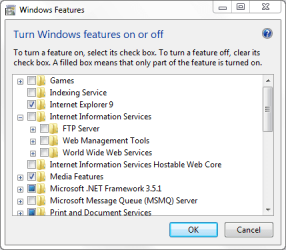
I think you need to turn on Internet Information Services and Internet Information Services Hostable Web Core if you want to set your computer up as a web server.

Navigate to Start>Control Panel>Programs>Turn Windows Features On or Off and select them from there.

FTP.PNG
 

My Computer

Computer Manufacturer/Model Number
HP Pavilion Elite 495UK
OS
Windows 7 Ultimate SP1 64-Bit
CPU
Intel Core i7 870 @ 2.93GHz
Motherboard
MSI 2A9C (CPU1)
Memory
8Gb Dual-Channel DDR3 @ 664MHz
Graphics Card(s)
nVidia GeForce GTX 460 1024MB dedicated RAM
Sound Card
Realtek HD Audio
Monitor(s) Displays
HP2310i
Screen Resolution
1920 x 1080
Hard Drives
1x1954GB Hitachi HDS22020ALA 330 (RAID), 1x1954GB Hitachi External for backup and storage
PSU
460W
Case
HP Elite
Cooling
Air cooled
Keyboard
Logitech K750 solar-powered keyboard
Mouse
Logitech Wireless M180 mouse
Internet Speed
2Mb
Other Info
Pure Avanti Flow Internet Radio with iPod Dock, 64Gb iPod, HP USB Speakers, Sony MDR-V500 Headphones, Sony Vaio F-Series Laptop
thanks, but that didn't work either. It is definitely something within Windows 7...

Lilliam
 

My Computer

Computer Manufacturer/Model Number
Dell Alienware
OS
Windows 7 64 bit
CPU
not sure
Motherboard
not sure
Memory
lots
Graphics Card(s)
Intel
Sound Card
don't know
Monitor(s) Displays
1
Hard Drives
288 GB
PSU
not sure
Case
unsure
Cooling
unsure
There could be a problem with your router settings so you might want to consider resetting your router.

It should have a rest button that can be accessed by a very small screwdriver or paper clip. Keep the router switched on, but press down on the reset button for 30 seconds or so.
 

My Computer

Computer Manufacturer/Model Number
HP Pavilion Elite 495UK
OS
Windows 7 Ultimate SP1 64-Bit
CPU
Intel Core i7 870 @ 2.93GHz
Motherboard
MSI 2A9C (CPU1)
Memory
8Gb Dual-Channel DDR3 @ 664MHz
Graphics Card(s)
nVidia GeForce GTX 460 1024MB dedicated RAM
Sound Card
Realtek HD Audio
Monitor(s) Displays
HP2310i
Screen Resolution
1920 x 1080
Hard Drives
1x1954GB Hitachi HDS22020ALA 330 (RAID), 1x1954GB Hitachi External for backup and storage
PSU
460W
Case
HP Elite
Cooling
Air cooled
Keyboard
Logitech K750 solar-powered keyboard
Mouse
Logitech Wireless M180 mouse
Internet Speed
2Mb
Other Info
Pure Avanti Flow Internet Radio with iPod Dock, 64Gb iPod, HP USB Speakers, Sony MDR-V500 Headphones, Sony Vaio F-Series Laptop
I think in that case I would not be able to publish from the old computer and I have no problem doing that.

Really, it's a windows 7 issue...if anyone has any experience with this, I would appreciate a reply. thanks
 

My Computer

Computer Manufacturer/Model Number
Dell Alienware
OS
Windows 7 64 bit
CPU
not sure
Motherboard
not sure
Memory
lots
Graphics Card(s)
Intel
Sound Card
don't know
Monitor(s) Displays
1
Hard Drives
288 GB
PSU
not sure
Case
unsure
Cooling
unsure
Back
Top