Solved Service Pack 1 Install Failed Error 8024200D

  • Thread starter Thread starter Zebo12345
  • Start date Start date
Z

Zebo12345

Guest
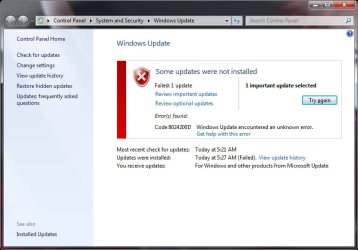
I have checked the Microsoft help page, multiple other people seem to have the same or a similar problem. Some of them have had success in solving it, but their solutions do not work for me. The service pack downloads fine, but fails when installing, giving me the error code 8024200D (which I have looked up, and the answers there did not help.) I have run the system update readiness tool, which did not find anything out of the ordinary, and I have also done the SFC scan, which also did not find anything out of the ordinary.

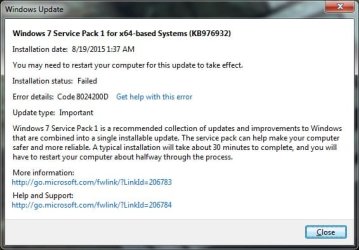
I have some suspicions that it might be because I have Windows N Ultimate edition, but I am not sure. The screenshot is from viewing the details of the failed update on the "view update history" screen in Windows Update. It doesn't really say anything that I have not already said. I am completely puzzled here. :confused:

I guess I COULD make a backup and install regular Windows 7 to fix the issue (even if it isn't compatibility, a clean install might fix it), but I would like to avoid that if possible. Thank you in advance, and if you need any more information to help me, don't be afraid to ask.
 

Attachments

  • ServicePack1.jpg
    ServicePack1.jpg
    35.9 KB · Views: 30
bump

I don't know what kind of rules there are with bumping, but I really just don't want my thread to get buried in other threads. Please help. :o
 

My Computer

Computer type
Laptop
Computer Manufacturer/Model Number
Asus K52F or Lenovo B51-80
OS
Win 7 x64 Home Premium (and x86 VirtualBox VM)/Win10
CPU
i3 370M/i7 6500U
Motherboard
Asus/Lenovo
Memory
8GB - finally :)/8GB
Graphics Card(s)
it's an i3, dude!/dual Intel&nVidia
Sound Card
onboard
Monitor(s) Displays
15.6" built-in
Screen Resolution
1366x768/1920x1080
Hard Drives
750GB Seagate internal
Sundry external drives attached to other computers on the local network
1TB SSD on the Lenovo
PSU
n/a
Internet Speed
as much as I can get - usually on a dongle/phone, so <1MB/s
Antivirus
MSE/Defender
Browser
IE11/12/Edge/Chrome/FF(if I must)
I should be a bit more specific, though I have tried lots of stuff already, so it 's hard to remember everything I have and have not tried. I have already tried installing it using that package, and it still failed. I can try again if that will get you any info you need. I have had this issue for a while, trying new solutions every once in a while, so I have forgotten which solutions I have tried, and which ones I haven't. I am going to be away from my computer for a while today, so I will get back to this thread later tonight, when I have some time.

On a side note, thanks for replying. I am actually really impressed with your skill, judging by all of your successful cases. Hopefully you can help me as well. :D
 
Okay, I am back now to see this thread. judging by the lack of a reply, I assume you are either busy or you didn't want me to try the manual install again, or both. Well, if you are available still, then great. because I am available now. Thanks again.
 

My Computer

Computer type
Laptop
Computer Manufacturer/Model Number
Asus K52F or Lenovo B51-80
OS
Win 7 x64 Home Premium (and x86 VirtualBox VM)/Win10
CPU
i3 370M/i7 6500U
Motherboard
Asus/Lenovo
Memory
8GB - finally :)/8GB
Graphics Card(s)
it's an i3, dude!/dual Intel&nVidia
Sound Card
onboard
Monitor(s) Displays
15.6" built-in
Screen Resolution
1366x768/1920x1080
Hard Drives
750GB Seagate internal
Sundry external drives attached to other computers on the local network
1TB SSD on the Lenovo
PSU
n/a
Internet Speed
as much as I can get - usually on a dongle/phone, so <1MB/s
Antivirus
MSE/Defender
Browser
IE11/12/Edge/Chrome/FF(if I must)
The automatic fixer had an error saying "This Microsoft Fix it does not apply to your operating system or application version," however, the manual section has me use the command prompt to uninstall service pack 1 in case it was corrupted. That was cleared successfully, and I am now trying to install service pack 1 again. I will get back to you once this is finished. (I have high hopes for this one. :D)

(Edit) I forgot to restart the computer before trying to install service pack 1, so now I'm following the whole procedure again. :banghead:
 
No luck. :cry: Once again got the message: Installation was not successful, followed by a request to use the system update readiness tool, or to visit the Microsoft site, which I have done already. This was using the service pack download from the website, not the automatic update installer.

I'm not ready to give up yet though. Do you have any more ideas?
 
Noel is always busy to very busy. You caught him on a busy day. That is good.

I do have a question Noel.
Could location be a problem?

Zebo has a E.U. edition of Windows 7 "N" and showing Washington State as location.

From specs.

OS Windows 7 Ultimate N x64
 
Last edited:

My Computer

Computer type
PC/Desktop
Computer Manufacturer/Model Number
Home made Desktop
OS
Windows 10 Pro. 64/ version 1709 Windows 7 Pro/64
CPU
Intel i7-6800K @ 4.3
Motherboard
ASUS X-99 Deluxe II
Memory
Corsair Platinum 16 gig @2400
Graphics Card(s)
EVGA GTX 1070 OC
Monitor(s) Displays
Asus 27" LED LCD/VE278Q
Screen Resolution
1920-1080 or 1280-720 HDMI
Hard Drives
INTEL SSD 730-240 Gb Sata 3.0/
PSU
EVGA Platium 1200W
Case
Phanteks Luxe Tempered Glass 8 fans/ one radiator
Cooling
XSPC/ Water Cooled CPU
Keyboard
Das 4 Professional
Mouse
Logitech M705/MX Anywhere 2-S
Internet Speed
100 mbits
Antivirus
Microsoft Security Essentials/ Malwarebytes Premium 3.0/ SAS
Browser
I.E. 11 default/Firefox/ ISP Time Warner Cable/Spectrum
Other Info
LG BluRay Burner/
Sound system-KLipsch-THX/
Icy Dock ssd Hot Swap bays.
I am not the one who installed windows on this computer, that was my father, who built this computer for me. I didn't know this was an EU edition, and I don't know why it's showing Washington D.C. as a location. I live in Washington state, though I suspect since D.C. and WA state are in the same country, the difference between the two probably doesn't matter. (I'm not an expert on this though, so don't take my word as truth) I wonder if EU matters though. Good catch. :)
 
Last edited:
I corrected my mistake. Washington D.C. to Washington State.
Whether it is a problem, I don't know; that is why I asked the question. Odds are Noel will know the answer.
 

My Computer

Computer type
PC/Desktop
Computer Manufacturer/Model Number
Home made Desktop
OS
Windows 10 Pro. 64/ version 1709 Windows 7 Pro/64
CPU
Intel i7-6800K @ 4.3
Motherboard
ASUS X-99 Deluxe II
Memory
Corsair Platinum 16 gig @2400
Graphics Card(s)
EVGA GTX 1070 OC
Monitor(s) Displays
Asus 27" LED LCD/VE278Q
Screen Resolution
1920-1080 or 1280-720 HDMI
Hard Drives
INTEL SSD 730-240 Gb Sata 3.0/
PSU
EVGA Platium 1200W
Case
Phanteks Luxe Tempered Glass 8 fans/ one radiator
Cooling
XSPC/ Water Cooled CPU
Keyboard
Das 4 Professional
Mouse
Logitech M705/MX Anywhere 2-S
Internet Speed
100 mbits
Antivirus
Microsoft Security Essentials/ Malwarebytes Premium 3.0/ SAS
Browser
I.E. 11 default/Firefox/ ISP Time Warner Cable/Spectrum
Other Info
LG BluRay Burner/
Sound system-KLipsch-THX/
Icy Dock ssd Hot Swap bays.
No - the location doesn't matter. The N version is only for sale within the EU, but it can be used anywhere (and activated anywhere).

You're currently using MSE - what other AV's have EVER been installed?
 

My Computer

Computer type
Laptop
Computer Manufacturer/Model Number
Asus K52F or Lenovo B51-80
OS
Win 7 x64 Home Premium (and x86 VirtualBox VM)/Win10
CPU
i3 370M/i7 6500U
Motherboard
Asus/Lenovo
Memory
8GB - finally :)/8GB
Graphics Card(s)
it's an i3, dude!/dual Intel&nVidia
Sound Card
onboard
Monitor(s) Displays
15.6" built-in
Screen Resolution
1366x768/1920x1080
Hard Drives
750GB Seagate internal
Sundry external drives attached to other computers on the local network
1TB SSD on the Lenovo
PSU
n/a
Internet Speed
as much as I can get - usually on a dongle/phone, so <1MB/s
Antivirus
MSE/Defender
Browser
IE11/12/Edge/Chrome/FF(if I must)
On this computer the only other AV was Spybot - Search and Destroy, but I believe I have always had real time protection off for that program. I use it to clean up a bit after MSE is done scanning, as a second line of defense.
 
Spybot is rather dated now - and despite the potential addition of an AV is not really recommended here much any more.
I'd suggest uninstalling it and using Malwarebytes (free version) instead, as the Spybot AV may actually be blocking stuff even if it's switched off.
 

My Computer

Computer type
Laptop
Computer Manufacturer/Model Number
Asus K52F or Lenovo B51-80
OS
Win 7 x64 Home Premium (and x86 VirtualBox VM)/Win10
CPU
i3 370M/i7 6500U
Motherboard
Asus/Lenovo
Memory
8GB - finally :)/8GB
Graphics Card(s)
it's an i3, dude!/dual Intel&nVidia
Sound Card
onboard
Monitor(s) Displays
15.6" built-in
Screen Resolution
1366x768/1920x1080
Hard Drives
750GB Seagate internal
Sundry external drives attached to other computers on the local network
1TB SSD on the Lenovo
PSU
n/a
Internet Speed
as much as I can get - usually on a dongle/phone, so <1MB/s
Antivirus
MSE/Defender
Browser
IE11/12/Edge/Chrome/FF(if I must)
Please post the following logs...
C:\Windows\Logs\CBS\CBS.log
C:\Windows\windowsupdate.log
C:\Windows\inf\setupapi.dev.log
C:\Windows\inf\setupapi.*.log (the * is a timestamp here - I just need the latest one)
 

My Computer

Computer type
Laptop
Computer Manufacturer/Model Number
Asus K52F or Lenovo B51-80
OS
Win 7 x64 Home Premium (and x86 VirtualBox VM)/Win10
CPU
i3 370M/i7 6500U
Motherboard
Asus/Lenovo
Memory
8GB - finally :)/8GB
Graphics Card(s)
it's an i3, dude!/dual Intel&nVidia
Sound Card
onboard
Monitor(s) Displays
15.6" built-in
Screen Resolution
1366x768/1920x1080
Hard Drives
750GB Seagate internal
Sundry external drives attached to other computers on the local network
1TB SSD on the Lenovo
PSU
n/a
Internet Speed
as much as I can get - usually on a dongle/phone, so <1MB/s
Antivirus
MSE/Defender
Browser
IE11/12/Edge/Chrome/FF(if I must)
Wow, I apparently don't know my computer that well! Upon searching for Spybot on my computer, I found that it was already uninstalled. (Perhaps my father tried that, because I asked him for help before I came here. He is a software engineer and has some good history with computers, so I tend to get his help with computers before trying to get other people's help.) Anyways, I have installed Malwarebytes as per your recommendation, however, since Spybot was already uninstalled, we can rule that out for potential causes for errors. I'm going to try installing SP1 again, but I don't think it is going to work, because nothing has been changed since last time I tried.

(Oh, just saw your other post. Let me get those files now.)
 
Okay here are my logs. The most recently modified log is seupapi.app.log

Thanks again for taking the time to help me, I really appreciate it :)

(Edit) As suspected, the service pack still failed, just so you know.
 

Attachments

The error code is still the same :(
This actually means that there is apparently a download missing - I suspect that in fact it means that Windows is seeing a persistent error in a single file.

Let's try this...
This could be due to corruption in the SoftwareDistribution folder - the problem with that*the conventional cure *can lead to problems later on, if not handled properly, and you will lose your Update history (but the updates will still be installed, and viewable in the Installed Updates listing).
*
Open an Elevated Command Prompt
Run the following commands
*
NET STOP WUAUSERV
REN C:\WINDOWS\SoftwareDistribution SDOLD
NET START WUAUSERV
*
reboot
then wait 10 minutes, and open Windows Updates, and run a Check for Updates.

Try the update again
 

My Computer

Computer type
Laptop
Computer Manufacturer/Model Number
Asus K52F or Lenovo B51-80
OS
Win 7 x64 Home Premium (and x86 VirtualBox VM)/Win10
CPU
i3 370M/i7 6500U
Motherboard
Asus/Lenovo
Memory
8GB - finally :)/8GB
Graphics Card(s)
it's an i3, dude!/dual Intel&nVidia
Sound Card
onboard
Monitor(s) Displays
15.6" built-in
Screen Resolution
1366x768/1920x1080
Hard Drives
750GB Seagate internal
Sundry external drives attached to other computers on the local network
1TB SSD on the Lenovo
PSU
n/a
Internet Speed
as much as I can get - usually on a dongle/phone, so <1MB/s
Antivirus
MSE/Defender
Browser
IE11/12/Edge/Chrome/FF(if I must)
I'm gonna try what you said, but you should know, just in case this is actually a bad thing, that one of the things I found to try online was to use NET STOP WUAUSERV then change the name of SoftwareDistribution to SoftwareDistributionOld then to run windows update again. The idea was to have windows update make a fresh SoftwareDistribution folder, and that solution did not help. I still have the SoftwareDistributionOld file, though I don't know if that's still useful.
 
Bad news. :(
Any more ideas?
 

Attachments

  • ServicePack1(2).jpg
    ServicePack1(2).jpg
    43.1 KB · Views: 0
Back
Top