Solved Service Pack 1 Install Failed Error 8024200D

  • Thread starter Thread starter Zebo12345
  • Start date Start date
Umm, dunno :(
The only think I can think of at this point is to see if there's anything to back out of...

You'll need to boot to the Repair Environment -as soon as the machine restarts, start tapping F8 - this should bring up the Advanced Boot Menu, at the top of which should be the option 'Repair my Computer'
Pick that
You'll have to log in with your username and password.

Pick the option to use a Command Prompt
At the prompt type

dism.exe /image:C:\ /cleanup-image /revertpendingactions

This is supposed to revert all pended updates.

post back with the result
 

My Computer My Computer

Computer type
Laptop
Computer Manufacturer/Model Number
Asus K52F or Lenovo B51-80
OS
Win 7 x64 Home Premium (and x86 VirtualBox VM)/Win10
CPU
i3 370M/i7 6500U
Motherboard
Asus/Lenovo
Memory
8GB - finally :)/8GB
Graphics Card(s)
it's an i3, dude!/dual Intel&nVidia
Sound Card
onboard
Monitor(s) Displays
15.6" built-in
Screen Resolution
1366x768/1920x1080
Hard Drives
750GB Seagate internal
Sundry external drives attached to other computers on the local network
1TB SSD on the Lenovo
PSU
n/a
Internet Speed
as much as I can get - usually on a dongle/phone, so <1MB/s
Antivirus
MSE/Defender
Browser
IE11/12/Edge/Chrome/FF(if I must)
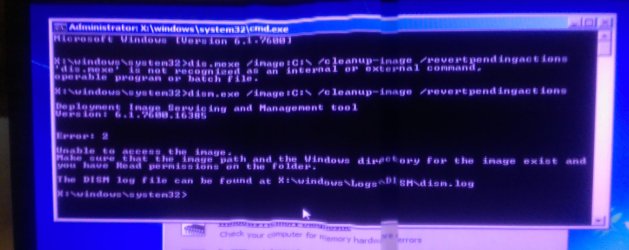
This must be a deeper issue than we thought or something, because I got an error here. I used my phone to take a picture, since I couldn't screenshot it. (Sorry for the bad quality, it was using the panorama feature of my phone. Yay for technology!)

I am an administrator for this machine, but we do have one other administrator. I suppose I could try that too, though I have my doubts. If you want me to try it, I will. I didn't make any typos besides the first one which I corrected, did I?
 

Attachments

  • IMAG0013.jpg
    IMAG0013.jpg
    220.6 KB · Views: 3
Okay so I talked to my good ol' dad a bit about this error that I got. His idea is to get the CD and use the disk drive with the same code, but he also says that when he installed Windows on this computer, this update should have been included, but failed without him noticing. That means this update failed with no software installed at all on a clean operating system.

He says that if we can't fix this issue, we can just install regular windows 7.

I guess it's your call on what to do next.
 
I suggest repeating the Repair Environment command - this time using the following command instead...
dism.exe /image:D:\ /cleanup-image /revertpendingactions
 

My Computer My Computer

Computer type
Laptop
Computer Manufacturer/Model Number
Asus K52F or Lenovo B51-80
OS
Win 7 x64 Home Premium (and x86 VirtualBox VM)/Win10
CPU
i3 370M/i7 6500U
Motherboard
Asus/Lenovo
Memory
8GB - finally :)/8GB
Graphics Card(s)
it's an i3, dude!/dual Intel&nVidia
Sound Card
onboard
Monitor(s) Displays
15.6" built-in
Screen Resolution
1366x768/1920x1080
Hard Drives
750GB Seagate internal
Sundry external drives attached to other computers on the local network
1TB SSD on the Lenovo
PSU
n/a
Internet Speed
as much as I can get - usually on a dongle/phone, so <1MB/s
Antivirus
MSE/Defender
Browser
IE11/12/Edge/Chrome/FF(if I must)
This time it was successful. The operation was very quick, and were applied on reboot. I take it I should try the update now?
 
Go for it - do a Check for Updates first.
 

My Computer My Computer

Computer type
Laptop
Computer Manufacturer/Model Number
Asus K52F or Lenovo B51-80
OS
Win 7 x64 Home Premium (and x86 VirtualBox VM)/Win10
CPU
i3 370M/i7 6500U
Motherboard
Asus/Lenovo
Memory
8GB - finally :)/8GB
Graphics Card(s)
it's an i3, dude!/dual Intel&nVidia
Sound Card
onboard
Monitor(s) Displays
15.6" built-in
Screen Resolution
1366x768/1920x1080
Hard Drives
750GB Seagate internal
Sundry external drives attached to other computers on the local network
1TB SSD on the Lenovo
PSU
n/a
Internet Speed
as much as I can get - usually on a dongle/phone, so <1MB/s
Antivirus
MSE/Defender
Browser
IE11/12/Edge/Chrome/FF(if I must)
Well, the check for updates found the service pack, but the installation still failed, with the same error code after only about 3 minutes of waiting time. I am puzzled here. Anything else you can think of? Other than the time it takes to reinstall any and all software I have on my computer now, I have worked out that I would not lose much at all from a clean install of Windows 7 Pro. I would rather not do that if possible, purely because it would take awhile, but it is my backup (no pun intended, again) if we can't find a solution.

(EDIT) I haven't slept in awhile, so I will go do that now. Thank you guys for your help, and if you have any more ideas, by all means, post them and I will try them when I get back.
 
Last edited:
The only other thing to try is a repair install, if you have the media - I'm out of ideas now :(
 

My Computer My Computer

Computer type
Laptop
Computer Manufacturer/Model Number
Asus K52F or Lenovo B51-80
OS
Win 7 x64 Home Premium (and x86 VirtualBox VM)/Win10
CPU
i3 370M/i7 6500U
Motherboard
Asus/Lenovo
Memory
8GB - finally :)/8GB
Graphics Card(s)
it's an i3, dude!/dual Intel&nVidia
Sound Card
onboard
Monitor(s) Displays
15.6" built-in
Screen Resolution
1366x768/1920x1080
Hard Drives
750GB Seagate internal
Sundry external drives attached to other computers on the local network
1TB SSD on the Lenovo
PSU
n/a
Internet Speed
as much as I can get - usually on a dongle/phone, so <1MB/s
Antivirus
MSE/Defender
Browser
IE11/12/Edge/Chrome/FF(if I must)
I'll try that, but I can't do it today.

I just tried something else-- Installing the Czech language pack optional update, since you mentioned Windows was trying to get a Czech version of SP1. (I figured it was a long shot.)

Here's the real kicker though

That failed too.

I have no clue at all why that would fail. I guess I will just have to do the repair install.
 

My Computer My Computer

Computer type
PC/Desktop
Computer Manufacturer/Model Number
Home made Desktop
OS
Windows 10 Pro. 64/ version 1709 Windows 7 Pro/64
CPU
Intel i7-6800K @ 4.3
Motherboard
ASUS X-99 Deluxe II
Memory
Corsair Platinum 16 gig @2400
Graphics Card(s)
EVGA GTX 1070 OC
Monitor(s) Displays
Asus 27" LED LCD/VE278Q
Screen Resolution
1920-1080 or 1280-720 HDMI
Hard Drives
INTEL SSD 730-240 Gb Sata 3.0/
PSU
EVGA Platium 1200W
Case
Phanteks Luxe Tempered Glass 8 fans/ one radiator
Cooling
XSPC/ Water Cooled CPU
Keyboard
Das 4 Professional
Mouse
Logitech M705/MX Anywhere 2-S
Internet Speed
100 mbits
Antivirus
Microsoft Security Essentials/ Malwarebytes Premium 3.0/ SAS
Browser
I.E. 11 default/Firefox/ ISP Time Warner Cable/Spectrum
Other Info
LG BluRay Burner/
Sound system-KLipsch-THX/
Icy Dock ssd Hot Swap bays.
I'm all for long-shots - especially from you, Jack! ;)
 

My Computer My Computer

Computer type
Laptop
Computer Manufacturer/Model Number
Asus K52F or Lenovo B51-80
OS
Win 7 x64 Home Premium (and x86 VirtualBox VM)/Win10
CPU
i3 370M/i7 6500U
Motherboard
Asus/Lenovo
Memory
8GB - finally :)/8GB
Graphics Card(s)
it's an i3, dude!/dual Intel&nVidia
Sound Card
onboard
Monitor(s) Displays
15.6" built-in
Screen Resolution
1366x768/1920x1080
Hard Drives
750GB Seagate internal
Sundry external drives attached to other computers on the local network
1TB SSD on the Lenovo
PSU
n/a
Internet Speed
as much as I can get - usually on a dongle/phone, so <1MB/s
Antivirus
MSE/Defender
Browser
IE11/12/Edge/Chrome/FF(if I must)
I looking for free space and to see if more that one partition is active.
Maybe the update has no place to go or a choice of active partition to go to and gets confused. That is a 1000 yard long shot at Camp Perry.

https://en.wikipedia.org/wiki/Wimbledon_Cup
 

My Computer My Computer

Computer type
PC/Desktop
Computer Manufacturer/Model Number
Home made Desktop
OS
Windows 10 Pro. 64/ version 1709 Windows 7 Pro/64
CPU
Intel i7-6800K @ 4.3
Motherboard
ASUS X-99 Deluxe II
Memory
Corsair Platinum 16 gig @2400
Graphics Card(s)
EVGA GTX 1070 OC
Monitor(s) Displays
Asus 27" LED LCD/VE278Q
Screen Resolution
1920-1080 or 1280-720 HDMI
Hard Drives
INTEL SSD 730-240 Gb Sata 3.0/
PSU
EVGA Platium 1200W
Case
Phanteks Luxe Tempered Glass 8 fans/ one radiator
Cooling
XSPC/ Water Cooled CPU
Keyboard
Das 4 Professional
Mouse
Logitech M705/MX Anywhere 2-S
Internet Speed
100 mbits
Antivirus
Microsoft Security Essentials/ Malwarebytes Premium 3.0/ SAS
Browser
I.E. 11 default/Firefox/ ISP Time Warner Cable/Spectrum
Other Info
LG BluRay Burner/
Sound system-KLipsch-THX/
Icy Dock ssd Hot Swap bays.
Sorry, I haven't looked at this post since I figured we were out of ideas. I used Print Screen instead of the clipping tool, but I figure that doesn't matter. Here's your image. I sure hope you are on to something good here. :cool:
 

Attachments

  • DiskManagement.jpg
    DiskManagement.jpg
    106.6 KB · Views: 6
Interesting - you do realise that almost a third of your drive space is unavailable because it's formatted MBR rather than UEFI/GPT?
Having said that, I can see nothing wrong there that's likely to cause problems. Can you, Jack?
 

My Computer My Computer

Computer type
Laptop
Computer Manufacturer/Model Number
Asus K52F or Lenovo B51-80
OS
Win 7 x64 Home Premium (and x86 VirtualBox VM)/Win10
CPU
i3 370M/i7 6500U
Motherboard
Asus/Lenovo
Memory
8GB - finally :)/8GB
Graphics Card(s)
it's an i3, dude!/dual Intel&nVidia
Sound Card
onboard
Monitor(s) Displays
15.6" built-in
Screen Resolution
1366x768/1920x1080
Hard Drives
750GB Seagate internal
Sundry external drives attached to other computers on the local network
1TB SSD on the Lenovo
PSU
n/a
Internet Speed
as much as I can get - usually on a dongle/phone, so <1MB/s
Antivirus
MSE/Defender
Browser
IE11/12/Edge/Chrome/FF(if I must)
Oh, well, thanks for telling me that. I'll fix that tomorrow before I do my repair install. Hmmm... The weirdest part of all this is the other day when my dad told me that this failed when he installed windows without him noticing, but the other updates installed fine. That was with nothing but display drivers and windows itself on the machine. If that's the case, then I think the only option is to repair install it. Something must have just gone wrong on the initial installation of Windows. That doesn't answer why the language packs and service pack won't install while the other updates were installed just fine though.
 
I don't recommend changing the drive format unless you're doing a clean install - you stand a good chance of losing everything!
 

My Computer My Computer

Computer type
Laptop
Computer Manufacturer/Model Number
Asus K52F or Lenovo B51-80
OS
Win 7 x64 Home Premium (and x86 VirtualBox VM)/Win10
CPU
i3 370M/i7 6500U
Motherboard
Asus/Lenovo
Memory
8GB - finally :)/8GB
Graphics Card(s)
it's an i3, dude!/dual Intel&nVidia
Sound Card
onboard
Monitor(s) Displays
15.6" built-in
Screen Resolution
1366x768/1920x1080
Hard Drives
750GB Seagate internal
Sundry external drives attached to other computers on the local network
1TB SSD on the Lenovo
PSU
n/a
Internet Speed
as much as I can get - usually on a dongle/phone, so <1MB/s
Antivirus
MSE/Defender
Browser
IE11/12/Edge/Chrome/FF(if I must)
Part of why I decided to wait until tomorrow. I can get help with that. It seems weird that I can't reformat an empty section of the hard drive, but I guess it isn't that important to fix. I am not that concerned with it. I'll just repair then.
 
It's not the format of the partition that's the problem - it's the format of the bare drive.
MBT doesn't understand drives larger than 2TB - so that's all it can see of your drive to be able to split it into smaller partitions.
UEFI/GPT can handle drives a over a thousand times larger.
The problem is that to get Windows 7 to install into a GPT drive takes a few tweaks (and your motherboard needs to be compatible) - but I don't know exactly what, as I've never had the opportunity to play with one. Windows 8 and higher can natively deal with it.
 

My Computer My Computer

Computer type
Laptop
Computer Manufacturer/Model Number
Asus K52F or Lenovo B51-80
OS
Win 7 x64 Home Premium (and x86 VirtualBox VM)/Win10
CPU
i3 370M/i7 6500U
Motherboard
Asus/Lenovo
Memory
8GB - finally :)/8GB
Graphics Card(s)
it's an i3, dude!/dual Intel&nVidia
Sound Card
onboard
Monitor(s) Displays
15.6" built-in
Screen Resolution
1366x768/1920x1080
Hard Drives
750GB Seagate internal
Sundry external drives attached to other computers on the local network
1TB SSD on the Lenovo
PSU
n/a
Internet Speed
as much as I can get - usually on a dongle/phone, so <1MB/s
Antivirus
MSE/Defender
Browser
IE11/12/Edge/Chrome/FF(if I must)
What I don't see is any reason there that world stop Updates from downloading and installing. I missed my 1000 yd. long shot.

Another place to look in my opinion is the Activation of the system. It again may or may not tell us anything. My next shot. Completing this tutorial by Brink. The log produced is right down Noels alley.
I'm running out of ammo.

http://www.sevenforums.com/windows-...ne-activation-issue-posting-instructions.html
 

My Computer My Computer

Computer type
PC/Desktop
Computer Manufacturer/Model Number
Home made Desktop
OS
Windows 10 Pro. 64/ version 1709 Windows 7 Pro/64
CPU
Intel i7-6800K @ 4.3
Motherboard
ASUS X-99 Deluxe II
Memory
Corsair Platinum 16 gig @2400
Graphics Card(s)
EVGA GTX 1070 OC
Monitor(s) Displays
Asus 27" LED LCD/VE278Q
Screen Resolution
1920-1080 or 1280-720 HDMI
Hard Drives
INTEL SSD 730-240 Gb Sata 3.0/
PSU
EVGA Platium 1200W
Case
Phanteks Luxe Tempered Glass 8 fans/ one radiator
Cooling
XSPC/ Water Cooled CPU
Keyboard
Das 4 Professional
Mouse
Logitech M705/MX Anywhere 2-S
Internet Speed
100 mbits
Antivirus
Microsoft Security Essentials/ Malwarebytes Premium 3.0/ SAS
Browser
I.E. 11 default/Firefox/ ISP Time Warner Cable/Spectrum
Other Info
LG BluRay Burner/
Sound system-KLipsch-THX/
Icy Dock ssd Hot Swap bays.
Okay I have done the repair install. I think I have found the issue. Once the whole repair install was finished, I logged in, and got a message saying that windows detected that my .NET Framework 4.5 needed to be repaired. When it started repairing, a got an error from "MOM.exe" which stated that to run this application, I must first install one of the following versions of the .NET Framework: v4.0

Now the Framework repair is done, and I am restarting my computer. Hopefully this fixes the problem.
 
Back
Top