Solved Set a video to play at a certain time?

jloc

New member
Pro User
VIP
Local time
8:51 AM
Messages
309
Location
UK
So someone told me about a trick where instead of using a song as your alarm, you set a video to play and after it wakes you up, you get interested and once the video's finished, you're fully awake.

How could I set a 30 minute video to open at a specific time? My PC always hibernates after a few hours of not being used.
 

My Computer My Computer

At a glance

Windows 7 UltimateDualCore Intel Pentium D 930, 3000 MHz (15 x ...3x512mb 1x1GBNVIDIA GeForce 7800 GTX
Computer type
PC/Desktop
Computer Manufacturer/Model Number
HP
OS
Windows 7 Ultimate
CPU
DualCore Intel Pentium D 930, 3000 MHz (15 x 200)
Motherboard
Asus P5LP-LE (Emery)
Memory
3x512mb 1x1GB
Graphics Card(s)
NVIDIA GeForce 7800 GTX
Sound Card
Realtek ALC882/D/M @ Intel 82801GB ICH7
Monitor(s) Displays
Iiyama ProLite E2407HDS
Screen Resolution
1920 x 1080 70 Hz
Hard Drives
1TB WD10EARS-00Y5B1 ATA Device
Keyboard
Hewlett Packard Wireless Ergo
Mouse
Logitech USB Wheel Mouse
Internet Speed
20mbps Download - 2mbps Upload
Antivirus
Windows Defender - Malwarebytes Anti Malware
Browser
Google Chrome
It's quite easy using Task Scheduler and Windows Media Player. Like this:
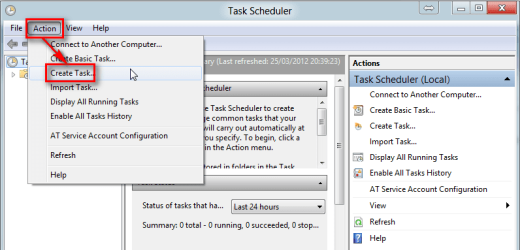
  1. Start Task Scheduler (type Task on Start Menu > Search, click Task Scheduler)
  2. Click Action > Create Task
    .
    Video_alarm_001.png
    .
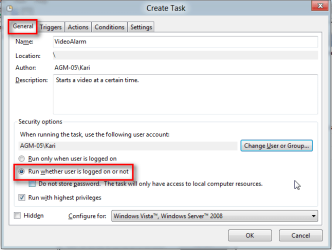
  3. In General tab, give your task a name and description, select Run wheter user is logged in or not:
    .
    Video_alarm_002.png
    .
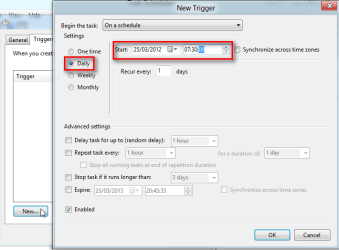
  4. In Triggers tab select when and how often task is to be run:
    .
    Video_alarm_003.png
    .
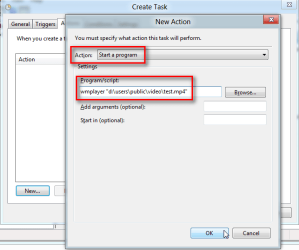
  5. In Action tab select Action: Start a program and set Program / script as wmplayer "path_to_your_video_file.ext":
    .
    Video_alarm_004.png
    .
    (Path must include the file extension of your file!)
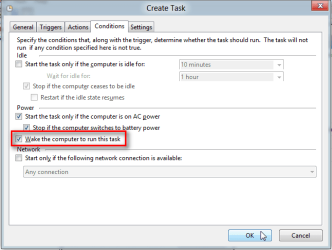
  6. In Conditions tab set computer to be waked up to run the task:
    .
    Video_alarm_006.png
    .
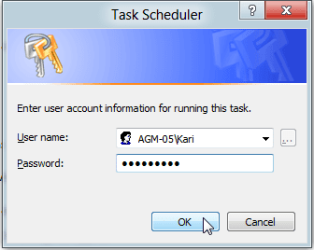
  7. Click OK. Task Scheduler asks now your credentials needed to wake computer up and log to Windows to allow task to be run on scheduled time:
    .
    Video_alarm_007.png
    .
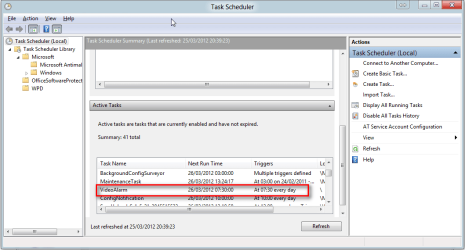
  8. Your Video Alarm is ready, waking up you at specific time:
    .
    Video_alarm_008.png
Kari
 

My Computer My Computer

At a glance

Windows 10 Pro x64 EN-GB1.6 GHz Intel Core i7-720QM Processor6 GBATI Mobility Radeon HD 5850 Graphics
Computer type
Laptop
Computer Manufacturer/Model Number
HP ENVY 17-1150eg
OS
Windows 10 Pro x64 EN-GB
CPU
1.6 GHz Intel Core i7-720QM Processor
Memory
6 GB
Graphics Card(s)
ATI Mobility Radeon HD 5850 Graphics
Sound Card
Beats sound system with integrated subwoofer
Monitor(s) Displays
17" laptop display, 22" LED and 32" Full HD TV through HDMI
Screen Resolution
1600*900 (1), 1920*1080 (2&3)
Hard Drives
Internal: 2 x 500 GB SATA Hard Disk Drive 7200 rpm
External: 2TB for backups, 3TB USB3 network drive for media
Cooling
As Envy runs a bit warm, I have it on a Cooler Master pad
Keyboard
Logitech diNovo Media Desktop Laser (bluetooth)
Mouse
Logitech Performance Mouse MX
Internet Speed
50/10 Mbps VDSL
Antivirus
Windows Defender 4.3.9431.0
Browser
Maxthon 3.5.2., IE11
Exactly what I needed! Thanks! :)
 

My Computer My Computer

At a glance

Windows 7 UltimateDualCore Intel Pentium D 930, 3000 MHz (15 x ...3x512mb 1x1GBNVIDIA GeForce 7800 GTX
Computer type
PC/Desktop
Computer Manufacturer/Model Number
HP
OS
Windows 7 Ultimate
CPU
DualCore Intel Pentium D 930, 3000 MHz (15 x 200)
Motherboard
Asus P5LP-LE (Emery)
Memory
3x512mb 1x1GB
Graphics Card(s)
NVIDIA GeForce 7800 GTX
Sound Card
Realtek ALC882/D/M @ Intel 82801GB ICH7
Monitor(s) Displays
Iiyama ProLite E2407HDS
Screen Resolution
1920 x 1080 70 Hz
Hard Drives
1TB WD10EARS-00Y5B1 ATA Device
Keyboard
Hewlett Packard Wireless Ergo
Mouse
Logitech USB Wheel Mouse
Internet Speed
20mbps Download - 2mbps Upload
Antivirus
Windows Defender - Malwarebytes Anti Malware
Browser
Google Chrome
You are welcome.

Kari
 

My Computer My Computer

At a glance

Windows 10 Pro x64 EN-GB1.6 GHz Intel Core i7-720QM Processor6 GBATI Mobility Radeon HD 5850 Graphics
Computer type
Laptop
Computer Manufacturer/Model Number
HP ENVY 17-1150eg
OS
Windows 10 Pro x64 EN-GB
CPU
1.6 GHz Intel Core i7-720QM Processor
Memory
6 GB
Graphics Card(s)
ATI Mobility Radeon HD 5850 Graphics
Sound Card
Beats sound system with integrated subwoofer
Monitor(s) Displays
17" laptop display, 22" LED and 32" Full HD TV through HDMI
Screen Resolution
1600*900 (1), 1920*1080 (2&3)
Hard Drives
Internal: 2 x 500 GB SATA Hard Disk Drive 7200 rpm
External: 2TB for backups, 3TB USB3 network drive for media
Cooling
As Envy runs a bit warm, I have it on a Cooler Master pad
Keyboard
Logitech diNovo Media Desktop Laser (bluetooth)
Mouse
Logitech Performance Mouse MX
Internet Speed
50/10 Mbps VDSL
Antivirus
Windows Defender 4.3.9431.0
Browser
Maxthon 3.5.2., IE11
Back
Top