Solved Set Fixed IP Address Impossible

Cheemag

New member
Member
VIP
Local time
11:12 PM
Messages
247
Location
Englandshire, Scotland
It seems) Windows 7 assigns itself random IP addresses at each boot, causing problems with a wireless connected laptop.

Trying to assign a fixed IP address through the Network Connections/TCP-IPv6 dialogue gives an error box 'In order to configure TCP/IP you must install and enable a network adaptor card' Arrant nonsense as the details of the adaptor card are clearly visible in the previous dialogue. I can access my three wired machines and the Internet, thus it seems obvious that the adaptor is installed and working !!!

What am I missing.

Regards

Cheemag
 

My Computer

Computer Manufacturer/Model Number
Gigabyte
OS
Windows 7 Professional 64-bit
CPU
Intel Core 2 Duo
Motherboard
EP41T-UD3L
Memory
4 GB
Graphics Card(s)
Nvidia GE Force 9500GT
Sound Card
On-board
Monitor(s) Displays
Acer V203H
Hard Drives
Two Samsung HD103SJ 1TB
PSU
?
Case
?
Cooling
Fan
Are you trying to assign a global unicast IPv6 address or change the link local address? Windows uses a temporary IPv6 address when connecting to the internet to help hide your identity on the web since the standard uses EUI-64 to form the interface ID part of the address (Mac Address with FFFE).

To disable this and use the EUI standard to surpress any temporary addresses then open an elevated command prompt and type the following exactly and individually (Separate command per line):

Code:
netsh interface ipv6 set privacy state=disabled store=active
netsh interface ipv6 set privacy state=disabled store=persistent
netsh interface ipv6 set global randomizeidentifiers=disabled store=active
netsh interface ipv6 set global randomizeidentifiers=disabled store=persistent

As for the error with installing and enabling the network card, it is not an error that I face often and is normally related to a TCP/IP binding error. Can you run the following script as administrator and see if that solves anything:

code of the script:

Code:
@Echo on
pushd\windows\system32\drivers\etc
attrib -h -s -r hosts
echo 127.0.0.1 localhost>HOSTS
attrib +r +h +s hosts
popd
ipconfig /release
ipconfig /renew
ipconfig /flushdns
netsh winsock reset all
netsh int ip reset all
shutdown -r -t 1
del %0

Hope This Helps,
Josh :)
 

Attachments

My Computer

Computer type
PC/Desktop
Computer Manufacturer/Model Number
Custom Built
OS
Windows 7 Professional x64 SP1 ; Windows Server 2012 R2 Standard
CPU
Intel Core i5 2400 @ 3.10GHz
Motherboard
Foxconn H67MP-S/-V/H67MP
Memory
8.0GB DDR3 @ 665MHz (2GBx4)
Graphics Card(s)
AMD Radeon HD 6870
Sound Card
Realtek High Definition Audio
Monitor(s) Displays
AOC 2243W & SMB1930NW
Screen Resolution
1440x900 & 1920x1080
Hard Drives
977GB Seagate ST31000524AS ATA Drive (SATA)
250GB WD iSCSI attached Drive
PSU
750W Gaming PSU
Case
Novatech Night
Cooling
Fan
Keyboard
Dell Standard PS/2 Keyboard
Mouse
R.A.T 07 Gaming Mouse
Internet Speed
Download: 10 Mbps Ping: 30ms Upload: 0.81 Mbps
Browser
Google Chrome
Other Info
Optiarc DVD RW AD-5260S ATA Device
Are you trying to assign a global unicast IPv6 address or change the link local address? Windows uses a temporary IPv6 address when connecting to the internet to help hide your identity on the web since the standard uses EUI-64 to form the interface ID part of the address (Mac Address with FFFE).

To disable this and use the EUI standard to surpress any temporary addresses then open an elevated command prompt and type the following exactly and individually (Separate command per line):

Code:
netsh interface ipv6 set privacy state=disabled store=active
netsh interface ipv6 set privacy state=disabled store=persistent
netsh interface ipv6 set global randomizeidentifiers=disabled store=active
netsh interface ipv6 set global randomizeidentifiers=disabled store=persistent
As for the error with installing and enabling the network card, it is not an error that I face often and is normally related to a TCP/IP binding error. Can you run the following script as administrator and see if that solves anything:

code of the script:

Code:
@Echo on
pushd\windows\system32\drivers\etc
attrib -h -s -r hosts
echo 127.0.0.1 localhost>HOSTS
attrib +r +h +s hosts
popd
ipconfig /release
ipconfig /renew
ipconfig /flushdns
netsh winsock reset all
netsh int ip reset all
shutdown -r -t 1
del %0
Hope This Helps,
Josh :)

That looks complicated. So I enter the first block of code at the command prompt then copy and run the batch file.

I'll let you know if it succeeds, but it may be some days before I can get back ...

(Later: I see you've attached the batch file - thanks! ]

Regards,

Cheemag
 
Last edited:

My Computer

Computer Manufacturer/Model Number
Gigabyte
OS
Windows 7 Professional 64-bit
CPU
Intel Core 2 Duo
Motherboard
EP41T-UD3L
Memory
4 GB
Graphics Card(s)
Nvidia GE Force 9500GT
Sound Card
On-board
Monitor(s) Displays
Acer V203H
Hard Drives
Two Samsung HD103SJ 1TB
PSU
?
Case
?
Cooling
Fan
Enter each netsh... command seperately in the command prompt and then for the batch file just run the script ;)

I included the contents so that other users who see this thread know what is in the file that it won't harm your machine

Josh :)
 

My Computer

Computer type
PC/Desktop
Computer Manufacturer/Model Number
Custom Built
OS
Windows 7 Professional x64 SP1 ; Windows Server 2012 R2 Standard
CPU
Intel Core i5 2400 @ 3.10GHz
Motherboard
Foxconn H67MP-S/-V/H67MP
Memory
8.0GB DDR3 @ 665MHz (2GBx4)
Graphics Card(s)
AMD Radeon HD 6870
Sound Card
Realtek High Definition Audio
Monitor(s) Displays
AOC 2243W & SMB1930NW
Screen Resolution
1440x900 & 1920x1080
Hard Drives
977GB Seagate ST31000524AS ATA Drive (SATA)
250GB WD iSCSI attached Drive
PSU
750W Gaming PSU
Case
Novatech Night
Cooling
Fan
Keyboard
Dell Standard PS/2 Keyboard
Mouse
R.A.T 07 Gaming Mouse
Internet Speed
Download: 10 Mbps Ping: 30ms Upload: 0.81 Mbps
Browser
Google Chrome
Other Info
Optiarc DVD RW AD-5260S ATA Device
Enter each netsh... command seperately in the command prompt and then for the batch file just run the script ;)

I included the contents so that other users who see this thread know what is in the file that it won't harm your machine

Josh :)

OK. Thanks.

I did all the netsh commands and got OK from each.

I ran the batch file. There were a couple of info boxes but they went away too quickly to read. The machine closed down (not just restarted).

Restarting, I still can't alter the IPv4 (or for that matter IPv6) parameters as the 'missing' network card issue is still there. :o

What now? Uninstall the card and re-install it?

On the other hand it isn't enormously important that this Windows 7 machine works with the laptop as the other two XP are available and networking with the laptop and with the Win-7 machine.
 

My Computer

Computer Manufacturer/Model Number
Gigabyte
OS
Windows 7 Professional 64-bit
CPU
Intel Core 2 Duo
Motherboard
EP41T-UD3L
Memory
4 GB
Graphics Card(s)
Nvidia GE Force 9500GT
Sound Card
On-board
Monitor(s) Displays
Acer V203H
Hard Drives
Two Samsung HD103SJ 1TB
PSU
?
Case
?
Cooling
Fan
Hmm... you may have to reinstall your network drivers to reinstall TCP/IP as it seems it isn't installed.

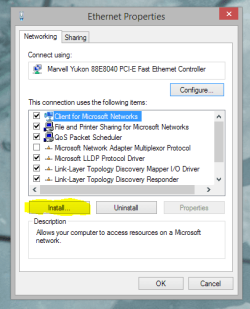
In the cards properties can you click on 'Install' and then click on 'Protocol' - What appears?

install TCP-IP.PNG

What is the make/model of the network card in question? My apologies if it has already mentioned before..

Josh :)
 

My Computer

Computer type
PC/Desktop
Computer Manufacturer/Model Number
Custom Built
OS
Windows 7 Professional x64 SP1 ; Windows Server 2012 R2 Standard
CPU
Intel Core i5 2400 @ 3.10GHz
Motherboard
Foxconn H67MP-S/-V/H67MP
Memory
8.0GB DDR3 @ 665MHz (2GBx4)
Graphics Card(s)
AMD Radeon HD 6870
Sound Card
Realtek High Definition Audio
Monitor(s) Displays
AOC 2243W & SMB1930NW
Screen Resolution
1440x900 & 1920x1080
Hard Drives
977GB Seagate ST31000524AS ATA Drive (SATA)
250GB WD iSCSI attached Drive
PSU
750W Gaming PSU
Case
Novatech Night
Cooling
Fan
Keyboard
Dell Standard PS/2 Keyboard
Mouse
R.A.T 07 Gaming Mouse
Internet Speed
Download: 10 Mbps Ping: 30ms Upload: 0.81 Mbps
Browser
Google Chrome
Other Info
Optiarc DVD RW AD-5260S ATA Device
As for the batch file, It is meant to reboot the machine and delete itself once completed. The information shown briefly is the commands being executed.

Josh :)
 

My Computer

Computer type
PC/Desktop
Computer Manufacturer/Model Number
Custom Built
OS
Windows 7 Professional x64 SP1 ; Windows Server 2012 R2 Standard
CPU
Intel Core i5 2400 @ 3.10GHz
Motherboard
Foxconn H67MP-S/-V/H67MP
Memory
8.0GB DDR3 @ 665MHz (2GBx4)
Graphics Card(s)
AMD Radeon HD 6870
Sound Card
Realtek High Definition Audio
Monitor(s) Displays
AOC 2243W & SMB1930NW
Screen Resolution
1440x900 & 1920x1080
Hard Drives
977GB Seagate ST31000524AS ATA Drive (SATA)
250GB WD iSCSI attached Drive
PSU
750W Gaming PSU
Case
Novatech Night
Cooling
Fan
Keyboard
Dell Standard PS/2 Keyboard
Mouse
R.A.T 07 Gaming Mouse
Internet Speed
Download: 10 Mbps Ping: 30ms Upload: 0.81 Mbps
Browser
Google Chrome
Other Info
Optiarc DVD RW AD-5260S ATA Device
From what I have read this issue occurs because a network adapter with the same IP address is in the registry but is hidden in Device Manager, it's basically been ghosted.

Also if you plan on using a static IP, it's best to use an IP that is outside the range of DHCP IP address that the router is using. Not sure why you would mess with IPv6 when the address needs to be IPv4. So if the router shows a DHCP range of 192.168.0.2/192.168.0.100 then use an IP that is just outside that range.

I'm not completely sure this is the same problem but the symptoms are similar.

The following link shows a Microsoft fix for the problem, there appears to be separate fixes for Windows 7/8 etc.

Error message when you try to set an IP address on a network adapter
 

My Computer

Computer type
PC/Desktop
Computer Manufacturer/Model Number
Home built
OS
Windows 7 Ult, Windows 8.1 Pro,
CPU
Q9650-4.275GHz, E8600 4.5GHz, E6750-3.8GHz
Motherboard
Evga 780i FTW
Memory
G.Skill PC2 9600 1200Mhz 5 5 5 15 2T
Graphics Card(s)
GTX480
Sound Card
Asus Xonar D2
Monitor(s) Displays
HannsG
Screen Resolution
1680X1050
Hard Drives
GSkill Phoenix Pro 120GB SSD
PSU
ThermalTake Toughpower 1000Watt modular
Case
ThermalTake XaserV
Cooling
Xigmatek S1283
Keyboard
Logitech G15
Mouse
Logitech G9
Internet Speed
T1
Hmm... you may have to reinstall your network drivers to reinstall TCP/IP as it seems it isn't installed.

:o(

In the cards properties can you click on 'Install' and then click on 'Protocol' - What appears?
"A protocol is a language your computer uses to communicate with other computers."

What is the make/model of the network card in question?
Realtec RTL8168D/8111D Family PCI-E Gigabit Ethernet NIC (NDIS 6.20).

Without taking the covers off, I'm fairly sure it's integrated.
 

My Computer

Computer Manufacturer/Model Number
Gigabyte
OS
Windows 7 Professional 64-bit
CPU
Intel Core 2 Duo
Motherboard
EP41T-UD3L
Memory
4 GB
Graphics Card(s)
Nvidia GE Force 9500GT
Sound Card
On-board
Monitor(s) Displays
Acer V203H
Hard Drives
Two Samsung HD103SJ 1TB
PSU
?
Case
?
Cooling
Fan
Please download the following folders to your machine and then on the 'Uninstall Driver' one open up the file inside to view instructions on how to uninstall your driver. (Network driver).

Once you have done that please open up the driver folder and install the driver inside that folder (You may need to extract the folder). Once done please reboot the machine and then try to set an IP address (IPv4 or IPv6)

EDIT: Updating the driver folder to correct one....

EDIT: Extract the 'Install' folder and then run setup.exe to install the driver

Hope This Helps,
Josh :)
 

Attachments

Last edited:

My Computer

Computer type
PC/Desktop
Computer Manufacturer/Model Number
Custom Built
OS
Windows 7 Professional x64 SP1 ; Windows Server 2012 R2 Standard
CPU
Intel Core i5 2400 @ 3.10GHz
Motherboard
Foxconn H67MP-S/-V/H67MP
Memory
8.0GB DDR3 @ 665MHz (2GBx4)
Graphics Card(s)
AMD Radeon HD 6870
Sound Card
Realtek High Definition Audio
Monitor(s) Displays
AOC 2243W & SMB1930NW
Screen Resolution
1440x900 & 1920x1080
Hard Drives
977GB Seagate ST31000524AS ATA Drive (SATA)
250GB WD iSCSI attached Drive
PSU
750W Gaming PSU
Case
Novatech Night
Cooling
Fan
Keyboard
Dell Standard PS/2 Keyboard
Mouse
R.A.T 07 Gaming Mouse
Internet Speed
Download: 10 Mbps Ping: 30ms Upload: 0.81 Mbps
Browser
Google Chrome
Other Info
Optiarc DVD RW AD-5260S ATA Device
Please download the following folders to your machine and then on the 'Uninstall Driver' one open up the file inside to view instructions on how to uninstall your driver. (Network driver).

Once you have done that please open up the driver folder and install the driver inside that folder (You may need to extract the folder). Once done please reboot the machine and then try to set an IP address (IPv4 or IPv6)

EDIT: Updating the driver folder to correct one....

EDIT: Extract the 'Install' folder and then run setup.exe to install the driver

Working on it ....
 

My Computer

Computer Manufacturer/Model Number
Gigabyte
OS
Windows 7 Professional 64-bit
CPU
Intel Core 2 Duo
Motherboard
EP41T-UD3L
Memory
4 GB
Graphics Card(s)
Nvidia GE Force 9500GT
Sound Card
On-board
Monitor(s) Displays
Acer V203H
Hard Drives
Two Samsung HD103SJ 1TB
PSU
?
Case
?
Cooling
Fan
I don't follow this 'MHT' file at all and I don't have that Windows Miniport thing.

Did you want me to uninstall the driver for the network card?

If so, why not just say go to Device Manager and uninstall the network card driver ? !!!! :o
 

My Computer

Computer Manufacturer/Model Number
Gigabyte
OS
Windows 7 Professional 64-bit
CPU
Intel Core 2 Duo
Motherboard
EP41T-UD3L
Memory
4 GB
Graphics Card(s)
Nvidia GE Force 9500GT
Sound Card
On-board
Monitor(s) Displays
Acer V203H
Hard Drives
Two Samsung HD103SJ 1TB
PSU
?
Case
?
Cooling
Fan
Yes uninstall the network driver for your network card from device manager. The steps were just an example to show you how to uninstall a driver from device manager in case you didn't know how to. My apologies for the confusion it is just based on your response to uninstalling a driver I thought you did not know how to.

Once the network driver for the card that won't accept the IP address is uninstalled then install the driver I provided in my previous post.

Josh
 

My Computer

Computer type
PC/Desktop
Computer Manufacturer/Model Number
Custom Built
OS
Windows 7 Professional x64 SP1 ; Windows Server 2012 R2 Standard
CPU
Intel Core i5 2400 @ 3.10GHz
Motherboard
Foxconn H67MP-S/-V/H67MP
Memory
8.0GB DDR3 @ 665MHz (2GBx4)
Graphics Card(s)
AMD Radeon HD 6870
Sound Card
Realtek High Definition Audio
Monitor(s) Displays
AOC 2243W & SMB1930NW
Screen Resolution
1440x900 & 1920x1080
Hard Drives
977GB Seagate ST31000524AS ATA Drive (SATA)
250GB WD iSCSI attached Drive
PSU
750W Gaming PSU
Case
Novatech Night
Cooling
Fan
Keyboard
Dell Standard PS/2 Keyboard
Mouse
R.A.T 07 Gaming Mouse
Internet Speed
Download: 10 Mbps Ping: 30ms Upload: 0.81 Mbps
Browser
Google Chrome
Other Info
Optiarc DVD RW AD-5260S ATA Device
Yes uninstall the network driver for your network card from device manager. The steps were just an example to show you how to uninstall a driver from device manager in case you didn't know how to. My apologies for the confusion it is just based on your response to uninstalling a driver I thought you did not know how to.

Once the network driver for the card that won't accept the IP address is uninstalled then install the driver I provided in my previous post.

Josh

I've replaced the driver, but ... the link I had to Network Connections no longer works "Local Area Connection cannot be found" when clicking on the link I had previously.

Nor can I find anywhere else where I can alter the TCP/IP etc properties, so I can't change the IP address !

The Internet and local net with one other XP machine which is running works OK. The IP address is 192.168.2.2 which it was yesterday but there's no guarantee it won't be something else tomorrow.
 

My Computer

Computer Manufacturer/Model Number
Gigabyte
OS
Windows 7 Professional 64-bit
CPU
Intel Core 2 Duo
Motherboard
EP41T-UD3L
Memory
4 GB
Graphics Card(s)
Nvidia GE Force 9500GT
Sound Card
On-board
Monitor(s) Displays
Acer V203H
Hard Drives
Two Samsung HD103SJ 1TB
PSU
?
Case
?
Cooling
Fan
Yes uninstall the network driver for your network card from device manager. The steps were just an example to show you how to uninstall a driver from device manager in case you didn't know how to. My apologies for the confusion it is just based on your response to uninstalling a driver I thought you did not know how to.

Once the network driver for the card that won't accept the IP address is uninstalled then install the driver I provided in my previous post.

Josh

I've replaced the driver, but ... the link I had to Network Connections no longer works "Local Area Connection cannot be found" when clicking on the link I had previously.

Nor can I find anywhere else where I can alter the TCP/IP etc properties, so I can't change the IP address !

The Internet and local net with one other XP machine which is running works OK. The IP address is 192.168.2.2 which it was yesterday but there's no guarantee it won't be something else tomorrow.

I did find the IPv4 properties eventually in a roundabout way, changed the IP to 192.168.2.152 and it survived a reboot, so I think we can say it works !

Only thing I need now is a desktop link to Network Connections. It was useful for disconnecting from the Internet by disabling it.

Many thanks to all who responded. I'm grateful.
 

My Computer

Computer Manufacturer/Model Number
Gigabyte
OS
Windows 7 Professional 64-bit
CPU
Intel Core 2 Duo
Motherboard
EP41T-UD3L
Memory
4 GB
Graphics Card(s)
Nvidia GE Force 9500GT
Sound Card
On-board
Monitor(s) Displays
Acer V203H
Hard Drives
Two Samsung HD103SJ 1TB
PSU
?
Case
?
Cooling
Fan
I'm glad your problem is solved :)

Josh
 

My Computer

Computer type
PC/Desktop
Computer Manufacturer/Model Number
Custom Built
OS
Windows 7 Professional x64 SP1 ; Windows Server 2012 R2 Standard
CPU
Intel Core i5 2400 @ 3.10GHz
Motherboard
Foxconn H67MP-S/-V/H67MP
Memory
8.0GB DDR3 @ 665MHz (2GBx4)
Graphics Card(s)
AMD Radeon HD 6870
Sound Card
Realtek High Definition Audio
Monitor(s) Displays
AOC 2243W & SMB1930NW
Screen Resolution
1440x900 & 1920x1080
Hard Drives
977GB Seagate ST31000524AS ATA Drive (SATA)
250GB WD iSCSI attached Drive
PSU
750W Gaming PSU
Case
Novatech Night
Cooling
Fan
Keyboard
Dell Standard PS/2 Keyboard
Mouse
R.A.T 07 Gaming Mouse
Internet Speed
Download: 10 Mbps Ping: 30ms Upload: 0.81 Mbps
Browser
Google Chrome
Other Info
Optiarc DVD RW AD-5260S ATA Device
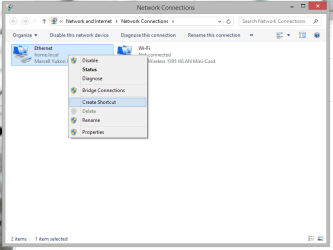
To re-add a shortcut just simply go back to Network and Sharing Center and then click on 'Change Adapter Settings in the side pain to bring up your network connections. From their you can right click and create a shortcut. ;)

network connection shortcut.png

Hope This Helps,
Josh
 

My Computer

Computer type
PC/Desktop
Computer Manufacturer/Model Number
Custom Built
OS
Windows 7 Professional x64 SP1 ; Windows Server 2012 R2 Standard
CPU
Intel Core i5 2400 @ 3.10GHz
Motherboard
Foxconn H67MP-S/-V/H67MP
Memory
8.0GB DDR3 @ 665MHz (2GBx4)
Graphics Card(s)
AMD Radeon HD 6870
Sound Card
Realtek High Definition Audio
Monitor(s) Displays
AOC 2243W & SMB1930NW
Screen Resolution
1440x900 & 1920x1080
Hard Drives
977GB Seagate ST31000524AS ATA Drive (SATA)
250GB WD iSCSI attached Drive
PSU
750W Gaming PSU
Case
Novatech Night
Cooling
Fan
Keyboard
Dell Standard PS/2 Keyboard
Mouse
R.A.T 07 Gaming Mouse
Internet Speed
Download: 10 Mbps Ping: 30ms Upload: 0.81 Mbps
Browser
Google Chrome
Other Info
Optiarc DVD RW AD-5260S ATA Device
I'm glad your problem is solved :)

Josh

I thought it was, but I have my doubts now:

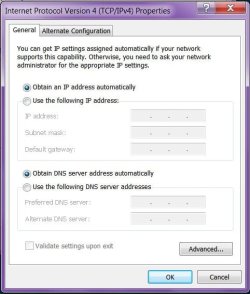
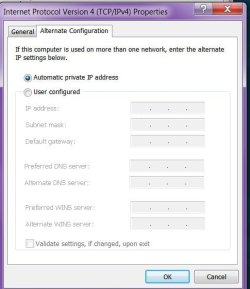
If I go into IPv4 properties it's set at (.) Obtain an IP address automatically despite my having set it up with 192.168.2.152. All the fields are blank. However, IPCONFIG at cmd shows 2.152. I note that in the IPv4 dialogue in XP these settings remain visible.

If I leave everything alone, 2.152 will survive a restart or shutdown.

If I go into IPv4 Properties and exit with an (OK) I lose the fixed IP and it reverts to something other than 2.152 from then on, as I suppose one might expect. Leaving IPv4 Properties with (Cancel) the fixed IP remains untouched. Clearly the IPv4 Properties aren't sticking in the Properties dialogue although they are sticking somewhere else.

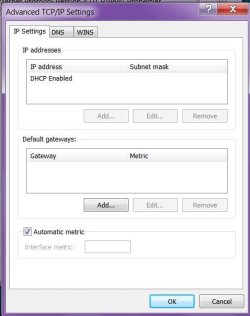
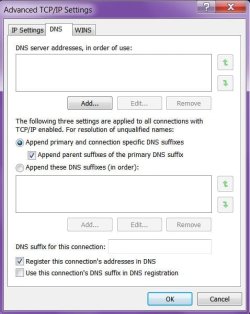
If I validate the settings on exit (tick box) then the Network Troubleshooter kicks in. If I let it try to sort the problem it finds, it tells me that DHCP has not been activated, yet in the Advanced>DNS dialogue it tells me DHCP is enabled (under the 'IP Address' heading).

Unless there's a fix, I'll probably have to leave it as it is and try to remember not to go into the IPv4 Properties and not to hit (OK) there !
 

My Computer

Computer Manufacturer/Model Number
Gigabyte
OS
Windows 7 Professional 64-bit
CPU
Intel Core 2 Duo
Motherboard
EP41T-UD3L
Memory
4 GB
Graphics Card(s)
Nvidia GE Force 9500GT
Sound Card
On-board
Monitor(s) Displays
Acer V203H
Hard Drives
Two Samsung HD103SJ 1TB
PSU
?
Case
?
Cooling
Fan
Possibly upload a screenshot of your IPconfig so we can better understand your issue? http://www.sevenforums.com/tutorials/9733-screenshots-files-upload-post-seven-forums.html

If you click 'Obtain an IP address automatically' then it will try to get an IP address from your router and not use a static one that you set up. If you click on 'Use the following IP address' then the machine will use the static IP address stack defined.

Just a question, does this happen to any other machines on the network? You have possible symptoms that your router is not setup for DHCP or NAT however to verify this we will need to see the IPconfig output.

Josh
 

My Computer

Computer type
PC/Desktop
Computer Manufacturer/Model Number
Custom Built
OS
Windows 7 Professional x64 SP1 ; Windows Server 2012 R2 Standard
CPU
Intel Core i5 2400 @ 3.10GHz
Motherboard
Foxconn H67MP-S/-V/H67MP
Memory
8.0GB DDR3 @ 665MHz (2GBx4)
Graphics Card(s)
AMD Radeon HD 6870
Sound Card
Realtek High Definition Audio
Monitor(s) Displays
AOC 2243W & SMB1930NW
Screen Resolution
1440x900 & 1920x1080
Hard Drives
977GB Seagate ST31000524AS ATA Drive (SATA)
250GB WD iSCSI attached Drive
PSU
750W Gaming PSU
Case
Novatech Night
Cooling
Fan
Keyboard
Dell Standard PS/2 Keyboard
Mouse
R.A.T 07 Gaming Mouse
Internet Speed
Download: 10 Mbps Ping: 30ms Upload: 0.81 Mbps
Browser
Google Chrome
Other Info
Optiarc DVD RW AD-5260S ATA Device
Possibly upload a screenshot of your IPconfig so we can better understand your issue? http://www.sevenforums.com/tutorials/9733-screenshots-files-upload-post-seven-forums.html

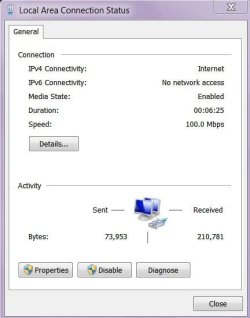
Not sure if you mean the Local Area dialogues or the cmd ipconfig, so I've attached the lot. Let me know if there are any others needed. Ipc.txt is the cmd output from 'ipconfig /all'

If you click 'Obtain an IP address automatically' then it will try to get an IP address from your router and not use a static one that you set up. If you click on 'Use the following IP address' then the machine will use the static IP address stack defined.

Just a question, does this happen to any other machines on the network? You have possible symptoms that your router is not setup for DHCP or NAT however to verify this we will need to see the IPconfig output.
All three XP machines network perfectly with each other. The two desktop XP machines network perfectly with the Win-7 machine whatever the IP (apparently). The wireless laptop (XP PRo) won't network with the Win-7 machine. I was trying to set this up when all of this transpired.

In the modem config the DHCP server is enabled. There are no machines listed on the LAN>DHCP client list.
I have a fixed IP.
 

Attachments

  • IPC1.jpg
    IPC1.jpg
    22.9 KB · Views: 2
  • IPC2.jpg
    IPC2.jpg
    43.7 KB · Views: 2
  • IPC3.jpg
    IPC3.jpg
    39.7 KB · Views: 2
  • IPC4.jpg
    IPC4.jpg
    31.9 KB · Views: 2
  • IPC5.jpg
    IPC5.jpg
    28.7 KB · Views: 2
  • IPC6.jpg
    IPC6.jpg
    38.5 KB · Views: 2
  • IPC7.jpg
    IPC7.jpg
    39.3 KB · Views: 2
  • IPC.TXT
    IPC.TXT
    1.9 KB · Views: 0

My Computer

Computer Manufacturer/Model Number
Gigabyte
OS
Windows 7 Professional 64-bit
CPU
Intel Core 2 Duo
Motherboard
EP41T-UD3L
Memory
4 GB
Graphics Card(s)
Nvidia GE Force 9500GT
Sound Card
On-board
Monitor(s) Displays
Acer V203H
Hard Drives
Two Samsung HD103SJ 1TB
PSU
?
Case
?
Cooling
Fan
Back
Top