Solved Static IP address, so why does IP address keep changing?

MG312

New member
Local time
12:17 AM
Messages
28
Hi


My PC is on a small work network of 6 PC's all connected by ethernet to a central router, via a switch to expand the number of ethernet ports.


I have a piece of equipment permanently attached to my PC that orders products online for my customers. This equipment's software is designed to work with a single IP address, so everytime I come in to work I have to ring the supplier to reinstall the software so it finds the equipment once it has reset the IP in its database. To get round this, our supplier recommended we change to a static ip address, and our broadband provider has recently done this.


The problem is my ip address still seems to be changing daily, so I haven't moved forward in any way.


Is this something to do with the router configuration, maybe? My broadband provider says it has done the work, and I'm going to have another go at asking them if there is anything further they can do, but until I can set aside half an hour to ring them I wonder if anyone has any bright ideas?


All the PC's on the network are running Windows 7, either home or professional.


Hoping someone can help.
 
Last edited:

My Computer

Computer type
PC/Desktop
OS
Windows 7 Professional
So you use it at home with one ipthen you goto work which has a different ip is that correct? so have you had both ip set to static you can have the same ip at home and work. I assume your refering to the internet ip not the local network ip
 

My Computer

Computer type
PC/Desktop
OS
win 8 32 bit
So you use it at home with one ipthen you goto work which has a different ip is that correct? so have you had both ip set to static you can have the same ip at home and work. I assume your refering to the internet ip not the local network ip


Sorry no, I may have been unclear. Everything is at work and does not move.


I do not know what the difference is between an internet ip and a local network ip.


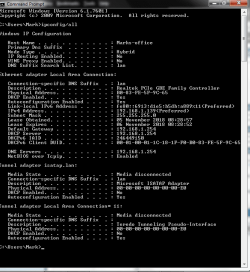
This is my ipconfig/all view today. The IPv4 address is what changes on a daily basis, and the equipment wants this to be fixed, (if my limited understanding of the situation is correct!)


Untitled.png
 

My Computer

Computer type
PC/Desktop
OS
Windows 7 Professional
If it's local IP it's simple to set that by going to net work setting and assign a fixed IP or go-to the router and reserve an IP for that PC at the moment the IP changes every day.
When you ring up what IP do they set is it the one starting 192 or other. If you go on a browser and search what's my IP that will tell you the one that's seen on the internet and the one a server would see from your PC as 192 ranges don't go onto the net
 

My Computer

Computer type
PC/Desktop
OS
win 8 32 bit
I do not know what the difference is between an internet ip and a local network ip.

MG, here's a brief backgrounder, if it helps put things in perspective.

Technically, a "router" connects networks (not computers) together--in your case, it's connecting the public internet to your local area network (LAN). One side of your router has a public IP, which is how outside traffic reaches your internal network. The other side feeds your internal LAN, and your computer's IP will be a local IP assigned by the router, not the public IP. For outside traffic to/from your computer, the router translates IP addresses between the two networks.

Whatever that "piece of equipment" you have is, it's traffic will need to traverse both internal and public networks, so both IPs will be relevant.

Your public IP is controlled by your ISP. It sounds like you've already had them set it to a static IP, so your public IP shouldn't change from now on.

Your internal IP is controlled by your router. In it's default state, it more or less randomly assigns an IP via DHCP ("Dynamic Host Configuration Protocol"), which depending on the router might be in the range 192.168.1.100-199, for instance. Your ISP doesn't control that, so if that's what needs to be locked down, you'll need to do that yourself (though if the ISP provided the router, they may be able to walk you through the procedure). You can do that by tweaking the router's settings--exact procedure will vary by router.

Alternatively, you can configure your computer to use a specific IP address instead of using a DHCP-assigned IP from the router.

Those are the two options samuria is referring to when he said, "going to network settings [on PC] and assign a fixed IP or go-to the router and reserve an IP for that PC."

Hopefully, this will help you focus in on what you need to do.
 

My Computer

Computer type
PC/Desktop
Computer Manufacturer/Model Number
Dell Optiplex 7050
OS
Windows 7/8.1/10 multiboot
CPU
Intel Core i7-7700
Motherboard
Dell, Intel Q270 chipset
Memory
48GB (2x16GB Crucial DDR4-3200 + 2x8GB Hynix DDR4-2400)
Graphics Card(s)
Intel HD630 + AMD Radeon R7 450 PCIe
Monitor(s) Displays
Asus VC279 (27")
Screen Resolution
1920x1080
Hard Drives
Toshiba M.2 NVMe (256GB),
Samsung 960 Evo (500GB),
WD Red Plus 80EFBX (8TB)
Thanks, following your assistance I took the following steps:


Spoke to my broadband provider re router settings, "Sorry we can't support that, you'll have to look on the internet for a guide" Not helpful.


Went into Network and Sharing centre to change IPv4 properties. Had to contact broadband provider (twice) to find DNS server settings. First time they gave me a number the pc said was out of range. Second time gave me a number for the Preferred DNS Server that worked, but they couldn't tell me what the Alternative DNS Server details were "We only have one DNS server". So the pc wouldn't accept that.


Found a manual for my model of router which didn't tell me how to change the required settings. Eventually went into the router, found my pc on the network, "Always use the same IP address" was set to "No". Changed the configuration to "Yes" and it now looks like the issue is resolved, as DHCP lease time is set to "Infinite" whereas before it was due to expire later today.


Hopefully this is sorted now, and this information may prove useful to others at some point in the future.


Thanks all! :party:
 

My Computer

Computer type
PC/Desktop
OS
Windows 7 Professional
Set your DNS to 1.1.1.1 & 1.0.0.1 that's a very fast server and will speed up your internet
 

My Computer

Computer type
PC/Desktop
OS
win 8 32 bit
Back
Top