Setting Portrait or Landscape

Hans L

New member
Member
VIP
Local time
4:35 PM
Messages
175
Hello:

In printing screens, it is often necessary to set the printing orientation to either Portrait or Landscape. However, drilling down in menus until you get to where you can set this is boring and time-consuming. Is there any way to do this quickly (button/macro or the like) for Win 7?

Thanks!

Hans L
 

My Computer My Computer

At a glance

Windows 7 UltimateIntel Core Duo E6600 @ 2.40 GHz3 GBNvidia eVGA GeForce 8600 GTS & 7600 GT
Computer Manufacturer/Model Number
BIOS American MegaTrend 1238
OS
Windows 7 Ultimate
CPU
Intel Core Duo E6600 @ 2.40 GHz
Motherboard
ASUS P5B-Deluxe
Memory
3 GB
Graphics Card(s)
Nvidia eVGA GeForce 8600 GTS & 7600 GT
Monitor(s) Displays
Iiyama PLE431S/PLH431S
Maybe try this freeware software, it's been around a while and seems pretty popular Gadwin Printscreen
 

My Computer My Computer

At a glance

Windows 7 Ultimate 64bitAMD Phenom Quad core 9950 black edition16Gb2x XFX Radeon 5850
Computer type
PC/Desktop
Computer Manufacturer/Model Number
Self Built
OS
Windows 7 Ultimate 64bit
CPU
AMD Phenom Quad core 9950 black edition
Motherboard
Gigabyte
Memory
16Gb
Graphics Card(s)
2x XFX Radeon 5850
Sound Card
PCI Express X-Fi Titanium / Logitech G35
Monitor(s) Displays
2x HP 2410i
Screen Resolution
1920x1080
Hard Drives
2x 500Gb Seagate
1x 300Gb Seagate
1x 1Tb Seagate
2x 1Tb Hitatchi
PSU
Jean Tech Storm 700W
Case
Cooler Master COSMOS S
Cooling
Akasa Evo Blue Pro
Keyboard
Logitech G15
Mouse
Mad Catz M.M.O. 7
Internet Speed
12mb
PooMan, that app does not seem to do what I want, namely being able to set Portrait or Landscape in one click or two.

Thanks anyway.

Hans L
 

My Computer My Computer

At a glance

Windows 7 UltimateIntel Core Duo E6600 @ 2.40 GHz3 GBNvidia eVGA GeForce 8600 GTS & 7600 GT
Computer Manufacturer/Model Number
BIOS American MegaTrend 1238
OS
Windows 7 Ultimate
CPU
Intel Core Duo E6600 @ 2.40 GHz
Motherboard
ASUS P5B-Deluxe
Memory
3 GB
Graphics Card(s)
Nvidia eVGA GeForce 8600 GTS & 7600 GT
Monitor(s) Displays
Iiyama PLE431S/PLH431S
Are you printing from Word? What version? Any shortcut is going to be specific to the software. In MS Word anything 2007 or newer it's on the Page Layout -> Orientation tab.
 

My Computer My Computer

At a glance

XP Professional, 7 Professional
OS
XP Professional, 7 Professional
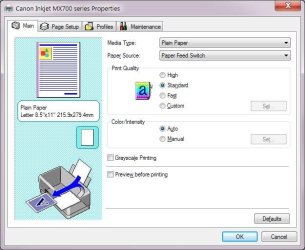
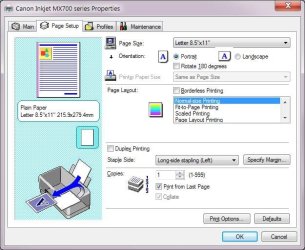
No, it is not app-specific. In my printer, Canon Inkjet MX700, it has to do with getting to

Printer properties – General – Preferences... button – Page Setup – Orientation (radio buttons Portrait or Landscape).

Any way to set Portrait or Landscape without having to go through the steps above?

Regards,

Hans L
 

My Computer My Computer

At a glance

Windows 7 UltimateIntel Core Duo E6600 @ 2.40 GHz3 GBNvidia eVGA GeForce 8600 GTS & 7600 GT
Computer Manufacturer/Model Number
BIOS American MegaTrend 1238
OS
Windows 7 Ultimate
CPU
Intel Core Duo E6600 @ 2.40 GHz
Motherboard
ASUS P5B-Deluxe
Memory
3 GB
Graphics Card(s)
Nvidia eVGA GeForce 8600 GTS & 7600 GT
Monitor(s) Displays
Iiyama PLE431S/PLH431S
Probably not, because you are trying to change a printer specific setting. The app you are printing from should be the better place to go and change it as needed.
 

My Computer My Computer

At a glance

Windows 7 Ultimate x64 SP1Intel Core i7-260012 GB Patriot Extreme DDR3-1333Nvidia GTX 470
OS
Windows 7 Ultimate x64 SP1
CPU
Intel Core i7-2600
Motherboard
Gigabyte GA-P67A-UD3P-B3
Memory
12 GB Patriot Extreme DDR3-1333
Graphics Card(s)
Nvidia GTX 470
Monitor(s) Displays
Dell UltraSharp 2209WA
Hard Drives
OCZ Agility3 240 GB, WD5001AALS, WD7501AALS
PSU
OCZ ModStream 700W
Case
CoolerMaster HAF 912 Advanced
Cooling
CoolerMaster Hyper 212 Plus
No printer registry setting that one could change "on the fly"?

Hans L
 

My Computer My Computer

At a glance

Windows 7 UltimateIntel Core Duo E6600 @ 2.40 GHz3 GBNvidia eVGA GeForce 8600 GTS & 7600 GT
Computer Manufacturer/Model Number
BIOS American MegaTrend 1238
OS
Windows 7 Ultimate
CPU
Intel Core Duo E6600 @ 2.40 GHz
Motherboard
ASUS P5B-Deluxe
Memory
3 GB
Graphics Card(s)
Nvidia eVGA GeForce 8600 GTS & 7600 GT
Monitor(s) Displays
Iiyama PLE431S/PLH431S
The app you are printing from should be the better place to go and change it as needed.

That's how I do it. The option is there as soon as the print preview comes up to select portrait or landscape, no need to change it in the printer settings.
 

My Computer My Computer

At a glance

Win 7 Ultimate x64FX-8350 @ 4.6 GHz so farADATA XPG V1 Series Black 8GB DDR3 1600Sapphire R9 270x Dual-X
Computer type
PC/Desktop
Computer Manufacturer/Model Number
Me
OS
Win 7 Ultimate x64
CPU
FX-8350 @ 4.6 GHz so far
Motherboard
Asus M5A97 EVO
Memory
ADATA XPG V1 Series Black 8GB DDR3 1600
Graphics Card(s)
Sapphire R9 270x Dual-X
Sound Card
Xonar DGX w/ Corsair Vengence 1300
Monitor(s) Displays
Acer S232HL Abid
Screen Resolution
1920x1080
Hard Drives
120 GB OCZ Vertex 3
500 GB Seagate 7200.12
PSU
Antec Earthwatts 650W Green
Case
Antec Three Hundred
Cooling
Cooler Master 212 EVO
Keyboard
Logitech G510
Mouse
Logitech G500s
Internet Speed
35000/3000
Here is what I have to do in ClipCache, a popular clipboard program (see attached image files):

ClipCache: Click the Print icon

Print.jpg: Click the Properties... button

Properties.jpg: Click the Page Setup tab

Page Setup.jpg: Check Landscape or Portrait, then click OK

Print.jpg: Click OK

-------

Just a pain, since I do this fairly often.

Any suggestions?

Hans L
 

Attachments

  • Print.jpg
    Print.jpg
    18.3 KB · Views: 7
  • Properties.jpg
    Properties.jpg
    46.2 KB · Views: 11
  • Page Setup.jpg
    Page Setup.jpg
    54.5 KB · Views: 9

My Computer My Computer

At a glance

Windows 7 UltimateIntel Core Duo E6600 @ 2.40 GHz3 GBNvidia eVGA GeForce 8600 GTS & 7600 GT
Computer Manufacturer/Model Number
BIOS American MegaTrend 1238
OS
Windows 7 Ultimate
CPU
Intel Core Duo E6600 @ 2.40 GHz
Motherboard
ASUS P5B-Deluxe
Memory
3 GB
Graphics Card(s)
Nvidia eVGA GeForce 8600 GTS & 7600 GT
Monitor(s) Displays
Iiyama PLE431S/PLH431S
I'm pretty sure it's possible to write a batch file which changes the settings for the printer. Then you could just double click the icon. If I remember correctly it's some form of the RUNDLL32 function. I'd have to spend some time researching and testing.
 

My Computer My Computer

At a glance

XP Professional, 7 Professional
OS
XP Professional, 7 Professional

My Computer My Computer

At a glance

Windows 7 UltimateIntel Core Duo E6600 @ 2.40 GHz3 GBNvidia eVGA GeForce 8600 GTS & 7600 GT
Computer Manufacturer/Model Number
BIOS American MegaTrend 1238
OS
Windows 7 Ultimate
CPU
Intel Core Duo E6600 @ 2.40 GHz
Motherboard
ASUS P5B-Deluxe
Memory
3 GB
Graphics Card(s)
Nvidia eVGA GeForce 8600 GTS & 7600 GT
Monitor(s) Displays
Iiyama PLE431S/PLH431S

My Computer My Computer

At a glance

Windows 7 UltimateIntel Core Duo E6600 @ 2.40 GHz3 GBNvidia eVGA GeForce 8600 GTS & 7600 GT
Computer Manufacturer/Model Number
BIOS American MegaTrend 1238
OS
Windows 7 Ultimate
CPU
Intel Core Duo E6600 @ 2.40 GHz
Motherboard
ASUS P5B-Deluxe
Memory
3 GB
Graphics Card(s)
Nvidia eVGA GeForce 8600 GTS & 7600 GT
Monitor(s) Displays
Iiyama PLE431S/PLH431S
I think if you set your print preferences how you want them, then click "Defaults" it should make those settings "take". Of course until you want to switch again. This is how the settings work for my HP printer at least. It is not a Windows setting.
As stated by importing an image to, say, WordPAd the print settings there are easy to access and flip-flop.
 

My Computer My Computer

At a glance

Windows 7 Ultimate X64 SP1Intel i5-2550K, Differing ~4.4-4.8GHz No buil...16GB G.Skill Sniper 1866MHz @ 2133MHz 2x8GBASUS GTX650TIB-DC2OC-2GD5, (650TI Boost)
Computer type
PC/Desktop
Computer Manufacturer/Model Number
Home Built Desktop By DataTech
OS
Windows 7 Ultimate X64 SP1
CPU
Intel i5-2550K, Differing ~4.4-4.8GHz No built in GPU
Motherboard
ASUS P8Z68-V PRO/GEN3
Memory
16GB G.Skill Sniper 1866MHz @ 2133MHz 2x8GB
Graphics Card(s)
ASUS GTX650TIB-DC2OC-2GD5, (650TI Boost)
Sound Card
Onboard Realtek 5-1
Monitor(s) Displays
Samsung P2570HD
Screen Resolution
1920x1080
Hard Drives
Samsung 840 Pro 256GB SSD for OS, 500GB Seagate Constellation (Enterprise drive) for Data
PSU
Corsair HX650W
Case
Inwin Dragon Rider
Cooling
Hyper 212 EVO w/two Noctua fans, push-pull, @1300 RPM
Keyboard
E-Z Eyes, bright yellow keys with large characters
Mouse
steelseries SENSEI Laser Pro Gaming
Internet Speed
48-51Mbs Mbs down, 11 Mbs up Xfinity Cable
Antivirus
Norton Internet Security 2013
Browser
IE 10, Opera, Pale Moon if needed
Other Info
4 case fans, LG BluRay-RE, ASUS DVD-RW, Mr. Fusion power supply, 1.21 gigawatts.
Why don't you make two of the same printers in your printer list, call one landscape, one portrait and set the default setting for each. Then you can just click which one you want.
 

My Computer My Computer

At a glance

Windows 7 Home Premium 64 OEM
Computer Manufacturer/Model Number
Acer Ferrari One/HP Proliant Microserver/Random Monstrosities
OS
Windows 7 Home Premium 64 OEM
I think if you set your print preferences how you want them, then click "Defaults" it should make those settings "take". Of course until you want to switch again. This is how the settings work for my HP printer at least. It is not a Windows setting.
Actually, I think that by simply setting the "printing preferences" in the objects shown on "Devices and Printers", that these become the defaults for that printer object. I don't see any "defaults" button, at least not on my HP 2605dn printer (for the three PCL5, PCL6 and PS600 drivers which correspond to three separate printer objects going to the same single physical printer), although if present that might just restore all HP-factory default settings rather than use my customized settings.

This is how to set the "default" printing preferences (including portrait vs. landscape, long/short edge binding to influence reverse side page rotation when printing on a duplex printer, etc.) which will then be in effect for all application programs "by default" anytime you print to that particular printer object selected from a "printers" dropdown list.

You can then override it for a given specific program application or printing situation instance by using that application's particular method of say "file -> printer setup", or maybe a setup button on the "file -> print" dialog, etc. Some applications may actually have their own "private setup" which is retained, outside of the Windows "default", so that you don't need to go into any setup dialog for each printing situation... unless, of course, you want to or need to for a special situation.

I do believe that the suggestion above (by "giblets") to make a second printer copy of the first which uses the same printer driver but is conceptually a second printer and therefore capable of having its own separate "printing preferences", is a very clever one. Call one "landscape" in its name prefix/suffix and the other "portrait". Very clever, very intuitive to use, and should work fine.

 

My Computer My Computer

At a glance

Windows 7 Pro x64 (1), Win7 Pro X64 (2)i5-3350p 3.1Ghz/6MB-cache (1); E8400 3.0Ghz/6...8GB PC3-12800 DDR3 (1); 4GB PC3-10600 DDR3 (2)ATI HD7750 (1), (see TV cards); ATI R7 250 (2)
Computer type
PC/Desktop
Computer Manufacturer/Model Number
Home-built, two systems (1) and (2)
OS
Windows 7 Pro x64 (1), Win7 Pro X64 (2)
CPU
i5-3350p 3.1Ghz/6MB-cache (1); E8400 3.0Ghz/6MB-cache (2)
Motherboard
ASUS P8Z77-V Pro (1); ASUS P5Q3 (2)
Memory
8GB PC3-12800 DDR3 (1); 4GB PC3-10600 DDR3 (2)
Graphics Card(s)
ATI HD7750 (1), (see TV cards); ATI R7 250 (2)
Sound Card
Realtek ALC892 HD Audio (1); Realtek ALC1200 HD Audio (2)
Monitor(s) Displays
Eizo HD2441W LCD, Eizo S2433W (1); Eizo 24" S2433W (2)
Screen Resolution
1920x1200, 1920x1200 (1); 1920x1200 (2)
Hard Drives
(1) 1TB SATA-II (7200RPM), 2x2TB SATA-III (7200RPM), 250GB SATA-III (10000RPM) for OS; 2x2TB external USB 3.0

(2) 320GB SATA-II (7200RPM), 750GB SATA-II (7200RPM), 150GB SATA-II (10000RPM) for OS; 2TB external USB 3.0
PSU
Nesteq ECS-6001 600W (1); Nesteq ECS-5001 500W (2)
Case
Acousti-Case 360 (1) and (2)
Cooling
Noctua NH-U12P SE2 for CPU, 2x120mm case fans (1) and (2)
Keyboard
IBM PS/2 (1) and (2)
Mouse
Logitech MX Revolution wireless (1); Microsoft wired (2)
Internet Speed
100mbps down / 10mbps up
Antivirus
Microsoft Security Essentials; Malwarebyte Anti-Malware Pro
Browser
Firefox
Other Info
Ceton InfiniTV 4-tuner cablecard-enabled TV card as well as Hauppauge HVR-2250 OTA/ATSC 2-tuner TV card in (1), running under Win7 WMC
There in the lower right...
 

My Computer My Computer

At a glance

Windows 7 Ultimate X64 SP1Intel i5-2550K, Differing ~4.4-4.8GHz No buil...16GB G.Skill Sniper 1866MHz @ 2133MHz 2x8GBASUS GTX650TIB-DC2OC-2GD5, (650TI Boost)
Computer type
PC/Desktop
Computer Manufacturer/Model Number
Home Built Desktop By DataTech
OS
Windows 7 Ultimate X64 SP1
CPU
Intel i5-2550K, Differing ~4.4-4.8GHz No built in GPU
Motherboard
ASUS P8Z68-V PRO/GEN3
Memory
16GB G.Skill Sniper 1866MHz @ 2133MHz 2x8GB
Graphics Card(s)
ASUS GTX650TIB-DC2OC-2GD5, (650TI Boost)
Sound Card
Onboard Realtek 5-1
Monitor(s) Displays
Samsung P2570HD
Screen Resolution
1920x1080
Hard Drives
Samsung 840 Pro 256GB SSD for OS, 500GB Seagate Constellation (Enterprise drive) for Data
PSU
Corsair HX650W
Case
Inwin Dragon Rider
Cooling
Hyper 212 EVO w/two Noctua fans, push-pull, @1300 RPM
Keyboard
E-Z Eyes, bright yellow keys with large characters
Mouse
steelseries SENSEI Laser Pro Gaming
Internet Speed
48-51Mbs Mbs down, 11 Mbs up Xfinity Cable
Antivirus
Norton Internet Security 2013
Browser
IE 10, Opera, Pale Moon if needed
Other Info
4 case fans, LG BluRay-RE, ASUS DVD-RW, Mr. Fusion power supply, 1.21 gigawatts.
I thought you said it was for your HP printer. The printing preferences screenshot you show is for a Canon inkjet printer, not an HP printer.

I have both a Canon Pixma Pro9000 photo printer, as well as a an HP 2605dn laserjet printer. For my Canon printer I, too, show that "defaults" button in printing preferences (main tab) but there is no such button on my HP printing preferences (none of its tabs).

However I still confirm that even with the Canon driver/setup printing preferences, this "default" button does NOT do anything except for restoring the "factory" settings to that page's settings, undoing whatever customization you might have done and putting back the initial default values. Change something from default, then push the button, and you'll see what it does. It's just a quick way to undo whatever you might have touched.

I still insist that the mere fact that you are working in this whole dialog ("devices and printers") and make a change to "printing preferences" for a printer object... that's what sets the new default values for that printer object whenever you select it for use in printing from any application. It's where the printer driver's settings are stored, and the whole dialog is specific to that manufacturer and particular printer driver.
 

My Computer My Computer

At a glance

Windows 7 Pro x64 (1), Win7 Pro X64 (2)i5-3350p 3.1Ghz/6MB-cache (1); E8400 3.0Ghz/6...8GB PC3-12800 DDR3 (1); 4GB PC3-10600 DDR3 (2)ATI HD7750 (1), (see TV cards); ATI R7 250 (2)
Computer type
PC/Desktop
Computer Manufacturer/Model Number
Home-built, two systems (1) and (2)
OS
Windows 7 Pro x64 (1), Win7 Pro X64 (2)
CPU
i5-3350p 3.1Ghz/6MB-cache (1); E8400 3.0Ghz/6MB-cache (2)
Motherboard
ASUS P8Z77-V Pro (1); ASUS P5Q3 (2)
Memory
8GB PC3-12800 DDR3 (1); 4GB PC3-10600 DDR3 (2)
Graphics Card(s)
ATI HD7750 (1), (see TV cards); ATI R7 250 (2)
Sound Card
Realtek ALC892 HD Audio (1); Realtek ALC1200 HD Audio (2)
Monitor(s) Displays
Eizo HD2441W LCD, Eizo S2433W (1); Eizo 24" S2433W (2)
Screen Resolution
1920x1200, 1920x1200 (1); 1920x1200 (2)
Hard Drives
(1) 1TB SATA-II (7200RPM), 2x2TB SATA-III (7200RPM), 250GB SATA-III (10000RPM) for OS; 2x2TB external USB 3.0

(2) 320GB SATA-II (7200RPM), 750GB SATA-II (7200RPM), 150GB SATA-II (10000RPM) for OS; 2TB external USB 3.0
PSU
Nesteq ECS-6001 600W (1); Nesteq ECS-5001 500W (2)
Case
Acousti-Case 360 (1) and (2)
Cooling
Noctua NH-U12P SE2 for CPU, 2x120mm case fans (1) and (2)
Keyboard
IBM PS/2 (1) and (2)
Mouse
Logitech MX Revolution wireless (1); Microsoft wired (2)
Internet Speed
100mbps down / 10mbps up
Antivirus
Microsoft Security Essentials; Malwarebyte Anti-Malware Pro
Browser
Firefox
Other Info
Ceton InfiniTV 4-tuner cablecard-enabled TV card as well as Hauppauge HVR-2250 OTA/ATSC 2-tuner TV card in (1), running under Win7 WMC
dsperber, I (Hans L, the oroginal poster) have a Canon, while someone who commented has an HP.

Britton30 and giblets, excellent idea to have two different printers (one landscape and one portrait). Then, all I have to do when I want to use the non-default printer is to click the combobox "Name:" in the Print windows (Print.jpg) and switch to the correct printer.

I'll do that now, and I think it will be my solution. I will report back!

Hans L
 

My Computer My Computer

At a glance

Windows 7 UltimateIntel Core Duo E6600 @ 2.40 GHz3 GBNvidia eVGA GeForce 8600 GTS & 7600 GT
Computer Manufacturer/Model Number
BIOS American MegaTrend 1238
OS
Windows 7 Ultimate
CPU
Intel Core Duo E6600 @ 2.40 GHz
Motherboard
ASUS P5B-Deluxe
Memory
3 GB
Graphics Card(s)
Nvidia eVGA GeForce 8600 GTS & 7600 GT
Monitor(s) Displays
Iiyama PLE431S/PLH431S
Hm, I renamed my Canon printer to "Canon MX700 – Portrait" and then, I added another printer, first named "Canon Inkjet MX700 series" and then changed by me to "Canon MX700 – Landscape". Now, in Control Panel – Hardware and Sound – Devices and Printers, only Canon MX700 – Landscape is listed, that is, Canon MX700 – Portrait AND Canon Inkjet MX700 series FAX have disappeared.

However, in my clipboard program, ClipCache, all three printers are listed under "Select Printer".

I have Windows 7 Ultima, 64-bit. I turned off and restarted the computer.

Would anyone know why this happened?

Regards,

Hans L
 

My Computer My Computer

At a glance

Windows 7 UltimateIntel Core Duo E6600 @ 2.40 GHz3 GBNvidia eVGA GeForce 8600 GTS & 7600 GT
Computer Manufacturer/Model Number
BIOS American MegaTrend 1238
OS
Windows 7 Ultimate
CPU
Intel Core Duo E6600 @ 2.40 GHz
Motherboard
ASUS P5B-Deluxe
Memory
3 GB
Graphics Card(s)
Nvidia eVGA GeForce 8600 GTS & 7600 GT
Monitor(s) Displays
Iiyama PLE431S/PLH431S
And can you believe it, I could not change the name from "Canon MX700 – portrait" to "Canon MX700 – Portrait" (capital "P"). I had to change it first to something else ("Canon" in my case) and then to "Canon MX700 – Portrait" in order to get the capital "P". Glitch, I guess. Now, testing!

Hans L
 

My Computer My Computer

At a glance

Windows 7 UltimateIntel Core Duo E6600 @ 2.40 GHz3 GBNvidia eVGA GeForce 8600 GTS & 7600 GT
Computer Manufacturer/Model Number
BIOS American MegaTrend 1238
OS
Windows 7 Ultimate
CPU
Intel Core Duo E6600 @ 2.40 GHz
Motherboard
ASUS P5B-Deluxe
Memory
3 GB
Graphics Card(s)
Nvidia eVGA GeForce 8600 GTS & 7600 GT
Monitor(s) Displays
Iiyama PLE431S/PLH431S
Back
Top