setting up a server for school help (windows server 2008)

cjsporl

New member
Local time
4:24 PM
Messages
9
As my final project for the year i am setting up a server that we will eventually move all our computers on to. I am using a poweredge 2900 as a server with windows server 2008 installed. As of now i have 2 computers connected to the domain which they can log on to.

- what i need help with
- How do i give all users access to programs?
- Each student needs to have access to her own drive through the server not locally.
The client computers are connected to a switch using dhcp.
Any help would be greatly appreciated.
 

My Computer

Computer type
PC/Desktop
Computer Manufacturer/Model Number
custom built by me
OS
windows 7 professional 64x
CPU
intel i7 2600k
Motherboard
Asus MAXIMUS
Memory
16gb 1600mhz
Graphics Card(s)
evega geforce GTX 560
Sound Card
creative sound blaster on board
Hard Drives
1000 gb SATA III
Antivirus
Norton
I'm quite sure your instructor/teacher did not intend for anybody but you to do the final project for the year and nobody else.
 

My Computer

Computer type
PC/Desktop
Computer Manufacturer/Model Number
Home made Desktop
OS
Windows 10 Pro. 64/ version 1709 Windows 7 Pro/64
CPU
Intel i7-6800K @ 4.3
Motherboard
ASUS X-99 Deluxe II
Memory
Corsair Platinum 16 gig @2400
Graphics Card(s)
EVGA GTX 1070 OC
Monitor(s) Displays
Asus 27" LED LCD/VE278Q
Screen Resolution
1920-1080 or 1280-720 HDMI
Hard Drives
INTEL SSD 730-240 Gb Sata 3.0/
PSU
EVGA Platium 1200W
Case
Phanteks Luxe Tempered Glass 8 fans/ one radiator
Cooling
XSPC/ Water Cooled CPU
Keyboard
Das 4 Professional
Mouse
Logitech M705/MX Anywhere 2-S
Internet Speed
100 mbits
Antivirus
Microsoft Security Essentials/ Malwarebytes Premium 3.0/ SAS
Browser
I.E. 11 default/Firefox/ ISP Time Warner Cable/Spectrum
Other Info
LG BluRay Burner/
Sound system-KLipsch-THX/
Icy Dock ssd Hot Swap bays.
I'm quite sure your instructor/teacher did not intend for anybody but you to do the final project for the year and nobody else.

actually i have permission from my teacher to get help on the forums
 

My Computer

Computer type
PC/Desktop
Computer Manufacturer/Model Number
custom built by me
OS
windows 7 professional 64x
CPU
intel i7 2600k
Motherboard
Asus MAXIMUS
Memory
16gb 1600mhz
Graphics Card(s)
evega geforce GTX 560
Sound Card
creative sound blaster on board
Hard Drives
1000 gb SATA III
Antivirus
Norton
I'm not going to give you exact directions because I feel it is for you to find out and research yourself as a final project.

- How do i give all users access to programs?

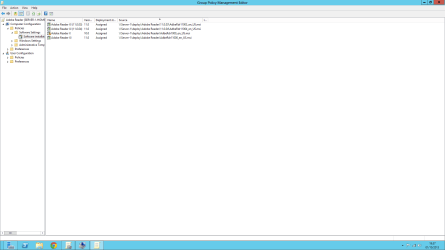
This is done with group policy normally however depends on the application. Group policy is limited to the deployment of .MSI installers only. Only enterprise or open sourced software maybe deployed in a domain, any use of home license software will break the license agreement and will not allow deployment. When deploying via group policy you need to create a share that all users may access (Read only) so that upon startup of the machine it can automatically install software.

group policy.png

- Each student needs to have access to her own drive through the server not locally.

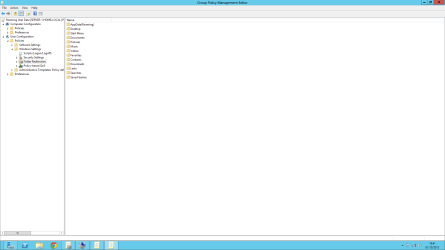
You need to first create a share that all users can access (everyone) and have (full control) so they can have full control over their files. After that in group policy change the folder redirection to the UNC path of the share (make sure when setting up the folder redirection you use the %USERNAME% variable so that the username is used as a folder.

group policy - folder redirection.png

Lastly, you may want to map the share for the users which can also be done by group policy so that upon log on they can have access to their area.

Josh
 

My Computer

Computer type
PC/Desktop
Computer Manufacturer/Model Number
Custom Built
OS
Windows 7 Professional x64 SP1 ; Windows Server 2012 R2 Standard
CPU
Intel Core i5 2400 @ 3.10GHz
Motherboard
Foxconn H67MP-S/-V/H67MP
Memory
8.0GB DDR3 @ 665MHz (2GBx4)
Graphics Card(s)
AMD Radeon HD 6870
Sound Card
Realtek High Definition Audio
Monitor(s) Displays
AOC 2243W & SMB1930NW
Screen Resolution
1440x900 & 1920x1080
Hard Drives
977GB Seagate ST31000524AS ATA Drive (SATA)
250GB WD iSCSI attached Drive
PSU
750W Gaming PSU
Case
Novatech Night
Cooling
Fan
Keyboard
Dell Standard PS/2 Keyboard
Mouse
R.A.T 07 Gaming Mouse
Internet Speed
Download: 10 Mbps Ping: 30ms Upload: 0.81 Mbps
Browser
Google Chrome
Other Info
Optiarc DVD RW AD-5260S ATA Device
I'm not going to give you exact directions because I feel it is for you to find out and research yourself as a final project.

- How do i give all users access to programs?

This is done with group policy normally however depends on the application. Group policy is limited to the deployment of .MSI installers only. Only enterprise or open sourced software maybe deployed in a domain, any use of home license software will break the license agreement and will not allow deployment. When deploying via group policy you need to create a share that all users may access (Read only) so that upon startup of the machine it can automatically install software.

View attachment 288022

- Each student needs to have access to her own drive through the server not locally.

You need to first create a share that all users can access (everyone) and have (full control) so they can have full control over their files. After that in group policy change the folder redirection to the UNC path of the share (make sure when setting up the folder redirection you use the %USERNAME% variable so that the username is used as a folder.

View attachment 288023

Lastly, you may want to map the share for the users which can also be done by group policy so that upon log on they can have access to their area.

Josh

I understand your concern since i did say it was a final project, but this isn't the kind of project you are thinking of. See, my class is in information Technology not networking. My teacher asked me to set up a network because our administrators wont give us access to the tools we need to write our programs without calling every single time we need something changed,added etc... I also possess more knowledge outside of programming than the other students in my class. Most of them cant even built a computer. If you could help me out step by step i would really appreciate it. i attempted to create a public folder and assign it as a primary drive on the domain. it didn't work so well.

i used this link as reference. Using Group Policy Preferences to Map Drives Based on Group Membership - Ask the Directory Services Team - Site Home - TechNet Blogs

Again, if you could give me more detailed instructions it would help me out a lot.
 

My Computer

Computer type
PC/Desktop
Computer Manufacturer/Model Number
custom built by me
OS
windows 7 professional 64x
CPU
intel i7 2600k
Motherboard
Asus MAXIMUS
Memory
16gb 1600mhz
Graphics Card(s)
evega geforce GTX 560
Sound Card
creative sound blaster on board
Hard Drives
1000 gb SATA III
Antivirus
Norton
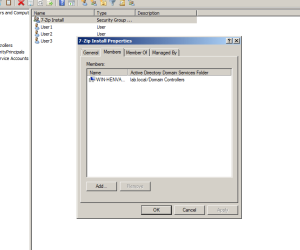
Assuming the domain and users are set up accordingly. To deploy software via group policy you will first need to create a security user group within Active Directory Users and Computers and name it something similar to the application you wish to deploy. Once done, assign assign the computers that you wish to have access to that application to the group.

group member.PNG

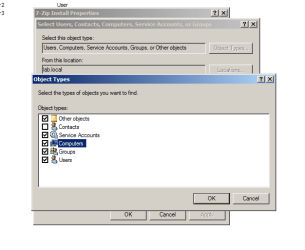
You will need to ensure that the object type includes 'Computers' to be able to add computers as members to the group

object type.PNG

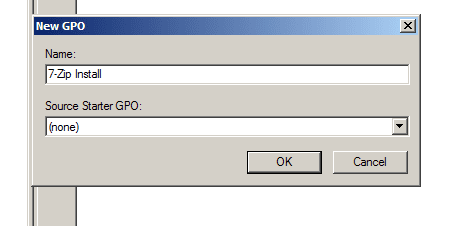
Next thing is to open Group Policy Management and create a new policy under your domain that will be used just for the deployment of a particular piece of software.

create policy.PNG

Once done right click and edit the policy, navigate to Computer Configuration\Policies\Software Settings\Software Installation. Once there, right click and then click on New>Package. From here then click on the .msi package that you wish to deploy to machines.

A window should pop up, click on Assigned to force the deployment to domain computers.

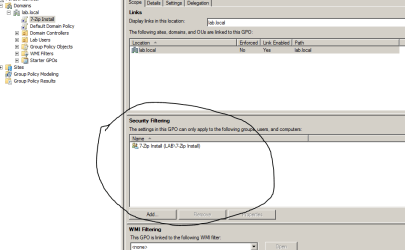
Now just change the security filter to apply only to the group you created in active directory (To apply to computers listed)

secuirty.PNG

Over time the application should be deployed to the machines that are joined to the group made in active directory.

____________________________________________________________

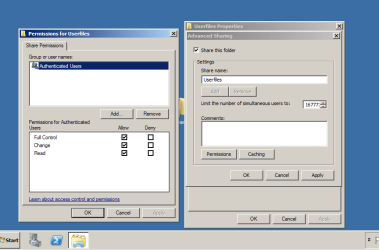
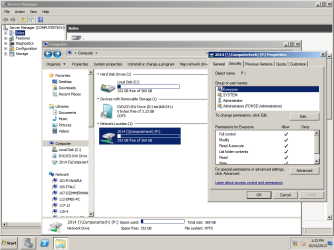
The next job for user files is to create a share that has the permissions shown in the screenshot below so that users can have full control of their files.

share.PNG

Then go to group policy and create a new policy called folder redirection.

Edit it and navigate to User Configuration\Policies\Windows Settings\Folder Redirection

Once there simply right click on the folder you wish to move to a remote location and click on properties

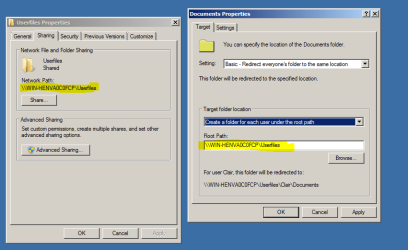
Then just change the setting to Basic and change the root path to the UNC SHARE!!! Make sure it is the same share as the one you created. The image below should help to clarify

folder redirection.PNG

Rinse and repeat on other user folders you wish to have stored on the server.

Now create a new group policy object and name it something like 'Map Drive'. Click edit and navigate to the following:

User Configuration\Preferences\Windows Settings\Drive Maps

Once located, just right click and select 'New>Mapped Drive'

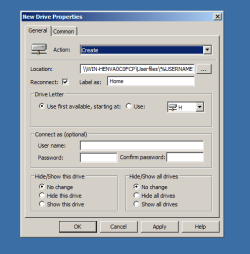
From here change the action to Create and the location to the same path as your share but add on '\%USERNAME%' at the end of it.

An example of mine is below:

map.PNG

The last '%' was cut off since it went over at the end.

Apply and OK and then you should have a mapped drive and redirected folders to that share on the server for all users in the domain.

Hope This Helps,
Josh :)
 

My Computer

Computer type
PC/Desktop
Computer Manufacturer/Model Number
Custom Built
OS
Windows 7 Professional x64 SP1 ; Windows Server 2012 R2 Standard
CPU
Intel Core i5 2400 @ 3.10GHz
Motherboard
Foxconn H67MP-S/-V/H67MP
Memory
8.0GB DDR3 @ 665MHz (2GBx4)
Graphics Card(s)
AMD Radeon HD 6870
Sound Card
Realtek High Definition Audio
Monitor(s) Displays
AOC 2243W & SMB1930NW
Screen Resolution
1440x900 & 1920x1080
Hard Drives
977GB Seagate ST31000524AS ATA Drive (SATA)
250GB WD iSCSI attached Drive
PSU
750W Gaming PSU
Case
Novatech Night
Cooling
Fan
Keyboard
Dell Standard PS/2 Keyboard
Mouse
R.A.T 07 Gaming Mouse
Internet Speed
Download: 10 Mbps Ping: 30ms Upload: 0.81 Mbps
Browser
Google Chrome
Other Info
Optiarc DVD RW AD-5260S ATA Device
Assuming the domain and users are set up accordingly. To deploy software via group policy you will first need to create a security user group within Active Directory Users and Computers and name it something similar to the application you wish to deploy. Once done, assign assign the computers that you wish to have access to that application to the group.

View attachment 288752

You will need to ensure that the object type includes 'Computers' to be able to add computers as members to the group

View attachment 288753

Next thing is to open Group Policy Management and create a new policy under your domain that will be used just for the deployment of a particular piece of software.

View attachment 288757

Once done right click and edit the policy, navigate to Computer Configuration\Policies\Software Settings\Software Installation. Once there, right click and then click on New>Package. From here then click on the .msi package that you wish to deploy to machines.

A window should pop up, click on Assigned to force the deployment to domain computers.

Now just change the security filter to apply only to the group you created in active directory (To apply to computers listed)

View attachment 288758

Over time the application should be deployed to the machines that are joined to the group made in active directory.

____________________________________________________________

The next job for user files is to create a share that has the permissions shown in the screenshot below so that users can have full control of their files.

View attachment 288761

Then go to group policy and create a new policy called folder redirection.

Edit it and navigate to User Configuration\Policies\Windows Settings\Folder Redirection

Once there simply right click on the folder you wish to move to a remote location and click on properties

Then just change the setting to Basic and change the root path to the UNC SHARE!!! Make sure it is the same share as the one you created. The image below should help to clarify

View attachment 288763

Rinse and repeat on other user folders you wish to have stored on the server.

Now create a new group policy object and name it something like 'Map Drive'. Click edit and navigate to the following:

User Configuration\Preferences\Windows Settings\Drive Maps

Once located, just right click and select 'New>Mapped Drive'

From here change the action to Create and the location to the same path as your share but add on '\%USERNAME%' at the end of it.

An example of mine is below:

View attachment 288765

The last '%' was cut off since it went over at the end.

Apply and OK and then you should have a mapped drive and redirected folders to that share on the server for all users in the domain.

Hope This Helps,
Josh :)

In the FOLDER REDIRECTION i cannot find the shared folder i created on the desktop. and what is the root path to the UNC share. If possible, could you create a video showing a full tutorial on the map driving. Thank you again for your help and taking time out of your day to help me.
 

My Computer

Computer type
PC/Desktop
Computer Manufacturer/Model Number
custom built by me
OS
windows 7 professional 64x
CPU
intel i7 2600k
Motherboard
Asus MAXIMUS
Memory
16gb 1600mhz
Graphics Card(s)
evega geforce GTX 560
Sound Card
creative sound blaster on board
Hard Drives
1000 gb SATA III
Antivirus
Norton
To redirect a users documents folder to a shared folder you would set it as the root path.

The UNC share is the share name made when you shared the folder. For example if I am on a machine called 'Josh-PC' and shared a folder on my desktop called 'test' then the UNC path will be:

\\Josh-PC\test

The algorithm is:

\\computer-name\share

The map drive location is just the same as the share used for folder redirection with a slight adjustment:

to keep with my previous example:

\\Josh-PC\test\%USERNAME%

That is all you would put for the mapped drive location. If you still need help I'll see what I can do...

Josh
 

My Computer

Computer type
PC/Desktop
Computer Manufacturer/Model Number
Custom Built
OS
Windows 7 Professional x64 SP1 ; Windows Server 2012 R2 Standard
CPU
Intel Core i5 2400 @ 3.10GHz
Motherboard
Foxconn H67MP-S/-V/H67MP
Memory
8.0GB DDR3 @ 665MHz (2GBx4)
Graphics Card(s)
AMD Radeon HD 6870
Sound Card
Realtek High Definition Audio
Monitor(s) Displays
AOC 2243W & SMB1930NW
Screen Resolution
1440x900 & 1920x1080
Hard Drives
977GB Seagate ST31000524AS ATA Drive (SATA)
250GB WD iSCSI attached Drive
PSU
750W Gaming PSU
Case
Novatech Night
Cooling
Fan
Keyboard
Dell Standard PS/2 Keyboard
Mouse
R.A.T 07 Gaming Mouse
Internet Speed
Download: 10 Mbps Ping: 30ms Upload: 0.81 Mbps
Browser
Google Chrome
Other Info
Optiarc DVD RW AD-5260S ATA Device
To redirect a users documents folder to a shared folder you would set it as the root path.

The UNC share is the share name made when you shared the folder. For example if I am on a machine called 'Josh-PC' and shared a folder on my desktop called 'test' then the UNC path will be:

\\Josh-PC\test

The algorithm is:

\\computer-name\share

The map drive location is just the same as the share used for folder redirection with a slight adjustment:

to keep with my previous example:

\\Josh-PC\test\%USERNAME%

That is all you would put for the mapped drive location. If you still need help I'll see what I can do...

Josh

Could you make a video? Unfortunately, I must be missing something. I can see the new folder drive under the network on the server but it does not appear on the client computer.
Thanks again,
Collin
 

My Computer

Computer type
PC/Desktop
Computer Manufacturer/Model Number
custom built by me
OS
windows 7 professional 64x
CPU
intel i7 2600k
Motherboard
Asus MAXIMUS
Memory
16gb 1600mhz
Graphics Card(s)
evega geforce GTX 560
Sound Card
creative sound blaster on board
Hard Drives
1000 gb SATA III
Antivirus
Norton
Not sure what to make a video on... Are you able to provide a screenshot of what you mean by the drive appearing under the network tab but not on the client computer? Have you made sure the client computer has joined the domain? Have you made sure that the security filter in group policy applies to Domain Computers?

Josh
 

My Computer

Computer type
PC/Desktop
Computer Manufacturer/Model Number
Custom Built
OS
Windows 7 Professional x64 SP1 ; Windows Server 2012 R2 Standard
CPU
Intel Core i5 2400 @ 3.10GHz
Motherboard
Foxconn H67MP-S/-V/H67MP
Memory
8.0GB DDR3 @ 665MHz (2GBx4)
Graphics Card(s)
AMD Radeon HD 6870
Sound Card
Realtek High Definition Audio
Monitor(s) Displays
AOC 2243W & SMB1930NW
Screen Resolution
1440x900 & 1920x1080
Hard Drives
977GB Seagate ST31000524AS ATA Drive (SATA)
250GB WD iSCSI attached Drive
PSU
750W Gaming PSU
Case
Novatech Night
Cooling
Fan
Keyboard
Dell Standard PS/2 Keyboard
Mouse
R.A.T 07 Gaming Mouse
Internet Speed
Download: 10 Mbps Ping: 30ms Upload: 0.81 Mbps
Browser
Google Chrome
Other Info
Optiarc DVD RW AD-5260S ATA Device
What I meant by a video is a tutorial on setting up that network drive. It would be easier for me to process then a written how to guide.

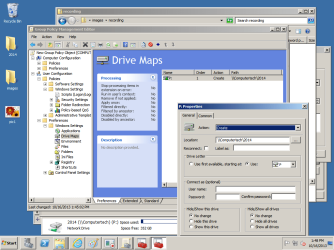
here is a screenshot
 

Attachments

  • pic1.png
    pic1.png
    41.9 KB · Views: 2

My Computer

Computer type
PC/Desktop
Computer Manufacturer/Model Number
custom built by me
OS
windows 7 professional 64x
CPU
intel i7 2600k
Motherboard
Asus MAXIMUS
Memory
16gb 1600mhz
Graphics Card(s)
evega geforce GTX 560
Sound Card
creative sound blaster on board
Hard Drives
1000 gb SATA III
Antivirus
Norton
video, another screenshot.

sorry, I don't have any recording software on here so I used Windows " record steps to reproduce a problem"
 

Attachments

My Computer

Computer type
PC/Desktop
Computer Manufacturer/Model Number
custom built by me
OS
windows 7 professional 64x
CPU
intel i7 2600k
Motherboard
Asus MAXIMUS
Memory
16gb 1600mhz
Graphics Card(s)
evega geforce GTX 560
Sound Card
creative sound blaster on board
Hard Drives
1000 gb SATA III
Antivirus
Norton
You've done it, though it isn't set up for each individual users home area if you will. What is the mapped drive for?

Your recording did not come through so I do not know exactly what the mapped drive is needed for :(

Hopefully I have attached a step by step problem step recorder on how to setup a mapped drive of your choice and apply to computers.

View attachment Map drive.zip
 

My Computer

Computer type
PC/Desktop
Computer Manufacturer/Model Number
Custom Built
OS
Windows 7 Professional x64 SP1 ; Windows Server 2012 R2 Standard
CPU
Intel Core i5 2400 @ 3.10GHz
Motherboard
Foxconn H67MP-S/-V/H67MP
Memory
8.0GB DDR3 @ 665MHz (2GBx4)
Graphics Card(s)
AMD Radeon HD 6870
Sound Card
Realtek High Definition Audio
Monitor(s) Displays
AOC 2243W & SMB1930NW
Screen Resolution
1440x900 & 1920x1080
Hard Drives
977GB Seagate ST31000524AS ATA Drive (SATA)
250GB WD iSCSI attached Drive
PSU
750W Gaming PSU
Case
Novatech Night
Cooling
Fan
Keyboard
Dell Standard PS/2 Keyboard
Mouse
R.A.T 07 Gaming Mouse
Internet Speed
Download: 10 Mbps Ping: 30ms Upload: 0.81 Mbps
Browser
Google Chrome
Other Info
Optiarc DVD RW AD-5260S ATA Device
Thanks for the rep Collin :)

I'm assuming that you managed to get it sorted, I'll see if I can get this thread marked as solved. Should you need any further help please don't hesitate to comment back

Many Thanks,
Josh :cool:
 

My Computer

Computer type
PC/Desktop
Computer Manufacturer/Model Number
Custom Built
OS
Windows 7 Professional x64 SP1 ; Windows Server 2012 R2 Standard
CPU
Intel Core i5 2400 @ 3.10GHz
Motherboard
Foxconn H67MP-S/-V/H67MP
Memory
8.0GB DDR3 @ 665MHz (2GBx4)
Graphics Card(s)
AMD Radeon HD 6870
Sound Card
Realtek High Definition Audio
Monitor(s) Displays
AOC 2243W & SMB1930NW
Screen Resolution
1440x900 & 1920x1080
Hard Drives
977GB Seagate ST31000524AS ATA Drive (SATA)
250GB WD iSCSI attached Drive
PSU
750W Gaming PSU
Case
Novatech Night
Cooling
Fan
Keyboard
Dell Standard PS/2 Keyboard
Mouse
R.A.T 07 Gaming Mouse
Internet Speed
Download: 10 Mbps Ping: 30ms Upload: 0.81 Mbps
Browser
Google Chrome
Other Info
Optiarc DVD RW AD-5260S ATA Device
Back
Top