
Setup error "A Require CD/DVD Device Driver is missing"

CushionDandy

New member
Local time
6:12 AM
Messages
10
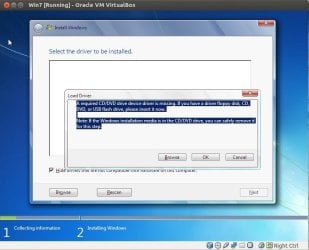
"A Require CD/DVD Device Driver is missing . If you have a driver floppy disc, CD, DVD, or USB please insert it now. Note: If the Windows installation media is in the CD/DVD drive, you may safely remove it now."

I trying to install a fresh copy of Windows 7 x64 SP1 onto a Dell Inspiron 15 7000 7559 laptop with an SSD drive, and after I insert my CD media into my External CD drive connected via USB (since the system has no internal CD Drive), I get this after clicking the "Install Windows" button. I have researched the topic fairly and I have found no working solutions to this issue. Here are the methods I have tried already:

1. After researching the error, multiple sites recommended i download the Serial ATA drivers from Dell and browse towards it using the driver finder when the error pops up. No Success.
2. Switching BIOS settings to support CSM, disabling secure boot, boot priority, etc where applicable. No Success.
3. I attempted installing from a different source of media aside from a CD and a different External CD drive. I also tried install from a USB stick. No Success. I believe all the USB ports are USB3 so I can't try from a USB2 port.
4. I've tried adding Intel USB3 and USB3.1 drivers to my Win7 USB setup, using dism, but it still doesn't work.

Is this something that can be fixed or worked around?

I think it the same issue as this thread as well: http://www.sevenforums.com/installation-setup/386215-error-while-installing-windows-7-a.html and this thread http://www.sevenforums.com/installation-setup/386439-required-cd-dvd-device-driver-missing.html

As mentioned, I've tried the suggestion by AddRAM to use dism to add USB3 support, but that doesn't seem to help.. still says not found...
If it was my own laptop, I'd just leave Windows 10 on here, because it works great. But the company I work for only really use Windows 7 so it would be great if we could install it on these newer laptops. I've read its because they use Intel's new chips, Skylake? And that has no native USB3 support?
 

Attachments
  • vdhLM.jpg
    vdhLM.jpg
    54.2 KB · Views: 0

My Computer

Computer type
PC/Desktop
Computer Manufacturer/Model Number
Custom built
OS
Windows 10 Pro x64 v1511
CPU
Intel Core i5-3570K CPU @ 3.40GHz
Motherboard
Gigabyte GA-Z77X-D3H
Memory
8GB
Graphics Card(s)
AMD Radeon 7970 3GB
Sound Card
On-board VIA HD Audio
Monitor(s) Displays
27" HP EliteDisplay E27i LED screen
Screen Resolution
1920x1080
Hard Drives
120GB Samsung 830 SSD
PSU
Antec
Case
Antec
Cooling
Thermalake
Keyboard
Microsoft
Mouse
Logitech MX518
Internet Speed
10mbps ADSL
Antivirus
AVG
Browser
Google Chrome

My Computer

Computer type
PC/Desktop
Computer Manufacturer/Model Number
Custom Build
OS
Windows 7 Home Premium 32-Bit - Build 7600 SP1
CPU
Intel Core i3-2120 3.30Ghz
Motherboard
Asus P8Z68-V LX Intel Z68 Socket H2 ATX
Memory
Kingston 4 GB DDR3 1333 mhz
Graphics Card(s)
AMD Radeon HD6670
Sound Card
Sound Blaster Audigy SE 24-Bit
Monitor(s) Displays
Asus VE228
Screen Resolution
1440 X 900
Hard Drives
OCZ Vertex 3 120 GB Sata 3 SSD ==
Kingston SH103/S3 120 G Hyper X 120 GB SSD ==
Western Digital 500 GB Caviar Green 7200 RPM ==
PSU
Corsair CX600M == 600 Watt
Case
NZXT Apollo - Silver with Clear Side Panel
Cooling
Three 120 mm Fans
Keyboard
Microsoft Natural 4000
Mouse
Microsoft Custom Optical 3000
Internet Speed
AT&T Fiber Optic Wireless Network
Antivirus
Microsoft Security Essentials
Browser
Chrome
Other Info
120 mm Blue LED Fan -- Three Blue LED Lazer Light Sticks
Ok I'm pretty sure its not any of those things, because I tried our original Win7 dvd and got this error, then downloaded a brand new iso from Microsoft subscription centre, and then also tried an iso I already had. So I've tried three different sources already, so I don't think its a damaged disk or corrupt iso. They all work fine on other PCs as well. But tomorrow, just to rule it out, I'll try the "Microsoft File Checksum Integrity Verifier tool" and report back. Thanks.
 

My Computer

Computer type
PC/Desktop
Computer Manufacturer/Model Number
Custom built
OS
Windows 10 Pro x64 v1511
CPU
Intel Core i5-3570K CPU @ 3.40GHz
Motherboard
Gigabyte GA-Z77X-D3H
Memory
8GB
Graphics Card(s)
AMD Radeon 7970 3GB
Sound Card
On-board VIA HD Audio
Monitor(s) Displays
27" HP EliteDisplay E27i LED screen
Screen Resolution
1920x1080
Hard Drives
120GB Samsung 830 SSD
PSU
Antec
Case
Antec
Cooling
Thermalake
Keyboard
Microsoft
Mouse
Logitech MX518
Internet Speed
10mbps ADSL
Antivirus
AVG
Browser
Google Chrome
I ran the tool, the hash checksum seems to match so I think its OK. Any more suggestions, any one? I may just have to leave Windows 10 on it I guess.
 

My Computer

Computer type
PC/Desktop
Computer Manufacturer/Model Number
Custom built
OS
Windows 10 Pro x64 v1511
CPU
Intel Core i5-3570K CPU @ 3.40GHz
Motherboard
Gigabyte GA-Z77X-D3H
Memory
8GB
Graphics Card(s)
AMD Radeon 7970 3GB
Sound Card
On-board VIA HD Audio
Monitor(s) Displays
27" HP EliteDisplay E27i LED screen
Screen Resolution
1920x1080
Hard Drives
120GB Samsung 830 SSD
PSU
Antec
Case
Antec
Cooling
Thermalake
Keyboard
Microsoft
Mouse
Logitech MX518
Internet Speed
10mbps ADSL
Antivirus
AVG
Browser
Google Chrome


You could try installing from usb thumb drive


Ignore that I had a moment
 

My Computer

Computer type
PC/Desktop
Computer Manufacturer/Model Number
Pauly Special
OS
Win7 Ultimate X64
CPU
Intel i5 3570K
Motherboard
Gigabyte Z77X-DS3H
Memory
8GB DDR3 1600
Graphics Card(s)
Onboard
Sound Card
Onboard
Screen Resolution
1280x1024
Hard Drives
Samsung 840 Evo SSD (OS)
1TB Spinner (Data)
PSU
800W Arctic
Case
Cooler Master
Cooling
3x120mm Fans
Keyboard
MS Wireless
Mouse
MS Wireless
Internet Speed
20M
I ran the tool, the hash checksum seems to match so I think its OK. Any more suggestions, any one? I may just have to leave Windows 10 on it I guess.

Are you going to try and install Win 7 again? You said you think it is OK.
 

My Computer

Computer type
PC/Desktop
Computer Manufacturer/Model Number
Custom Build
OS
Windows 7 Home Premium 32-Bit - Build 7600 SP1
CPU
Intel Core i3-2120 3.30Ghz
Motherboard
Asus P8Z68-V LX Intel Z68 Socket H2 ATX
Memory
Kingston 4 GB DDR3 1333 mhz
Graphics Card(s)
AMD Radeon HD6670
Sound Card
Sound Blaster Audigy SE 24-Bit
Monitor(s) Displays
Asus VE228
Screen Resolution
1440 X 900
Hard Drives
OCZ Vertex 3 120 GB Sata 3 SSD ==
Kingston SH103/S3 120 G Hyper X 120 GB SSD ==
Western Digital 500 GB Caviar Green 7200 RPM ==
PSU
Corsair CX600M == 600 Watt
Case
NZXT Apollo - Silver with Clear Side Panel
Cooling
Three 120 mm Fans
Keyboard
Microsoft Natural 4000
Mouse
Microsoft Custom Optical 3000
Internet Speed
AT&T Fiber Optic Wireless Network
Antivirus
Microsoft Security Essentials
Browser
Chrome
Other Info
120 mm Blue LED Fan -- Three Blue LED Lazer Light Sticks
Ah I think you misunderstand me, sorry let me explain: When I said "I think its OK" I meant the iso is not corrupt, not the issue is resolved.

I ran the hash check tool as recommended in that MS KB article you sent me, as that's the only real recommendation it offered I had not already tried. My sha1 hash for the iso matches the hash given by Microsoft, so I don't believe iso corruption is the issue here. I will try again but I don't think it will make any difference after the hash check, hence why I'm considering resorting to installing Win 10.

Do you think this could be a possible cause? Intel Skylake Removes Support for USB based Windows 7 Installation - Major Platform Specs Confirmed
 

My Computer

Computer type
PC/Desktop
Computer Manufacturer/Model Number
Custom built
OS
Windows 10 Pro x64 v1511
CPU
Intel Core i5-3570K CPU @ 3.40GHz
Motherboard
Gigabyte GA-Z77X-D3H
Memory
8GB
Graphics Card(s)
AMD Radeon 7970 3GB
Sound Card
On-board VIA HD Audio
Monitor(s) Displays
27" HP EliteDisplay E27i LED screen
Screen Resolution
1920x1080
Hard Drives
120GB Samsung 830 SSD
PSU
Antec
Case
Antec
Cooling
Thermalake
Keyboard
Microsoft
Mouse
Logitech MX518
Internet Speed
10mbps ADSL
Antivirus
AVG
Browser
Google Chrome
If it`s a Skylake platform motherboard, That`s your problem. There`s is no usb 3.0 support for Skylake in the Windows 7 installer.

If it had an internal dvd drive it might work.

You are trying to install 7 in a VM on a Skylake build, correct ?

I will hammer all this out when I install 7 on my Sabertooth Z170 tomorrow :party:

I will do it, the Force will be with me.

Read on my friend...

https://www.google.com/webhp?source...8#q=can+I+install+windows+7+on+a+z170&es_th=1

And here`s a fix that should work, which I will try.


*1. Install your SATA HD or SSD in another computer, (old rig perhaps?)
*2. On this other computer, boot from your WIN7 Installer USB or CD. (90% of the time will recognize the disk to install windows)
*3. Begin your Windows Install.
*4. Only run the first portion of your Windows 7 install, the portion while you are booted from the USB.
*5. Prevent the computer from rebooting, soon as it shuts down cut power.
*6. Remove Sata drive from the old PC and Install it in your z170 system.
*7. Boot up your New z170 system selecting the Drive you just set up if you have multiple installed, the drive is primed to accept whatever system it boots into and the z170 chipset/win7 will auto-update registry to match.
Viala! The z170 chipset recognizes all the drives without issue in the bios and will even try to boot from them, its the win7 installer that doesn't recognize the drives through the z170 system. I have done this on 4 z170 systems now and it works every time.
 

My Computer

Computer type
PC/Desktop
Computer Manufacturer/Model Number
Skylake Special #666
OS
Windows 10 Pro x64
CPU
Intel Core i7 6700K
Motherboard
Asus Sabertooth Z170 Mark 1
Memory
GSkill TridentZ RGB 16GB 3600 16-16-16-36
Graphics Card(s)
EVGA GTX 980 Ti SC x2
Sound Card
Realtek High Definition
Monitor(s) Displays
AOC G2460PG
Screen Resolution
1920 x 1080 144Hz
Hard Drives
Samsung 860 Pro 256GB, Seagate Barracuda 4TB x2
PSU
EVGA 1000 P2, EVGA White Custom Braided Cables
Case
Corsair Vengeance C70 Gunmetal Black
Cooling
Corsair H100i v2, Corsair ML120 x2, Thermal Grizzly Kryonaut
Keyboard
Logitech G910 Orion Spectrum
Mouse
Logitech G700s
Internet Speed
Verizon Fios Quantum Gateway 75/75
Antivirus
Windows Defender, Malwarebytes Free 3.8.3
Browser
Chrome
Other Info
Corsair SP120 x4, LG Blu-ray Drive, Durabrand HT-395 100 Watt Dolby Digital Amp, Corsair H2100 Wireless 7.1 Headset
AddRam, you have my interest Peaked. Please post your results, it sounds fascinating.
 

My Computer

Computer type
PC/Desktop
Computer Manufacturer/Model Number
Custom Build
OS
Windows 7 Home Premium 32-Bit - Build 7600 SP1
CPU
Intel Core i3-2120 3.30Ghz
Motherboard
Asus P8Z68-V LX Intel Z68 Socket H2 ATX
Memory
Kingston 4 GB DDR3 1333 mhz
Graphics Card(s)
AMD Radeon HD6670
Sound Card
Sound Blaster Audigy SE 24-Bit
Monitor(s) Displays
Asus VE228
Screen Resolution
1440 X 900
Hard Drives
OCZ Vertex 3 120 GB Sata 3 SSD ==
Kingston SH103/S3 120 G Hyper X 120 GB SSD ==
Western Digital 500 GB Caviar Green 7200 RPM ==
PSU
Corsair CX600M == 600 Watt
Case
NZXT Apollo - Silver with Clear Side Panel
Cooling
Three 120 mm Fans
Keyboard
Microsoft Natural 4000
Mouse
Microsoft Custom Optical 3000
Internet Speed
AT&T Fiber Optic Wireless Network
Antivirus
Microsoft Security Essentials
Browser
Chrome
Other Info
120 mm Blue LED Fan -- Three Blue LED Lazer Light Sticks
If it`s a Skylake platform motherboard, That`s your problem. There`s is no usb 3.0 support for Skylake in the Windows 7 installer.

Yes, it is a Skylake motherboard! Definitely! It's the first one our companies bought, and I doubt it will be the last so I'm really hoping there is a workaround! I thought this maybe the issue when I googled it but wasn't sure what the fix would be, thats why I posted the link to that page that mentioned the dropped support for EHCI. If you could let me know how it goes that would be wonderful.

Its not a VM: just a Dell laptop with no internal disk drive, only USB3 ports. The screenshot is from a VM because it was hard to get a screenshot of the error message I'm getting, so I just grabbed the best one I could find from google image search. Sorry for being lazy lol.

Let me know if you want me to try anything when I'm back in the office on Monday. I haven't installed any programs on the laptop yet so I'm more then happy to wipe it or try taking the SSD out. I just downloaded and installed Win 10 v1511 pro on it, that worked fine, but unfortunately some of our remote access tools don't support Win 10 yet so that's why I'm keen on downgrading it to 7 if possible.

Thank you both for your help, have a good weekend.
 
Last edited:

My Computer

Computer type
PC/Desktop
Computer Manufacturer/Model Number
Custom built
OS
Windows 10 Pro x64 v1511
CPU
Intel Core i5-3570K CPU @ 3.40GHz
Motherboard
Gigabyte GA-Z77X-D3H
Memory
8GB
Graphics Card(s)
AMD Radeon 7970 3GB
Sound Card
On-board VIA HD Audio
Monitor(s) Displays
27" HP EliteDisplay E27i LED screen
Screen Resolution
1920x1080
Hard Drives
120GB Samsung 830 SSD
PSU
Antec
Case
Antec
Cooling
Thermalake
Keyboard
Microsoft
Mouse
Logitech MX518
Internet Speed
10mbps ADSL
Antivirus
AVG
Browser
Google Chrome

My Computer

Computer type
PC/Desktop
Computer Manufacturer/Model Number
Skylake Special #666
OS
Windows 10 Pro x64
CPU
Intel Core i7 6700K
Motherboard
Asus Sabertooth Z170 Mark 1
Memory
GSkill TridentZ RGB 16GB 3600 16-16-16-36
Graphics Card(s)
EVGA GTX 980 Ti SC x2
Sound Card
Realtek High Definition
Monitor(s) Displays
AOC G2460PG
Screen Resolution
1920 x 1080 144Hz
Hard Drives
Samsung 860 Pro 256GB, Seagate Barracuda 4TB x2
PSU
EVGA 1000 P2, EVGA White Custom Braided Cables
Case
Corsair Vengeance C70 Gunmetal Black
Cooling
Corsair H100i v2, Corsair ML120 x2, Thermal Grizzly Kryonaut
Keyboard
Logitech G910 Orion Spectrum
Mouse
Logitech G700s
Internet Speed
Verizon Fios Quantum Gateway 75/75
Antivirus
Windows Defender, Malwarebytes Free 3.8.3
Browser
Chrome
Other Info
Corsair SP120 x4, LG Blu-ray Drive, Durabrand HT-395 100 Watt Dolby Digital Amp, Corsair H2100 Wireless 7.1 Headset

My Computer

Computer type
PC/Desktop
Computer Manufacturer/Model Number
Custom built
OS
Windows 10 Pro x64 v1511
CPU
Intel Core i5-3570K CPU @ 3.40GHz
Motherboard
Gigabyte GA-Z77X-D3H
Memory
8GB
Graphics Card(s)
AMD Radeon 7970 3GB
Sound Card
On-board VIA HD Audio
Monitor(s) Displays
27" HP EliteDisplay E27i LED screen
Screen Resolution
1920x1080
Hard Drives
120GB Samsung 830 SSD
PSU
Antec
Case
Antec
Cooling
Thermalake
Keyboard
Microsoft
Mouse
Logitech MX518
Internet Speed
10mbps ADSL
Antivirus
AVG
Browser
Google Chrome
I did not use the swap method, did not have to, the thing is, you are trying to use the usb 3.0 ports on the laptop to install 7, I think that`s your problem.

I connected my keyboard and mouse to the usb 2.0 ports and had no problems at all.

The swap method may work in theory, but you may not get it to boot or you may get a windows can not continue setup error message, who knows what could happen. That guy had success, you may not. Everything on each bios must be the same as far as settings.
 

My Computer

Computer type
PC/Desktop
Computer Manufacturer/Model Number
Skylake Special #666
OS
Windows 10 Pro x64
CPU
Intel Core i7 6700K
Motherboard
Asus Sabertooth Z170 Mark 1
Memory
GSkill TridentZ RGB 16GB 3600 16-16-16-36
Graphics Card(s)
EVGA GTX 980 Ti SC x2
Sound Card
Realtek High Definition
Monitor(s) Displays
AOC G2460PG
Screen Resolution
1920 x 1080 144Hz
Hard Drives
Samsung 860 Pro 256GB, Seagate Barracuda 4TB x2
PSU
EVGA 1000 P2, EVGA White Custom Braided Cables
Case
Corsair Vengeance C70 Gunmetal Black
Cooling
Corsair H100i v2, Corsair ML120 x2, Thermal Grizzly Kryonaut
Keyboard
Logitech G910 Orion Spectrum
Mouse
Logitech G700s
Internet Speed
Verizon Fios Quantum Gateway 75/75
Antivirus
Windows Defender, Malwarebytes Free 3.8.3
Browser
Chrome
Other Info
Corsair SP120 x4, LG Blu-ray Drive, Durabrand HT-395 100 Watt Dolby Digital Amp, Corsair H2100 Wireless 7.1 Headset
*1. Install your SATA HD or SSD in another computer, (old rig perhaps?)
*2. On this other computer, boot from your WIN7 Installer USB or CD. (90% of the time will recognize the disk to install windows)
*3. Begin your Windows Install.
*4. Only run the first portion of your Windows 7 install, the portion while you are booted from the USB.
*5. Prevent the computer from rebooting, soon as it shuts down cut power.
*6. Remove Sata drive from the old PC and Install it in your z170 system.
*7. Boot up your New z170 system selecting the Drive you just set up if you have multiple installed, the drive is primed to accept whatever system it boots into and the z170 chipset/win7 will auto-update registry to match.
Viala! The z170 chipset recognizes all the drives without issue in the bios and will even try to boot from them, its the win7 installer that doesn't recognize the drives through the z170 system. I have done this on 4 z170 systems now and it works every time.

This worked for me. I shut it down instead of letting it reboot after this screen:
560_Win7_Inst_WindowsNeedsToRestart_062211.jpg

Then put the SSD back into the laptop, powered it on, Windows 7 finished installing. The only issues I've had since then was getting drivers on it (since the USB ports, WiFi and Ethernet wouldn't work and it has no DVD drive). I had to take the hard drive out again, download the drivers on another PC, then copy them on to the hard drive. But now its all working fine. Thanks for the help guys :)
 

My Computer

Computer type
PC/Desktop
Computer Manufacturer/Model Number
Custom built
OS
Windows 10 Pro x64 v1511
CPU
Intel Core i5-3570K CPU @ 3.40GHz
Motherboard
Gigabyte GA-Z77X-D3H
Memory
8GB
Graphics Card(s)
AMD Radeon 7970 3GB
Sound Card
On-board VIA HD Audio
Monitor(s) Displays
27" HP EliteDisplay E27i LED screen
Screen Resolution
1920x1080
Hard Drives
120GB Samsung 830 SSD
PSU
Antec
Case
Antec
Cooling
Thermalake
Keyboard
Microsoft
Mouse
Logitech MX518
Internet Speed
10mbps ADSL
Antivirus
AVG
Browser
Google Chrome
You got it done, that`s all that matters, good job :)
 

My Computer

Computer type
PC/Desktop
Computer Manufacturer/Model Number
Skylake Special #666
OS
Windows 10 Pro x64
CPU
Intel Core i7 6700K
Motherboard
Asus Sabertooth Z170 Mark 1
Memory
GSkill TridentZ RGB 16GB 3600 16-16-16-36
Graphics Card(s)
EVGA GTX 980 Ti SC x2
Sound Card
Realtek High Definition
Monitor(s) Displays
AOC G2460PG
Screen Resolution
1920 x 1080 144Hz
Hard Drives
Samsung 860 Pro 256GB, Seagate Barracuda 4TB x2
PSU
EVGA 1000 P2, EVGA White Custom Braided Cables
Case
Corsair Vengeance C70 Gunmetal Black
Cooling
Corsair H100i v2, Corsair ML120 x2, Thermal Grizzly Kryonaut
Keyboard
Logitech G910 Orion Spectrum
Mouse
Logitech G700s
Internet Speed
Verizon Fios Quantum Gateway 75/75
Antivirus
Windows Defender, Malwarebytes Free 3.8.3
Browser
Chrome
Other Info
Corsair SP120 x4, LG Blu-ray Drive, Durabrand HT-395 100 Watt Dolby Digital Amp, Corsair H2100 Wireless 7.1 Headset
*1. Install your SATA HD or SSD in another computer, (old rig perhaps?)
*2. On this other computer, boot from your WIN7 Installer USB or CD. (90% of the time will recognize the disk to install windows)
*3. Begin your Windows Install.
*4. Only run the first portion of your Windows 7 install, the portion while you are booted from the USB.
*5. Prevent the computer from rebooting, soon as it shuts down cut power.
*6. Remove Sata drive from the old PC and Install it in your z170 system.
*7. Boot up your New z170 system selecting the Drive you just set up if you have multiple installed, the drive is primed to accept whatever system it boots into and the z170 chipset/win7 will auto-update registry to match.
Viala! The z170 chipset recognizes all the drives without issue in the bios and will even try to boot from them, its the win7 installer that doesn't recognize the drives through the z170 system. I have done this on 4 z170 systems now and it works every time.

This worked for me. I shut it down instead of letting it reboot after this screen:
560_Win7_Inst_WindowsNeedsToRestart_062211.jpg

Then put the SSD back into the laptop, powered it on, Windows 7 finished installing. The only issues I've had since then was getting drivers on it (since the USB ports, WiFi and Ethernet wouldn't work and it has no DVD drive). I had to take the hard drive out again, download the drivers on another PC, then copy them on to the hard drive. But now its all working fine. Thanks for the help guys :)

Hi , I just bought the laptop too. Now , I tried to downgrade to Win 7 , I have followed your method , and it worked fine. But , can you give me the link download of driver ( USB , Ethernet ) ?
Most important is the USB , really need the driver badly!
My pendrive , external hdd won't detect. :(
 

My Computer

Computer type
Laptop
OS
PAHANG
No one can find you a driver without knowing the exact make and model of your laptop.

Have you tried visiting your manufacturers support site and searching for it ?

If your machine is the exact same one as the OPs you will find available drivers here
Product Support | Dell UK
 

My Computer

Computer type
PC/Desktop
Computer Manufacturer/Model Number
Pauly Special
OS
Win7 Ultimate X64
CPU
Intel i5 3570K
Motherboard
Gigabyte Z77X-DS3H
Memory
8GB DDR3 1600
Graphics Card(s)
Onboard
Sound Card
Onboard
Screen Resolution
1280x1024
Hard Drives
Samsung 840 Evo SSD (OS)
1TB Spinner (Data)
PSU
800W Arctic
Case
Cooler Master
Cooling
3x120mm Fans
Keyboard
MS Wireless
Mouse
MS Wireless
Internet Speed
20M
No one can find you a driver without knowing the exact make and model of your laptop.

Have you tried visiting your manufacturers support site and searching for it ?

If your machine is the exact same one as the OPs you will find available drivers here
Product Support | Dell UK

I'm sorry , but my model is the same as the Thread Starter , Dell Inspiron 15 7000 7559
So , I was thinking if the Thread Starter had any link to drivers which supported for windows 7.
I'm currently having trouble finding LAN , USB 3.0 and Touchpad drivers. Support site does not have those 3 drivers.
 

My Computer

Computer type
Laptop
OS
PAHANG
If it`s a Skylake platform motherboard, That`s your problem. There`s is no usb 3.0 support for Skylake in the Windows 7 installer.

If it had an internal dvd drive it might work.

You are trying to install 7 in a VM on a Skylake build, correct ?

I will hammer all this out when I install 7 on my Sabertooth Z170 tomorrow :party:

I will do it, the Force will be with me.

Read on my friend...

https://www.google.com/webhp?source...8#q=can+I+install+windows+7+on+a+z170&es_th=1

And here`s a fix that should work, which I will try.


*1. Install your SATA HD or SSD in another computer, (old rig perhaps?)
*2. On this other computer, boot from your WIN7 Installer USB or CD. (90% of the time will recognize the disk to install windows)
*3. Begin your Windows Install.
*4. Only run the first portion of your Windows 7 install, the portion while you are booted from the USB.
*5. Prevent the computer from rebooting, soon as it shuts down cut power.
*6. Remove Sata drive from the old PC and Install it in your z170 system.
*7. Boot up your New z170 system selecting the Drive you just set up if you have multiple installed, the drive is primed to accept whatever system it boots into and the z170 chipset/win7 will auto-update registry to match.

A question - before I try this myself - not having an old system sitting around to do this - can I disconnect the HDD in my desktop and plug in the laptop HDD instead until it gets to the removal stage, or will this do bad things to my desktop when it starts the installation ?
 

My Computer

Computer type
Laptop
Computer Manufacturer/Model Number
Acer Aspire V11 Touch V3-112P-C26A
OS
Windows 7 professional 64 bit SP1
CPU
Intel Celeron N2840 2.16GHz
Motherboard
Acer R2 (cpu 1)
Memory
4.00GB DDR3 @ 666MHz (9-9-9-24)
Graphics Card(s)
Intel HD Graphics (Acer Incorperated [ALI])
Sound Card
Realtek High Definition Audio
Hard Drives
500GB Seagate ST500LT012-1DG142 ATA Device (SATA)
Back
Top