
Solved Setup was unable to create a new system Partition

bambi

New member
Member
Local time
4:03 PM
Messages
65
I'm trying to install a fresh copy of Windows 7 onto my brand new mSATA SSD. I keep getting the same error "Setup was unable to create a new system Partition".

My Specs are as follows: Intel® NUC Kit DC3217IYE

Integrated Board: D33217GKE
mSATA M500 Crucial 240gb SSD
Intel® Core™ i3 3217U Processor (1.8 GHz, Dual Core processor with 3 MB smart cache)

Install methods:

Install via USB stick as the NUC has no CD Drive and I have no externals around
1) Install to the USB via Windows Tool
2) Install to the USB via Rufus

Methods I've tried:

1) Letting Windows Setup configure everything for me.
(Try to install on an unallocated space,
Try to install after creating a new partition,
Try to install after formatting the partition created before)

2) Create a new partition via DiskPart:
DiskPart <ENTER>
list disk <ENTER>
select disk 0 <ENTER>
clean <ENTER> (Also tried Clean All)
create partition primary align=1024 <ENTER>
format fs=ntfs <ENTER> (Will Take a While)
assign <ENTER>
active <ENTER>
exit <ENTER>
exit <ENTER>

3)Tried to follow http://www.sevenforums.com/tutorials/91339-ssd-hdd-optimize-windows-reinstallation.html

4) Tried to follow http://www.sevenforums.com/tutorials/1649-clean-install-windows-7-a.html

5) Tried to follow http://www.sevenforums.com/tutorials/306285-install-windows-msata-ssd-drive.html (HOWEVER, I do not have "SATA OPERATION change to AHCI from ISRT") All I have is AHCI and IDE

6) I tried turning UEFI off and booting legacy

7) I've tried having the SATA drive in AHCI and IDE

8)Tried 2 different ISO's (Both from MS, on was Win7 Proff x86 and the other was Win7 Ultimate x64)

9)I Used this thread as reference but still to no avail http://www.sevenforums.com/installation-setup/260850-setup-unable-create-new-system-partition-2.html

Does anyone have any ideas I could try?
 
Last edited:

My Computer My Computer

OS
Windows 7 7000; Windows XP Pro SP3
After reading your OP I still don't know what it is your trying to do. Install a fresh copy of Win7, write an image made from a previous OS partition reinstall from a recovery? Maybe you should also list all of the steps you have gone through thus far so that someone could see if there is a place you missed something.
 

My Computer My Computer

Computer type
PC/Desktop
Computer Manufacturer/Model Number
CUSTOM BUILD
OS
Windows 7 Ultimate x64
CPU
AMD Phenom B55 3200MHz
Motherboard
Gigabyte MA785GM-US2H
Memory
4GB
Graphics Card(s)
On Board
Sound Card
On Board 8.1 HD
Monitor(s) Displays
(1) Samsung 713N, (2) IBM Thinkvision
Screen Resolution
1280x1024
Hard Drives
Hitachi, Seagate, Maxtor
PSU
CoolerMaster
Case
CoolerMaster
Cooling
CoolerMaster Hyper 212+
Keyboard
Dell QuietKey
Mouse
Logitech
Internet Speed
20-40Mb/s
Antivirus
Kapersky
Browser
Waterfox, Chrome, Opera
Simply, install windows 7 on a brand new SSD. No backups, no saved images. Just a totally fresh copy on a totally fresh SSD
 

My Computer My Computer

OS
Windows 7 7000; Windows XP Pro SP3
format fs=ntfs <ENTER> (Will Take a While)
I recommend you use format fs=ntfs quick or format fs=ntfs /q - that will be fast.

Then you have to direct the installer to that partition. If you don't do that, the installer finds no space on the SSD because it is all taken by the partition you just defined. All it can do is put the bootmgr into your partition because it is active. But else you did everything right.
 

My Computer My Computer

Computer Manufacturer/Model Number
HP, Dell, Gateway, Toshiba - 4 laptops and 2 desktops
OS
Vista, Windows7, Mint Mate, Zorin, Windows 8
CPU
from 1.6GHz Duo to i7
Monitor(s) Displays
2x HP w2207
Hard Drives
5x HDD, 7x SSD, 12x Externals
Keyboard
with trackball - no mices
Mouse
Trackball mice
Internet Speed
DSL 6000
Last edited:

My Computer My Computer

Computer type
PC/Desktop
Computer Manufacturer/Model Number
Skylake Special #666
OS
Windows 10 Pro x64
CPU
Intel Core i7 6700K
Motherboard
Asus Sabertooth Z170 Mark 1
Memory
GSkill TridentZ RGB 16GB 3600 16-16-16-36
Graphics Card(s)
EVGA GTX 980 Ti SC x2
Sound Card
Realtek High Definition
Monitor(s) Displays
AOC G2460PG
Screen Resolution
1920 x 1080 144Hz
Hard Drives
Samsung 860 Pro 256GB, Seagate Barracuda 4TB x2
PSU
EVGA 1000 P2, EVGA White Custom Braided Cables
Case
Corsair Vengeance C70 Gunmetal Black
Cooling
Corsair H100i v2, Corsair ML120 x2, Thermal Grizzly Kryonaut
Keyboard
Logitech G910 Orion Spectrum
Mouse
Logitech G700s
Internet Speed
Verizon Fios Quantum Gateway 75/75
Antivirus
Windows Defender, Malwarebytes Free 3.8.3
Browser
Chrome
Other Info
Corsair SP120 x4, LG Blu-ray Drive, Durabrand HT-395 100 Watt Dolby Digital Amp, Corsair H2100 Wireless 7.1 Headset

My Computer My Computer

Computer type
PC/Desktop
Computer Manufacturer/Model Number
Self Built
OS
Win 10 Pro x64
CPU
Intel I5-2500K @3.3GHz
Motherboard
Asrock P67 Extreme4
Memory
16GB G.Skill Ripjaws X (4x4GB)
Graphics Card(s)
EVGA GeForce 750 Ti SC 2GB
Sound Card
ASUS Xonar DG 5.1 Channels 24-bit 96KHz PCI Interface Sound
Monitor(s) Displays
auria eq2367
Screen Resolution
1920 x 1080
Hard Drives
250GB Samsung 850 EVO SSD
1TB WD Blue
1TB Hitachi
PSU
SeaSonic X 650W 80 Plus Gold
Case
Corsair Obsidian 750D
Cooling
Corsair H60, Three 140mm case fans
Keyboard
Logitech Wireless Keyboard K520
Mouse
Logitech Wireless Mouse M310
Internet Speed
Wave Broadband ~ 100 dn 5 up
Antivirus
Windows Defender, Malwarebytes Premium
Browser
Edge, IE11, Chrome
Other Info
Laptop specs: HP g7-1365dx /
CPU: AMD A6-3420M APU with Radeon(tm) HD Graphics /
RAM: Crucial 8Gb (2x4Gb) /
SSD: Crucial M4-CT128M4SSD2 ATA Device/ FW 000F /
GFX: AMD Radeon HD 6520G /
OS: Windows 10 Pro x64
Good catch, Derek.

Let us know if changing the SATA controller from IRST to AHCI and then cleaning the drive works, per the tutorial.

If not here are other steps for Overcoming Windows 7 Installation Failures - Windows 7 Help Forums.

There is really no need to create on your own the System Reserved partition. If you want it then use the Drive Options to create and format your partition(s):

2441d1379261910t-clean-install-windows-7-step8.jpg
 
I've tried creating a System Reserved partition first and then both a primary active partition and an unallocated partition.


Greg is correct, you do not make a system reserved partition on your own, windows creates it for you when you do not make a pre defined partition, which you say you`ve done, and you can`t create an unallocated partition.
unallocated space is just that, space that hasn`t been defined yet.

Try again and this time just delete any partitions you made so it looks exactly like the picture in step 7, your ssd will of course show a different size in GB, after you have all un allocated space just click next, the install dvd will take care of everything including alignment etc. You can always break the drive up into 2 partitions if you want using Partition Wizard, after the install.
 

My Computer My Computer

Computer type
PC/Desktop
Computer Manufacturer/Model Number
Skylake Special #666
OS
Windows 10 Pro x64
CPU
Intel Core i7 6700K
Motherboard
Asus Sabertooth Z170 Mark 1
Memory
GSkill TridentZ RGB 16GB 3600 16-16-16-36
Graphics Card(s)
EVGA GTX 980 Ti SC x2
Sound Card
Realtek High Definition
Monitor(s) Displays
AOC G2460PG
Screen Resolution
1920 x 1080 144Hz
Hard Drives
Samsung 860 Pro 256GB, Seagate Barracuda 4TB x2
PSU
EVGA 1000 P2, EVGA White Custom Braided Cables
Case
Corsair Vengeance C70 Gunmetal Black
Cooling
Corsair H100i v2, Corsair ML120 x2, Thermal Grizzly Kryonaut
Keyboard
Logitech G910 Orion Spectrum
Mouse
Logitech G700s
Internet Speed
Verizon Fios Quantum Gateway 75/75
Antivirus
Windows Defender, Malwarebytes Free 3.8.3
Browser
Chrome
Other Info
Corsair SP120 x4, LG Blu-ray Drive, Durabrand HT-395 100 Watt Dolby Digital Amp, Corsair H2100 Wireless 7.1 Headset
Urghh that moment when you have a lovely formatted post and you close the tab by mistake :/ Lets try again

Post #4: I've tried doing a quick format via Diskpart and pointing the setup at that partition but still the same error
Post #5: I see the same as your screenshot but rather than Unallocated, it has my partition. Clicking next produces the same error
Post #6: I've tried to follow that as best I could but as I noted above in my first post, I do only have access to AHCI or IDE
Post #7: In that link I do see some UEFI options in the BIOS. I've tried turning it off and booting legacy but that doesn't help. If I turn it on and try to follow that tutorial I run into problems with Rufus, installing Win7 setup onto the Usb stick. I'm at work now and can't quite remember the error but it wouldn't let me is all i can remember.
Post #8: As the first post, I've tried doing that and it still doesn't work
 

My Computer My Computer

OS
Windows 7 7000; Windows XP Pro SP3
Last edited:

My Computer My Computer

Computer type
PC/Desktop
Computer Manufacturer/Model Number
Skylake Special #666
OS
Windows 10 Pro x64
CPU
Intel Core i7 6700K
Motherboard
Asus Sabertooth Z170 Mark 1
Memory
GSkill TridentZ RGB 16GB 3600 16-16-16-36
Graphics Card(s)
EVGA GTX 980 Ti SC x2
Sound Card
Realtek High Definition
Monitor(s) Displays
AOC G2460PG
Screen Resolution
1920 x 1080 144Hz
Hard Drives
Samsung 860 Pro 256GB, Seagate Barracuda 4TB x2
PSU
EVGA 1000 P2, EVGA White Custom Braided Cables
Case
Corsair Vengeance C70 Gunmetal Black
Cooling
Corsair H100i v2, Corsair ML120 x2, Thermal Grizzly Kryonaut
Keyboard
Logitech G910 Orion Spectrum
Mouse
Logitech G700s
Internet Speed
Verizon Fios Quantum Gateway 75/75
Antivirus
Windows Defender, Malwarebytes Free 3.8.3
Browser
Chrome
Other Info
Corsair SP120 x4, LG Blu-ray Drive, Durabrand HT-395 100 Watt Dolby Digital Amp, Corsair H2100 Wireless 7.1 Headset
Let's also make sure you've enabled Legacy Mode and switched off UEFI in BIOS setup. Do any UEFI choices show up when you select the BIOS Boot Menu key at boot?

If so look in BIOS for UEFI, CSM, Legacy BIOS or Legacy Boot settings and post back their choices.
 
Thanks for the suggestions. I'm currently seeing friends for the bank holiday weekend so well try this tomorrow and try the suggestion in post #10. My phone doesn't like typing computer things. Silly autocorrect.

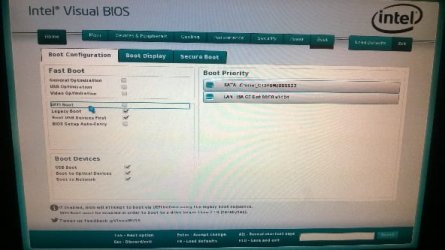
Post #11: This confused me a bit. I have two options in the bios. One is enable uefi. For now I chose disabled. The other was legacy boot which I enabled. I'm 90% sure that the only things in the boot order were Kingston USB stick, msata sad and one other that I think (if possible) was a Lan controller? I'll have to have a look when I'm home though and let you know exactly what I see.
 

My Computer My Computer

OS
Windows 7 7000; Windows XP Pro SP3
With an MSATA drive there is a small SSD chip on it intended for paging. It's normally RAIDed or joined to the drive by IRST or similar in BIOS setup as per Derek's link in post 6. Do you see anything similar in BIOS setup. When you delete all partitions or wipe the HD per that link do you see all Unallocated Space in the Win7 installer's Drive Selection panel?

2441d1379261910t-clean-install-windows-7-step8.jpg
 
Hi Greg


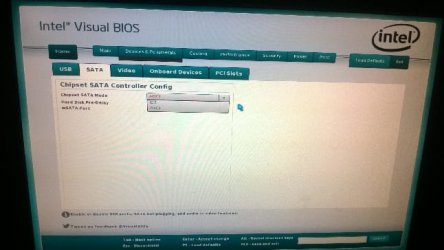
This is what I found. I have uefi,

I only have ide or ahci for the chip set mode

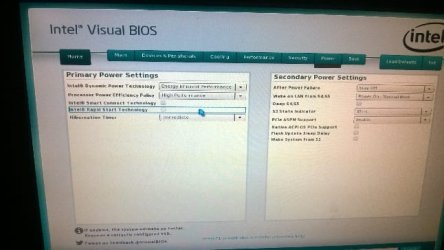
I have IRST I think but it's disabled and I can't enable it


I've tried installing it with both the uefi enabled and disabled and both chipset modes.
 

Attachments

  • WP_20140505_22_58_24_Pro.jpg
    WP_20140505_22_58_24_Pro.jpg
    27.9 KB · Views: 47
  • WP_20140505_22_59_00_Pro.jpg
    WP_20140505_22_59_00_Pro.jpg
    27.2 KB · Views: 47
  • WP_20140505_23_00_47_Pro.jpg
    WP_20140505_23_00_47_Pro.jpg
    29.8 KB · Views: 47

My Computer My Computer

OS
Windows 7 7000; Windows XP Pro SP3
Sorry I'm using tapatalk and I can't edit my post. But yes if I delete all the partitions I see unallocated space. I will take some more pics tomorrow if it would help you visualize what I see
 

My Computer My Computer

OS
Windows 7 7000; Windows XP Pro SP3
For MSATA Mode I only have AHCI or IDE, I don't have IRST.

I tried booting in UEFI but I can't since the device isn't listed in the boot order for UEFI. I can only legacy boot with it. Does that mean that Rufus didn't do it properly?

EDIT: Yes, Rufus made a boo boo. Went and re-did it out on a hunch and it now appears in the boot loader. Going to try to install now and see how that goes


EDIT2: IT WORKED!!! :) Looks like the UEFI installation worked. Not sure I entirely trust Rufus. Third time was the charm.

To confirm what I did was make the USB stick UEFI "ready" via Rufus (albeit three times), have the MSATA mode in ACHI and install this way. Not sure why the legacy way wouldn't work but hey.
Massive thanks to all who helped in this thread and to Greg personally.
 
Last edited:

My Computer My Computer

OS
Windows 7 7000; Windows XP Pro SP3
If you want to post back a screenshot of Disk Management - Post a Screen Capture Image
we can look it over for you to make sure it is correct.

After comparing the performance with when you ran it with IRST, if you decide you'd prefer to install it with IRST I found this tutorial which may help: http://www.sevenforums.com/tutorials/307529-install-windows-system-msata-isrt.html

It turns out there are two MSATA tutorials and this one gets more into the mechanics of IRST, although it may still be different for your model.
 
Last edited:
Hi. I have the same message.
I have 2 partitions. One was supposed to be for System the other for files in case of OS failure.
Is there any other way how to install without wiping whole HDD? I have more than 400GB on the other Partition...
 

My Computer My Computer

Computer type
PC/Desktop
OS
64bit Win 7 Pro
Your files should always be backed up against hard drive failure, by dragging to external or another method like Sync, Backup and Store your Files to the Cloud with Skydrive - Windows 7 Forums.

Is this a Win8 PC which is installed in UEFI to a GPT format hard drive, and which has already had Secure Boot turned off? If so and using a flash stick installer have you formatted it using Option One in UEFI (Unified Extensible Firmware Interface) - Install Windows 7 with - Windows 7 Forums?

If so then boot the installer, delete the OS partition making sure not to touch the data partition no matter what. Before deleting or formatting anything, ask yourself twice if that is the data partition and dont' do it if you're unsure.

Once you delete the OS partition, format it and then try the install. If this fails, delete the small UEFI boot partition(s) which may precede the OS partition, reformat and try again.

If these all fail then you'll need to 1) move the data off (it needs to be backed up externally anyway) to delete all partitions to try again, if necessary wiping the HD with Diskpart Clean Command, 2) look at settings in BIOS setup to try enabling CSM or Legacy mode which on some BIOS is required to install Win7, 3) change to Legacy BIOS, delete all partitions or wipe the HD, to change the formatting to MBR and Bypass UEFI to Install WIn7 .

If you want to post back camera snaps of the BIOS choices on Boot, Advanced, Security and Exit tabs with UEFI, CSM, Legacy BIOS choices expanded to see them all, use the paper clip icon in reply box to attach these. Otherwise you can type them out.
 
Back
Top