Setup Windows 7 64bit - Dual Boot

phillizee

New member
Local time
10:42 AM
Messages
12
Hello Forum! :)

Im new here. I browsed this forum for a bit and decided this is a good place to learn about new things and to get help with problems.

Well i have a problem.

I currently have a pc with Windows 7 64bit installed on it.
Now im tryin to install another Windows 7 64bit on a newly shrinked partition i created - The size is 103gb

When ever i try to install on the newly created parition i'm gettin this error:

"Setup was unable to use the existing system partition because it does not contain the required free space"

Im have lots of free space on the new partition..But i was told that my SYSTEM RESERVED 100mb is whats causing the problem because i only have 1mb free on this partition.

Im pretty much lost now..Could anyone here provide some advice on how to install
Another Windows 7 64bit on a newly created partition?

Many Thanks!:cool:
 

My Computer

Computer Manufacturer/Model Number
Gateway NV 53
OS
Windows 7 Home Premium 64bit
CPU
AMD Athlon II X2 M300
Memory
4gb
Graphics Card(s)
ATI Radeon 4200
Monitor(s) Displays
1366 x 768 LED - 15.6"
Hard Drives
SATA - 500gb
Hello Forum! :)

Im new here. I browsed this forum for a bit and decided this is a good place to learn about new things and to get help with problems.

Well i have a problem.

I currently have a pc with Windows 7 64bit installed on it.
Now im tryin to install another Windows 7 64bit on a newly shrinked partition i created - The size is 103gb

When ever i try to install on the newly created parition i'm gettin this error:

"Setup was unable to use the existing system partition because it does not contain the required free space"

Im have lots of free space on the new partition..But i was told that my SYSTEM RESERVED 100mb is whats causing the problem because i only have 1mb free on this partition.

Im pretty much lost now..Could anyone here provide some advice on how to install
Another Windows 7 64bit on a newly created partition?

Many Thanks!:cool:


You simply need to point the installer to the new empty partition. It is now trying to install in the 100 system partition with no success.


Ken J
 

My Computer

Computer Manufacturer/Model Number
HP Pavillion dv-7 1005 Tx
OS
Win 8 Release candidate 8400
CPU
[email protected]
Memory
4 gigs
Graphics Card(s)
Nvidia 9600M
Sound Card
HD built-in
Monitor(s) Displays
17" Wxga
Screen Resolution
1440x900
Cooling
none
Internet Speed
45Mb down 5Mb up
Thanks Ken for your reply

You simply need to point the installer to the new empty partition. It is now trying to install in the 100 system partition with no success.

What i did was to click on the partition i want to install Win 7 on...but when i click next i still get the same error message
 

My Computer

Computer Manufacturer/Model Number
Gateway NV 53
OS
Windows 7 Home Premium 64bit
CPU
AMD Athlon II X2 M300
Memory
4gb
Graphics Card(s)
ATI Radeon 4200
Monitor(s) Displays
1366 x 768 LED - 15.6"
Hard Drives
SATA - 500gb
Hello phillizee, welcome to Seven Forums!


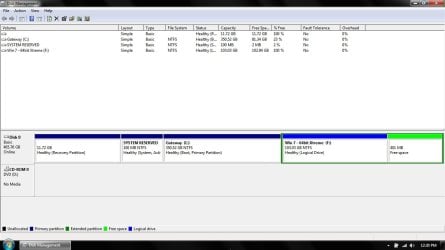
Before we make any specific recommendations will you please post a snip/screen-shot of the entire disk management drive map with a full description as to which drive/partition is which, so we can see what you have going on as there may be a fairly simple way to resolve the situation.

In the Windows start menu right click computer and click manage, in the left pane of the "Computer Management" window that opens click disk management and post a snip of that.


How to Upload and Post a Screenshot and File in Seven Forums
 

My Computer

Computer Manufacturer/Model Number
* BFK Customs *
OS
W 7 64-bit Ultimate
CPU
Intel Q9550 Yorkfield
Motherboard
ASUS P5Q Pro
Memory
8GB Dominator 8500C5D
Graphics Card(s)
ATI : XFX 5870
Sound Card
Realtek HD Audio 7-1
Monitor(s) Displays
1x 47" LCD HDMI & 3x 26" LCD HDMI
Screen Resolution
1920x1080P & 1920x1200
Hard Drives
1x 80GB Intel X25-M G2 SSD : 1x 500GB & 1x 640GB WD Caviar Black(s)
PSU
Corsair 620HX
Case
Cooler Master RC-690
Cooling
Tuniq Tower 120, 2x 140mm and 3x 120mm case fans
Keyboard
Microsoft 500
Mouse
Razer Diamondback 3G
Internet Speed
14 Mb/s
Other Info
1x Koutech 3Gb/s SATA HDD Hot Swap Rack
SnapSHot.jpg

Blank Label - This is the recovery partition

Gateway C: - This drive is what im now using as my default win os.

System RESERVED - Came with the pc

Win 7 - 64bit Xtreme - This is newly created partition were i want to install the other
os.
 

My Computer

Computer Manufacturer/Model Number
Gateway NV 53
OS
Windows 7 Home Premium 64bit
CPU
AMD Athlon II X2 M300
Memory
4gb
Graphics Card(s)
ATI Radeon 4200
Monitor(s) Displays
1366 x 768 LED - 15.6"
Hard Drives
SATA - 500gb
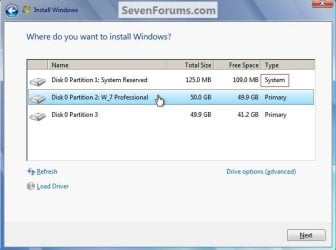
And when you point the installer to F: at this dialog box (the snip below) during the install you get "not enough free space" error.


Maybe you could use Option Four in this tutorial to convert the Extended/Logical to a Primary partition to see if that helps.

Partition Wizard : Use the Bootable CD

click to enlarge
Install.jpg
 

My Computer

Computer Manufacturer/Model Number
* BFK Customs *
OS
W 7 64-bit Ultimate
CPU
Intel Q9550 Yorkfield
Motherboard
ASUS P5Q Pro
Memory
8GB Dominator 8500C5D
Graphics Card(s)
ATI : XFX 5870
Sound Card
Realtek HD Audio 7-1
Monitor(s) Displays
1x 47" LCD HDMI & 3x 26" LCD HDMI
Screen Resolution
1920x1080P & 1920x1200
Hard Drives
1x 80GB Intel X25-M G2 SSD : 1x 500GB & 1x 640GB WD Caviar Black(s)
PSU
Corsair 620HX
Case
Cooler Master RC-690
Cooling
Tuniq Tower 120, 2x 140mm and 3x 120mm case fans
Keyboard
Microsoft 500
Mouse
Razer Diamondback 3G
Internet Speed
14 Mb/s
Other Info
1x Koutech 3Gb/s SATA HDD Hot Swap Rack
I Downloaded Partition Wizard

I then set drive F (Win 7 - 64bit Xtreme - The newly created partition were i want to install the other os) to primary.

Rebooted the pc and started the WIN 7 installation selected option Custom
Clicked on the Drive F: and i still recieved the same error message."Setup was unable to use the existing system partition because it does not contain the required free space"
 

My Computer

Computer Manufacturer/Model Number
Gateway NV 53
OS
Windows 7 Home Premium 64bit
CPU
AMD Athlon II X2 M300
Memory
4gb
Graphics Card(s)
ATI Radeon 4200
Monitor(s) Displays
1366 x 768 LED - 15.6"
Hard Drives
SATA - 500gb
To add: Do u think if i set my original primary drive to logical and use the F drive as primary would give some progress?
 

My Computer

Computer Manufacturer/Model Number
Gateway NV 53
OS
Windows 7 Home Premium 64bit
CPU
AMD Athlon II X2 M300
Memory
4gb
Graphics Card(s)
ATI Radeon 4200
Monitor(s) Displays
1366 x 768 LED - 15.6"
Hard Drives
SATA - 500gb
No. Do not convert any OS partition to Logical.

The problem is likely that something has written to SysReserved, possibly even during factory install, leaving it inadequate space to update the System boot files.

You can try shrinking the left side of the C drive by 100mb using Partition Wizard bootable CD, then Resize SysReserved into the extra space to add more space to it.

Back up a Win7 backup image and your files first as resizing can fail, although with Data Protection Mode checked Partition Wizard bootable CD will not fail, only restart to try over until you bail out of it at restart.

What is Win7 Extreme? How do you plan to activate it?
 
I have good news guys. Well after following all of our guidlines and advice i finally got Windows 7 64bit installation working on the other partition.

I was worried that it would'nt work.


I followed gregrocker's method by using Partition Wizard to Extend The SYSTEM RESERVED
space from 100mb to about 200mb.

Then i started the setup again..and it all went through..Im now able to boot to both partitions
hassle free - I also used EasyBCD 2.0 to rename one to avoid confusion.

I would like to thank zigzag3143(Ken J), Bare Foot Kid and gregrocker For their most appreciated inputs in helping me on my journey..

You Guys Rock!!! :D
 

My Computer

Computer Manufacturer/Model Number
Gateway NV 53
OS
Windows 7 Home Premium 64bit
CPU
AMD Athlon II X2 M300
Memory
4gb
Graphics Card(s)
ATI Radeon 4200
Monitor(s) Displays
1366 x 768 LED - 15.6"
Hard Drives
SATA - 500gb
Good to see you got it running and thanks for the update.
 

My Computer

Computer Manufacturer/Model Number
* BFK Customs *
OS
W 7 64-bit Ultimate
CPU
Intel Q9550 Yorkfield
Motherboard
ASUS P5Q Pro
Memory
8GB Dominator 8500C5D
Graphics Card(s)
ATI : XFX 5870
Sound Card
Realtek HD Audio 7-1
Monitor(s) Displays
1x 47" LCD HDMI & 3x 26" LCD HDMI
Screen Resolution
1920x1080P & 1920x1200
Hard Drives
1x 80GB Intel X25-M G2 SSD : 1x 500GB & 1x 640GB WD Caviar Black(s)
PSU
Corsair 620HX
Case
Cooler Master RC-690
Cooling
Tuniq Tower 120, 2x 140mm and 3x 120mm case fans
Keyboard
Microsoft 500
Mouse
Razer Diamondback 3G
Internet Speed
14 Mb/s
Other Info
1x Koutech 3Gb/s SATA HDD Hot Swap Rack
Many thanks

Hi, I had the very same problem and I just wanna give thanks guys, the partition wizard magic did it all!
keep up the good work
kottalovag
 

My Computer

OS
Windows 7 Professional
CPU
intel i5
Memory
kingmax 2x4GB
Graphics Card(s)
nvidia quadro nvs 5100M
Hello kottalovag, welcome to Seven Forums!


Good to see you found a solution and thanks for the update.
 

My Computer

Computer Manufacturer/Model Number
* BFK Customs *
OS
W 7 64-bit Ultimate
CPU
Intel Q9550 Yorkfield
Motherboard
ASUS P5Q Pro
Memory
8GB Dominator 8500C5D
Graphics Card(s)
ATI : XFX 5870
Sound Card
Realtek HD Audio 7-1
Monitor(s) Displays
1x 47" LCD HDMI & 3x 26" LCD HDMI
Screen Resolution
1920x1080P & 1920x1200
Hard Drives
1x 80GB Intel X25-M G2 SSD : 1x 500GB & 1x 640GB WD Caviar Black(s)
PSU
Corsair 620HX
Case
Cooler Master RC-690
Cooling
Tuniq Tower 120, 2x 140mm and 3x 120mm case fans
Keyboard
Microsoft 500
Mouse
Razer Diamondback 3G
Internet Speed
14 Mb/s
Other Info
1x Koutech 3Gb/s SATA HDD Hot Swap Rack
I just wanted to say thanks as I was also having this problem installing Windows 7 Ultimate x64 and I could not understand why it would not let me install despite having enough free space, even though I selected a partition with 90 GB of free space. Deleting the tiny system reserved partition (either from Windows 8 or Windows XP, I forget what created it) was all it took. Apparently if a partition smaller than 10 GB exists, Windows 7 (and Windows 8) has a problem installing on any other partition?

Either way, thanks for the advice and tips in this thread, otherwise I Wouldn't have gotten my laptop set up earlier today. :cool:
 

My Computer

OS
Windows 7 Ultimate x64
Hello AlkalynicZ, welcome to Seven Forums; glad you found a solution!
 

My Computer

Computer Manufacturer/Model Number
* BFK Customs *
OS
W 7 64-bit Ultimate
CPU
Intel Q9550 Yorkfield
Motherboard
ASUS P5Q Pro
Memory
8GB Dominator 8500C5D
Graphics Card(s)
ATI : XFX 5870
Sound Card
Realtek HD Audio 7-1
Monitor(s) Displays
1x 47" LCD HDMI & 3x 26" LCD HDMI
Screen Resolution
1920x1080P & 1920x1200
Hard Drives
1x 80GB Intel X25-M G2 SSD : 1x 500GB & 1x 640GB WD Caviar Black(s)
PSU
Corsair 620HX
Case
Cooler Master RC-690
Cooling
Tuniq Tower 120, 2x 140mm and 3x 120mm case fans
Keyboard
Microsoft 500
Mouse
Razer Diamondback 3G
Internet Speed
14 Mb/s
Other Info
1x Koutech 3Gb/s SATA HDD Hot Swap Rack
Back
Top