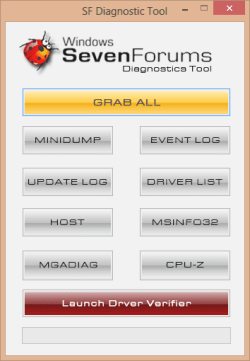
SF Diagnostic Tool - Using for Troubleshooting

Using SF Diagnostic Tool v5 For Troubleshooting

   Information
The SF Diagnostic Tool and SF Debug Tool is used to collect diagnostic information from your computer required to analysis Blue Screen of Death (BSOD) and other troubleshooting purposes for Vista, Windows 7, and Windows 8.

You must be logged in as an administrator to be able to use either tool.

   Note
SF Diagnostic Tool created by Shyam (Capt.Jack Sparrow).

Changelog for 5.0.0.6
  • Fixed typo in button
  • Added DXDIAG log
  • Added System Info Log - Log will also contain product ID, I was told with product ID we could find if Windows is genuine or not.
  • Minor bug fixes
   Warning
Some antivirus or firewall programs may detect SF Diagnostic Tool as a Trojan. It's just a False positive because the publisher is unknown.

There is nothing to worry about as the SF Diagnostic Tool is 100% safe and will not harm your computer.


Here's How:

1. Click/tap on the Download button below to download SF Diagnostic Tool.
Download


2. Save the ZIP file to your desktop, open it, and extract (drag and drop) the SF_Diagnostic_Tool.exe file to your desktop.

3. Right click on or press and hold the extracted SF_Diagnostic_Tool.exe file, and click/tap on Run as administrator.

4. If prompted by UAC, then click/tap on Yes.

5. Click/tap on the Grab All button, and click/tap on OK for each notice dialog until it's finished.screenshot.png
Success.jpg
6. You will now have a folder saved on your Desktop with the name of SF_DD_MM_YYYY (SF_day_month_year) that includes the information from each button in the tool.

7. ZIP the SF_DD_MM_YYYY folder, then rename the ZIP folder to your user name here at Vista Forums, Seven Forums, or Eight Forums.

8. When you are finished, you can close the SF Diagnostic Tool.


FAQ

1, If you're getting this error below, then instead of clicking on Grab All, click the buttons one by one in order to see which one is giving you the error.

Code:
************* Exception Text **************
System.IO.DirectoryNotFoundException: Could not find a part of the path '\\Desktop\SF_19-04-2013'.
at System.IO.__Error.WinIOError(Int32 errorCode, String maybeFullPath)
at System.IO.Directory.InternalCreateDirectory(String fullPath, String path, DirectorySecurity dirSecurity)
at System.IO.Directory.CreateDirectory(String path, DirectorySecurity directorySecurity)
at System.IO.Directory.CreateDirectory(String path)
at SF_Diagnostic_Tool.Form1.Button1_Click(Object sender, EventArgs e)
at System.Windows.Forms.Control.OnClick(EventArgs e)
at System.Windows.Forms.Button.OnClick(EventArgs e)
at System.Windows.Forms.Button.OnMouseUp(MouseEventArgs mevent)
at System.Windows.Forms.Control.WmMouseUp(Message& m, MouseButtons button, Int32 clicks)
at System.Windows.Forms.Control.WndProc(Message& m)
at System.Windows.Forms.ButtonBase.WndProc(Message& m)
at System.Windows.Forms.Button.WndProc(Message& m)
at System.Windows.Forms.Control.ControlNativeWindow.OnMessage(Message& m)
at System.Windows.Forms.Control.ControlNativeWindow.WndProc(Message& m)
at System.Windows.Forms.NativeWindow.Callback(IntPtr hWnd, Int32 msg, IntPtr wparam, IntPtr lparam)
 
 
************** Loaded Assemblies **************
mscorlib
Assembly Version: 2.0.0.0
Win32 Version: 2.0.50727.5466 (Win7SP1GDR.050727-5400)
CodeBase: file:///C:/Windows/Microsoft.NET/Framework/v2.0.50727/mscorlib.dll
----------------------------------------
SF Diagnostic Tool
Assembly Version: 5.0.0.6
Win32 Version: 5.0.0.6
CodeBase: file:///C:/Users/dagbel/Desktop/SF_Diagnostic_Tool.exe
----------------------------------------
Microsoft.VisualBasic
Assembly Version: 8.0.0.0
Win32 Version: 8.0.50727.5420 (Win7SP1.050727-5400)
CodeBase: file:///C:/Windows/assembly/GAC_MSIL/Microsoft.VisualBasic/8.0.0.0__b03f5f7f11d50a3a/Microsoft.VisualBasic.dll
----------------------------------------
System.Windows.Forms
Assembly Version: 2.0.0.0
Win32 Version: 2.0.50727.5468 (Win7SP1GDR.050727-5400)
CodeBase: file:///C:/Windows/assembly/GAC_MSIL/System.Windows.Forms/2.0.0.0__b77a5c561934e089/System.Windows.Forms.dll
----------------------------------------
System
Assembly Version: 2.0.0.0
Win32 Version: 2.0.50727.5467 (Win7SP1GDR.050727-5400)
CodeBase: file:///C:/Windows/assembly/GAC_MSIL/System/2.0.0.0__b77a5c561934e089/System.dll
----------------------------------------
System.Drawing
Assembly Version: 2.0.0.0
Win32 Version: 2.0.50727.5467 (Win7SP1GDR.050727-5400)
CodeBase: file:///C:/Windows/assembly/GAC_MSIL/System.Drawing/2.0.0.0__b03f5f7f11d50a3a/System.Drawing.dll
----------------------------------------
System.Runtime.Remoting
Assembly Version: 2.0.0.0
Win32 Version: 2.0.50727.5420 (Win7SP1.050727-5400)
CodeBase: file:///C:/Windows/assembly/GAC_MSIL/System.Runtime.Remoting/2.0.0.0__b77a5c561934e089/System.Runtime.Remoting.dll
----------------------------------------
 
************** JIT Debugging **************
To enable just-in-time (JIT) debugging, the .config file for this
application or computer (machine.config) must have the
jitDebugging value set in the system.windows.forms section.
The application must also be compiled with debugging
enabled.
 
For example:
 
<configuration>
<system.windows.forms jitDebugging="true" />
</configuration>
 
When JIT debugging is enabled, any unhandled exception
will be sent to the JIT debugger registered on the computer
rather than be handled by this dialog box.
2, I have given the default location %userprofile%\Desktop as the default location. If it's not accessible then the tool will not work. If it's not getting created that means the default locations in the registry is messed up.


Attachments

Last edited by a moderator:
I run as admin, click grab all, and I first get the warning to run as admin, then I get the below error. Something about cannot find \\desktop

Windows is installed on c:\, Users on d:\ . I've tried running it from both.

Thanks

Hello Basalt, and welcome to Seven Forums. The issue is that your user profile is not on C. That's why it's not able to find your desktop folder. :(
 
Last edited:

My Computer My Computer

Computer type
PC/Desktop
Computer Manufacturer/Model Number
Self built custom
OS
64-bit Windows 11 Pro for Workstations
CPU
Intel i7-8700K OC'd to 5 GHz
Motherboard
ASUS ROG Maximus XI Formula Z390
Memory
64 GB (4x16GB) G.SKILL TridentZ RGB DDR4 3600 MHz
Graphics Card(s)
ASUS ROG-STRIX-GTX1080TI-O11G-GAMING
Sound Card
Integrated
Monitor(s) Displays
2 x Samsung Odyssey G7 27"
Screen Resolution
2560x1440
Hard Drives
1TB Samsung 990 PRO M.2,
4TB Samsung 990 PRO PRO M.2,
TerraMaster F8 SSD Plus NAS
PSU
Seasonic Prime Titanium 850W
Case
Thermaltake Core P3
Cooling
Corsair Hydro H115i
Keyboard
Logitech wireless K800
Mouse
Logitech MX Master 4
Internet Speed
2 Gb/s Download and 100 Mb/s Upload
Antivirus
Malwarebyte Anti-Malware Premium
Browser
Google Chrome
Other Info
Logitech Z625 speaker system,
Logitech BRIO 4K Pro webcam,
HP Color LaserJet Pro MFP M477fdn,
APC SMART-UPS RT 1000 XL - SURT1000XLI,
Galaxy S23 Plus phone
Who can we send the info from the tool to find out what it means?
 

My Computer My Computer

Computer type
PC/Desktop
Computer Manufacturer/Model Number
Custom/Digital Storm
OS
Windows 7 Ultimate x64
CPU
Intel Core i5 3570K 3.40 GHz (Unlocked CPU) (Quad Core)
Motherboard
ASUS SABERTOOTH Z77 (Intel Z77
Memory
16GB DDR3 1600MHz
Graphics Card(s)
NVIDIA GeForce GTX 680 2GB
Sound Card
Creative Labs X-Fi Titanium HD 24-bit
Monitor(s) Displays
SyncMaster 245 24"
Screen Resolution
1920X1200
PSU
1050W Corsair Pro Silver 1050HX
Case
Cooler Master
Cooling
Air
Internet Speed
High-Speed Cable / DSL / Network Connections)
Antivirus
Avast
Browser
IE 10
Other Info
OS Boost: Yes, Disable and tweak all of the non-crucial services on the operating system
Windows OS: Microsoft Windows 7 Ultimate (64-Bit Edition)
Hello Clayp,

If it's about an issue with the tool, then you could just post it here.

If it's about something else, then you could create a new thread as usual to seek help with it.

Hope this helps, :)
Shawn
 

My Computer My Computer

Computer type
PC/Desktop
Computer Manufacturer/Model Number
Self built custom
OS
64-bit Windows 11 Pro for Workstations
CPU
Intel i7-8700K OC'd to 5 GHz
Motherboard
ASUS ROG Maximus XI Formula Z390
Memory
64 GB (4x16GB) G.SKILL TridentZ RGB DDR4 3600 MHz
Graphics Card(s)
ASUS ROG-STRIX-GTX1080TI-O11G-GAMING
Sound Card
Integrated
Monitor(s) Displays
2 x Samsung Odyssey G7 27"
Screen Resolution
2560x1440
Hard Drives
1TB Samsung 990 PRO M.2,
4TB Samsung 990 PRO PRO M.2,
TerraMaster F8 SSD Plus NAS
PSU
Seasonic Prime Titanium 850W
Case
Thermaltake Core P3
Cooling
Corsair Hydro H115i
Keyboard
Logitech wireless K800
Mouse
Logitech MX Master 4
Internet Speed
2 Gb/s Download and 100 Mb/s Upload
Antivirus
Malwarebyte Anti-Malware Premium
Browser
Google Chrome
Other Info
Logitech Z625 speaker system,
Logitech BRIO 4K Pro webcam,
HP Color LaserJet Pro MFP M477fdn,
APC SMART-UPS RT 1000 XL - SURT1000XLI,
Galaxy S23 Plus phone
Hi, Followed link information as follows from Win8 Forums,,

Attention: Tepid Before posting a BSOD thread, please read the instructions here: Blue Screen of Death (BSOD) Posting Instructions If you need to add new information like the dump files, please make a new post in your initial BSOD thread. Please do not make an extra new thread.
Ran the SF_Diagnostic_Tool.exe as admin
I ran this just to take a look and see what it does in Win8.

There are a couple of issues....

1.) the app runs center screen,, and the message box pop under the app so have to close them from the Taskbar Preview.

2.) Crashes with the following error searching for Windowsupdate.log which does not exist,,,, Note: I created a test Windowsupdate.log in the C:\Windows folder with some garbage in the file and it copied successfully. Either needs a check to escape out of the fail code or, Windowsupdate.log is not ever located there in Win8. Searching entire system did not locate one either. Still searching to see if I can locate what it may have changed to. Or, I just have not generated one, however, I am running RTM with all updates, up to date.

Code:
See the end of this message for details on invoking 
just-in-time (JIT) debugging instead of this dialog box.

************** Exception Text **************
System.IO.FileNotFoundException: Could not find file 'C:\WINDOWS\Windowsupdate.log'.
File name: 'C:\WINDOWS\Windowsupdate.log'
   at Microsoft.VisualBasic.FileIO.FileSystem.CopyOrMoveFile(CopyOrMove operation, String sourceFileName, String destinationFileName, Boolean overwrite, UIOptionInternal showUI, UICancelOption onUserCancel)
   at Microsoft.VisualBasic.FileIO.FileSystem.CopyFile(String sourceFileName, String destinationFileName, UIOption showUI, UICancelOption onUserCancel)
   at Microsoft.VisualBasic.MyServices.FileSystemProxy.CopyFile(String sourceFileName, String destinationFileName, UIOption showUI, UICancelOption onUserCancel)
   at SF_Diagnostic_Tool.Form1.Button1_Click(Object sender, EventArgs e)
   at System.Windows.Forms.Control.OnClick(EventArgs e)
   at System.Windows.Forms.Button.OnClick(EventArgs e)
   at System.Windows.Forms.Button.OnMouseUp(MouseEventArgs mevent)
   at System.Windows.Forms.Control.WmMouseUp(Message& m, MouseButtons button, Int32 clicks)
   at System.Windows.Forms.Control.WndProc(Message& m)
   at System.Windows.Forms.ButtonBase.WndProc(Message& m)
   at System.Windows.Forms.Button.WndProc(Message& m)
   at System.Windows.Forms.Control.ControlNativeWindow.OnMessage(Message& m)
   at System.Windows.Forms.Control.ControlNativeWindow.WndProc(Message& m)
   at System.Windows.Forms.NativeWindow.Callback(IntPtr hWnd, Int32 msg, IntPtr wparam, IntPtr lparam)


************** Loaded Assemblies **************
mscorlib
    Assembly Version: 2.0.0.0
    Win32 Version: 2.0.50727.6387 (Win8RTM.050727-6300)
    CodeBase: file:///C:/Windows/Microsoft.NET/Framework/v2.0.50727/mscorlib.dll
----------------------------------------
SF Diagnostic Tool
    Assembly Version: 5.0.0.6
    Win32 Version: 5.0.0.6
    CodeBase: file:///C:/Users/Win8/Downloads/SF_Diagnostic_Tool.exe
----------------------------------------
Microsoft.VisualBasic
    Assembly Version: 8.0.0.0
    Win32 Version: 8.0.50727.6387 (Win8RTM.050727-6300)
    CodeBase: file:///C:/WINDOWS/assembly/GAC_MSIL/Microsoft.VisualBasic/8.0.0.0__b03f5f7f11d50a3a/Microsoft.VisualBasic.dll
----------------------------------------
System
    Assembly Version: 2.0.0.0
    Win32 Version: 2.0.50727.6387 (Win8RTM.050727-6300)
    CodeBase: file:///C:/WINDOWS/assembly/GAC_MSIL/System/2.0.0.0__b77a5c561934e089/System.dll
----------------------------------------
System.Windows.Forms
    Assembly Version: 2.0.0.0
    Win32 Version: 2.0.50727.6387 (Win8RTM.050727-6300)
    CodeBase: file:///C:/WINDOWS/assembly/GAC_MSIL/System.Windows.Forms/2.0.0.0__b77a5c561934e089/System.Windows.Forms.dll
----------------------------------------
System.Drawing
    Assembly Version: 2.0.0.0
    Win32 Version: 2.0.50727.6387 (Win8RTM.050727-6300)
    CodeBase: file:///C:/WINDOWS/assembly/GAC_MSIL/System.Drawing/2.0.0.0__b03f5f7f11d50a3a/System.Drawing.dll
----------------------------------------
System.Runtime.Remoting
    Assembly Version: 2.0.0.0
    Win32 Version: 2.0.50727.6387 (Win8RTM.050727-6300)
    CodeBase: file:///C:/WINDOWS/assembly/GAC_MSIL/System.Runtime.Remoting/2.0.0.0__b77a5c561934e089/System.Runtime.Remoting.dll
----------------------------------------

************** JIT Debugging **************
To enable just-in-time (JIT) debugging, the .config file for this
application or computer (machine.config) must have the
jitDebugging value set in the system.windows.forms section.
The application must also be compiled with debugging
enabled.

For example:

<configuration>
    <system.windows.forms jitDebugging="true" />
</configuration>

When JIT debugging is enabled, any unhandled exception
will be sent to the JIT debugger registered on the computer
rather than be handled by this dialog box.
 

My Computer My Computer

Computer Manufacturer/Model Number
Self Built
OS
Win 7 Ultimate 32bit
CPU
C2D E6600 2.4Ghz
Motherboard
Intel D965WH
Memory
4G Kingston KHX5400D2
Graphics Card(s)
EVGA GTX 570 HD SC (012-P3-1573-KR)
Sound Card
On-Board
Monitor(s) Displays
Samsung 226BW
Screen Resolution
1680 x 1050
Hard Drives
2 x 250 Seagate Barracuda
2 x 500 Seagate Barracuda (Raid1)
PSU
Corsair TX750W
Case
In-Win C589
Cooling
Stock Intel Cooling
Thanks for the feedback Tepid. I'll work on it and see if I can fix it.
 

My Computer My Computer

Computer Manufacturer/Model Number
Samsung NP550P5C-S02IN
OS
Windows 7 Ultimate - 64-bit | Windows 8 Pro - 64-bit
CPU
Intel® Core™ i7 Processor 3,610QM (2.30Hz, 6MB L3 Cach
Memory
8 GB
Graphics Card(s)
NVIDIA® GeForce® GT 650M 2GB Graphics, Optimus™ techno
Sound Card
SoundAlive™ JBL 3 Speakers (With sub-Woofer)
Monitor(s) Displays
39.62cm (15.6) SuperBright 300nit HD+ LED Display
Screen Resolution
1,600 x 900, Anti-Reflective
Hard Drives
1TB S-ATA II Hard Drive (5,400RPM)
I am able to run this program (as administrator). But in the end, no folder/file is created on the desktop. My Desktop folder is actually on D drive (D:\Comp\UserData\<username>\Desktop). I read above that it may be cuz it cannot find the desktop folder since it is on D ? (The C:\Users\jaesun\Desktop folder exists though?)

Is there any way to run this without moving my User folder back to the C drive?
 

My Computer My Computer

Computer Manufacturer/Model Number
Self-Built, No OC
OS
windows7 Professional 64-bit
CPU
Intel i7 3770-k
Motherboard
Asus P8Z77-V LGA 1155
Memory
G.Skill 8GB (2 x 4GB) DDR3 1600
Graphics Card(s)
nVidia 560 Ti
Hard Drives
1xIntel 520 180GB SSD, 5x SATA Hard Drives
PSU
Corsair 850W
Cooling
CoolerMaster Hyper 212 EVO
I am able to run this program (as administrator). But in the end, no folder/file is created on the desktop. My Desktop folder is actually on D drive (D:\Comp\UserData\<username>\Desktop). I read above that it may be cuz it cannot find the desktop folder since it is on D ? (The C:\Users\jaesun\Desktop folder exists though?)

Is there any way to run this without moving my User folder back to the C drive?

Try this path %userprofile%\Desktop from Start > Run.
 

My Computer My Computer

Computer Manufacturer/Model Number
Samsung NP550P5C-S02IN
OS
Windows 7 Ultimate - 64-bit | Windows 8 Pro - 64-bit
CPU
Intel® Core™ i7 Processor 3,610QM (2.30Hz, 6MB L3 Cach
Memory
8 GB
Graphics Card(s)
NVIDIA® GeForce® GT 650M 2GB Graphics, Optimus™ techno
Sound Card
SoundAlive™ JBL 3 Speakers (With sub-Woofer)
Monitor(s) Displays
39.62cm (15.6) SuperBright 300nit HD+ LED Display
Screen Resolution
1,600 x 900, Anti-Reflective
Hard Drives
1TB S-ATA II Hard Drive (5,400RPM)
I am able to run this program (as administrator). But in the end, no folder/file is created on the desktop. My Desktop folder is actually on D drive (D:\Comp\UserData\<username>\Desktop). I read above that it may be cuz it cannot find the desktop folder since it is on D ? (The C:\Users\jaesun\Desktop folder exists though?)

Is there any way to run this without moving my User folder back to the C drive?

Try this path %userprofile%\Desktop from Start > Run.

Brings up windows explorer, Desktop folder. C:\Users\<username>\Desktop There a folder there, from a prior game install a few years ago (doesnt show up on my UI desktop though). But no other folders or anything from the diagnostics tool
 

My Computer My Computer

Computer Manufacturer/Model Number
Self-Built, No OC
OS
windows7 Professional 64-bit
CPU
Intel i7 3770-k
Motherboard
Asus P8Z77-V LGA 1155
Memory
G.Skill 8GB (2 x 4GB) DDR3 1600
Graphics Card(s)
nVidia 560 Ti
Hard Drives
1xIntel 520 180GB SSD, 5x SATA Hard Drives
PSU
Corsair 850W
Cooling
CoolerMaster Hyper 212 EVO
Nice, convenient utility. But it looks like it's finished running, but keeps running in the background. I closed it before it was finished, so now I'm not sure if it got everything correctly or not. I also have no way of knowing when it has competed. Advise to update the instructions (or the utility) to add some clarity. Specifically, you could say how many files to expect, what indicates when it's done, approximately how long to wait, etc. Thanks for the utility.
 
Last edited:

My Computer My Computer

Computer type
PC/Desktop
Computer Manufacturer/Model Number
Lenovo/2757CTO Thinkpad W700
OS
Microsoft Windows 7 Professional 64-bit 7601 Multiprocessor Free Service Pack 1
CPU
AMD A6-5350M APU with Radeon(tm) HD Graphics
Motherboard
LENOVO 20B20011US
Memory
16.00 GB
Graphics Card(s)
AMD Radeon HD 8450G
Sound Card
(1) AMD High Definition Audio Device (2) Conexant 20671 Sm
Monitor(s) Displays
??
Screen Resolution
1366 x 768 x 32 bits (4294967296 colors) @ 60 Hz
Hard Drives
HGST HTS 545032A7E380 SATA Disk Device
Mouse
Microsoft Optical Wheel Mouse
Other Info
BIOS: Ver 1.00PARTTBLX
Hello StupidUser,

The program is finished when you no longer get a prompt to click on OK. Double check the program's icon on your taskbar for any additional prompt windows that may be hidden behind something else. :)
 

My Computer My Computer

Computer type
PC/Desktop
Computer Manufacturer/Model Number
Self built custom
OS
64-bit Windows 11 Pro for Workstations
CPU
Intel i7-8700K OC'd to 5 GHz
Motherboard
ASUS ROG Maximus XI Formula Z390
Memory
64 GB (4x16GB) G.SKILL TridentZ RGB DDR4 3600 MHz
Graphics Card(s)
ASUS ROG-STRIX-GTX1080TI-O11G-GAMING
Sound Card
Integrated
Monitor(s) Displays
2 x Samsung Odyssey G7 27"
Screen Resolution
2560x1440
Hard Drives
1TB Samsung 990 PRO M.2,
4TB Samsung 990 PRO PRO M.2,
TerraMaster F8 SSD Plus NAS
PSU
Seasonic Prime Titanium 850W
Case
Thermaltake Core P3
Cooling
Corsair Hydro H115i
Keyboard
Logitech wireless K800
Mouse
Logitech MX Master 4
Internet Speed
2 Gb/s Download and 100 Mb/s Upload
Antivirus
Malwarebyte Anti-Malware Premium
Browser
Google Chrome
Other Info
Logitech Z625 speaker system,
Logitech BRIO 4K Pro webcam,
HP Color LaserJet Pro MFP M477fdn,
APC SMART-UPS RT 1000 XL - SURT1000XLI,
Galaxy S23 Plus phone
Hello StupidUser,

The program is finished when you no longer get a prompt to click on OK. Double check the program's icon on your taskbar for any additional prompt windows that may be hidden behind something else. :)

Right. My point is that I don't know how many "OK" boxes there are. And since some of the OKs take a while to appear, and the program looks like it's done, and even keeps collecting info after you close it, it's hard to know when it's done. Suppose I think it's done, but really another collection is happening in the background. I do recognize that this utility is being used by Windows savants who may know what is happening and how much data is being collected. But for the rest of us, a hint or two in the instructions at the top would be nice. This is really nit-picking. It's a great and useful utility.
 

My Computer My Computer

Computer type
PC/Desktop
Computer Manufacturer/Model Number
Lenovo/2757CTO Thinkpad W700
OS
Microsoft Windows 7 Professional 64-bit 7601 Multiprocessor Free Service Pack 1
CPU
AMD A6-5350M APU with Radeon(tm) HD Graphics
Motherboard
LENOVO 20B20011US
Memory
16.00 GB
Graphics Card(s)
AMD Radeon HD 8450G
Sound Card
(1) AMD High Definition Audio Device (2) Conexant 20671 Sm
Monitor(s) Displays
??
Screen Resolution
1366 x 768 x 32 bits (4294967296 colors) @ 60 Hz
Hard Drives
HGST HTS 545032A7E380 SATA Disk Device
Mouse
Microsoft Optical Wheel Mouse
Other Info
BIOS: Ver 1.00PARTTBLX
No problem. The final OK prompt is the right screenshot under step 4. When you see it and click on OK, the program is all finished. :)
 

My Computer My Computer

Computer type
PC/Desktop
Computer Manufacturer/Model Number
Self built custom
OS
64-bit Windows 11 Pro for Workstations
CPU
Intel i7-8700K OC'd to 5 GHz
Motherboard
ASUS ROG Maximus XI Formula Z390
Memory
64 GB (4x16GB) G.SKILL TridentZ RGB DDR4 3600 MHz
Graphics Card(s)
ASUS ROG-STRIX-GTX1080TI-O11G-GAMING
Sound Card
Integrated
Monitor(s) Displays
2 x Samsung Odyssey G7 27"
Screen Resolution
2560x1440
Hard Drives
1TB Samsung 990 PRO M.2,
4TB Samsung 990 PRO PRO M.2,
TerraMaster F8 SSD Plus NAS
PSU
Seasonic Prime Titanium 850W
Case
Thermaltake Core P3
Cooling
Corsair Hydro H115i
Keyboard
Logitech wireless K800
Mouse
Logitech MX Master 4
Internet Speed
2 Gb/s Download and 100 Mb/s Upload
Antivirus
Malwarebyte Anti-Malware Premium
Browser
Google Chrome
Other Info
Logitech Z625 speaker system,
Logitech BRIO 4K Pro webcam,
HP Color LaserJet Pro MFP M477fdn,
APC SMART-UPS RT 1000 XL - SURT1000XLI,
Galaxy S23 Plus phone
No problem. The final OK prompt is the right screenshot under step 4. When you see it and click on OK, the program is all finished. :)
Oh.. duh! (living up to my username :D).
 

My Computer My Computer

Computer type
PC/Desktop
Computer Manufacturer/Model Number
Lenovo/2757CTO Thinkpad W700
OS
Microsoft Windows 7 Professional 64-bit 7601 Multiprocessor Free Service Pack 1
CPU
AMD A6-5350M APU with Radeon(tm) HD Graphics
Motherboard
LENOVO 20B20011US
Memory
16.00 GB
Graphics Card(s)
AMD Radeon HD 8450G
Sound Card
(1) AMD High Definition Audio Device (2) Conexant 20671 Sm
Monitor(s) Displays
??
Screen Resolution
1366 x 768 x 32 bits (4294967296 colors) @ 60 Hz
Hard Drives
HGST HTS 545032A7E380 SATA Disk Device
Mouse
Microsoft Optical Wheel Mouse
Other Info
BIOS: Ver 1.00PARTTBLX
LOL, no problem mate. :)
 

My Computer My Computer

Computer type
PC/Desktop
Computer Manufacturer/Model Number
Self built custom
OS
64-bit Windows 11 Pro for Workstations
CPU
Intel i7-8700K OC'd to 5 GHz
Motherboard
ASUS ROG Maximus XI Formula Z390
Memory
64 GB (4x16GB) G.SKILL TridentZ RGB DDR4 3600 MHz
Graphics Card(s)
ASUS ROG-STRIX-GTX1080TI-O11G-GAMING
Sound Card
Integrated
Monitor(s) Displays
2 x Samsung Odyssey G7 27"
Screen Resolution
2560x1440
Hard Drives
1TB Samsung 990 PRO M.2,
4TB Samsung 990 PRO PRO M.2,
TerraMaster F8 SSD Plus NAS
PSU
Seasonic Prime Titanium 850W
Case
Thermaltake Core P3
Cooling
Corsair Hydro H115i
Keyboard
Logitech wireless K800
Mouse
Logitech MX Master 4
Internet Speed
2 Gb/s Download and 100 Mb/s Upload
Antivirus
Malwarebyte Anti-Malware Premium
Browser
Google Chrome
Other Info
Logitech Z625 speaker system,
Logitech BRIO 4K Pro webcam,
HP Color LaserJet Pro MFP M477fdn,
APC SMART-UPS RT 1000 XL - SURT1000XLI,
Galaxy S23 Plus phone
I too just ran the program, win764bit Pro.
OS installed on C:, everything on C: .. extra places made and routed to other drives like documents etc.. but original locations still on C:.
Anyways, Ran the program got through all the prompts, the program said look at my desktop and zip up the folder etc, but I have nothing there and unable to find the file(s) it created.
 

My Computer My Computer

Computer Manufacturer/Model Number
Custom
OS
win 7 pro x64
CPU
AMD [email protected]
Motherboard
MSI NF-980a
Memory
16gb G.Skill RipJaws 1333mhz
Graphics Card(s)
Tri Sli MSI GTX 470
Sound Card
Audigy
Monitor(s) Displays
View Sonic G220f
Screen Resolution
2046x1536
Hard Drives
SATA

Raid0-3x64gbSSD-500-640-1TB
PSU
Corsair TX950
Case
CM 932KWN3
Cooling
Corsair H-50 2kP&P
Keyboard
Microsoft
Mouse
G9x
Internet Speed
25mb/4mb
Nevermind found it,
for some reason the program put it on D:/useres/symp/etc ... etc..
dont know why it did that.. that is not a valid location.
 

My Computer My Computer

Computer Manufacturer/Model Number
Custom
OS
win 7 pro x64
CPU
AMD [email protected]
Motherboard
MSI NF-980a
Memory
16gb G.Skill RipJaws 1333mhz
Graphics Card(s)
Tri Sli MSI GTX 470
Sound Card
Audigy
Monitor(s) Displays
View Sonic G220f
Screen Resolution
2046x1536
Hard Drives
SATA

Raid0-3x64gbSSD-500-640-1TB
PSU
Corsair TX950
Case
CM 932KWN3
Cooling
Corsair H-50 2kP&P
Keyboard
Microsoft
Mouse
G9x
Internet Speed
25mb/4mb
Hello Symp,

Odd. Did you move your user profile to the D: drive?
 

My Computer My Computer

Computer type
PC/Desktop
Computer Manufacturer/Model Number
Self built custom
OS
64-bit Windows 11 Pro for Workstations
CPU
Intel i7-8700K OC'd to 5 GHz
Motherboard
ASUS ROG Maximus XI Formula Z390
Memory
64 GB (4x16GB) G.SKILL TridentZ RGB DDR4 3600 MHz
Graphics Card(s)
ASUS ROG-STRIX-GTX1080TI-O11G-GAMING
Sound Card
Integrated
Monitor(s) Displays
2 x Samsung Odyssey G7 27"
Screen Resolution
2560x1440
Hard Drives
1TB Samsung 990 PRO M.2,
4TB Samsung 990 PRO PRO M.2,
TerraMaster F8 SSD Plus NAS
PSU
Seasonic Prime Titanium 850W
Case
Thermaltake Core P3
Cooling
Corsair Hydro H115i
Keyboard
Logitech wireless K800
Mouse
Logitech MX Master 4
Internet Speed
2 Gb/s Download and 100 Mb/s Upload
Antivirus
Malwarebyte Anti-Malware Premium
Browser
Google Chrome
Other Info
Logitech Z625 speaker system,
Logitech BRIO 4K Pro webcam,
HP Color LaserJet Pro MFP M477fdn,
APC SMART-UPS RT 1000 XL - SURT1000XLI,
Galaxy S23 Plus phone
Nope,
the only thing I've done on my D: was make alternate locations for my libaries, ie documents/downloads and what not.
 

My Computer My Computer

Computer Manufacturer/Model Number
Custom
OS
win 7 pro x64
CPU
AMD [email protected]
Motherboard
MSI NF-980a
Memory
16gb G.Skill RipJaws 1333mhz
Graphics Card(s)
Tri Sli MSI GTX 470
Sound Card
Audigy
Monitor(s) Displays
View Sonic G220f
Screen Resolution
2046x1536
Hard Drives
SATA

Raid0-3x64gbSSD-500-640-1TB
PSU
Corsair TX950
Case
CM 932KWN3
Cooling
Corsair H-50 2kP&P
Keyboard
Microsoft
Mouse
G9x
Internet Speed
25mb/4mb
If the program saves into a library, and you have set the library save to location to be that folder, then that could be why it's doing it.
 

My Computer My Computer

Computer type
PC/Desktop
Computer Manufacturer/Model Number
Self built custom
OS
64-bit Windows 11 Pro for Workstations
CPU
Intel i7-8700K OC'd to 5 GHz
Motherboard
ASUS ROG Maximus XI Formula Z390
Memory
64 GB (4x16GB) G.SKILL TridentZ RGB DDR4 3600 MHz
Graphics Card(s)
ASUS ROG-STRIX-GTX1080TI-O11G-GAMING
Sound Card
Integrated
Monitor(s) Displays
2 x Samsung Odyssey G7 27"
Screen Resolution
2560x1440
Hard Drives
1TB Samsung 990 PRO M.2,
4TB Samsung 990 PRO PRO M.2,
TerraMaster F8 SSD Plus NAS
PSU
Seasonic Prime Titanium 850W
Case
Thermaltake Core P3
Cooling
Corsair Hydro H115i
Keyboard
Logitech wireless K800
Mouse
Logitech MX Master 4
Internet Speed
2 Gb/s Download and 100 Mb/s Upload
Antivirus
Malwarebyte Anti-Malware Premium
Browser
Google Chrome
Other Info
Logitech Z625 speaker system,
Logitech BRIO 4K Pro webcam,
HP Color LaserJet Pro MFP M477fdn,
APC SMART-UPS RT 1000 XL - SURT1000XLI,
Galaxy S23 Plus phone
well, in reference to what symp said and as an update to my prior post:

I am able to run this program (as administrator). But in the end, no folder/file is created on the desktop. My Desktop folder is actually on D drive (D:\Comp\UserData\<username>\Desktop). I read above that it may be cuz it cannot find the desktop folder since it is on D ? (The C:\Users\jaesun\Desktop folder exists though?)

Is there any way to run this without moving my User folder back to the C drive?

(I ended up having to reinstall windows (separate issue, accidentally killed my motherboard doing something else, so had to buy new mobo/cpu and did some other upgrades in the process) )

Anyways, I was going through my hard drive to pull some files I needed before the windows install, I found that the tool actually put the logs into a seperate (but it created it, not me), D:\Users\jaesun\Desktop folder.

Not sure why it created the folder and put it in there, but it did it for me also.
 

My Computer My Computer

Computer Manufacturer/Model Number
Self-Built, No OC
OS
windows7 Professional 64-bit
CPU
Intel i7 3770-k
Motherboard
Asus P8Z77-V LGA 1155
Memory
G.Skill 8GB (2 x 4GB) DDR3 1600
Graphics Card(s)
nVidia 560 Ti
Hard Drives
1xIntel 520 180GB SSD, 5x SATA Hard Drives
PSU
Corsair 850W
Cooling
CoolerMaster Hyper 212 EVO
Back
Top