SF Diagnostic Tool - Using for Troubleshooting

Using SF Diagnostic Tool v5 For Troubleshooting

   Information
The SF Diagnostic Tool and SF Debug Tool is used to collect diagnostic information from your computer required to analysis Blue Screen of Death (BSOD) and other troubleshooting purposes for Vista, Windows 7, and Windows 8.

You must be logged in as an administrator to be able to use either tool.

   Note
SF Diagnostic Tool created by Shyam (Capt.Jack Sparrow).

Changelog for 5.0.0.6
  • Fixed typo in button
  • Added DXDIAG log
  • Added System Info Log - Log will also contain product ID, I was told with product ID we could find if Windows is genuine or not.
  • Minor bug fixes
   Warning
Some antivirus or firewall programs may detect SF Diagnostic Tool as a Trojan. It's just a False positive because the publisher is unknown.

There is nothing to worry about as the SF Diagnostic Tool is 100% safe and will not harm your computer.


Here's How:

1. Click/tap on the Download button below to download SF Diagnostic Tool.
Download


2. Save the ZIP file to your desktop, open it, and extract (drag and drop) the SF_Diagnostic_Tool.exe file to your desktop.

3. Right click on or press and hold the extracted SF_Diagnostic_Tool.exe file, and click/tap on Run as administrator.

4. If prompted by UAC, then click/tap on Yes.

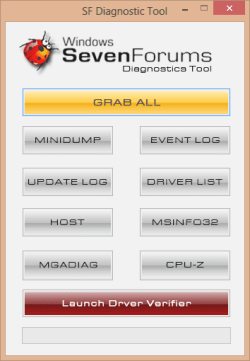
5. Click/tap on the Grab All button, and click/tap on OK for each notice dialog until it's finished.screenshot.png
Success.jpg
6. You will now have a folder saved on your Desktop with the name of SF_DD_MM_YYYY (SF_day_month_year) that includes the information from each button in the tool.

7. ZIP the SF_DD_MM_YYYY folder, then rename the ZIP folder to your user name here at Vista Forums, Seven Forums, or Eight Forums.

8. When you are finished, you can close the SF Diagnostic Tool.


FAQ

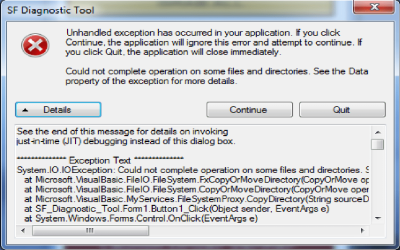
1, If you're getting this error below, then instead of clicking on Grab All, click the buttons one by one in order to see which one is giving you the error.

Code:
************* Exception Text **************
System.IO.DirectoryNotFoundException: Could not find a part of the path '\\Desktop\SF_19-04-2013'.
at System.IO.__Error.WinIOError(Int32 errorCode, String maybeFullPath)
at System.IO.Directory.InternalCreateDirectory(String fullPath, String path, DirectorySecurity dirSecurity)
at System.IO.Directory.CreateDirectory(String path, DirectorySecurity directorySecurity)
at System.IO.Directory.CreateDirectory(String path)
at SF_Diagnostic_Tool.Form1.Button1_Click(Object sender, EventArgs e)
at System.Windows.Forms.Control.OnClick(EventArgs e)
at System.Windows.Forms.Button.OnClick(EventArgs e)
at System.Windows.Forms.Button.OnMouseUp(MouseEventArgs mevent)
at System.Windows.Forms.Control.WmMouseUp(Message& m, MouseButtons button, Int32 clicks)
at System.Windows.Forms.Control.WndProc(Message& m)
at System.Windows.Forms.ButtonBase.WndProc(Message& m)
at System.Windows.Forms.Button.WndProc(Message& m)
at System.Windows.Forms.Control.ControlNativeWindow.OnMessage(Message& m)
at System.Windows.Forms.Control.ControlNativeWindow.WndProc(Message& m)
at System.Windows.Forms.NativeWindow.Callback(IntPtr hWnd, Int32 msg, IntPtr wparam, IntPtr lparam)
 
 
************** Loaded Assemblies **************
mscorlib
Assembly Version: 2.0.0.0
Win32 Version: 2.0.50727.5466 (Win7SP1GDR.050727-5400)
CodeBase: file:///C:/Windows/Microsoft.NET/Framework/v2.0.50727/mscorlib.dll
----------------------------------------
SF Diagnostic Tool
Assembly Version: 5.0.0.6
Win32 Version: 5.0.0.6
CodeBase: file:///C:/Users/dagbel/Desktop/SF_Diagnostic_Tool.exe
----------------------------------------
Microsoft.VisualBasic
Assembly Version: 8.0.0.0
Win32 Version: 8.0.50727.5420 (Win7SP1.050727-5400)
CodeBase: file:///C:/Windows/assembly/GAC_MSIL/Microsoft.VisualBasic/8.0.0.0__b03f5f7f11d50a3a/Microsoft.VisualBasic.dll
----------------------------------------
System.Windows.Forms
Assembly Version: 2.0.0.0
Win32 Version: 2.0.50727.5468 (Win7SP1GDR.050727-5400)
CodeBase: file:///C:/Windows/assembly/GAC_MSIL/System.Windows.Forms/2.0.0.0__b77a5c561934e089/System.Windows.Forms.dll
----------------------------------------
System
Assembly Version: 2.0.0.0
Win32 Version: 2.0.50727.5467 (Win7SP1GDR.050727-5400)
CodeBase: file:///C:/Windows/assembly/GAC_MSIL/System/2.0.0.0__b77a5c561934e089/System.dll
----------------------------------------
System.Drawing
Assembly Version: 2.0.0.0
Win32 Version: 2.0.50727.5467 (Win7SP1GDR.050727-5400)
CodeBase: file:///C:/Windows/assembly/GAC_MSIL/System.Drawing/2.0.0.0__b03f5f7f11d50a3a/System.Drawing.dll
----------------------------------------
System.Runtime.Remoting
Assembly Version: 2.0.0.0
Win32 Version: 2.0.50727.5420 (Win7SP1.050727-5400)
CodeBase: file:///C:/Windows/assembly/GAC_MSIL/System.Runtime.Remoting/2.0.0.0__b77a5c561934e089/System.Runtime.Remoting.dll
----------------------------------------
 
************** JIT Debugging **************
To enable just-in-time (JIT) debugging, the .config file for this
application or computer (machine.config) must have the
jitDebugging value set in the system.windows.forms section.
The application must also be compiled with debugging
enabled.
 
For example:
 
<configuration>
<system.windows.forms jitDebugging="true" />
</configuration>
 
When JIT debugging is enabled, any unhandled exception
will be sent to the JIT debugger registered on the computer
rather than be handled by this dialog box.
2, I have given the default location %userprofile%\Desktop as the default location. If it's not accessible then the tool will not work. If it's not getting created that means the default locations in the registry is messed up.


Attachments

Last edited by a moderator:
Pretty new to BSOD's and its certainly helped me.

Jack Sparrow: "I think we've all arrived at a very special place. Spiritually, ecumenically, grammatically." :D

Cheers

Dave
 

My Computer My Computer

Computer type
PC/Desktop
OS
Windows 7 Professional 64bit
CPU
AMD Athlon (tm) X2 5200+ Dual Core 2712 Mhz
Motherboard
Asus
Memory
4GB
Graphics Card(s)
Nividia GeForce 8600 GTS- DIED 25/7/2013 R.I.P
Sound Card
None
Monitor(s) Displays
22" Yuraku LCD (Dont ask)
Screen Resolution
1280x960
Hard Drives
2TB WD Caviar green
PSU
Windy up type
Case
Scout cm Storm
Cooling
Hair dryer on full cool power ;-)
Keyboard
QWERTY
Mouse
Microsoft Special
Internet Speed
BT Infinity 9.38Mb/s Wheeeeeeeeeeeeeeee!!
Antivirus
MSE
Browser
Internet Explore 10 and Chrome
Other Info
Don't shout...I've got a Hangover!
HUm just wondering how long the features take to run as I sat for ahalf an hour waiting for a result from event viewer and I just got an exception etc etc message??
 

My Computer My Computer

Computer type
PC/Desktop
Computer Manufacturer/Model Number
Own build (new) Desk1 / Asus ROG Win 7 / Desk2 1st build
OS
Desk1 7 Home Prem / Desk2 10 Pro / Main lap Asus ROG 10 Pro 2 laptop Toshiba 7 Pro Asus P2520 7 & 10
CPU
Desk1 i5 3750K / Laptop i7 GTX 860M / Desk2 i5 2500
Motherboard
Desk1 Asus P877-V / Desk2 Gigabyte H67 UD3H / Laptop ?
Memory
Desk1 8GB (1866) / Desk2 16GB (1333) / Laptop 8Gb DDR3
Graphics Card(s)
Desk 1& 2NVidia GTX 650 & Laptops on board Intel
Sound Card
Desk 1 & 2 -XONAR DG Realtek High Def audio Laptop
Monitor(s) Displays
Desk 1 Benq HD 2450 / Desk2 Philips 24" / Laptop 17.5"
Screen Resolution
1920x1080 D1 & D2 & Laptop 1
Hard Drives
Desk1 Samsung 120GB 830 SSD
Asus ROG 256GB 850 Pro SSD
Desk2 Samsung 840 256 SSD
Toshiba 120GB EVO
PSU
Desk 1 Corsair HX 1050/ Laptop ? / Desk 2 Corsair HX 650
Case
Desk 1 Cooler HAF XM ? Toshiba laptop / Desk2 Coolermaster
Cooling
Fans on all Desk1 -2 Desk2 - all Coolermasters 5 Laptop ?
Keyboard
Desk 1 MS Sidewinder X6 Desk 2 MS Sidewinder X 4
Mouse
Desk 1&2 - Gigabyte MS 900 gamer - laptop - Logitec wireless
Internet Speed
ADSL2+
Other Info
One other Desktop (tester) and spare Toshba laptop both with SSD's
Running Kaspersky 2016 ISS on all machines config'd identically
Logitec audio stereo systems on each machine (x3)
Canon MG5250MFC
Router/modem TP-Link running WPA2SK
I was able to run this tool yesterday with success. Today when I try to run it I am getting an exception error. Image attached. I am logged in as administrator and chose run as administrator.
 

Attachments

  • error.png
    error.png
    51.6 KB · Views: 258

My Computer My Computer

OS
Win 7 64-bit Home Professional
CPU
Intel Core 2 Duo CPU E8400 @ 3.00GHz
Motherboard
MS-7380 (MSI P7N SLI Platinum)
Memory
4GB
Graphics Card(s)
Palit GTX 460 Sonic Platinum
Hard Drives
80 GB Intel SSD
149GB SATA
PSU
Corsair TX650 Enthusiast Series
So..... I just used driver verifier via the Start menu and it crashed like a million times. I finally got it to stop and now I'm using this tool to collect everything and zip it up. I got the window where it said "Event logs Copied SUccessfully" and I clicked okay... but the window is still there, and nothing seems to be happening with the tool. WHen I try to go to the other window, it automatically puts the SF Diagnostic Tool window on top, so I can't click okay on that window anymore. Do I just let this sit?
 

My Computer My Computer

OS
Windows 7
CPU
AMD Phenom II X4 555
Motherboard
Biostar TA785G3
Memory
2x2GB OCZ Platinum Edition DDR3 PC3-10666
Graphics Card(s)
Sapphire Radeon 6870
Hard Drives
Generic SSD (64GB)
Samsung F3 (1TB)
Seagate (1TB)
Case
Antec 300
So..... I just used driver verifier via the Start menu and it crashed like a million times. I finally got it to stop and now I'm using this tool to collect everything and zip it up. I got the window where it said "Event logs Copied SUccessfully" and I clicked okay... but the window is still there, and nothing seems to be happening with the tool. WHen I try to go to the other window, it automatically puts the SF Diagnostic Tool window on top, so I can't click okay on that window anymore. Do I just let this sit?
Yep which is basically what is happening in my app.
 

My Computer My Computer

Computer type
PC/Desktop
Computer Manufacturer/Model Number
Own build (new) Desk1 / Asus ROG Win 7 / Desk2 1st build
OS
Desk1 7 Home Prem / Desk2 10 Pro / Main lap Asus ROG 10 Pro 2 laptop Toshiba 7 Pro Asus P2520 7 & 10
CPU
Desk1 i5 3750K / Laptop i7 GTX 860M / Desk2 i5 2500
Motherboard
Desk1 Asus P877-V / Desk2 Gigabyte H67 UD3H / Laptop ?
Memory
Desk1 8GB (1866) / Desk2 16GB (1333) / Laptop 8Gb DDR3
Graphics Card(s)
Desk 1& 2NVidia GTX 650 & Laptops on board Intel
Sound Card
Desk 1 & 2 -XONAR DG Realtek High Def audio Laptop
Monitor(s) Displays
Desk 1 Benq HD 2450 / Desk2 Philips 24" / Laptop 17.5"
Screen Resolution
1920x1080 D1 & D2 & Laptop 1
Hard Drives
Desk1 Samsung 120GB 830 SSD
Asus ROG 256GB 850 Pro SSD
Desk2 Samsung 840 256 SSD
Toshiba 120GB EVO
PSU
Desk 1 Corsair HX 1050/ Laptop ? / Desk 2 Corsair HX 650
Case
Desk 1 Cooler HAF XM ? Toshiba laptop / Desk2 Coolermaster
Cooling
Fans on all Desk1 -2 Desk2 - all Coolermasters 5 Laptop ?
Keyboard
Desk 1 MS Sidewinder X6 Desk 2 MS Sidewinder X 4
Mouse
Desk 1&2 - Gigabyte MS 900 gamer - laptop - Logitec wireless
Internet Speed
ADSL2+
Other Info
One other Desktop (tester) and spare Toshba laptop both with SSD's
Running Kaspersky 2016 ISS on all machines config'd identically
Logitec audio stereo systems on each machine (x3)
Canon MG5250MFC
Router/modem TP-Link running WPA2SK
Hi everybody, I have a BSOD problem so I installed SF D.Tool. However it doesn't work when i open it. I ran it as administrator. A window says "SF Diagnostic Tool has stopped working". Here is the details:

Description:
Stopped working

Problem signature:
Problem Event Name: APPCRASH
Application Name: SF_Diagnostic_Tool.exe
Application Version: 5.0.0.6
Application Timestamp: 508b892b
Fault Module Name: mscorwks.dll
Fault Module Version: 2.0.50727.5420
Fault Module Timestamp: 4ca2b820
Exception Code: c0000005
Exception Offset: 000154c0
OS Version: 6.1.7601.2.1.0.768.2
Locale ID: 1055
 

My Computer My Computer

Computer Manufacturer/Model Number
Lenovo G780
OS
Windows
CPU
i5-3210M
Memory
4,00 GB
Graphics Card(s)
GeForce GT630M
I don't know what does it mean but i typed sfc/scannow in command prompt and restarted, appcrash problem is solved. :)
 

My Computer My Computer

Computer Manufacturer/Model Number
Lenovo G780
OS
Windows
CPU
i5-3210M
Memory
4,00 GB
Graphics Card(s)
GeForce GT630M
Hi,

Re:SF Diagnostic Tool v5 For Troubleshooting: I'm afraid this just hangs at about 1/3 green line.

Please advise.

Thanks,

Ric
 

My Computer My Computer

Computer type
PC/Desktop
Computer Manufacturer/Model Number
dell
OS
Windows 7 & 64 bit, Home Premium, 2.80GHz AMDII
CPU
2.8
Antivirus
Avast
Browser
chrome

My Computer My Computer

Computer type
PC/Desktop
Computer Manufacturer/Model Number
Self Assembled
OS
Microsoft Windows 10 Pro Insider Preview 64-bit
CPU
Intel(R) Core(TM) i3-4130 CPU @ 3.40GHz
Motherboard
Gigabyte Technology Co., Ltd. B85M-D3H
Memory
Corsair Vengence 4GB x2 (8.00GB Dual-Channel DDR3 @ 798MHz)
Graphics Card(s)
2047MB GeForce GTS 450 (ZOTAC International)
Sound Card
Onboard (Realtek High Definition Audio)
Monitor(s) Displays
LG Flatron E2040T
Screen Resolution
1600x900
Hard Drives
Western Digital 1 TB
Seagate 500 GB
PSU
Corsair VS550
Case
Cooler Master K380
Cooling
Cooler Master Seidon 120V Plus
Keyboard
Logitech MK260r
Mouse
Logitech MK260r
Internet Speed
PMPL Broadband
Antivirus
Windows Defender + MBAM
Browser
Firefox
Other Info
Dell Studio 15" Laptop

My Computer My Computer

Computer Manufacturer/Model Number
Samsung NP550P5C-S02IN
OS
Windows 7 Ultimate - 64-bit | Windows 8 Pro - 64-bit
CPU
Intel® Core™ i7 Processor 3,610QM (2.30Hz, 6MB L3 Cach
Memory
8 GB
Graphics Card(s)
NVIDIA® GeForce® GT 650M 2GB Graphics, Optimus™ techno
Sound Card
SoundAlive™ JBL 3 Speakers (With sub-Woofer)
Monitor(s) Displays
39.62cm (15.6) SuperBright 300nit HD+ LED Display
Screen Resolution
1,600 x 900, Anti-Reflective
Hard Drives
1TB S-ATA II Hard Drive (5,400RPM)
me going round in circles also :(
 

My Computer My Computer

Computer type
PC/Desktop
Computer Manufacturer/Model Number
dell
OS
Windows 7 & 64 bit, Home Premium, 2.80GHz AMDII
CPU
2.8
Antivirus
Avast
Browser
chrome
''sorry no dump found'' what is wrong?
 

My Computer My Computer

Computer type
PC/Desktop
Computer Manufacturer/Model Number
acer
OS
Windows 7 ultimate x64
CPU
p6100
Motherboard
5733z
Memory
4gb
Graphics Card(s)
intel hd cards
Hard Drives
500gb
Antivirus
eset ess
Browser
google chrom

My Computer My Computer

Computer type
PC/Desktop
Computer Manufacturer/Model Number
Golden Mk. I.4
OS
Windows 10 Pro x64 ; Xubuntu x64
CPU
Intel i7 860 @ 2.80 GHz O/C'ed to 4.0GHz
Motherboard
Gigabyte P55A-UD3R Rev.1. Award BIOS F13
Memory
16GB Corsair Vengance DDR3 @ 661 MHz Dual Channel (9-9-9-24)
Graphics Card(s)
EVGA NVidia GTX 560 1024MB
Sound Card
Realtek Integrated
Monitor(s) Displays
Dual Samsung SyncMaster 2494HS
Screen Resolution
1920*1080 and 1920*1080
Hard Drives
1*Samsung 840 EVO 120GB SSD;
1*OCZ Vertex 2 60GB SSD;
2*Samsung F3 SpinPoint 1TB in RAID0;
1*Samsung F1 SpinPoint 1TB;
2*Western Digital 1TB External USB 3.0
1*Western Digital 500GB External USB 3.0
1*Seagate 500GB External USB 2.0
PSU
Thermaltake ToughPower QFan 750W
Case
Thermaltake Element S VK60001W2Z
Cooling
Corsair H60 Water Cooling, 2*230mm and 2*80mm case fans
Keyboard
Logitech G110
Mouse
Logitech MX518
SF diagnostic tool not working

When I run the SF diagnostic tool it says it's completed, but it doesn't put the folder on my destop to see the files. What am I doing wrong?
 

My Computer My Computer

Computer type
PC/Desktop
OS
win 7 XP
Hello Ace, and welcome to Seven Forums.

Refresh (F5) your desktop to see if the folders may be there afterwards.
 

My Computer My Computer

Computer type
PC/Desktop
Computer Manufacturer/Model Number
Self built custom
OS
64-bit Windows 11 Pro for Workstations
CPU
Intel i7-8700K OC'd to 5 GHz
Motherboard
ASUS ROG Maximus XI Formula Z390
Memory
64 GB (4x16GB) G.SKILL TridentZ RGB DDR4 3600 MHz
Graphics Card(s)
ASUS ROG-STRIX-GTX1080TI-O11G-GAMING
Sound Card
Integrated
Monitor(s) Displays
2 x Samsung Odyssey G7 27"
Screen Resolution
2560x1440
Hard Drives
1TB Samsung 990 PRO M.2,
4TB Samsung 990 PRO PRO M.2,
TerraMaster F8 SSD Plus NAS
PSU
Seasonic Prime Titanium 850W
Case
Thermaltake Core P3
Cooling
Corsair Hydro H115i
Keyboard
Logitech wireless K800
Mouse
Logitech MX Master 4
Internet Speed
2 Gb/s Download and 100 Mb/s Upload
Antivirus
Malwarebyte Anti-Malware Premium
Browser
Google Chrome
Other Info
Logitech Z625 speaker system,
Logitech BRIO 4K Pro webcam,
HP Color LaserJet Pro MFP M477fdn,
APC SMART-UPS RT 1000 XL - SURT1000XLI,
Galaxy S23 Plus phone
SF diagnostic tool not working

Thanks for the quick response. I'm really trying to learn more about diagnosing BSOD. I'm leaving work right now for the weekend, but I'll start again on Monday. Thanks again for the help and I'm looking foward to learning as much as I can from this forum.
 

My Computer My Computer

Computer type
PC/Desktop
OS
win 7 XP
Thank you!
 

My Computer My Computer

Computer type
Laptop
Computer Manufacturer/Model Number
Compaq CQ58
OS
Windows 7 Ultimate 32 bit
CPU
AMD E1-1200
Memory
2 GB
Graphics Card(s)
Radeon HD Graphics 1.4o GHz
Hard Drives
Hitachi HTS543232A7A384 SATA
Antivirus
Eset
Browser
Firefox
I need to get some help! I have downloaded the tool, got all the files and created the ZIP. What do I do from here?
Thanks!
 

My Computer My Computer

Computer type
PC/Desktop
Computer Manufacturer/Model Number
Custom build
OS
Windows 7 Home Premium 32bit
CPU
Intel Core2 Dup E6550 2.33GHz
Motherboard
MSI P35 Platinum
Memory
4GB
Graphics Card(s)
Raedon 5450
Hard Drives
Western Digital 500GB, Hitachi 500GB, Seagate 1TB Backup
Antivirus
Norton
Browser
Firefox, Chrome, IE

My Computer My Computer

Computer type
PC/Desktop
Computer Manufacturer/Model Number
Self built custom
OS
64-bit Windows 11 Pro for Workstations
CPU
Intel i7-8700K OC'd to 5 GHz
Motherboard
ASUS ROG Maximus XI Formula Z390
Memory
64 GB (4x16GB) G.SKILL TridentZ RGB DDR4 3600 MHz
Graphics Card(s)
ASUS ROG-STRIX-GTX1080TI-O11G-GAMING
Sound Card
Integrated
Monitor(s) Displays
2 x Samsung Odyssey G7 27"
Screen Resolution
2560x1440
Hard Drives
1TB Samsung 990 PRO M.2,
4TB Samsung 990 PRO PRO M.2,
TerraMaster F8 SSD Plus NAS
PSU
Seasonic Prime Titanium 850W
Case
Thermaltake Core P3
Cooling
Corsair Hydro H115i
Keyboard
Logitech wireless K800
Mouse
Logitech MX Master 4
Internet Speed
2 Gb/s Download and 100 Mb/s Upload
Antivirus
Malwarebyte Anti-Malware Premium
Browser
Google Chrome
Other Info
Logitech Z625 speaker system,
Logitech BRIO 4K Pro webcam,
HP Color LaserJet Pro MFP M477fdn,
APC SMART-UPS RT 1000 XL - SURT1000XLI,
Galaxy S23 Plus phone
Back
Top