
SFC Corruption, SFCFix Help

emerysteele

New member
Local time
10:15 PM
Messages
7
Location
Canada
Hello,

I'm having some issues with corruption on one of my machines. I've run sfc scan 3 times & then sfc fix. But some files are not getting repaired automatically. Hoping someone can help. This is the log from SFCFix:


SFCFix version 3.0.0.0 by niemiro.
Start time: 2018-11-08 18:42:59.681
Microsoft Windows 7 Service Pack 1 - amd64
Not using a script file.


AutoAnalysis::
WARNING: Failed to get store name from identity name with return code 2 for component prnca00z.inf and file Amd64\CNBGRC41.GPD. File is reported as corrupt by SFC.
CORRUPT: Amd64\CNBGRC41.GPD of component prnca00z.inf.


FIXED: Corruption at C:\Windows\winsxs\wow64_microsoft-windows-bth-user_31bf3856ad364e35_6.1.7601.17514_none_cd93efad202e5fb6\wshbth.dll has been successfully repaired from C:\Windows\System32\wshbth.dll.


CORRUPT: C:\Windows\winsxs\amd64_microsoft-windows-naturallanguage6_31bf3856ad364e35_6.1.7601.17514_none_fc00d9a9415b5f6e\NlsLexicons0007.dll
CORRUPT: C:\Windows\winsxs\x86_microsoft-windows-a..rface-ldap-provider_31bf3856ad364e35_6.1.7601.17514_none_1e34e64e592ba38e\adsldp.dll


SUMMARY: Some corruptions could not be fixed automatically. Seek advice from helper or sysnative.com.
CBS & SFC total detected corruption count: 4
CBS & SFC total unimportant corruption count: 0
CBS & SFC total fixed corruption count: 1
SURT total detected corruption count: 0
SURT total unimportant corruption count: 0
SURT total fixed corruption count: 0
AutoAnalysis:: directive completed successfully.


Successfully processed all directives.
SFCFix version 3.0.0.0 by niemiro has completed.
Currently storing 2 datablocks.
Finish time: 2018-11-08 18:50:12.597
----------------------EOF-----------------------
 

My Computer

Computer Manufacturer/Model Number
Myself
OS
Windows 7
CPU
3.0GHz AMD Phenom II x4 940
Motherboard
Asus M4A79 Deluxe
Memory
8GB of 1066 DDR2 (4 x 2GB)
Graphics Card(s)
ATI Radeon HD4870
Monitor(s) Displays
Acer X223w & Acer X193w
Hard Drives
128GB Kingston SSDNow V-Series
1TB Western Digital Caviar Green
PSU
Corsair 750W
Case
Raidmax Smilodon
Cooling
Stock fans & Cooler Master GeminII Heatsink
Hi emerysteele,

I'll see if I have those missing dll files

Here's your missing DLLs.

View attachment Missing DLLs.zip

Unzip to your Desktop

Please run SFCFix.exe (from your Desktop) again and when it completes, post SFCFix.txt (it will be on your desktop).
 
Last edited:

My Computer

Computer type
PC/Desktop
Computer Manufacturer/Model Number
HP Desktop & Compaq Laptop
OS
Win 10 x64, Linux Lite, Win 7 x64, BlackArch, & Kali
Hard Drives
Samsung 850 Pro 256Gb,
Hitachi HDD 1Tb,
Crucial MX SSD 250Gb
Segate 3Tb USB 3.0 Ext. Backup HDD
Internet Speed
150Mbps dn, 20Mbps up
Antivirus
Avast Free, Malwarebytes Anti-Exploit & Anti-Ransomware
Browser
Firefox, Chrome, Opera, & VPN
Thanks Snick!

Did what you said, 3 of the files got fixed. I am still getting an error with the AMD64/CNBGRC41.GPD though.

Code:
SFCFix version 3.0.0.0 by niemiro.
Start time: 2018-11-10 15:55:07.526
Microsoft Windows 7 Service Pack 1 - amd64
Not using a script file.


AutoAnalysis::
WARNING: Failed to get store name from identity name with return code 2 for component prnca00z.inf and file Amd64\CNBGRC41.GPD. File is reported as corrupt by SFC.
CORRUPT: Amd64\CNBGRC41.GPD of component prnca00z.inf.


WARNING: File C:\Windows\winsxs\wow64_microsoft-windows-bth-user_31bf3856ad364e35_6.1.7601.17514_none_cd93efad202e5fb6\wshbth.dll was not backed up as that would replace the current backup.
FIXED: Corruption at C:\Windows\winsxs\wow64_microsoft-windows-bth-user_31bf3856ad364e35_6.1.7601.17514_none_cd93efad202e5fb6\wshbth.dll has been successfully repaired from C:\Windows\System32\wshbth.dll.
FIXED: Corruption at C:\Windows\winsxs\amd64_microsoft-windows-naturallanguage6_31bf3856ad364e35_6.1.7601.17514_none_fc00d9a9415b5f6e\NlsLexicons0007.dll has been successfully repaired from C:\Users\Owner\Desktop\Missing DLLs\amd64_microsoft-windows-naturallanguage6_31bf3856ad364e35_6.1.7601.17514_none_fc00d9a9415b5f6e\NlsLexicons0007.dll.
FIXED: Corruption at C:\Windows\winsxs\x86_microsoft-windows-a..rface-ldap-provider_31bf3856ad364e35_6.1.7601.17514_none_1e34e64e592ba38e\adsldp.dll has been successfully repaired from C:\Users\Owner\Desktop\Missing DLLs\x86_microsoft-windows-a..rface-ldap-provider_31bf3856ad364e35_6.1.7601.17514_none_1e34e64e592ba38e\adsldp.dll.


SUMMARY: Some corruptions could not be fixed automatically. Seek advice from helper or sysnative.com.
   CBS & SFC total detected corruption count:     4
   CBS & SFC total unimportant corruption count:  0
   CBS & SFC total fixed corruption count:        3
   SURT total detected corruption count:          0
   SURT total unimportant corruption count:       0
   SURT total fixed corruption count:             0
AutoAnalysis:: directive completed successfully.


Successfully processed all directives.
SFCFix version 3.0.0.0 by niemiro has completed.
Currently storing 4 datablocks.
Finish time: 2018-11-10 15:57:30.563
----------------------EOF-----------------------
 

My Computer

Computer Manufacturer/Model Number
Myself
OS
Windows 7
CPU
3.0GHz AMD Phenom II x4 940
Motherboard
Asus M4A79 Deluxe
Memory
8GB of 1066 DDR2 (4 x 2GB)
Graphics Card(s)
ATI Radeon HD4870
Monitor(s) Displays
Acer X223w & Acer X193w
Hard Drives
128GB Kingston SSDNow V-Series
1TB Western Digital Caviar Green
PSU
Corsair 750W
Case
Raidmax Smilodon
Cooling
Stock fans & Cooler Master GeminII Heatsink
Took me a few!
Here's the other corrupt file

Download View attachment SFCfix.zip

SFCFix.exe should be on your desktop
Place SFCFix.zip on desktop
Drag SFCFix.zip onto SFCFix.exe
post SFCFix.txt as an attachment please
To do so:
Go Advanced > manage attachments > browse > upload > close window
 
Last edited:

My Computer

Computer type
PC/Desktop
Computer Manufacturer/Model Number
HP Desktop & Compaq Laptop
OS
Win 10 x64, Linux Lite, Win 7 x64, BlackArch, & Kali
Hard Drives
Samsung 850 Pro 256Gb,
Hitachi HDD 1Tb,
Crucial MX SSD 250Gb
Segate 3Tb USB 3.0 Ext. Backup HDD
Internet Speed
150Mbps dn, 20Mbps up
Antivirus
Avast Free, Malwarebytes Anti-Exploit & Anti-Ransomware
Browser
Firefox, Chrome, Opera, & VPN
Okay, I have attached SFCFix.txt.

SFC scan is still saying corrupt files. I'm not sure but looks like it may have went to wrong location. It went into root C:\ directory.
 

Attachments

My Computer

Computer Manufacturer/Model Number
Myself
OS
Windows 7
CPU
3.0GHz AMD Phenom II x4 940
Motherboard
Asus M4A79 Deluxe
Memory
8GB of 1066 DDR2 (4 x 2GB)
Graphics Card(s)
ATI Radeon HD4870
Monitor(s) Displays
Acer X223w & Acer X193w
Hard Drives
128GB Kingston SSDNow V-Series
1TB Western Digital Caviar Green
PSU
Corsair 750W
Case
Raidmax Smilodon
Cooling
Stock fans & Cooler Master GeminII Heatsink
Very good sleuthing, you are correct, it installed in the wrong directory (see below as to why)

I ran this several times on my computer and it installed in
%SystemRoot%\System32\DriverStore\FileRepository

This is the header from your SFCFix.txt

SFCFix version 3.0.0.0 by niemiro.
Start time: 2018-11-11 16:15:16.715
Microsoft Windows 7 Service Pack 1 - amd64
Using .zip script file at C:\Fixes\SFCfix.zip [0]

Instructions were for you to place SFCFix.zip and SFCFix.exe on your Desktop, not in C:\Fixes, then Drag and Drop SFCFix.zip onto SFCFix.exe not in C:\Fixes
Please do this now and attach the SFCfix.txt to your next post.

OOPS, you can delete that incorectly placed folder, please see instructions below.

Here's the header from my execution

SFCFix version 3.0.0.0 by niemiro.
Start time: 2018-11-11 21:52:02.855
Microsoft Windows 7 Service Pack 1 - amd64
Using .zip script file at C:\Users\BlaBlaBla\Desktop\SFCfix.zip [0]

And it installed in the correct location
Successfully copied file C:\Users\BlaBlaBla\AppData\Local\niemiro\Archive\prnca00z.inf_amd64_neutral_27f402ce616c3ebc\Amd64\CNBGRC41.GPD to C:\Windows\System32\DriverStore\FileRepository\prnca00z.inf_amd64_neutral_27f402ce616c3ebc\Amd64\CNBGRC41.GPD.

To locate and delete folder, look for the folder in C:

To do so:
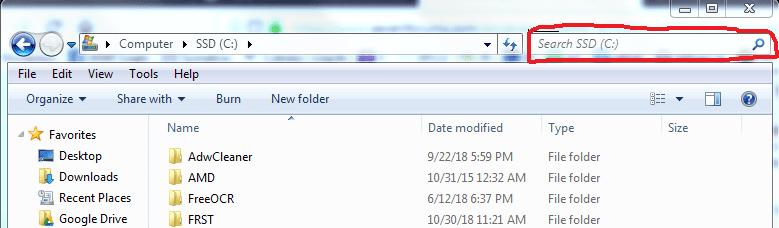
Copy the red text Cprnca00z.inf_amd64_neutral_27f402ce616c3ebc then navigate to Computer > C:
paste the text into the searchbox, upper right corner of window. Be patient, if the location is not indexed it may take a few minutes to locate the folder. You will see a green bar start from left to right across the top of the window while the search is progressing.

Capture.PNG

You will most likely not be able to delete it with normal method, right-click delete but try it anyway. If it deletes then, well, it's deleted. If it's a protected system file, Trusted Installer will not permit alteration of files in some locations. I'm not positive regarding C:

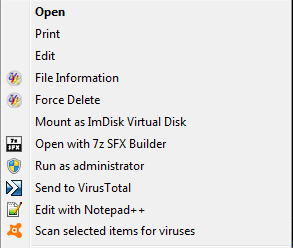
If you cannot delete the file, ACCESS DENIED, or YOU NEED PERMISSION, or something similar download and install UVK by Carifred
Your right-click context menu should now look similar to this

Untitled.png

Then locate and delete folder, look for the folder in C:

To do so:
Copy the red text Cprnca00z.inf_amd64_neutral_27f402ce616c3ebc then navigate to Computer > C:
paste the text into the searchbox, upper right corner of window. Be patient, if the location is not indexed it may take a few minutes to locate the folder. You will see a green bar start from left to right across the top of the window while the search is progressing.

This time, right-click the folder and choose > Force Delete > accept the popup OK, Continue or whatever it say to proceed. It will either delete the folder then or will be deleted after reboot.

You can either leave UVK on your computer or uninstall it via control panel > uninstall a program.

If you peruse UVK's GUI (graphical user interface) the window that opens when you run UVK, there are several choices, which open addition GUIs with a plethora of repair tools.

There may be additional issues, as I haven't perused the CBS.log thoroughly yet, I believe that being a failed/botched KB install.

I will be curtailing posting on SevenForums after today for a while. :(

Paul Black will be my liaison for a day or two, tops! Worst case scenario, a Repair Install and he is familiar with it. (you won't loose any of your data, it only replaces Win7 OS).
 
Last edited:

My Computer

Computer type
PC/Desktop
Computer Manufacturer/Model Number
HP Desktop & Compaq Laptop
OS
Win 10 x64, Linux Lite, Win 7 x64, BlackArch, & Kali
Hard Drives
Samsung 850 Pro 256Gb,
Hitachi HDD 1Tb,
Crucial MX SSD 250Gb
Segate 3Tb USB 3.0 Ext. Backup HDD
Internet Speed
150Mbps dn, 20Mbps up
Antivirus
Avast Free, Malwarebytes Anti-Exploit & Anti-Ransomware
Browser
Firefox, Chrome, Opera, & VPN
Back
Top