SFC.exe Prompt saying there are corrupted files and they are fixed.

JLAF5150

New member
Local time
3:00 PM
Messages
20
Hi Everybody,

First post here should be an easy one.. Well after running sfc/scanow in cmd prompt I finally solved all my issues.. the problem I am having if I run sfc.exe it still says there are corrupted files but there is not.

I looked in the cbs log and it stated at the last part All files and registry keys listed in this transaction have been successfully repaired which they have.. I will post that part in code.. now why is when I run sfc.exe it reports there are still corruption and my question is can I clear that so it report no integrity violations??

here is part of the log:

Code:
 Repairing 2 components
2017-01-17 22:55:51, Info                  CSI    00000332 [SR] Beginning Verify and Repair transaction
2017-01-17 22:55:51, Info                  CSI    00000334 [SR] Cannot repair member file [l:24{12}]"opengl32.dll" of Microsoft-Windows-OpenGL, Version = 6.1.7600.16385, pA = PROCESSOR_ARCHITECTURE_AMD64 (9), Culture neutral, VersionScope = 1 nonSxS, PublicKeyToken = {l:8 b:31bf3856ad364e35}, Type neutral, TypeName neutral, PublicKey neutral in the store, hash mismatch
2017-01-17 22:55:51, Info                  CSI    00000336 [SR] Cannot repair member file [l:24{12}]"opengl32.dll" of Microsoft-Windows-OpenGL, Version = 6.1.7600.16385, pA = PROCESSOR_ARCHITECTURE_INTEL (0), Culture neutral, VersionScope = 1 nonSxS, PublicKeyToken = {l:8 b:31bf3856ad364e35}, Type neutral, TypeName neutral, PublicKey neutral in the store, hash mismatch
2017-01-17 22:55:51, Info                  CSI    00000338 [SR] Cannot repair member file [l:24{12}]"opengl32.dll" of Microsoft-Windows-OpenGL, Version = 6.1.7600.16385, pA = PROCESSOR_ARCHITECTURE_INTEL (0), Culture neutral, VersionScope = 1 nonSxS, PublicKeyToken = {l:8 b:31bf3856ad364e35}, Type neutral, TypeName neutral, PublicKey neutral in the store, hash mismatch
2017-01-17 22:55:51, Info                  CSI    00000339 [SR] This component was referenced by [l:202{101}]"Microsoft-Windows-Foundation-Package~31bf3856ad364e35~amd64~~6.1.7601.17514.WindowsFoundationDelivery"
2017-01-17 22:55:51, Info                  CSI    0000033b [SR] Cannot repair member file [l:24{12}]"opengl32.dll" of Microsoft-Windows-OpenGL, Version = 6.1.7600.16385, pA = PROCESSOR_ARCHITECTURE_AMD64 (9), Culture neutral, VersionScope = 1 nonSxS, PublicKeyToken = {l:8 b:31bf3856ad364e35}, Type neutral, TypeName neutral, PublicKey neutral in the store, hash mismatch
2017-01-17 22:55:51, Info                  CSI    0000033c [SR] This component was referenced by [l:202{101}]"Microsoft-Windows-Foundation-Package~31bf3856ad364e35~amd64~~6.1.7601.17514.WindowsFoundationDelivery"
2017-01-17 22:55:51, Info                  CSI    0000033e [SR] Repair complete
2017-01-17 22:55:51, Info                  CSI    0000033f [SR] Committing transaction
2017-01-17 22:55:51, Info                  CSI    00000343 [SR] Verify and Repair Transaction completed. All files and registry keys listed in this transaction  have been successfully repaired
 
Last edited:

My Computer My Computer

At a glance

Win 7 Home Premium 64bitIntel i5 3570KCorsair 16gb 1600mhzevga 980GTX
Computer type
PC/Desktop
Computer Manufacturer/Model Number
Asus HomeBuilt
OS
Win 7 Home Premium 64bit
CPU
Intel i5 3570K
Motherboard
Asus P8Z68-V Gen3
Memory
Corsair 16gb 1600mhz
Graphics Card(s)
evga 980GTX
Hard Drives
Samsung Evo 500GB
Browser
Firefox
Hello and welcome JLAF5150 ok well it might be worth running this too
Disk Check < if necessary include the /f and /r in the command line as per Option2 (if you are going to use the /r switch there is no need for the /f switch)

Best in safe mode.

Just out of interest are you running an AV?? if so have you scanned the machine recently? It might be as well to run these to see if they come up with anything.
SUPERAntiSpyware | Remove Malware | Remove Spyware - AntiMalware, AntiSpyware, AntiAdware!
Malwarebytes | Malwarebytes Premium
AdwCleaner Download
ADW download from bleeping computer delete any rubbish found with the malware scans
(NB If you are running Kaspersky as the main AV then it might need disabling it when trying ADW because it does not like it at times)
 

My Computer My Computer

At a glance

Desk1 7 Home Prem / Desk2 10 Pro / Main lap A...Desk1 i5 3750K / Laptop i7 GTX 860M / Desk2 i...Desk1 8GB (1866) / Desk2 16GB (1333) / Laptop...Desk 1& 2NVidia GTX 650 & Laptops on board Intel
Computer type
PC/Desktop
Computer Manufacturer/Model Number
Own build (new) Desk1 / Asus ROG Win 7 / Desk2 1st build
OS
Desk1 7 Home Prem / Desk2 10 Pro / Main lap Asus ROG 10 Pro 2 laptop Toshiba 7 Pro Asus P2520 7 & 10
CPU
Desk1 i5 3750K / Laptop i7 GTX 860M / Desk2 i5 2500
Motherboard
Desk1 Asus P877-V / Desk2 Gigabyte H67 UD3H / Laptop ?
Memory
Desk1 8GB (1866) / Desk2 16GB (1333) / Laptop 8Gb DDR3
Graphics Card(s)
Desk 1& 2NVidia GTX 650 & Laptops on board Intel
Sound Card
Desk 1 & 2 -XONAR DG Realtek High Def audio Laptop
Monitor(s) Displays
Desk 1 Benq HD 2450 / Desk2 Philips 24" / Laptop 17.5"
Screen Resolution
1920x1080 D1 & D2 & Laptop 1
Hard Drives
Desk1 Samsung 120GB 830 SSD
Asus ROG 256GB 850 Pro SSD
Desk2 Samsung 840 256 SSD
Toshiba 120GB EVO
PSU
Desk 1 Corsair HX 1050/ Laptop ? / Desk 2 Corsair HX 650
Case
Desk 1 Cooler HAF XM ? Toshiba laptop / Desk2 Coolermaster
Cooling
Fans on all Desk1 -2 Desk2 - all Coolermasters 5 Laptop ?
Keyboard
Desk 1 MS Sidewinder X6 Desk 2 MS Sidewinder X 4
Mouse
Desk 1&2 - Gigabyte MS 900 gamer - laptop - Logitec wireless
Internet Speed
ADSL2+
Other Info
One other Desktop (tester) and spare Toshba laptop both with SSD's
Running Kaspersky 2016 ISS on all machines config'd identically
Logitec audio stereo systems on each machine (x3)
Canon MG5250MFC
Router/modem TP-Link running WPA2SK
thank you, I did run chkdsk but not in safe mode I will give that a try.. I ran Adware and it did not find anything so that is good..

I run MSE and MalewareBytes.. I also wanted to let you know this is basically a fresh install of windows on a SSD with the drive wiped internally so it is as Fresh and install as I can get..

I ran into some trouble with SimPit Warp it is a Software for Fron Projection curved screens.. I deleted it for know and am running nThusim again which I like better.. After I installed SimPit warp there where 3 files that SFC said where corrupted:

1. OpenGL32.dll
2. d3d9.dll
3.dxgi.dll

So I deleted those files in both System32 and Sys64 and recopied them from my Windows disk.. Now when I run the scan it still states that OpenGL is corrupt but when I look in the CBS.log it states that they are all fixed??

I am just trying to find out why SFC says they are corrupt and the CBS.Log says there fine.. I am also trying to find out if there is something I can clear or copy over to get SFC/Scannow to say there are no integrity viloations again.. As The PC is running Superb and back to 99.99% ;)
 

My Computer My Computer

At a glance

Win 7 Home Premium 64bitIntel i5 3570KCorsair 16gb 1600mhzevga 980GTX
Computer type
PC/Desktop
Computer Manufacturer/Model Number
Asus HomeBuilt
OS
Win 7 Home Premium 64bit
CPU
Intel i5 3570K
Motherboard
Asus P8Z68-V Gen3
Memory
Corsair 16gb 1600mhz
Graphics Card(s)
evga 980GTX
Hard Drives
Samsung Evo 500GB
Browser
Firefox
Well I just ran the chkdsk in safe mode it came back Clean.. I then ran sfc.scannow and it still states the same.. it was exactly the same as the log I posted in the 1st post.. except the time stamps are different now but same message..
 

My Computer My Computer

At a glance

Win 7 Home Premium 64bitIntel i5 3570KCorsair 16gb 1600mhzevga 980GTX
Computer type
PC/Desktop
Computer Manufacturer/Model Number
Asus HomeBuilt
OS
Win 7 Home Premium 64bit
CPU
Intel i5 3570K
Motherboard
Asus P8Z68-V Gen3
Memory
Corsair 16gb 1600mhz
Graphics Card(s)
evga 980GTX
Hard Drives
Samsung Evo 500GB
Browser
Firefox
Hi Jlaf,
those dll's are usually referenced/used by your graphics card drivers, and are called when you run a game.
Are they upto date.

As you dont run games in safe mode there not called and the chkdsk results come back clean

Roy
 

My Computer My Computer

At a glance

W7 home premium 32bit/W7HP 64bit/w10 tp insid...E5300 dual core3gbNvidia Geforce 7100 Nforce 630i
Computer type
PC/Desktop
Computer Manufacturer/Model Number
medionl/Aspire 6930G/acer x55a
OS
W7 home premium 32bit/W7HP 64bit/w10 tp insider ring
CPU
E5300 dual core
Motherboard
medion MS7366
Memory
3gb
Graphics Card(s)
Nvidia Geforce 7100 Nforce 630i
Monitor(s) Displays
avixc
Internet Speed
n (isp resticted to 72)
Antivirus
mse/pands
Browser
palemoon
Other Info
Belkin Fd7050 n USB using Railink RT2870 drivers, more upto date
Well I am running the newest drivers 376.33.. Even If I run chkdsk in normal mode the same thing happens but I will run chkdsk again to see what happens..

And currently the cbs log only reports Opengl32.dll as corrupt, but I replaced them with the Windows disk and since updated my NVidia drivers.. So it should be fine..

The problem I am having is when I run SFC Scannow it reports I have corrupted files but they are not..
 

My Computer My Computer

At a glance

Win 7 Home Premium 64bitIntel i5 3570KCorsair 16gb 1600mhzevga 980GTX
Computer type
PC/Desktop
Computer Manufacturer/Model Number
Asus HomeBuilt
OS
Win 7 Home Premium 64bit
CPU
Intel i5 3570K
Motherboard
Asus P8Z68-V Gen3
Memory
Corsair 16gb 1600mhz
Graphics Card(s)
evga 980GTX
Hard Drives
Samsung Evo 500GB
Browser
Firefox
Well I just reinstalled windows and all seems ok now thnx for all the help wish it would have turned out different but this will be good enough.. Still installing some last apps..

I did a SFC/scannow and it came back golden..
 

My Computer My Computer

At a glance

Win 7 Home Premium 64bitIntel i5 3570KCorsair 16gb 1600mhzevga 980GTX
Computer type
PC/Desktop
Computer Manufacturer/Model Number
Asus HomeBuilt
OS
Win 7 Home Premium 64bit
CPU
Intel i5 3570K
Motherboard
Asus P8Z68-V Gen3
Memory
Corsair 16gb 1600mhz
Graphics Card(s)
evga 980GTX
Hard Drives
Samsung Evo 500GB
Browser
Firefox
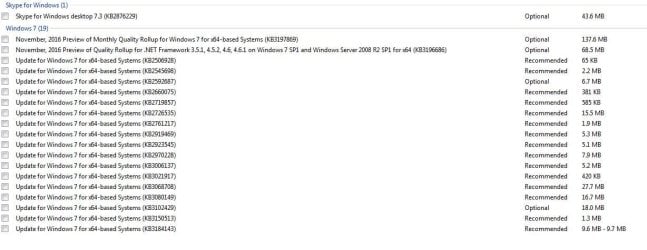
And here`s some updates to avoid, they are optional/recommended but not needed.

You have to read the More Info details about every Optional/Recommended update that MS throws at you now, but it`s much better then 6 months ago :)
 

Attachments

  • Updates to avoid.JPG
    Updates to avoid.JPG
    80.4 KB · Views: 2

My Computer My Computer

At a glance

Windows 10 Pro x64Intel Core i7 6700KGSkill TridentZ RGB 16GB 3600 16-16-16-36EVGA GTX 980 Ti SC x2
Computer type
PC/Desktop
Computer Manufacturer/Model Number
Skylake Special #666
OS
Windows 10 Pro x64
CPU
Intel Core i7 6700K
Motherboard
Asus Sabertooth Z170 Mark 1
Memory
GSkill TridentZ RGB 16GB 3600 16-16-16-36
Graphics Card(s)
EVGA GTX 980 Ti SC x2
Sound Card
Realtek High Definition
Monitor(s) Displays
AOC G2460PG
Screen Resolution
1920 x 1080 144Hz
Hard Drives
Samsung 860 Pro 256GB, Seagate Barracuda 4TB x2
PSU
EVGA 1000 P2, EVGA White Custom Braided Cables
Case
Corsair Vengeance C70 Gunmetal Black
Cooling
Corsair H100i v2, Corsair ML120 x2, Thermal Grizzly Kryonaut
Keyboard
Logitech G910 Orion Spectrum
Mouse
Logitech G700s
Internet Speed
Verizon Fios Quantum Gateway 75/75
Antivirus
Windows Defender, Malwarebytes Free 3.8.3
Browser
Chrome
Other Info
Corsair SP120 x4, LG Blu-ray Drive, Durabrand HT-395 100 Watt Dolby Digital Amp, Corsair H2100 Wireless 7.1 Headset
Simply restart your computer, access Safe Mode and run CHKDSK command again. I'm sure it will help you to resolve the issue.
 

My Computer My Computer

At a glance

Windows 7 Ultimate x64Intel Core i3-44330 Haswell16GBGTX 960
Computer type
PC/Desktop
Computer Manufacturer/Model Number
Asus
OS
Windows 7 Ultimate x64
CPU
Intel Core i3-44330 Haswell
Motherboard
Asus
Memory
16GB
Graphics Card(s)
GTX 960
Hard Drives
SSD Plextor
Antivirus
Kaspersky Internet Security
Browser
Mozilla Firefox
Back
Top