Sfc/Scannow cannot repair corrupt .inf and .nlp files

Hailstorm

New member
Local time
4:29 PM
Messages
4
I have run sfc/scannow in win 7, and have followed instructions to run sfc at boot in command prompt, but nothing has solved the errors. i have saved the file sfcdetails.txt to desktop, and have extracted only the problematic parts and saved it in another file problems.txt
kindly check the file, as i have attached it here.

all the files are either .inf or with .nlp extensions.
windows is running fine. but i want to get rid of the problems before they become a serious issue. I have a pre-installed OEM version of win 7 basic, and i have a HP G6-1117TX laptop. There is a drive named "System", which is the active and boot-able partition, and is not the same drive where windows is installed. Plz help....:confused:
 

Attachments

My Computer My Computer

At a glance

win 7 home basic 64 bit SP1intel core i3-2310M CPU @ 2.1 ghz3 gb 1333mhzAMD Radeon HD 6470M 1gb
Computer Manufacturer/Model Number
HP g6-1117TX
OS
win 7 home basic 64 bit SP1
CPU
intel core i3-2310M CPU @ 2.1 ghz
Memory
3 gb 1333mhz
Graphics Card(s)
AMD Radeon HD 6470M 1gb
Screen Resolution
1366*768
Try using this tutorial to restore the .inf and .nlp File Types.
 

My Computer My Computer

At a glance

Windows 7 Ultimate SP1 - 64 BitIntel Core i5 2500k2x4GB DDR3 1333HzAti Radeon 6770
Computer type
PC/Desktop
Computer Manufacturer/Model Number
Novatech iRush Pro
OS
Windows 7 Ultimate SP1 - 64 Bit
CPU
Intel Core i5 2500k
Motherboard
Foxconn H67M-S/H67M-V/H67
Memory
2x4GB DDR3 1333Hz
Graphics Card(s)
Ati Radeon 6770
Sound Card
None
Monitor(s) Displays
Samsung S22B150
Screen Resolution
1920x1080
Hard Drives
2x500GB
PSU
500W
Cooling
Fan
Keyboard
HP KU0316
Mouse
Wireless Logitech M185
Internet Speed
20MB/s
Antivirus
Avast Free
Browser
Google Chrome
Other Info
Logitech M185 Mouse
KU-M316 Keyboard
Thanx, Infinite :-)

Thanx a ton Infinite :),

I have restored the .inf files, but cannot find the way to restore the .nlp files...:confused:
I will run sfc again and report back here...
 

My Computer My Computer

At a glance

win 7 home basic 64 bit SP1intel core i3-2310M CPU @ 2.1 ghz3 gb 1333mhzAMD Radeon HD 6470M 1gb
Computer Manufacturer/Model Number
HP g6-1117TX
OS
win 7 home basic 64 bit SP1
CPU
intel core i3-2310M CPU @ 2.1 ghz
Memory
3 gb 1333mhz
Graphics Card(s)
AMD Radeon HD 6470M 1gb
Screen Resolution
1366*768
Try using this tutorial to restore the .inf and .nlp File Types.

OK it didn't help, but still thanx for it :). anyway, i found that only 1 .nlp file was missing. it is big5.nlp

C:\Windows\Assembly\GAC_32\mscorlib\2.0.0.0__b77a5c561934e089\big5.nlp
C:\Windows\Assembly\GAC_64\mscorlib\2.0.0.0__b77a5c561934e089\big5.nlp

these are the locations. so if anyone has these two big5.nlp files kindly upload them for me..

big.nlp file is asscociated with the .net framework, and in this case .net 2 sever pack 2. i ran a .net verification tool and it found these errors, contained in the attached file.

C:\Windows\Microsoft.NET\Framework\sbscmp20_mscorlib.dll
C:\Windows\Microsoft.NET\Framework\v4.0.30319\WPF\wpftxt_v0400.dll
C:\Windows\Microsoft.NET\Framework64\v4.0.30319\WPF\WPFFontCache_v0400.exe
C:\Windows\Microsoft.NET\Framework64\v4.0.30319\WPF\wpftxt_v0400.dll

ok these are 3 .dll files and 1 .exe file that i need too, and the above are the locations. and mind you the version of .net framework is 4.030319

also there are 7 .inf files missing which are:
msmouse.inf, msclmd.inf, msports.inf, mtconfig.inf, mstape.inf, mpio.inf, msdv.inf

so if anyone has all or either of these files, plz upload. I'll be greatly indebted.
 

Attachments

Last edited:

My Computer My Computer

At a glance

win 7 home basic 64 bit SP1intel core i3-2310M CPU @ 2.1 ghz3 gb 1333mhzAMD Radeon HD 6470M 1gb
Computer Manufacturer/Model Number
HP g6-1117TX
OS
win 7 home basic 64 bit SP1
CPU
intel core i3-2310M CPU @ 2.1 ghz
Memory
3 gb 1333mhz
Graphics Card(s)
AMD Radeon HD 6470M 1gb
Screen Resolution
1366*768
I'm at school right now and can't send any individual files, but as a thought, how about uninstalling and then reinstalling the .Net framework?

If that doesn't help and you're still stuck I will check back when I get home later tonight. :)
 

My Computer My Computer

At a glance

Main - Windows 7 Pro SP1 64-Bit; 2nd - Window...Main - Core i7 2600K; 2nd - Core i7 920Main - 16GB Corsair Vengeance; 2nd - 12GB Cor...Main - XFX Radeon 6870 1GB; 2nd - XFX Radeon ...
Computer Manufacturer/Model Number
Self
OS
Main - Windows 7 Pro SP1 64-Bit; 2nd - Windows Server 2008 R2
CPU
Main - Core i7 2600K; 2nd - Core i7 920
Motherboard
Main - Asus P8Z68-V Pro/Gen3; 2nd - Gigabyte GA-EX58-UDR3
Memory
Main - 16GB Corsair Vengeance; 2nd - 12GB Corsair Vengeance
Graphics Card(s)
Main - XFX Radeon 6870 1GB; 2nd - XFX Radeon 4870 1GB
Sound Card
Both: Onboard Realtek Azalia
Monitor(s) Displays
Main - Hann 25" + I-INC 25" + Acer 23"; 2nd - Upgrading Soon
Screen Resolution
Main - 1920x1080 (All Three Monitors); 2nd - Upgrading Soon
Hard Drives
Main - (1) Crucial M4 128GB (Boot)
Main - (1) Seagate 2TB 64MB Cache (Data)
Main - (1) Seagate 2TB 64MB Cache (Data Backup)
2nd - (1) Intel X25-M SSD 80GB (Boot)
2nd - (3) Seagate 1TB 32MB Cache (Data Backup)
2nd - (1) Seagate 320GB (Because)
PSU
Main - OCZ 600W Modular; 2nd - OCZ 600W
Case
Main - Thermaltake Element G; 2nd - NZXT something or other
Cooling
Main - Corsair H80; 2nd - Prolimatech Megahalems
Keyboard
Main - Razer Reclusa; 2nd - Old MS Keyboard
Mouse
Main - Logitech MX Revolution; 2nd - Old MS Mouse
Internet Speed
20Mbps Time-Warner Cable
I'm at school right now and can't send any individual files, but as a thought, how about uninstalling and then reinstalling the .Net framework?

If that doesn't help and you're still stuck I will check back when I get home later tonight. :)

Hello Profdlp,
Yes I have already done it..but still no luck... also i could only uninstall and re-install the .net framework 4
as .net 2.0 sp2, .net 3.0 sp2, and .net 3.5 sp1 are windows components( or features) which can only be turned off or on....they are not in the installed programs menu. Ok, if u can kindly try, then that would be hugely helpful to me.

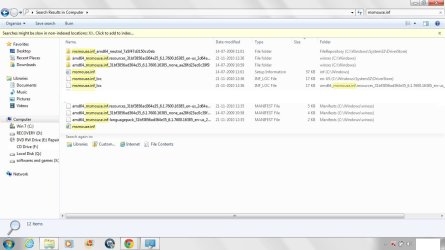
But i am not so sure about the .inf file locations, as if I search anyone of these, say msmouse.inf, then i get many locations and files, and I'm rather confused, where to put it( when i get a good copy from someone). In other words I'm not sure which among all these msmouse.inf files is corrupted and so which one to replace..? I'm attaching a snapshot, kindly check, and when u get time please check the problems.txt file i attached earlier.
 

Attachments

  • a (3).jpg
    a (3).jpg
    91.1 KB · Views: 25

My Computer My Computer

At a glance

win 7 home basic 64 bit SP1intel core i3-2310M CPU @ 2.1 ghz3 gb 1333mhzAMD Radeon HD 6470M 1gb
Computer Manufacturer/Model Number
HP g6-1117TX
OS
win 7 home basic 64 bit SP1
CPU
intel core i3-2310M CPU @ 2.1 ghz
Memory
3 gb 1333mhz
Graphics Card(s)
AMD Radeon HD 6470M 1gb
Screen Resolution
1366*768
Back
Top