SFC /Scannow can't fix corrupt files.

Tweakit

New member
Power User
Local time
10:17 PM
Messages
75
Every few months I run the SFC and its never reported a problem. Today I ran it and it found problems it can't fix. I attached the sfcdetails file. I've run the SFC /scannow command at least 6 times rebooting between checks but it always returns the same result. My computer seems to be running fine so I'm not even sure if I actually have a problem. Yesterday I installed 29 Microsoft updates which was about 500MB in total but i don't really know if that's when the problem started or not.
I'd like to get some suggestions about the best way to fix this or if I even should fix it.
Thanks for reading.
Also, i do have a repair disk which I made a long time ago.
 

Attachments

My Computer My Computer

At a glance

Windows 7 professional 64 biti7-870G.Skill F3-10666CL9D-8GBRL; (8GB)Radeon HD4670
Computer type
PC/Desktop
Computer Manufacturer/Model Number
Custom Build
OS
Windows 7 professional 64 bit
CPU
i7-870
Motherboard
Gigabyte GA-P55-USB3 (rev 2)
Memory
G.Skill F3-10666CL9D-8GBRL; (8GB)
Graphics Card(s)
Radeon HD4670
Sound Card
on board
Monitor(s) Displays
Dell U2311H plus ASUS PB238
Screen Resolution
1080P (dual monitors)
Hard Drives
VelociRaptor WD1500HLHX 150GB (system)
2TB Samsung spinpoint (data)
596GB WD caviar blue (data)
PSU
FSP AS400 400W ATX2.31/EPS2.92
Case
Antec Sonata III 500
Cooling
CPU cooled by Rosewill HSF RCX-Z90-CP
Keyboard
Microsoft ergonomic PS-2
Mouse
Logitech M510
Internet Speed
very fast via cable
Antivirus
Microsoft Security Essentials
Browser
Chrome and IE10
Other Info
Also have hauppauge TV Card HVR-1600
CPU, case and GPU Fans are controlled by SpeedFan.
Try these from a Elevated Command Prompt:

Dism /Online /Cleanup-Image /StartComponentCleanup
Dism /Online /Cleanup-Image /RestoreHealth
SFC /scannow
 

My Computer My Computer

At a glance

Windows 10 Pro X64Intel Quad Core i7-4770 @ 3.4Ghz16.0GB PC3-12800 DDR3 SDRAM 1600 MHzIntel Integrated HD Graphics
Computer type
PC/Desktop
Computer Manufacturer/Model Number
Lenovo IdeaCenter 450
OS
Windows 10 Pro X64
CPU
Intel Quad Core i7-4770 @ 3.4Ghz
Memory
16.0GB PC3-12800 DDR3 SDRAM 1600 MHz
Graphics Card(s)
Intel Integrated HD Graphics
Sound Card
Realtek HD Audio
Monitor(s) Displays
HP 22" LCD
Screen Resolution
1680 x 1050
Hard Drives
250GB Samsung EVO SATA-3 SSD
2TB Seagate ST2000DM001 SATA-2
1.5TB Seagate ST3150041AS SATA
Keyboard
Dell USB
Mouse
Lenovo USB
Internet Speed
Cable via Road Runner 3MB Upload, 30MB Download
Antivirus
Windows Defender, MBAM Pro, MBAE
Browser
Seamonkey
Other Info
UEFI/GPT
PLDS DVD-RW DH16AERSH
Thank you Ztruker for your suggestion.
Is this running the system update readiness tool from an online location?
If so, is this the same as what is described here: https://support.microsoft.com/en-us/kb/947821 ??
Is this a low risk operation? What does it do?
Thanks again for your help.
 

My Computer My Computer

At a glance

Windows 7 professional 64 biti7-870G.Skill F3-10666CL9D-8GBRL; (8GB)Radeon HD4670
Computer type
PC/Desktop
Computer Manufacturer/Model Number
Custom Build
OS
Windows 7 professional 64 bit
CPU
i7-870
Motherboard
Gigabyte GA-P55-USB3 (rev 2)
Memory
G.Skill F3-10666CL9D-8GBRL; (8GB)
Graphics Card(s)
Radeon HD4670
Sound Card
on board
Monitor(s) Displays
Dell U2311H plus ASUS PB238
Screen Resolution
1080P (dual monitors)
Hard Drives
VelociRaptor WD1500HLHX 150GB (system)
2TB Samsung spinpoint (data)
596GB WD caviar blue (data)
PSU
FSP AS400 400W ATX2.31/EPS2.92
Case
Antec Sonata III 500
Cooling
CPU cooled by Rosewill HSF RCX-Z90-CP
Keyboard
Microsoft ergonomic PS-2
Mouse
Logitech M510
Internet Speed
very fast via cable
Antivirus
Microsoft Security Essentials
Browser
Chrome and IE10
Other Info
Also have hauppauge TV Card HVR-1600
CPU, case and GPU Fans are controlled by SpeedFan.
I'd still like to get some help with this as i'm not have any success. Here's what i did since the last post. I ran sfc /scannow from the repair disk booted on the CD Rom. Ran it at least 6 times but it never fixed the problems. Then I ran the System Update Readiness Tool found here: https://support.microsoft.com/en-us/kb/947821. That completed and found no problems!
Then I did a disk cleanup since my windows update backup files had grown to 12GB. That completed and the windows update backup files folder no longer appears in the disk cleanup window. Neither of these solved the problem however as sfc still wont fix problems found.
Next from within the elevated command prompt i ran: "Dism /online /cleanup-image /scanhealth." This found errors also and could not fix them. The log file it produced is attached as "DismLog.txt"
Then I again ran sfc /scannow from the elevated cmd prompt again failing to fix the problems. The log file produced is attached as "sfcdetails7.txt."
Is their anything else to try at this point other then falling back to an old restore point. I may have to try that if there is no other creative way of fixing this. Any help will be appreciated.
Thanks.
 

Attachments

My Computer My Computer

At a glance

Windows 7 professional 64 biti7-870G.Skill F3-10666CL9D-8GBRL; (8GB)Radeon HD4670
Computer type
PC/Desktop
Computer Manufacturer/Model Number
Custom Build
OS
Windows 7 professional 64 bit
CPU
i7-870
Motherboard
Gigabyte GA-P55-USB3 (rev 2)
Memory
G.Skill F3-10666CL9D-8GBRL; (8GB)
Graphics Card(s)
Radeon HD4670
Sound Card
on board
Monitor(s) Displays
Dell U2311H plus ASUS PB238
Screen Resolution
1080P (dual monitors)
Hard Drives
VelociRaptor WD1500HLHX 150GB (system)
2TB Samsung spinpoint (data)
596GB WD caviar blue (data)
PSU
FSP AS400 400W ATX2.31/EPS2.92
Case
Antec Sonata III 500
Cooling
CPU cooled by Rosewill HSF RCX-Z90-CP
Keyboard
Microsoft ergonomic PS-2
Mouse
Logitech M510
Internet Speed
very fast via cable
Antivirus
Microsoft Security Essentials
Browser
Chrome and IE10
Other Info
Also have hauppauge TV Card HVR-1600
CPU, case and GPU Fans are controlled by SpeedFan.
There is a list of about 10 updates that is causing this, I just re installed windows 5 times on 3 different ssd`s saving images along the way. When I got to the updates that say "This resolves issues in Windows" they are near the very end of all the updates, they are the culprits, if you want it right you`ll have to re install windows, unless you have rerstore points, and hide those updates, what a PITA that was :mad:

I`m all good, now I just have to put the image from the Intel onto the Samsung, sheeeeesh :hot:
 

Attachments

  • SFC.JPG
    SFC.JPG
    34.1 KB · Views: 5

My Computer My Computer

At a glance

Windows 10 Pro x64Intel Core i7 6700KGSkill TridentZ RGB 16GB 3600 16-16-16-36EVGA GTX 980 Ti SC x2
Computer type
PC/Desktop
Computer Manufacturer/Model Number
Skylake Special #666
OS
Windows 10 Pro x64
CPU
Intel Core i7 6700K
Motherboard
Asus Sabertooth Z170 Mark 1
Memory
GSkill TridentZ RGB 16GB 3600 16-16-16-36
Graphics Card(s)
EVGA GTX 980 Ti SC x2
Sound Card
Realtek High Definition
Monitor(s) Displays
AOC G2460PG
Screen Resolution
1920 x 1080 144Hz
Hard Drives
Samsung 860 Pro 256GB, Seagate Barracuda 4TB x2
PSU
EVGA 1000 P2, EVGA White Custom Braided Cables
Case
Corsair Vengeance C70 Gunmetal Black
Cooling
Corsair H100i v2, Corsair ML120 x2, Thermal Grizzly Kryonaut
Keyboard
Logitech G910 Orion Spectrum
Mouse
Logitech G700s
Internet Speed
Verizon Fios Quantum Gateway 75/75
Antivirus
Windows Defender, Malwarebytes Free 3.8.3
Browser
Chrome
Other Info
Corsair SP120 x4, LG Blu-ray Drive, Durabrand HT-395 100 Watt Dolby Digital Amp, Corsair H2100 Wireless 7.1 Headset

My Computer My Computer

At a glance

Windows 7 Ultimate x64 SP1AMD Phenom 2 1090T2x8GB Kingston HyperX Fury Black 1600Mhz Unga...MSI GTX 970 Gaming 4G
Computer type
PC/Desktop
Computer Manufacturer/Model Number
Custom Build
OS
Windows 7 Ultimate x64 SP1
CPU
AMD Phenom 2 1090T
Motherboard
Gigabyte GA-890FXA-UD5
Memory
2x8GB Kingston HyperX Fury Black 1600Mhz Unganged
Graphics Card(s)
MSI GTX 970 Gaming 4G
Sound Card
Realtek On-Board HD 7.1 Audio / Logitech G35
Monitor(s) Displays
3xAcer GD245HQ
Screen Resolution
1920x1080
Hard Drives
Samsung 850 Pro 512GB SSD - OS /
WD Caviar Black SATA 3 - 1 TBx2 - Dynamic RAID 0 /
WD Caviar Green SATA 2 - 640GBx2 - Dynamic RAID 0 /
WD Caviar Green SATA 2 - 640GB - Internal Backup /
Seagate Barracude SATA 3 - 3TB - External Backup/ Sync
PSU
HighPower 1000W
Case
Cooler Master HAF 932
Cooling
Noctua NH-D14
Keyboard
Logitech G19
Mouse
Logitech G500
Internet Speed
100/4 Mbit Cable (100GB quota)
Antivirus
ZoneAlarm Extreme Security / MBAM Pro / MBAE Free / SAS Free
Browser
IE 11 - Firefox - Chrome
Other Info
Logitech F710/ G27/ G940/ Z5500 // TrackIR 5 // Nvidia 3D Surround Vision

My Computer My Computer

At a glance

Windows 10 Pro X64Intel Quad Core i7-4770 @ 3.4Ghz16.0GB PC3-12800 DDR3 SDRAM 1600 MHzIntel Integrated HD Graphics
Computer type
PC/Desktop
Computer Manufacturer/Model Number
Lenovo IdeaCenter 450
OS
Windows 10 Pro X64
CPU
Intel Quad Core i7-4770 @ 3.4Ghz
Memory
16.0GB PC3-12800 DDR3 SDRAM 1600 MHz
Graphics Card(s)
Intel Integrated HD Graphics
Sound Card
Realtek HD Audio
Monitor(s) Displays
HP 22" LCD
Screen Resolution
1680 x 1050
Hard Drives
250GB Samsung EVO SATA-3 SSD
2TB Seagate ST2000DM001 SATA-2
1.5TB Seagate ST3150041AS SATA
Keyboard
Dell USB
Mouse
Lenovo USB
Internet Speed
Cable via Road Runner 3MB Upload, 30MB Download
Antivirus
Windows Defender, MBAM Pro, MBAE
Browser
Seamonkey
Other Info
UEFI/GPT
PLDS DVD-RW DH16AERSH
GokAy,
Thanks much sir!! I just uninstalled KB3022345 and sfc worked fine! I didn't run the fix tool.
GokAy and Ztruker: I still may have a problem though. The SURT runs fine and finds no issues but the command "Dism /online /cleanup-image /scanhealth" still results in the same issue i described in the 4th post from the top. The resulting log file is attached and shows problems. Apparently this command is valid for windows 7 since you can find information in the cmd prompt by entering "DISM /online /?"
Can anyone help me understand if I still have a problem as shown by the DISM? I'm not sure if its real or there is some phantom explanation.
 

Attachments

My Computer My Computer

At a glance

Windows 7 professional 64 biti7-870G.Skill F3-10666CL9D-8GBRL; (8GB)Radeon HD4670
Computer type
PC/Desktop
Computer Manufacturer/Model Number
Custom Build
OS
Windows 7 professional 64 bit
CPU
i7-870
Motherboard
Gigabyte GA-P55-USB3 (rev 2)
Memory
G.Skill F3-10666CL9D-8GBRL; (8GB)
Graphics Card(s)
Radeon HD4670
Sound Card
on board
Monitor(s) Displays
Dell U2311H plus ASUS PB238
Screen Resolution
1080P (dual monitors)
Hard Drives
VelociRaptor WD1500HLHX 150GB (system)
2TB Samsung spinpoint (data)
596GB WD caviar blue (data)
PSU
FSP AS400 400W ATX2.31/EPS2.92
Case
Antec Sonata III 500
Cooling
CPU cooled by Rosewill HSF RCX-Z90-CP
Keyboard
Microsoft ergonomic PS-2
Mouse
Logitech M510
Internet Speed
very fast via cable
Antivirus
Microsoft Security Essentials
Browser
Chrome and IE10
Other Info
Also have hauppauge TV Card HVR-1600
CPU, case and GPU Fans are controlled by SpeedFan.
Unfortunately I am not knowledgeable about the issue in your last post. Hopefully Ztruker will answer when he is online. :)
 

My Computer My Computer

At a glance

Windows 7 Ultimate x64 SP1AMD Phenom 2 1090T2x8GB Kingston HyperX Fury Black 1600Mhz Unga...MSI GTX 970 Gaming 4G
Computer type
PC/Desktop
Computer Manufacturer/Model Number
Custom Build
OS
Windows 7 Ultimate x64 SP1
CPU
AMD Phenom 2 1090T
Motherboard
Gigabyte GA-890FXA-UD5
Memory
2x8GB Kingston HyperX Fury Black 1600Mhz Unganged
Graphics Card(s)
MSI GTX 970 Gaming 4G
Sound Card
Realtek On-Board HD 7.1 Audio / Logitech G35
Monitor(s) Displays
3xAcer GD245HQ
Screen Resolution
1920x1080
Hard Drives
Samsung 850 Pro 512GB SSD - OS /
WD Caviar Black SATA 3 - 1 TBx2 - Dynamic RAID 0 /
WD Caviar Green SATA 2 - 640GBx2 - Dynamic RAID 0 /
WD Caviar Green SATA 2 - 640GB - Internal Backup /
Seagate Barracude SATA 3 - 3TB - External Backup/ Sync
PSU
HighPower 1000W
Case
Cooler Master HAF 932
Cooling
Noctua NH-D14
Keyboard
Logitech G19
Mouse
Logitech G500
Internet Speed
100/4 Mbit Cable (100GB quota)
Antivirus
ZoneAlarm Extreme Security / MBAM Pro / MBAE Free / SAS Free
Browser
IE 11 - Firefox - Chrome
Other Info
Logitech F710/ G27/ G940/ Z5500 // TrackIR 5 // Nvidia 3D Surround Vision
DISM doesn't have that support in Windows 7, only Windows 8 and above. SURT in WIn 7 does mostly what DISM does in WIn 8.
 

My Computer My Computer

At a glance

Windows 10 Pro X64Intel Quad Core i7-4770 @ 3.4Ghz16.0GB PC3-12800 DDR3 SDRAM 1600 MHzIntel Integrated HD Graphics
Computer type
PC/Desktop
Computer Manufacturer/Model Number
Lenovo IdeaCenter 450
OS
Windows 10 Pro X64
CPU
Intel Quad Core i7-4770 @ 3.4Ghz
Memory
16.0GB PC3-12800 DDR3 SDRAM 1600 MHz
Graphics Card(s)
Intel Integrated HD Graphics
Sound Card
Realtek HD Audio
Monitor(s) Displays
HP 22" LCD
Screen Resolution
1680 x 1050
Hard Drives
250GB Samsung EVO SATA-3 SSD
2TB Seagate ST2000DM001 SATA-2
1.5TB Seagate ST3150041AS SATA
Keyboard
Dell USB
Mouse
Lenovo USB
Internet Speed
Cable via Road Runner 3MB Upload, 30MB Download
Antivirus
Windows Defender, MBAM Pro, MBAE
Browser
Seamonkey
Other Info
UEFI/GPT
PLDS DVD-RW DH16AERSH
Ztruker,
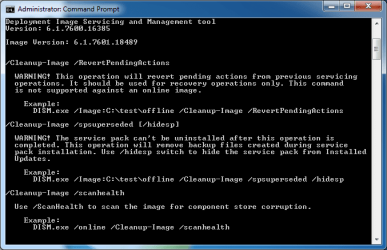
Thanks for your reply. While i suspect you are correct, I am confused. I attached the /? response from my Windows 7 machine. The last line shows the very command that i used. i think this means the system is telling me that it is a supported command and in fact it runs and produces a log albeit showing corruption. Am I missing something or is the system incorrectly representing that this DISM feature is supported when in fact it is not?? Why do you think it is not supported? Thanks for your comments.
 

Attachments

  • DISM.png
    DISM.png
    14.3 KB · Views: 20

My Computer My Computer

At a glance

Windows 7 professional 64 biti7-870G.Skill F3-10666CL9D-8GBRL; (8GB)Radeon HD4670
Computer type
PC/Desktop
Computer Manufacturer/Model Number
Custom Build
OS
Windows 7 professional 64 bit
CPU
i7-870
Motherboard
Gigabyte GA-P55-USB3 (rev 2)
Memory
G.Skill F3-10666CL9D-8GBRL; (8GB)
Graphics Card(s)
Radeon HD4670
Sound Card
on board
Monitor(s) Displays
Dell U2311H plus ASUS PB238
Screen Resolution
1080P (dual monitors)
Hard Drives
VelociRaptor WD1500HLHX 150GB (system)
2TB Samsung spinpoint (data)
596GB WD caviar blue (data)
PSU
FSP AS400 400W ATX2.31/EPS2.92
Case
Antec Sonata III 500
Cooling
CPU cooled by Rosewill HSF RCX-Z90-CP
Keyboard
Microsoft ergonomic PS-2
Mouse
Logitech M510
Internet Speed
very fast via cable
Antivirus
Microsoft Security Essentials
Browser
Chrome and IE10
Other Info
Also have hauppauge TV Card HVR-1600
CPU, case and GPU Fans are controlled by SpeedFan.
Interesting, that's not whart I see when I enter dism /? on my Win 7 Pro X64 system with SP1 and all updates:

Code:
Deployment Image Servicing and Management tool
Version: 6.1.7600.16385


DISM.exe [dism_options] {WIM_command} [<WIM_arguments>]
DISM.exe {/Image:<path_to_offline_image> | /Online} [dism_options] 
         {servicing_command} [<servicing_arguments>]

DESCRIPTION:

  DISM enumerates, installs, uninstalls, configures, and updates features
  and packages in Windows images. The commands that are available depend 
  on the image being serviced and whether the image is offline or running.

WIM COMMANDS:

  /Get-MountedWimInfo     - Displays information about mounted WIM images.
  /Get-WimInfo            - Displays information about images in a WIM file.
  /Commit-Wim             - Saves changes to a mounted WIM image.
  /Unmount-Wim            - Unmounts a mounted WIM image.
  /Mount-Wim              - Mounts an image from a WIM file.
  /Remount-Wim            - Recovers an orphaned WIM mount directory.
  /Cleanup-Wim            - Deletes resources associated with mounted WIM
                            images that are corrupt.

IMAGE SPECIFICATIONS:

  /Online                 - Targets the running operating system.
  /Image                  - Specifies the path to the root directory of an
                            offline Windows image.

DISM OPTIONS:

  /English                - Displays command line output in English.
  /Format                 - Specifies the report output format.
  /WinDir                 - Specifies the path to the Windows directory.
  /SysDriveDir            - Specifies the path to the system-loader file named
                            BootMgr.
  /LogPath                - Specifies the logfile path.
  /LogLevel               - Specifies the output level shown in the log (1-4).
  /NoRestart              - Suppresses automatic reboots and reboot prompts.
  /Quiet                  - Suppresses all output except for error messages.
  /ScratchDir             - Specifies the path to a scratch directory.

For more information about these DISM options and their arguments, specify an
option immediately before /?.

  Examples:     
    DISM.exe /Mount-Wim /?
    DISM.exe /ScratchDir /?
    DISM.exe /Image:C:\test\offline /?
    DISM.exe /Online /?
When I try to run it I get this:
>Dism /Online /Cleanup-Image /RestoreHealth

Deployment Image Servicing and Management tool
Version 6.1.7600.16385

Image Version 6.1.7601.18489


Error 87

The restorehealth option is not recognized in this context.
For more information, refer to the help.

The DISM log file can be found at C:\Windows\Logs\DISM\dism.log1
 

My Computer My Computer

At a glance

Windows 10 Pro X64Intel Quad Core i7-4770 @ 3.4Ghz16.0GB PC3-12800 DDR3 SDRAM 1600 MHzIntel Integrated HD Graphics
Computer type
PC/Desktop
Computer Manufacturer/Model Number
Lenovo IdeaCenter 450
OS
Windows 10 Pro X64
CPU
Intel Quad Core i7-4770 @ 3.4Ghz
Memory
16.0GB PC3-12800 DDR3 SDRAM 1600 MHz
Graphics Card(s)
Intel Integrated HD Graphics
Sound Card
Realtek HD Audio
Monitor(s) Displays
HP 22" LCD
Screen Resolution
1680 x 1050
Hard Drives
250GB Samsung EVO SATA-3 SSD
2TB Seagate ST2000DM001 SATA-2
1.5TB Seagate ST3150041AS SATA
Keyboard
Dell USB
Mouse
Lenovo USB
Internet Speed
Cable via Road Runner 3MB Upload, 30MB Download
Antivirus
Windows Defender, MBAM Pro, MBAE
Browser
Seamonkey
Other Info
UEFI/GPT
PLDS DVD-RW DH16AERSH
Ztruker,
I was a little hasty in my entry above. What I actually entered from the prompt was:
Dism /online /cleanup-image /?
If you enter that on your win 7 machine I think you will see the screen I posted in Post #11 above.
To run the command for store corruption, you need to run the last line in the screen shot repeated below:
Dism /online /cleanup-image /scanhealth
You entered:
Dism /online /cleanup-image /restoreHealth
That one is not listed in the help query which is why you get the error 87.
So, it continues to look like the command is supported but yet it produces a log file that shows corruption (see DismLog.txt attached in Post #4). This is what I’d like to get resolved.
Thanks again for any help you might provide.:)
 

My Computer My Computer

At a glance

Windows 7 professional 64 biti7-870G.Skill F3-10666CL9D-8GBRL; (8GB)Radeon HD4670
Computer type
PC/Desktop
Computer Manufacturer/Model Number
Custom Build
OS
Windows 7 professional 64 bit
CPU
i7-870
Motherboard
Gigabyte GA-P55-USB3 (rev 2)
Memory
G.Skill F3-10666CL9D-8GBRL; (8GB)
Graphics Card(s)
Radeon HD4670
Sound Card
on board
Monitor(s) Displays
Dell U2311H plus ASUS PB238
Screen Resolution
1080P (dual monitors)
Hard Drives
VelociRaptor WD1500HLHX 150GB (system)
2TB Samsung spinpoint (data)
596GB WD caviar blue (data)
PSU
FSP AS400 400W ATX2.31/EPS2.92
Case
Antec Sonata III 500
Cooling
CPU cooled by Rosewill HSF RCX-Z90-CP
Keyboard
Microsoft ergonomic PS-2
Mouse
Logitech M510
Internet Speed
very fast via cable
Antivirus
Microsoft Security Essentials
Browser
Chrome and IE10
Other Info
Also have hauppauge TV Card HVR-1600
CPU, case and GPU Fans are controlled by SpeedFan.
Tweakit: GokAy in post #6 had the answer spelled out for you.

I experienced the very same problem as you had - on three machines.
I recovered one from a backup image and installed ALL the May 12th updates EXCEPT for KB 3022345.
That solved the negative SFC scans.

Then I just went to the installed windows updates - uninstalled KB 3022345 - restart and all is well.
The last two repairs were quick as I don't have to re-image the hard drive ...

Hope this helps.

Paul
 

My Computer My Computer

At a glance

Win 7 64 bitIntell i7-2600 @3.4 GHz 4 Cores16GB
Computer type
PC/Desktop
Computer Manufacturer/Model Number
Dell XPS-8300
OS
Win 7 64 bit
CPU
Intell i7-2600 @3.4 GHz 4 Cores
Memory
16GB
Paul,
I am aware of post #6. I mentioned earlier that my SFC scans have been clean since I uninstalled KB3022345 per GoKAy’s instruction in post #6. The question I posed in posts #8, #11 and #13 relates to the DISM command, the corruption it flags and it’s application to the Windows 7 environment. Have you tried running the command below after you solved the KB3022345 problem?
"Dism /online /cleanup-image /scanhealth"
If so, please let us know what it found. The log file will be found here:
C:\Windows\Logs\CBS\CheckSUR.log
Thanks for your comments.
 

My Computer My Computer

At a glance

Windows 7 professional 64 biti7-870G.Skill F3-10666CL9D-8GBRL; (8GB)Radeon HD4670
Computer type
PC/Desktop
Computer Manufacturer/Model Number
Custom Build
OS
Windows 7 professional 64 bit
CPU
i7-870
Motherboard
Gigabyte GA-P55-USB3 (rev 2)
Memory
G.Skill F3-10666CL9D-8GBRL; (8GB)
Graphics Card(s)
Radeon HD4670
Sound Card
on board
Monitor(s) Displays
Dell U2311H plus ASUS PB238
Screen Resolution
1080P (dual monitors)
Hard Drives
VelociRaptor WD1500HLHX 150GB (system)
2TB Samsung spinpoint (data)
596GB WD caviar blue (data)
PSU
FSP AS400 400W ATX2.31/EPS2.92
Case
Antec Sonata III 500
Cooling
CPU cooled by Rosewill HSF RCX-Z90-CP
Keyboard
Microsoft ergonomic PS-2
Mouse
Logitech M510
Internet Speed
very fast via cable
Antivirus
Microsoft Security Essentials
Browser
Chrome and IE10
Other Info
Also have hauppauge TV Card HVR-1600
CPU, case and GPU Fans are controlled by SpeedFan.
Back
Top