sfc/scannow Could not repair corrupted files; CBS.log not showing any

lolfire3000

New member
Local time
12:14 PM
Messages
18
Location
Florida
Hello,
I am using Windows 8 (64-bit version) and have recently had a virus which I have quarantined and removed. After restarting my computer it seemed that Windows 8 was taking ages to boot around 3 minutes compared to it's usual half minute start up and login.

Searching online I found that you should scan in elevated command prompt using sfc/scannow. After reaching 100% a message came up stating "Windows Resource Protection found corrupt files but was unable to fix some of them. Details are included in the CBS.Log %WinDir%\Logs\CBS\CBS.log."

I have already looked into it searching with the word "corrupted" and "fixed" not finding anything. This code: findstr /c:"[SR]" %windir%\logs\cbs\cbs.log >%userprofile%\Desktop\sfcdetails.txt and thread "http://www.sevenforums.com/bsod-help-support/55984-how-analyse-cbs-log.html" resulted in an empty file. :huh: Also forgot to add that Windows 8 Advanced Repair was no help either.

I have also attached the CBS.log as a .txt file if that helps.


Thanks for looking at this post, any support would great.
Emanuel
 
Last edited:

My Computer My Computer

At a glance

Windows 8 x64 bitIntel(R) Core(TM) i3-3110M CPU @ 2.40GHz Quad...4GBIntel HD 4000
Computer Manufacturer/Model Number
HP
OS
Windows 8 x64 bit
CPU
Intel(R) Core(TM) i3-3110M CPU @ 2.40GHz Quad-Core
Memory
4GB
Graphics Card(s)
Intel HD 4000
Monitor(s) Displays
Full Display Device
Antivirus
Malwarebytes
Browser
Chrome
bump
 
Last edited:

My Computer My Computer

At a glance

Windows 8 x64 bitIntel(R) Core(TM) i3-3110M CPU @ 2.40GHz Quad...4GBIntel HD 4000
Computer Manufacturer/Model Number
HP
OS
Windows 8 x64 bit
CPU
Intel(R) Core(TM) i3-3110M CPU @ 2.40GHz Quad-Core
Memory
4GB
Graphics Card(s)
Intel HD 4000
Monitor(s) Displays
Full Display Device
Antivirus
Malwarebytes
Browser
Chrome
bump
 

My Computer My Computer

At a glance

Windows 8 x64 bitIntel(R) Core(TM) i3-3110M CPU @ 2.40GHz Quad...4GBIntel HD 4000
Computer Manufacturer/Model Number
HP
OS
Windows 8 x64 bit
CPU
Intel(R) Core(TM) i3-3110M CPU @ 2.40GHz Quad-Core
Memory
4GB
Graphics Card(s)
Intel HD 4000
Monitor(s) Displays
Full Display Device
Antivirus
Malwarebytes
Browser
Chrome
I suggest you look at this tutorial since you are using Windows 8.

Might be good to post in the Windows 8 forum as well.

SFC /SCANNOW Command - Run in Windows 8

I saw no evidence of SFC in your log file.
 

My Computer My Computer

At a glance

Windows 10 Pro x64, Windows 8.1 Pro x64, Wind...INTEL i9-7920X LGA 206664 GB (4 X 16 GB) G-Skill V Series DDR4 3200 ...EVGA GTX 1060 SC 3 GB
Computer type
PC/Desktop
Computer Manufacturer/Model Number
Custom Built
OS
Windows 10 Pro x64, Windows 8.1 Pro x64, Windows 7 Ultimate x64 SP1,
CPU
INTEL i9-7920X LGA 2066
Motherboard
Gigabyte X299-WU8 F3
Memory
64 GB (4 X 16 GB) G-Skill V Series DDR4 3200 Quad Channel
Graphics Card(s)
EVGA GTX 1060 SC 3 GB
Sound Card
Realtek Onboard ALC1220
Monitor(s) Displays
2 x Samsung S27E310
Screen Resolution
1920x1080
Hard Drives
Samsung 2 x 970 EVO Plus 500 GB NVMe
1 x 6TB WD 6003FZBX SATA
1 x 6TB WD 60EFRX SATA
12 x 3TB WD 30EFRX SATA
PSU
Seasonic X-1050
Case
Thermaltake Armor+
Cooling
Corsair H80i V2 Liquid AOI Cooler
Keyboard
Logitech G510s
Mouse
Logitech MX Master 2S
Internet Speed
200 Mb/s
Antivirus
ESET NOD32 13.1
Browser
EDGE (Dev, Canary, Beta), Chrome
Other Info
ASUS RT-AC68U router
Malwarebytes 4.0.4
Thanks for replying but what do you mean with evidence? The sfc/scannow did say I have corrupted files so there must be something going on right? I am currently doing the tutorial you posted and if it works then I'll mark this as solved.
Thanks
lolfire3000
 

My Computer My Computer

At a glance

Windows 8 x64 bitIntel(R) Core(TM) i3-3110M CPU @ 2.40GHz Quad...4GBIntel HD 4000
Computer Manufacturer/Model Number
HP
OS
Windows 8 x64 bit
CPU
Intel(R) Core(TM) i3-3110M CPU @ 2.40GHz Quad-Core
Memory
4GB
Graphics Card(s)
Intel HD 4000
Monitor(s) Displays
Full Display Device
Antivirus
Malwarebytes
Browser
Chrome
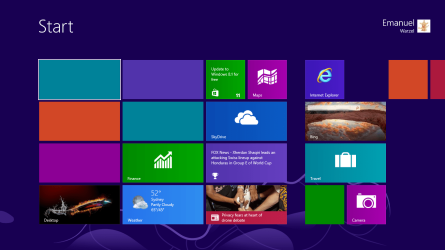
OK, still the same. I have run it multiple times but I am still getting the same message. I also forgot to add that my start screen looks not like it used to, please see the attachment. I think this is part of the corruption.
 

Attachments

  • start meny.PNG
    start meny.PNG
    70.7 KB · Views: 2

My Computer My Computer

At a glance

Windows 8 x64 bitIntel(R) Core(TM) i3-3110M CPU @ 2.40GHz Quad...4GBIntel HD 4000
Computer Manufacturer/Model Number
HP
OS
Windows 8 x64 bit
CPU
Intel(R) Core(TM) i3-3110M CPU @ 2.40GHz Quad-Core
Memory
4GB
Graphics Card(s)
Intel HD 4000
Monitor(s) Displays
Full Display Device
Antivirus
Malwarebytes
Browser
Chrome

My Computer My Computer

At a glance

Windows 10 Pro. 64/ version 1709 Windows 7 Pr...Intel i7-6800K @ 4.3Corsair Platinum 16 gig @2400EVGA GTX 1070 OC
Computer type
PC/Desktop
Computer Manufacturer/Model Number
Home made Desktop
OS
Windows 10 Pro. 64/ version 1709 Windows 7 Pro/64
CPU
Intel i7-6800K @ 4.3
Motherboard
ASUS X-99 Deluxe II
Memory
Corsair Platinum 16 gig @2400
Graphics Card(s)
EVGA GTX 1070 OC
Monitor(s) Displays
Asus 27" LED LCD/VE278Q
Screen Resolution
1920-1080 or 1280-720 HDMI
Hard Drives
INTEL SSD 730-240 Gb Sata 3.0/
PSU
EVGA Platium 1200W
Case
Phanteks Luxe Tempered Glass 8 fans/ one radiator
Cooling
XSPC/ Water Cooled CPU
Keyboard
Das 4 Professional
Mouse
Logitech M705/MX Anywhere 2-S
Internet Speed
100 mbits
Antivirus
Microsoft Security Essentials/ Malwarebytes Premium 3.0/ SAS
Browser
I.E. 11 default/Firefox/ ISP Time Warner Cable/Spectrum
Other Info
LG BluRay Burner/
Sound system-KLipsch-THX/
Icy Dock ssd Hot Swap bays.
Back
Top