
shadow copy

deanie44

New member
Member
Local time
6:33 AM
Messages
66
Location
West Haven, CT
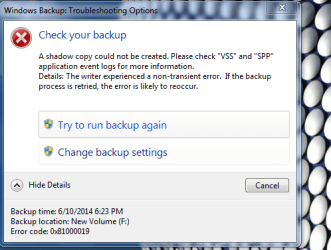
Hi everyone. I am trying to backup my computer to an external hdd and I continue to receive an error message stating that the shadow copy could not be created. I have researched on the internet concerning this issue, but the troubleshooting did not fix the problem. I have performed a backup before to this hard drive and was successful. Any clue to what is wrong? Any assistance will be appreciated. deanie44
 

Attachments
  • shadow copy 2.PNG
    shadow copy 2.PNG
    29.2 KB · Views: 22

My Computer My Computer

Computer Manufacturer/Model Number
INSPIRON 560MT
OS
windows 7 X64
CPU
Intel(R) Pentium(4) CPU 3.06 GHz
Memory
4 GB OF RAM
Sound Card
REALTEK HD AUDIO
Monitor(s) Displays
Dell Generic Monitor and Vizio E320VL LCD TV
Screen Resolution
1280 X 720
Hard Drives
1 TB SATA II HARDDRIVE
Keyboard
Dell generic keyboard
Internet Speed
16 Mbp
Last edited:

My Computer My Computer

Computer type
PC/Desktop
Computer Manufacturer/Model Number
Dell XPS 420
OS
Windows 10, Home Clean Install
CPU
Intel Core2 processsor Q8200(2.33Ghz 1333FSB) Quad Core Tech
Motherboard
Dell
Memory
6 gb
Graphics Card(s)
ATI Radeon 256MB HD3650
Sound Card
Intergrated 7.1 Channel Audio
Monitor(s) Displays
Dell SP2009W 20"
Hard Drives
640 GB Serial ATA Hard drive
Cooling
Fan
Keyboard
Dell USB Keyboard
Mouse
Dell Premium Optical USB
Internet Speed
DSL 2.85
Method 1: Verify the Volume Shadow Copy and Windows backup service is started. If it has not started, start the service and check. Follow these steps:


a) Click Start, type “services” on the start search box and press enter.

b) Scroll down and check for the service mentioned above (Volume Shadow Copy and Windows backup).

c) Double click each of the services and start them if they have not started. Click ok.


Method 2: Run the System File Checker (SFC) scan to fix any corrupted files.


You may also refer this article for more information:


System Restore: frequently asked questions - Windows Help

What is System Restore? - Windows Help

http://windows.microsoft.com/en-us/windows7/what-is-system-protectio
 

My Computer My Computer

Computer type
PC/Desktop
Computer Manufacturer/Model Number
Custom Built
OS
Windows 10 Pro
CPU
AMD Ryzen 5 2400G Processor with Radeon RX Vega 11 Graphics
Motherboard
ASRock X470 Master SLI/AC AM4 AMD Promontory X470 SATA 6Gb/s
Memory
G.SKILL Ripjaws V Series 16GB (2 x 8GB) 288-Pin DDR4 SDRAM D
Graphics Card(s)
2047MB NVIDIA GeForce GTX 1060 6GB (EVGA)
Sound Card
Motherboard Built in
Monitor(s) Displays
Acer R240HY bidx 23.8-Inch IPS HDMI DVI VGA (1920 x 1080) Wi
Screen Resolution
1920 x 1080
Hard Drives
1TB Sandisk SSD PLUS (Main drive)
500 GB Seagate 7200 RPM (Games)
500 GB Western Digital 7200 RPM (Virtual Machines)
PSU
CORSAIR TX Series TX650M 650W 80+ Gold Modular Power Supply
Case
CORSAIR CARBIDE SPEC-02 Mid-Tower Gaming Case, Red LED Fan
Cooling
220mm, two 120mm, and four 60mm fans
Keyboard
Wired Dell keyboard
Mouse
Wireless Logitech mouse
Internet Speed
250mb down, 30mb up
Antivirus
Panda Cloud Antivirus
Browser
Chrome-ish x64
Other Info
Your awesome for reading this.
Back
Top