Share Hard drive space

subhakantac

New member
Local time
8:44 PM
Messages
5
Hi,
I have got windows 7HB OEM copy. I installed the virtual machine and installed XP on on it. I am not able to view my physical hard drives from the virtual xp os. Also the SUB drive is also not accessible. Please suggest me what needs to be done. All I see from the virtual OS is the Virtual hard disk, floopy drive and the cd drive. Its very necessary to see the physical hard drive.

Regards
Subhakanta
 

My Computer

OS
Windows 7 HB x64
Hi Subhakanta, welcome to the Seven Forums.

To be able to assist you, I need to ask you to clarify a few things. I assume your operation system is Windows 7 Home Premium, 7HB does not exist.

So:
- Which virtualization program you have installed? (Oracle VirtualBox, VMWare, VMLite, Microsoft Virtual PC?)
- How did you install XP to virtual machine? From a CD/DVD? From a so called ISO file? Or did you use a program to create an XP virtual machine from your old XP computer?
- What do you mean with SUB drive? Do you mean an external drive connected to your computer's USB port?

Kari
 

My Computer

Computer type
Laptop
Computer Manufacturer/Model Number
HP ENVY 17-1150eg
OS
Windows 10 Pro x64 EN-GB
CPU
1.6 GHz Intel Core i7-720QM Processor
Memory
6 GB
Graphics Card(s)
ATI Mobility Radeon HD 5850 Graphics
Sound Card
Beats sound system with integrated subwoofer
Monitor(s) Displays
17" laptop display, 22" LED and 32" Full HD TV through HDMI
Screen Resolution
1600*900 (1), 1920*1080 (2&3)
Hard Drives
Internal: 2 x 500 GB SATA Hard Disk Drive 7200 rpm
External: 2TB for backups, 3TB USB3 network drive for media
Cooling
As Envy runs a bit warm, I have it on a Cooler Master pad
Keyboard
Logitech diNovo Media Desktop Laser (bluetooth)
Mouse
Logitech Performance Mouse MX
Internet Speed
50/10 Mbps VDSL
Antivirus
Windows Defender 4.3.9431.0
Browser
Maxthon 3.5.2., IE11
Hi Kari,

Thanks for your quick reply. Here are the details you mentioned which you have asked...

I use Windows 7 Home basic 64bit OEM copy.

I use Microsoft Virtual PC 2007 setup.

I installed windows xP from a CD into the virtual pc.

Total hard disk space is 320 GB. While installing WIN7 i did divided into 2partition. So total i have C: and D... I created the virtual hard drive of 3GB using my computer management as while installing it as asking for .vhd file. After installing the windows XP SP2 all i see the 3GB virtual hard drive space, the floopy drive and the CD/DVD drive. How can i see my actual c: or D: from the virtual machine.
 

My Computer

OS
Windows 7 HB x64
How stupid can I be, telling 7HB does not exist! I totally, totally forgot the Home Basic. Please forgive me :o Feeling like a total idiot now!

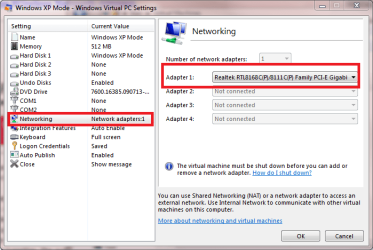
OK. To start, 3GB vhd for XP is awfully small! But, that's what you now have. To be able to see the host's drives, you need to change the used network adapter from the XP virtual machines settings. I have not a Virtual PC 2007, but this screenshot from my newer Virtual PC shows what I mean:

VPC_NIC.png

After that you should see the host's drives.

Kari
 

My Computer

Computer type
Laptop
Computer Manufacturer/Model Number
HP ENVY 17-1150eg
OS
Windows 10 Pro x64 EN-GB
CPU
1.6 GHz Intel Core i7-720QM Processor
Memory
6 GB
Graphics Card(s)
ATI Mobility Radeon HD 5850 Graphics
Sound Card
Beats sound system with integrated subwoofer
Monitor(s) Displays
17" laptop display, 22" LED and 32" Full HD TV through HDMI
Screen Resolution
1600*900 (1), 1920*1080 (2&3)
Hard Drives
Internal: 2 x 500 GB SATA Hard Disk Drive 7200 rpm
External: 2TB for backups, 3TB USB3 network drive for media
Cooling
As Envy runs a bit warm, I have it on a Cooler Master pad
Keyboard
Logitech diNovo Media Desktop Laser (bluetooth)
Mouse
Logitech Performance Mouse MX
Internet Speed
50/10 Mbps VDSL
Antivirus
Windows Defender 4.3.9431.0
Browser
Maxthon 3.5.2., IE11
Hi Kari,

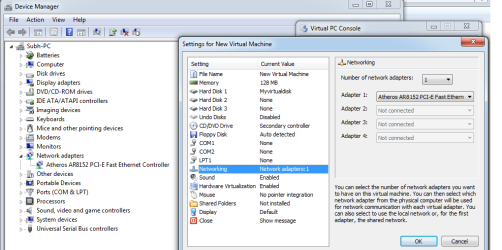
Attached an image which shows the network drives selected in my virtual machine settings. On the left hand side of the image you will find the Windows 7 device manager which shows the network driver installed and on the right hand side shows the virtual pc settings network settings where the same is selected. But still i dont see the host drive in the virtual pc xp os.
Please suggest me what needs to be done...

Regards
Subhakanta:cry:
 

Attachments

  • vmshot.png
    vmshot.png
    89 KB · Views: 40

My Computer

OS
Windows 7 HB x64

My Computer

Computer type
Laptop
Computer Manufacturer/Model Number
HP ENVY 17-1150eg
OS
Windows 10 Pro x64 EN-GB
CPU
1.6 GHz Intel Core i7-720QM Processor
Memory
6 GB
Graphics Card(s)
ATI Mobility Radeon HD 5850 Graphics
Sound Card
Beats sound system with integrated subwoofer
Monitor(s) Displays
17" laptop display, 22" LED and 32" Full HD TV through HDMI
Screen Resolution
1600*900 (1), 1920*1080 (2&3)
Hard Drives
Internal: 2 x 500 GB SATA Hard Disk Drive 7200 rpm
External: 2TB for backups, 3TB USB3 network drive for media
Cooling
As Envy runs a bit warm, I have it on a Cooler Master pad
Keyboard
Logitech diNovo Media Desktop Laser (bluetooth)
Mouse
Logitech Performance Mouse MX
Internet Speed
50/10 Mbps VDSL
Antivirus
Windows Defender 4.3.9431.0
Browser
Maxthon 3.5.2., IE11
Hi Kari,

Installed the loopback adapter and followed the steps mentioned by you. But still that didnot help in getting the physical hard drive from the virtual pc....

Anyother steps need to be followed... please suggest...

Regards
Subhakanta
 

My Computer

OS
Windows 7 HB x64
Have you installed the VPC additions on the virtual XP machine?
 

My Computer

Computer type
Laptop
Computer Manufacturer/Model Number
HP ENVY 17-1150eg
OS
Windows 10 Pro x64 EN-GB
CPU
1.6 GHz Intel Core i7-720QM Processor
Memory
6 GB
Graphics Card(s)
ATI Mobility Radeon HD 5850 Graphics
Sound Card
Beats sound system with integrated subwoofer
Monitor(s) Displays
17" laptop display, 22" LED and 32" Full HD TV through HDMI
Screen Resolution
1600*900 (1), 1920*1080 (2&3)
Hard Drives
Internal: 2 x 500 GB SATA Hard Disk Drive 7200 rpm
External: 2TB for backups, 3TB USB3 network drive for media
Cooling
As Envy runs a bit warm, I have it on a Cooler Master pad
Keyboard
Logitech diNovo Media Desktop Laser (bluetooth)
Mouse
Logitech Performance Mouse MX
Internet Speed
50/10 Mbps VDSL
Antivirus
Windows Defender 4.3.9431.0
Browser
Maxthon 3.5.2., IE11
Have you installed the VPC additions on the virtual XP machine?

Hey Kari,

Sorry for late reply. Was out of station for couple of days. You used the word additons and that worked. I got the article with VPC additons. This link was really helpful.

Virtual PC 2007 - Install Virtual Machine Additions - Vista Forums

Thanks a lot Kari. Thanks for your time. My motive has been solved now. I can share folders or drives as per my wish. If required both folders and drives can be shared... Also i had another problem of mouse pointer moving from parent OS to the VPC window. Now that also solved with the installation of VPC additions.

You are awesome. Thanks again man. Also thanks to Vista 64 tutorials.

Regards and Hearful thanks again
Subhakanta Choudhary
 
Last edited:

My Computer

OS
Windows 7 HB x64
:) You are welcome!
 

My Computer

Computer type
Laptop
Computer Manufacturer/Model Number
HP ENVY 17-1150eg
OS
Windows 10 Pro x64 EN-GB
CPU
1.6 GHz Intel Core i7-720QM Processor
Memory
6 GB
Graphics Card(s)
ATI Mobility Radeon HD 5850 Graphics
Sound Card
Beats sound system with integrated subwoofer
Monitor(s) Displays
17" laptop display, 22" LED and 32" Full HD TV through HDMI
Screen Resolution
1600*900 (1), 1920*1080 (2&3)
Hard Drives
Internal: 2 x 500 GB SATA Hard Disk Drive 7200 rpm
External: 2TB for backups, 3TB USB3 network drive for media
Cooling
As Envy runs a bit warm, I have it on a Cooler Master pad
Keyboard
Logitech diNovo Media Desktop Laser (bluetooth)
Mouse
Logitech Performance Mouse MX
Internet Speed
50/10 Mbps VDSL
Antivirus
Windows Defender 4.3.9431.0
Browser
Maxthon 3.5.2., IE11
Back
Top