
'share with...' specific people aren't listed

ballzac

New member
Local time
12:08 AM
Messages
27
I have recently upgraded from XP SP3 to Windows 7, and have spent the last few days trying to figure out how to get the 'share with...' function to work. I have been searching for a solution and have seen that a lot of people have had trouble setting up sharing, but haven't found anyone who is having EXACTLY the same problems that I'm having. There are four computers on the network. All except mine are running XP SP3.

I have joined the workgroup, and can access the internet via the workgroup. I can access the shared folders and files that are on the other computers. If I set up the homegroup on my machine, I can select 'share with--->homegroup' or 'share with--->specific people--->everyone', and these files can be seen on the other computers. However, opening up the dialogue box for 'specific people', I cannot see other computers, or user accounts on other machines in the drop down menu. If I type the name of a user account or machine, it says that it cannot be found.

I read in one of the threads here about setting up a network with both xp and 7 machines that you cannot use a homegroup if there is one or more machine on the network not running Windows 7. I have turned off the homegroup, but this has not helped.

If worst comes to worst, I can still use sharing in the same manner that I used it on xp, but I would really like to use the 'share with...' ability, as there are things that I would like to share with my girlfriend that I don't want to share with everyone. But I still want to be able to share my printer and some music and stuff.

Hopefully there is something basic that I'm missing and can easily fix. Any advice will be greatly appreciated. While I'm reasonably savvy with xp, I am totally new to 7, so don't be afraid to patronize me. Looking forward to responses. :) Thanks.
 
Last edited:

My Computer My Computer

OS
Windows 7
CPU
Core 2 duo (E8400)
Motherboard
GA S-Series
Memory
4GB DDR2 Kingston
Graphics Card(s)
8800GT
Sound Card
Audigy 2 Platinum
Monitor(s) Displays
2693HM & TFT5015
Hard Drives
2 x 1TB Seagate
1 x 320GB Seagate
PSU
Coolermaster 800W
Case
Thermaltake Armour+ MX
Cooling
Case fans + tricool
Keyboard
Razer Lycosa
Mouse
Razer Copperhead
Internet Speed
ADSL 2+
Other Info
Event TR8 Active Reference Monitors
Logitech G-25
Ok i might as well get the ball rolling on this.

I have joined the workgroup, and can access the internet via the workgroup. I can access the shared folders and files that are on the other computers. If I set up the homegroup on my machine, I can select 'share with--->homegroup' or 'share with--->specific people--->everyone', and these files can be seen on the other computers. However, opening up the dialogue box for 'specific people', I cannot see other computers, or user accounts on other machines in the drop down menu. If I type the name of a user account or machine, it says that it cannot be found.

Don't quote me on this, but the machines might need to be configured to be part of a domain in order for you to add "domain" users from location you specified.

I read in one of the threads here about setting up a network with both xp and 7 machines that you cannot use a homegroup if there is one or more machine on the network not running Windows 7. I have turned off the homegroup, but this has not helped.

W7 Homegroup is only for W7s only, that is correct.
 

My Computer My Computer

Computer Manufacturer/Model Number
Lenovo ThinkPad T60
OS
Windows 7 Ultimate 64Bit
CPU
GenuineIntel Intel(R) Core(TM) DuoCore T2400 @ 1.83GHz
Motherboard
Intel(R) 82801G (ICH7 Family)
Memory
2.00 GB
Graphics Card(s)
Mobile Intel(R) 945 Express Chipset
Sound Card
SoundMAX Integrated Digital HD Audio
Monitor(s) Displays
ThinkPad Display
Screen Resolution
1400x1050
Hard Drives
100Gb SATA
Keyboard
Standard Keyboard
Mouse
HID-compliant Mouse
Internet Speed
Cable Broadband - 54Mbps
Other Info
Intel(R) PRO/1000 PL Network Connection
11a/b/g Wireless LAN Mini PCI Express Adapter
I believe he is under workgroup and not in domain..
 

My Computer My Computer

Computer Manufacturer/Model Number
MacBook Pro
OS
Lion
CPU
i5
Memory
4GB
Graphics Card(s)
Intel
Screen Resolution
1200x800
Hard Drives
Seagate FreeAgent GO 250GB Ext. HDD

My Computer My Computer

OS
Windows 7
CPU
Core 2 duo (E8400)
Motherboard
GA S-Series
Memory
4GB DDR2 Kingston
Graphics Card(s)
8800GT
Sound Card
Audigy 2 Platinum
Monitor(s) Displays
2693HM & TFT5015
Hard Drives
2 x 1TB Seagate
1 x 320GB Seagate
PSU
Coolermaster 800W
Case
Thermaltake Armour+ MX
Cooling
Case fans + tricool
Keyboard
Razer Lycosa
Mouse
Razer Copperhead
Internet Speed
ADSL 2+
Other Info
Event TR8 Active Reference Monitors
Logitech G-25
Hi ballzac & welcome. :D
The easiest and best way to share folders across a network is to ditch all the context menus. Type fsmgmt.msc into the Start Menu and share your folders this way. I too had trouble sharing to and from XP > 7 but after using this method everything works hunkydory!
 

My Computer My Computer

Computer Manufacturer/Model Number
HP Touchsmart IQ771.uk
OS
Windows 7 Ultimate x64
CPU
AMD Turion(tm) 64 X2 Mobile Technology TL-56
Motherboard
ASUS Pheonix
Memory
3GB Nanya PC2-6400 DDR2-SDRAM SO-DIM (400MHz)
Graphics Card(s)
NVIDIA GeForce Go 7600 256MB GDDR3 SDRAM
Sound Card
High Definition Intergrated NVIDIA MCP51
Monitor(s) Displays
46" Sony Bravia HDTV
Screen Resolution
1600x1200
Hard Drives
1.5TB Samsug
320GB Seagate ST3320820AS - SATA 3Gb/s 8MB
500GB Maxtor Basics STM305003EHD301-RK
Internet Speed
↓6.32 Mb/s ↑0.35 Mb/s ↔26ms
Other Info
BIOS - American Megatrends Inc. 5.07
Ethernet Port - NVIDIA nForce 10/100/1000 Mbps
DVD Drive - TSSTcorp DVDR/RW TS-T632L
Thanks heaps for that rsvr85. I had not come across that before and it looks much simpler than other ways to access the sharing capabilities.

I click on the properties for some of the things I have shared, and choose the 'share permissions' tab, and I can still only see 'everyone', and my own account, but cannot see the accounts on other computers. However, this has a tab entitled 'security', which wasn't there when I was trying using the context menus. This has (under group or user names) 'system', my account, 'administrator', 'WMPNetworkSvc', and three 'Account unknown'. Some of the things I have shared have only one or two of the 'account unknown' users listed. This makes me think that it may be the other accounts, because not all three computers have been on the whole time that I've been messing around trying to share things. Could these be the accounts on other computers? If so, how do I know which one's which? And why don't they show up in the 'share permissions' tab?

Thanks for your help.
 

My Computer My Computer

OS
Windows 7
CPU
Core 2 duo (E8400)
Motherboard
GA S-Series
Memory
4GB DDR2 Kingston
Graphics Card(s)
8800GT
Sound Card
Audigy 2 Platinum
Monitor(s) Displays
2693HM & TFT5015
Hard Drives
2 x 1TB Seagate
1 x 320GB Seagate
PSU
Coolermaster 800W
Case
Thermaltake Armour+ MX
Cooling
Case fans + tricool
Keyboard
Razer Lycosa
Mouse
Razer Copperhead
Internet Speed
ADSL 2+
Other Info
Event TR8 Active Reference Monitors
Logitech G-25
From what you said here > If I set up the homegroup on my machine, I can select 'share with--->homegroup' or 'share with--->specific people--->everyone', and these files can be seen on the other computers.

It seems like you did indeed join the Homegroup at some point with your Win 7 machine. If so you also need to leave the Homegroup from the Win 7 machine and then set up the Workgroup on the Win 7 machine. You should re-enable Homegroups first.

There should be no reason to disable Homegroups if you aren't using it. And I can assure you that the GUI works perfectly in Windows 7 for sharing.
http://www.sevenforums.com/tutorials/43980-homegroup-leave.html?filter

After that you should run the network set up wizard on all the XP machines and then allow for sharing as you set go through the Wizard.
 

My Computer My Computer

Computer type
PC/Desktop
Computer Manufacturer/Model Number
Home built
OS
Windows 7 Ult, Windows 8.1 Pro,
CPU
Q9650-4.275GHz, E8600 4.5GHz, E6750-3.8GHz
Motherboard
Evga 780i FTW
Memory
G.Skill PC2 9600 1200Mhz 5 5 5 15 2T
Graphics Card(s)
GTX480
Sound Card
Asus Xonar D2
Monitor(s) Displays
HannsG
Screen Resolution
1680X1050
Hard Drives
GSkill Phoenix Pro 120GB SSD
PSU
ThermalTake Toughpower 1000Watt modular
Case
ThermalTake XaserV
Cooling
Xigmatek S1283
Keyboard
Logitech G15
Mouse
Logitech G9
Internet Speed
T1
I'm not sure, but it sounds like you're using the terms 'disable' and 'leave' to mean different things (with regard to homegroups). I have already 'left' the homegroup, but have not seen any mention of how to disable it...not that you say I need to anyway.

I just mentioned it because the sharing seemed to work a little more smoothly when I was on the homegroup, but seeing as people say it won't work with the xp machines on the network, I have left it and will not rejoin.

Why do I need to run the setup wizard on the xp machines? The network was working fine prior to my windows 7 upgrade, and I have joined that network on this machine. For the most part it seems to be working, except for not being able to see the xp machines in the 'share with...specific people' bit. I figured it must be something on MY machine that needs to be set differently.

Of course I'm happy to do it if it's definitely necessary, but do not want to mess with settings on other peoples computers while the network is currently working fine for them unless it is absolutely necessary.

Thanks for your help chev :)
 

My Computer My Computer

OS
Windows 7
CPU
Core 2 duo (E8400)
Motherboard
GA S-Series
Memory
4GB DDR2 Kingston
Graphics Card(s)
8800GT
Sound Card
Audigy 2 Platinum
Monitor(s) Displays
2693HM & TFT5015
Hard Drives
2 x 1TB Seagate
1 x 320GB Seagate
PSU
Coolermaster 800W
Case
Thermaltake Armour+ MX
Cooling
Case fans + tricool
Keyboard
Razer Lycosa
Mouse
Razer Copperhead
Internet Speed
ADSL 2+
Other Info
Event TR8 Active Reference Monitors
Logitech G-25
I'm not sure, but it sounds like you're using the terms 'disable' and 'leave' to mean different things (with regard to homegroups). I have already 'left' the homegroup, but have not seen any mention of how to disable it...not that you say I need to anyway.

I just mentioned it because the sharing seemed to work a little more smoothly when I was on the homegroup, but seeing as people say it won't work with the xp machines on the network, I have left it and will not rejoin.

Why do I need to run the setup wizard on the xp machines? The network was working fine prior to my windows 7 upgrade, and I have joined that network on this machine. For the most part it seems to be working, except for not being able to see the xp machines in the 'share with...specific people' bit. I figured it must be something on MY machine that needs to be set differently.

Of course I'm happy to do it if it's definitely necessary, but do not want to mess with settings on other peoples computers while the network is currently working fine for them unless it is absolutely necessary.

Thanks for your help chev :)

That is just standard procedure on XP machines if you want to share properly with your Win 7 machine. Your old XP network is a thing of the past.

Think of it like this, the Win 7 machine is setting up a new network for all of your XP machines to join. Joining this new Workgroup from the XP machines will work better after you run the network set up wizard on the XP machines. If you can already share files don't worrie about it.

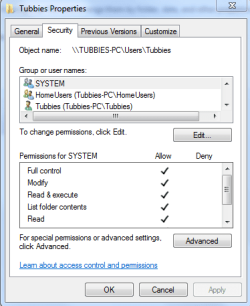
As for the "Share with" problem. The one you were using was for Homegroup sharing. For the workgroup these permissions settings work best for that.

This tutorial will help you get there.
http://www.sevenforums.com/tutorials/24232-sharing-permissions.html?filter
 

Attachments

  • Tubbies access full control.PNG
    Tubbies access full control.PNG
    13.2 KB · Views: 43

My Computer My Computer

Computer type
PC/Desktop
Computer Manufacturer/Model Number
Home built
OS
Windows 7 Ult, Windows 8.1 Pro,
CPU
Q9650-4.275GHz, E8600 4.5GHz, E6750-3.8GHz
Motherboard
Evga 780i FTW
Memory
G.Skill PC2 9600 1200Mhz 5 5 5 15 2T
Graphics Card(s)
GTX480
Sound Card
Asus Xonar D2
Monitor(s) Displays
HannsG
Screen Resolution
1680X1050
Hard Drives
GSkill Phoenix Pro 120GB SSD
PSU
ThermalTake Toughpower 1000Watt modular
Case
ThermalTake XaserV
Cooling
Xigmatek S1283
Keyboard
Logitech G15
Mouse
Logitech G9
Internet Speed
T1
Yes, I should have mentioned that I have set up the advanced settings properly. What you are saying about the workgroup on the w7 machine being a new network makes sense. Should I change the name of the workgroup so that each xp machine will join the right one? Or does the analogy break down there and I can leave it the same? I will try it on one machine as is, and see if I am seeing it. Thanks again.
 

My Computer My Computer

OS
Windows 7
CPU
Core 2 duo (E8400)
Motherboard
GA S-Series
Memory
4GB DDR2 Kingston
Graphics Card(s)
8800GT
Sound Card
Audigy 2 Platinum
Monitor(s) Displays
2693HM & TFT5015
Hard Drives
2 x 1TB Seagate
1 x 320GB Seagate
PSU
Coolermaster 800W
Case
Thermaltake Armour+ MX
Cooling
Case fans + tricool
Keyboard
Razer Lycosa
Mouse
Razer Copperhead
Internet Speed
ADSL 2+
Other Info
Event TR8 Active Reference Monitors
Logitech G-25
I just ran the network setup wizard on one of the other three machines (the other two are currently off). I used the same workgroup name that I have on THIS (win 7) machine, which was the name that the workgroup the xp machines were on has always been.

Nothing has changed. I can still access files and folders on the xp machine from the win 7 machine and vice versa, but the user on the xp machine does not show up when choosing 'specific people' in the 'share with...' menu.
 

My Computer My Computer

OS
Windows 7
CPU
Core 2 duo (E8400)
Motherboard
GA S-Series
Memory
4GB DDR2 Kingston
Graphics Card(s)
8800GT
Sound Card
Audigy 2 Platinum
Monitor(s) Displays
2693HM & TFT5015
Hard Drives
2 x 1TB Seagate
1 x 320GB Seagate
PSU
Coolermaster 800W
Case
Thermaltake Armour+ MX
Cooling
Case fans + tricool
Keyboard
Razer Lycosa
Mouse
Razer Copperhead
Internet Speed
ADSL 2+
Other Info
Event TR8 Active Reference Monitors
Logitech G-25
Well the Workgroup name needs to be the same on all machines. XP home will set up the name as MSGROUP by default, so that would need to be changed to Workgroup or what ever name you choose they all need to be the same is all.

The permissions tutorial should help with the other problem.
http://www.sevenforums.com/tutorials/24232-sharing-permissions.html?filter

Look at the turtorial. Scroll Down to #3, it will show you how to add those names to the list so you can allow for permissions. You may need to reboot your machines after you set up those permissions before they work right.

As for setting up user shares on the XP machines this is how. Notice the part about turning off simple file sharing to allow for better control over individual user shares.
http://support.microsoft.com/kb/304040
 
Last edited:

My Computer My Computer

Computer type
PC/Desktop
Computer Manufacturer/Model Number
Home built
OS
Windows 7 Ult, Windows 8.1 Pro,
CPU
Q9650-4.275GHz, E8600 4.5GHz, E6750-3.8GHz
Motherboard
Evga 780i FTW
Memory
G.Skill PC2 9600 1200Mhz 5 5 5 15 2T
Graphics Card(s)
GTX480
Sound Card
Asus Xonar D2
Monitor(s) Displays
HannsG
Screen Resolution
1680X1050
Hard Drives
GSkill Phoenix Pro 120GB SSD
PSU
ThermalTake Toughpower 1000Watt modular
Case
ThermalTake XaserV
Cooling
Xigmatek S1283
Keyboard
Logitech G15
Mouse
Logitech G9
Internet Speed
T1
I have never used the default names for the workgroup. The network is called (something along the lines of) STUDY. I used this name when joining on the win 7 machine, and I also used this name when running the network setup wizard on the xp machine a moment ago.
 

My Computer My Computer

OS
Windows 7
CPU
Core 2 duo (E8400)
Motherboard
GA S-Series
Memory
4GB DDR2 Kingston
Graphics Card(s)
8800GT
Sound Card
Audigy 2 Platinum
Monitor(s) Displays
2693HM & TFT5015
Hard Drives
2 x 1TB Seagate
1 x 320GB Seagate
PSU
Coolermaster 800W
Case
Thermaltake Armour+ MX
Cooling
Case fans + tricool
Keyboard
Razer Lycosa
Mouse
Razer Copperhead
Internet Speed
ADSL 2+
Other Info
Event TR8 Active Reference Monitors
Logitech G-25
Alright... I shall put in my knlowledge; just not my spelling. I am from america. It is not a requirement for us.


I will explain what I have in my house.

SERVER COMPUTER:
1) ADMINISTRATOR ACCOUT
2) MEDIA SERVE ACCOUNT

ALL COMPUTERS IN MY HOUSE:

1) ADMINISTRATOR ACCOUNT (BELONGS TO ME)
2) THE COMPUTER OWNERS ACCOUNT

I have sharing opened and mapped to the server so that tey can pull files to their own folder.

+++++++++++++++++++++++++++++++++++++++++++++

THIS IS WHAT YOU NEED TO DO TO YOUR COMPUTER:


***Your Computer***
Make a user account for your girlfriend lets call her "Jane" with password

Once you have created the user account you need to log off and log into he account so that her account is fully set up.
One the account is fully set up then log back out and then back into yours


Once you are in your Account:

Open up "cmd" with Run as Administrator

type this in: net user Jane /active:no
hit enter

what this will do is take he name away from the welcome screen but will still keep her in the computer.

That way whe you want to share somthing with your girlfriend, then you can just click on he folder or file and then go to sharing.... if you are using Windows XP, you will select SEARCH (if i am not mistaking) and find JANE and then add her to the list for the file
 

My Computer My Computer

Computer Manufacturer/Model Number
HP Pavilion Elite HPE-410f
OS
Windows 7 Ultimate x64
CPU
AMD Phenom x6 1045t
Motherboard
N/A
Memory
8 GB
Graphics Card(s)
ATI Radeon HD 5570
Sound Card
Realtek Highdefinition Audio / 5.1 Dolby Setup
Monitor(s) Displays
HP w2207h Widescreen
Screen Resolution
1680*1050
Hard Drives
1 TB (fixed), 320 Portable maxtor, Server Hard drives
PSU
350 Watt
Case
HP CASE
Cooling
Bass
Keyboard
Logitech MX 5500
Mouse
Logitech MX 5500
Internet Speed
ROAD RUNNER 16MB D/512 U
At one stage while trying to set this up, I did some of what you suggest. I created an account with her username on my computer, and then I shared with it. However, it only shared with the non-existent user. That is, I could choose 'share with specific people', and then pick the name from the list, but these shared files did not show up on my girlfriend's computer.

I will try following your instructions word for word and see if it solves it.

Thank you.
 

My Computer My Computer

OS
Windows 7
CPU
Core 2 duo (E8400)
Motherboard
GA S-Series
Memory
4GB DDR2 Kingston
Graphics Card(s)
8800GT
Sound Card
Audigy 2 Platinum
Monitor(s) Displays
2693HM & TFT5015
Hard Drives
2 x 1TB Seagate
1 x 320GB Seagate
PSU
Coolermaster 800W
Case
Thermaltake Armour+ MX
Cooling
Case fans + tricool
Keyboard
Razer Lycosa
Mouse
Razer Copperhead
Internet Speed
ADSL 2+
Other Info
Event TR8 Active Reference Monitors
Logitech G-25
Should the account on MY computer have the same password that she has on her account on HER computer?
 

My Computer My Computer

OS
Windows 7
CPU
Core 2 duo (E8400)
Motherboard
GA S-Series
Memory
4GB DDR2 Kingston
Graphics Card(s)
8800GT
Sound Card
Audigy 2 Platinum
Monitor(s) Displays
2693HM & TFT5015
Hard Drives
2 x 1TB Seagate
1 x 320GB Seagate
PSU
Coolermaster 800W
Case
Thermaltake Armour+ MX
Cooling
Case fans + tricool
Keyboard
Razer Lycosa
Mouse
Razer Copperhead
Internet Speed
ADSL 2+
Other Info
Event TR8 Active Reference Monitors
Logitech G-25
Well...

If you dont want her to have to type her user name and password everytime she wants to access the files... then having the same user name and password is a must.

or you can change it to what you want and have her log in with those cridentials everytime...
 

My Computer My Computer

Computer Manufacturer/Model Number
HP Pavilion Elite HPE-410f
OS
Windows 7 Ultimate x64
CPU
AMD Phenom x6 1045t
Motherboard
N/A
Memory
8 GB
Graphics Card(s)
ATI Radeon HD 5570
Sound Card
Realtek Highdefinition Audio / 5.1 Dolby Setup
Monitor(s) Displays
HP w2207h Widescreen
Screen Resolution
1680*1050
Hard Drives
1 TB (fixed), 320 Portable maxtor, Server Hard drives
PSU
350 Watt
Case
HP CASE
Cooling
Bass
Keyboard
Logitech MX 5500
Mouse
Logitech MX 5500
Internet Speed
ROAD RUNNER 16MB D/512 U
This is how it is for me. I have the Administrator account set up on all my computers.... even on computers that aren't mine but i do it anyways because there are alot of dumb people in my house that do stupid things and forget easiliy and if they forgot their password or they get a virus that won't allow them in then i can go around it with my Admin password....


Now becuase I have an admin password on all of the computer. All the same creditials then if i have to access a folder that has all the same creditials then it will not ask me for my user name and password becuase I am logged in with that account ont he computer i am working with.

It works the same way with your Girlfriend...

If you have a server computer:
because your not using like 2003 or 2007 server... you should just do it this way.

YOUR COMPUTER
1) ADMIN ACCOUNT
2) YOUR ACCOUNT - YOUR PASSWORD
3) GIRLFRIEND'S USER NAME - PASSWORD THAT SHE USES ON HER COMPUTER

GIRLFRIEND'S COMPUTER
1) ADMIN ACCOUNT
2) GIRLFRIEND'S ACCOUNT...

Here is the thing. if your girlfriend chooses not to give you her password but she will be SOL when it comes to sharing files with her. If she wants to see your files that you share with her then she will have to either use a different password with same user id.... or if she gets lucky and windows 7 allows her to save... thens he can save the credentials (sorry for my spelling, just typing fast)

THEREFORE; THIS THEORY GOES FOR THE REST OF YOUR COMPUTERS ON THE NETWORK
 

My Computer My Computer

Computer Manufacturer/Model Number
HP Pavilion Elite HPE-410f
OS
Windows 7 Ultimate x64
CPU
AMD Phenom x6 1045t
Motherboard
N/A
Memory
8 GB
Graphics Card(s)
ATI Radeon HD 5570
Sound Card
Realtek Highdefinition Audio / 5.1 Dolby Setup
Monitor(s) Displays
HP w2207h Widescreen
Screen Resolution
1680*1050
Hard Drives
1 TB (fixed), 320 Portable maxtor, Server Hard drives
PSU
350 Watt
Case
HP CASE
Cooling
Bass
Keyboard
Logitech MX 5500
Mouse
Logitech MX 5500
Internet Speed
ROAD RUNNER 16MB D/512 U
I set up an account for her the way you suggest in post #14. I can now type her name into the dialog box under 'choose people to share with' and it shows up underneath (the user icon is slightly translucent though. not sure what that means). However, when I share a file with this account, she cannot see it from her computer. I can only assume that the account on my computer with her name, and the one on her computer are not linked in any way and I am only sharing with the one on my computer. Both accounts have the same user name and password. Are they automatically linked? If so, why is it not happening?

I don't want to put an admin account on my girlfriend's computer, and I don't think she would want me to either. I thought the whole point in using workgroups instead of domains was that each user is on an equal footing. My girlfriend's account IS an admin account on her computer. Do I NEED my own admin account on her computer? If all of this stuff is necessary, why isn't any of it mentioned in any of the network setup tutorial found online?

Thanks again for all the help.
 

My Computer My Computer

OS
Windows 7
CPU
Core 2 duo (E8400)
Motherboard
GA S-Series
Memory
4GB DDR2 Kingston
Graphics Card(s)
8800GT
Sound Card
Audigy 2 Platinum
Monitor(s) Displays
2693HM & TFT5015
Hard Drives
2 x 1TB Seagate
1 x 320GB Seagate
PSU
Coolermaster 800W
Case
Thermaltake Armour+ MX
Cooling
Case fans + tricool
Keyboard
Razer Lycosa
Mouse
Razer Copperhead
Internet Speed
ADSL 2+
Other Info
Event TR8 Active Reference Monitors
Logitech G-25
I'll be perfectly honest with the admin account. All Windows 7 computers have Admin accounts. You are tecnically the admin of the computer but not the true admin. So, the true admin is actually on the computer already, you cannot delete it. It would be smar to activate it for security purposes.

So, you went over to her computer, checked her computers USER profile and made it exactly like it is on your computer with the same exact password... is that correct.

Also, you need to make sure that your Firewalls are configured right and that both of you are in the HOME network as well. Check your network and Sharing center for that

Can you tell me what firewall you are using please/
 

My Computer My Computer

Computer Manufacturer/Model Number
HP Pavilion Elite HPE-410f
OS
Windows 7 Ultimate x64
CPU
AMD Phenom x6 1045t
Motherboard
N/A
Memory
8 GB
Graphics Card(s)
ATI Radeon HD 5570
Sound Card
Realtek Highdefinition Audio / 5.1 Dolby Setup
Monitor(s) Displays
HP w2207h Widescreen
Screen Resolution
1680*1050
Hard Drives
1 TB (fixed), 320 Portable maxtor, Server Hard drives
PSU
350 Watt
Case
HP CASE
Cooling
Bass
Keyboard
Logitech MX 5500
Mouse
Logitech MX 5500
Internet Speed
ROAD RUNNER 16MB D/512 U
Back
Top