
Shared Memory Increased after CMOS Battery Change

jeffro75

New member
Member
Local time
9:50 AM
Messages
41
Location
McKinney, Texas
]Changed my CMOS battery and now my usable memory has decreased by 512MB and shared memory has increased by 512MB. All the BIOS setting haven't changed. Did a search of this site and tried suggested BIOS changes (decrease video memory) and still no luck. How do I get my usable memory back?

This use to say 3.5 usable.
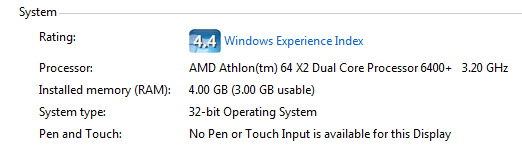
Usable Memory.PNG
 

My Computer

Computer type
PC/Desktop
Computer Manufacturer/Model Number
Dell Vostro 460
OS
Windows 10 Pro 64bit
CPU
Intel Core i7 2600 @ 3.4Ghz
Motherboard
Dell 0Y2MRG
Memory
16GB PC3-10600 DDR3 @ 1333Mhz
Graphics Card(s)
ASUS GeForce GTX 550 Ti 1GB DDR5
Sound Card
Realtek ALC888 HD Audio
Monitor(s) Displays
Dell E2211H 22" Widescreen Flat Panel
Screen Resolution
1920 x 1080
Hard Drives
Kingston 480GB SATA III SSD, Western Digital 1TB SATA III HDD
PSU
Antec Modular 550W
Keyboard
Dell USB Keyboard
Mouse
Dell USB Mouse
Internet Speed
200Mbs Down/20Mbs Up
Other Info
Netgear C7000 Cable Modem/Wireless Router
Have a good look through the bios for a setting called "Memory hole remapping" or something similar and if it is disabled, enable it.

Changing the battery can and usually will cause the bios to reset, and that is one setting that depending on the motherboard in most cases is set to disabled and needs to be enabled to use/see more than 4 GB of ram in 64 bit.
 

My Computer

Computer type
PC/Desktop
Computer Manufacturer/Model Number
Me
OS
Win 7 Ultimate x64
CPU
FX-8350 @ 4.6 GHz so far
Motherboard
Asus M5A97 EVO
Memory
ADATA XPG V1 Series Black 8GB DDR3 1600
Graphics Card(s)
Sapphire R9 270x Dual-X
Sound Card
Xonar DGX w/ Corsair Vengence 1300
Monitor(s) Displays
Acer S232HL Abid
Screen Resolution
1920x1080
Hard Drives
120 GB OCZ Vertex 3
500 GB Seagate 7200.12
PSU
Antec Earthwatts 650W Green
Case
Antec Three Hundred
Cooling
Cooler Master 212 EVO
Keyboard
Logitech G510
Mouse
Logitech G500s
Internet Speed
35000/3000
I'm afraid the BIOS on this Dell is pretty limited. No such memory hole setting in the BIOS. Only memory related is the video memory size setting, which can be set to 16, 32, 64, 128, 256.
 

My Computer

Computer type
PC/Desktop
Computer Manufacturer/Model Number
Dell Vostro 460
OS
Windows 10 Pro 64bit
CPU
Intel Core i7 2600 @ 3.4Ghz
Motherboard
Dell 0Y2MRG
Memory
16GB PC3-10600 DDR3 @ 1333Mhz
Graphics Card(s)
ASUS GeForce GTX 550 Ti 1GB DDR5
Sound Card
Realtek ALC888 HD Audio
Monitor(s) Displays
Dell E2211H 22" Widescreen Flat Panel
Screen Resolution
1920 x 1080
Hard Drives
Kingston 480GB SATA III SSD, Western Digital 1TB SATA III HDD
PSU
Antec Modular 550W
Keyboard
Dell USB Keyboard
Mouse
Dell USB Mouse
Internet Speed
200Mbs Down/20Mbs Up
Other Info
Netgear C7000 Cable Modem/Wireless Router
Just realized that you are running 32 bit Windows. One thing I can tell you is that your video card (8500 GT) has its own memory on it and uses/takes nothing from system ram. This should help explain 4 GB on 32 bit,

Coding Horror: Dude, Where's My 4 Gigabytes of RAM?

In your case right off the bat you are going to lose 512 MB due to the video card, with the rest of the hardware taking the rest. There is a god possibility that with changing the battery it caused the bios to reset, and enable/re-enable a setting or two for something on the motherboard that was disabled and hence the decrease in available ram.

By chance is the onboard video still enabled even with the video card? If so see if there is the option to disable it, and if not and you haven't already set the memory for it as low as it will go.
 

My Computer

Computer type
PC/Desktop
Computer Manufacturer/Model Number
Me
OS
Win 7 Ultimate x64
CPU
FX-8350 @ 4.6 GHz so far
Motherboard
Asus M5A97 EVO
Memory
ADATA XPG V1 Series Black 8GB DDR3 1600
Graphics Card(s)
Sapphire R9 270x Dual-X
Sound Card
Xonar DGX w/ Corsair Vengence 1300
Monitor(s) Displays
Acer S232HL Abid
Screen Resolution
1920x1080
Hard Drives
120 GB OCZ Vertex 3
500 GB Seagate 7200.12
PSU
Antec Earthwatts 650W Green
Case
Antec Three Hundred
Cooling
Cooler Master 212 EVO
Keyboard
Logitech G510
Mouse
Logitech G500s
Internet Speed
35000/3000
Problem solved. Upgraded to Windows 7 64bit and added another 4GB of memory.
 

My Computer

Computer type
PC/Desktop
Computer Manufacturer/Model Number
Dell Vostro 460
OS
Windows 10 Pro 64bit
CPU
Intel Core i7 2600 @ 3.4Ghz
Motherboard
Dell 0Y2MRG
Memory
16GB PC3-10600 DDR3 @ 1333Mhz
Graphics Card(s)
ASUS GeForce GTX 550 Ti 1GB DDR5
Sound Card
Realtek ALC888 HD Audio
Monitor(s) Displays
Dell E2211H 22" Widescreen Flat Panel
Screen Resolution
1920 x 1080
Hard Drives
Kingston 480GB SATA III SSD, Western Digital 1TB SATA III HDD
PSU
Antec Modular 550W
Keyboard
Dell USB Keyboard
Mouse
Dell USB Mouse
Internet Speed
200Mbs Down/20Mbs Up
Other Info
Netgear C7000 Cable Modem/Wireless Router
Problem solved. Upgraded to Windows 7 64bit and added another 4GB of memory.

that's one of the best ways of solving a problem :thumbsup:
 

My Computer

Computer type
PC/Desktop
Computer Manufacturer/Model Number
self build
OS
win 7 ultimate32bit, Win8.1pro wmc 32bit
CPU
amd phenom x4 9600
Motherboard
asus m2n32-sli deluxe
Memory
corsair twinxs 2x2gb
Graphics Card(s)
2x nvidia 1gb 8500gt
Sound Card
onboard
Monitor(s) Displays
23" PB Viseo 233d
Screen Resolution
1920x1080
Hard Drives
maxtor sata 500gb
maxtor sata 320gb
fujitsu sata200gb
PSU
oryxx tornado 750w
Case
thermaltake xaser lll
Cooling
artic freezer64 pro + 7 case fans
Ha yeah :D

I would have guessed that the problem was related to a built in video controller which you could (and probably had) turned off in the BIOS before the batter change which may have reset your BIOS to defaults.
 

My Computer

Computer Manufacturer/Model Number
Scratch built
OS
Windows 7 x64 Ultimate
CPU
i7 960
Motherboard
Asus P6X58D
Memory
12 Gig Corsair Dominator
Graphics Card(s)
Nvidia 480
Sound Card
Maudio Delta 44 + breakout box
Monitor(s) Displays
Dell UltraSharp U2410 24in and Samsung 21 dual monitors
Screen Resolution
1920x1200 and 1280x1024
Hard Drives
Primary: Intel X-25M G2 160G SSD
Secondary: Segate baracuda 1.0 TB
HDs in AHCI mode.
PSU
Corasair TX850
Case
Cooler Master HAF
Cooling
Corsair H50
Keyboard
Logitech G15 + N52 game pad
Mouse
Logitech MX518
Internet Speed
15kbs down 4.5kbps up
Other Info
WEI 7.6
CPU & RAM 7.6
Graphics 7.9
Hard disk 7.7
Back
Top