sharing between mac and pc

FisherPric3

New member
Local time
4:42 PM
Messages
15
alright. iv got an i mac and a windows 7 PC before i had windows 7 the i mac seen my XP system and could connect and share a printer no porblem. now that iv upgraded to windows 7 thigs have become much more complicated and i need some serious help. iv been seraching and reading forums for days and nothing.

issue 1: mac does not even recognize the windows 7 PC:
my old xp system just showed up in the network tab of the i mac i did
not need to do anything it was just there. now i have 7 and i dont show
up.

issue 2: printer does not show up:
when i had xp i set the printer to be shared on the network and it would
just show up in the mac search for printers. switched to 7 and now i
share the printer and it doesn't show up. someone please help me.
 

My Computer

OS
win 7 prof 64
Since you upgraded to Windows 7, did you set the sharing permissions right. That's the only thing I can think of now. Good luck.
 

My Computer

Computer Manufacturer/Model Number
HP
OS
Windows 7 profesional
Memory
4 Gigs
Monitor(s) Displays
Built in display
Hard Drives
1 280 gig
Case
N/A
Keyboard
Built in
Mouse
Built in
Internet Speed
100 mbps
alright. iv got an i mac and a windows 7 PC before i had windows 7 the i mac seen my XP system and could connect and share a printer no porblem. now that iv upgraded to windows 7 thigs have become much more complicated and i need some serious help. iv been seraching and reading forums for days and nothing.

issue 1: mac does not even recognize the windows 7 PC:
my old xp system just showed up in the network tab of the i mac i did
not need to do anything it was just there. now i have 7 and i dont show
up.

issue 2: printer does not show up:
when i had xp i set the printer to be shared on the network and it would
just show up in the mac search for printers. switched to 7 and now i
share the printer and it doesn't show up. someone please help me.


Did you turn off the firewall?
 

My Computer

OS
Windows 7 Ultimate x64,Windows 7 Professional x64, Windows 7 Enterprise x64
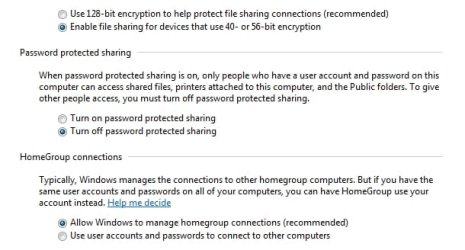
i have set sharing permissions as low as possible like open to everyone 40-50 byt encryption no pass word protection.
 

My Computer

OS
win 7 prof 64
i have set sharing permissions as low as possible like open to everyone 40-50 byt encryption no pass word protection.


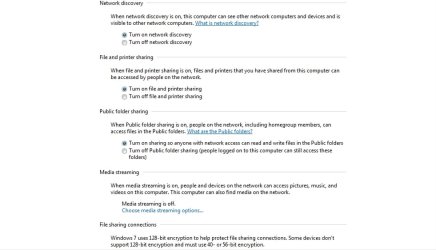
Can you provide a screen shot the settings? You can crop out the names if you like.
 

My Computer

OS
Windows 7 Ultimate x64,Windows 7 Professional x64, Windows 7 Enterprise x64

My Computer

OS
7600x64 ultimate, not SP1
CPU
i7 930
Motherboard
Gigabye X58A-ud5
Memory
12gb ddr3 1600 triple channel Corsair XMS3
Graphics Card(s)
Radeon 5850 1gb OC edition
Sound Card
Asus Xonar Essence STX
Monitor(s) Displays
Acer 24'', Dell 23'' display port
Screen Resolution
1920x1200, 1920x1080
Hard Drives
3x64GB Microcenter SSDs RAID0
1tb spinpoint f3 (system)
1tb spinpoint f3 (media)
1tb spinpoint f3 OSX
1x2TB WD green images
1tb 7200.12 (time machine)
2x 500gb western digital green drives for archiving,keeping install files.
PSU
700 modular
Case
Antec 1200
Cooling
Promlimatech Megahalems
Keyboard
logitech 2.4ghz wireless wave something
Mouse
logitech laser wireless mouse.
Internet Speed
50/10
Other Info
4 systems currently:
1. sig rig
2. 930 i7 x64 ultimate (backup, media center PC)
3. c314 2gb ram tablet 7600 ultimate
4. athlon 6000+ home server (still in progress)
5. ipad for on the go
Can you provide a screen shot the settings? You can crop out the names if you like.

is this good or is there more stuff you need?
 

Attachments

  • screenshot.1.jpg
    screenshot.1.jpg
    204.4 KB · Views: 54
  • screenshot.2.jpg
    screenshot.2.jpg
    128.6 KB · Views: 33

My Computer

OS
win 7 prof 64
Can you provide a screen shot the settings? You can crop out the names if you like.
is this good or is there more stuff you need?


have you actually setup any shares? Right-click on a folder you want to share and click on "Share with" and follow the prompts.
 

My Computer

OS
Windows 7 Ultimate x64,Windows 7 Professional x64, Windows 7 Enterprise x64

My Computer

OS
win 7 prof 64
http://www.sevenforums.com/network-...ok-w7-workgroup-after-upgrade.html#post421600


Accessing Mac OS X Windows Sharing from Windows 7
Windows 7 will not work with Mac OS X Windows file sharing support by default. If you attempt to access a folder shared from Mac OS X, Windows 7 will display a logon error repeatedly.
The problem is that Windows 7, by default, will only use NTLMv2 for authentication, which is not supported by Mac OS X's Windows Sharing service.
The other problem is the Minimum Session Security for NTVLM SSP based Clients.
To get around this:
1. In Windows 7, open the Control Panel
3. Double-click Administration Tools
4. Double-click Local Security Policy
5. Expand "Local Policies" and select "Security Options"
6. Locate "Network Security: LAN Manager Authentication Level" in the list and double-click it.
7. Change the setting from "Send NTMLv2 response only" to "Send LM & NTLM - use NTLMv2 session if negotiated"
8. Network Security: Minimum session security for NTLM SSP Based (including secure RPC) Clients
9. Change the setting from "require 128 bit" to unchecked (No Minimum)
10. Click OK
 

My Computer

OS
7600x64 ultimate, not SP1
CPU
i7 930
Motherboard
Gigabye X58A-ud5
Memory
12gb ddr3 1600 triple channel Corsair XMS3
Graphics Card(s)
Radeon 5850 1gb OC edition
Sound Card
Asus Xonar Essence STX
Monitor(s) Displays
Acer 24'', Dell 23'' display port
Screen Resolution
1920x1200, 1920x1080
Hard Drives
3x64GB Microcenter SSDs RAID0
1tb spinpoint f3 (system)
1tb spinpoint f3 (media)
1tb spinpoint f3 OSX
1x2TB WD green images
1tb 7200.12 (time machine)
2x 500gb western digital green drives for archiving,keeping install files.
PSU
700 modular
Case
Antec 1200
Cooling
Promlimatech Megahalems
Keyboard
logitech 2.4ghz wireless wave something
Mouse
logitech laser wireless mouse.
Internet Speed
50/10
Other Info
4 systems currently:
1. sig rig
2. 930 i7 x64 ultimate (backup, media center PC)
3. c314 2gb ram tablet 7600 ultimate
4. athlon 6000+ home server (still in progress)
5. ipad for on the go
http://www.sevenforums.com/network-...ok-w7-workgroup-after-upgrade.html#post421600


Accessing Mac OS X Windows Sharing from Windows 7
Windows 7 will not work with Mac OS X Windows file sharing support by default. If you attempt to access a folder shared from Mac OS X, Windows 7 will display a logon error repeatedly.
The problem is that Windows 7, by default, will only use NTLMv2 for authentication, which is not supported by Mac OS X's Windows Sharing service.
The other problem is the Minimum Session Security for NTVLM SSP based Clients.
To get around this:
1. In Windows 7, open the Control Panel
3. Double-click Administration Tools
4. Double-click Local Security Policy
5. Expand "Local Policies" and select "Security Options"
6. Locate "Network Security: LAN Manager Authentication Level" in the list and double-click it.
7. Change the setting from "Send NTMLv2 response only" to "Send LM & NTLM - use NTLMv2 session if negotiated"
8. Network Security: Minimum session security for NTLM SSP Based (including secure RPC) Clients
9. Change the setting from "require 128 bit" to unchecked (No Minimum)
10. Click OK


i very much appreciate the help but i have done this and double cheacked all the seettings and it has not helped.
 

My Computer

OS
win 7 prof 64
Not sure if it matters, but have you made sure NetBIOS is on for the Windows 7 PC?
 

My Computer

OS
Windows 7 Ultimate x64,Windows 7 Professional x64, Windows 7 Enterprise x64

My Computer

OS
Windows 7 Ultimate x64,Windows 7 Professional x64, Windows 7 Enterprise x64
Ok, here's what I did to get things working between Windows 7 Ultimate (32 bit) and my wife's Macbook Pro with OSX (I'm going to assume you've already properly configured sharing on your Windows 7 computer; if you don't know how to do that, google for Windows 7 sharing, or check out the tutorials on this website):

1. On my 7 machine, I went to add/remove programs, and clicked on "Turn Windows features on or off"
2. Under Print and Document Services, I ticked LPD Print Service.
3. I shared my printer.

4. On the Macbook, I went to Network, then clicked Advanced.
5. Under WINS, I made sure my Windows workgroup was listed in the workgroup box, then closed that window.
6. I went to Print & Fax, and clicked the + symbol.
7. I clicked on the Windows icon, then clicked on my workgroup, then my PC (I entered my Windows username and password, because I don't allow guest access to my computer. If you allow guest connections, this won't be necessary), then I selected my printer.

Oh, and don't bother trying to share anything from your My Documents folder. By design, it's not going to allow sharing. If you want to share something, either enable public sharing and put those documents in the sharing folder, or create a new directory on a different partition and share that out.

http://answers.microsoft.com/en-us/...are-with/bd920e46-dbeb-4bb2-a38e-8791facd0608
 

My Computer

Computer Manufacturer/Model Number
Dell XPS 15 L502x
OS
Windows 7 Ultimate x64 SP1
CPU
Core i7-2670QM
Memory
8GB DDR3 PC3-10600
Graphics Card(s)
Intel HD Graphics 3000 + GeForce GT 540M
Screen Resolution
1920x1080
Hard Drives
1TB 5400RPM Seagate
  • Like
Reactions: 2xg
Back
Top