Sharing Printers when Firewall is OFF (Corporate GPO)

data1025

New member
Local time
9:42 PM
Messages
8
Location
Florida
Hello everyone,

I am looking for the "correct" way to share printers using a Windows 7 Professional installation when a group policy turns off the firewall.

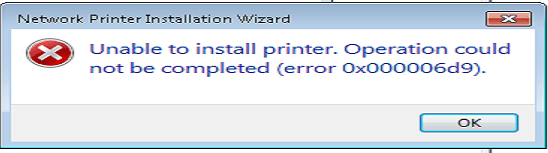
When I attempt to share a printer and apply the settings, I get an error that the operation could not be completed. I did some basic research and found it how to turn ON the Windows Firewall. Once done, I am able to save the printer settings. I then run gpupdate /force to get the firewall back "off" so it appears "red" in the firewall settings gui (control panel > windows firewall).

I keep thinking I am overdoing something. Is this really the professional way to have to do this?

This post is a precursor to a larger problem I am having... I am trying to share some HP printers via this Win 7 Pro computer. When an XP computer attempts to print, the print job never completes and stays "Printing".

Is there any documentation on sharing printers in Win 7 (on a domain) with XP computers? All their firewalls are off.

Thanks for any help. I've been beating my head against the wall with this.
 

My Computer My Computer

At a glance

Windows 7 Pro 32bit
OS
Windows 7 Pro 32bit
Monitor(s) Displays
3
Is Group Policy disabling the firewall PROFILES (Domain, Public, Private) or disabling the firewall SERVICE? Note the latter is not supported, and for good reason - it breaks stuff. Given the behavior you're seeing (red X in the firewall MMC), I'm believe the service is disabled.
 

My Computer My Computer

At a glance

Windows 10 Pro x64Intel Core i7 4790K @ 4.5GHz32GB DDR3Nvidia GeForce GTX970
Computer type
PC/Desktop
Computer Manufacturer/Model Number
Custom
OS
Windows 10 Pro x64
CPU
Intel Core i7 4790K @ 4.5GHz
Motherboard
Asus Maximus Hero VII
Memory
32GB DDR3
Graphics Card(s)
Nvidia GeForce GTX970
Sound Card
Realtek HD Audio
Screen Resolution
1920x1200
Hard Drives
1x Samsung 250GB SSD
4x WD RE 2TB (RAIDZ)
PSU
Corsair AX760i
Case
Fractal Design Define R4
Cooling
Noctua NH-D15
Windows Firewall with Advanced Security - Domain Profile Settings - Firewall State = OFF

Everything else under that heading is "not configured".

Under another GPO, there is one option set for Network/Network Connections/Windows/Firewall/Domain Profile called "Windows Firewall: Protect all network connections" = DISABLED
 

My Computer My Computer

At a glance

Windows 7 Pro 32bit
OS
Windows 7 Pro 32bit
Monitor(s) Displays
3
What's the state of the Windows Firewall service in services.msc?
 

My Computer My Computer

At a glance

Windows 10 Pro x64Intel Core i7 4790K @ 4.5GHz32GB DDR3Nvidia GeForce GTX970
Computer type
PC/Desktop
Computer Manufacturer/Model Number
Custom
OS
Windows 10 Pro x64
CPU
Intel Core i7 4790K @ 4.5GHz
Motherboard
Asus Maximus Hero VII
Memory
32GB DDR3
Graphics Card(s)
Nvidia GeForce GTX970
Sound Card
Realtek HD Audio
Screen Resolution
1920x1200
Hard Drives
1x Samsung 250GB SSD
4x WD RE 2TB (RAIDZ)
PSU
Corsair AX760i
Case
Fractal Design Define R4
Cooling
Noctua NH-D15
Windows Firewall is Started and set to Automatically start.
 

My Computer My Computer

At a glance

Windows 7 Pro 32bit
OS
Windows 7 Pro 32bit
Monitor(s) Displays
3
OK, so at least we are sure that is working. What type of printer are you sharing (local, TCP port, etc) and what is the exact error message? If you have a screenshot of it, that would be quite useful.
 

My Computer My Computer

At a glance

Windows 10 Pro x64Intel Core i7 4790K @ 4.5GHz32GB DDR3Nvidia GeForce GTX970
Computer type
PC/Desktop
Computer Manufacturer/Model Number
Custom
OS
Windows 10 Pro x64
CPU
Intel Core i7 4790K @ 4.5GHz
Motherboard
Asus Maximus Hero VII
Memory
32GB DDR3
Graphics Card(s)
Nvidia GeForce GTX970
Sound Card
Realtek HD Audio
Screen Resolution
1920x1200
Hard Drives
1x Samsung 250GB SSD
4x WD RE 2TB (RAIDZ)
PSU
Corsair AX760i
Case
Fractal Design Define R4
Cooling
Noctua NH-D15
Attached is the screen shot. Sorry for the delay in responding. This is when adding a new printer (to share) or just sharing an existing printer.
 

Attachments

  • Win7_Sharing_Printer.png
    Win7_Sharing_Printer.png
    11.1 KB · Views: 4

My Computer My Computer

At a glance

Windows 7 Pro 32bit
OS
Windows 7 Pro 32bit
Monitor(s) Displays
3
Very interesting - that error code equals "EPT_S_NOT_REGISTERED". So, I wonder if (when the firewall is enabled) the print ports are blocked in both directions, or someone has locked down RPC in both directions???
 

My Computer My Computer

At a glance

Windows 10 Pro x64Intel Core i7 4790K @ 4.5GHz32GB DDR3Nvidia GeForce GTX970
Computer type
PC/Desktop
Computer Manufacturer/Model Number
Custom
OS
Windows 10 Pro x64
CPU
Intel Core i7 4790K @ 4.5GHz
Motherboard
Asus Maximus Hero VII
Memory
32GB DDR3
Graphics Card(s)
Nvidia GeForce GTX970
Sound Card
Realtek HD Audio
Screen Resolution
1920x1200
Hard Drives
1x Samsung 250GB SSD
4x WD RE 2TB (RAIDZ)
PSU
Corsair AX760i
Case
Fractal Design Define R4
Cooling
Noctua NH-D15
I can see and print to the shared printer from another computer after I turn off the firewall again (after the initial step of sharing the printer), so could anything still be blocked if that's the case?
 

My Computer My Computer

At a glance

Windows 7 Pro 32bit
OS
Windows 7 Pro 32bit
Monitor(s) Displays
3
Back
Top